Etherpad
Write together in real time, with each author in their own colour.
No server needed to start: Cloudgate can provide one. What happens when you click Deploy
What is Etherpad?
Etherpad is a self-hosted collaborative editor: write meeting notes and documents together in real time, with author colours and full history.
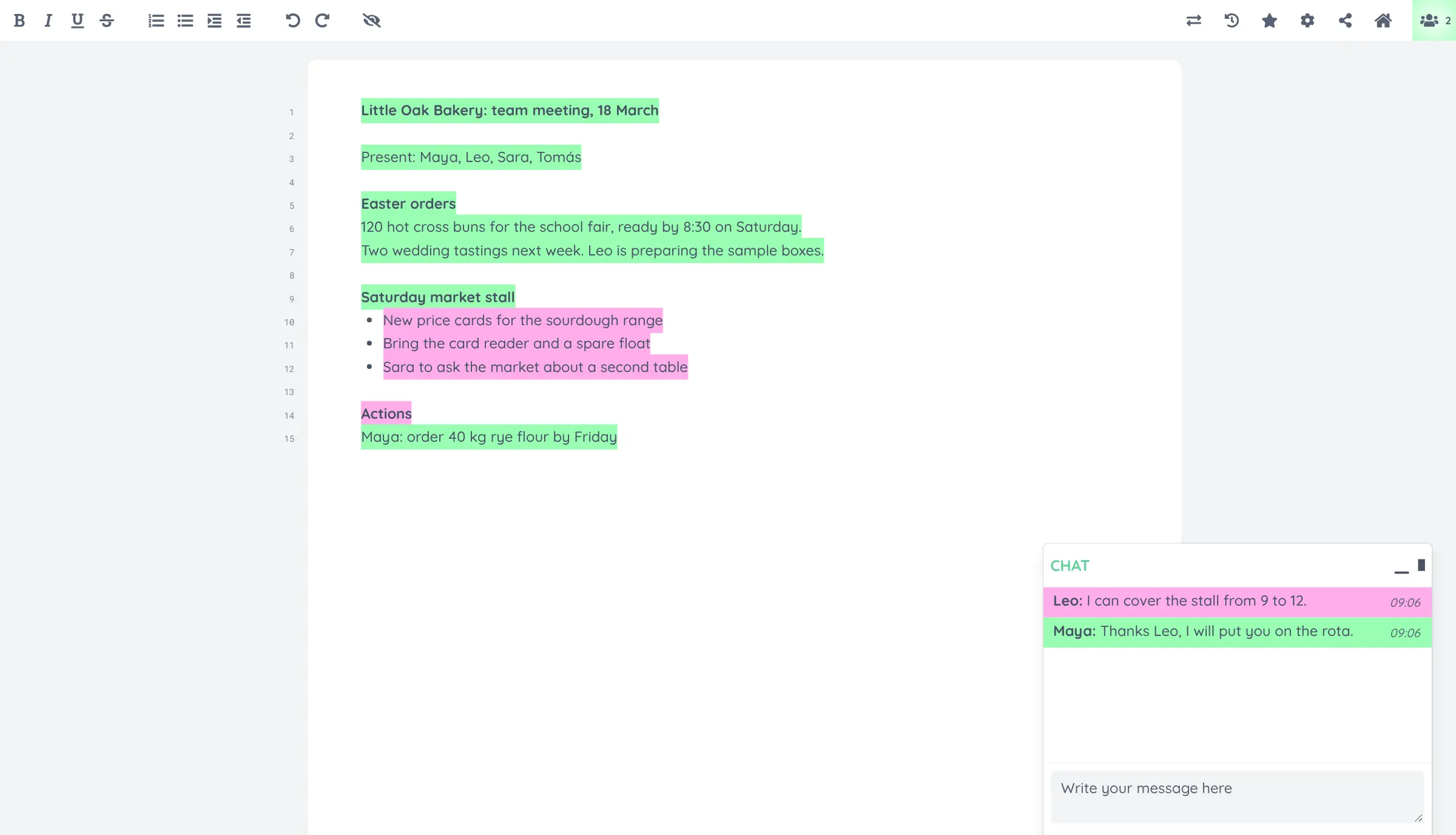
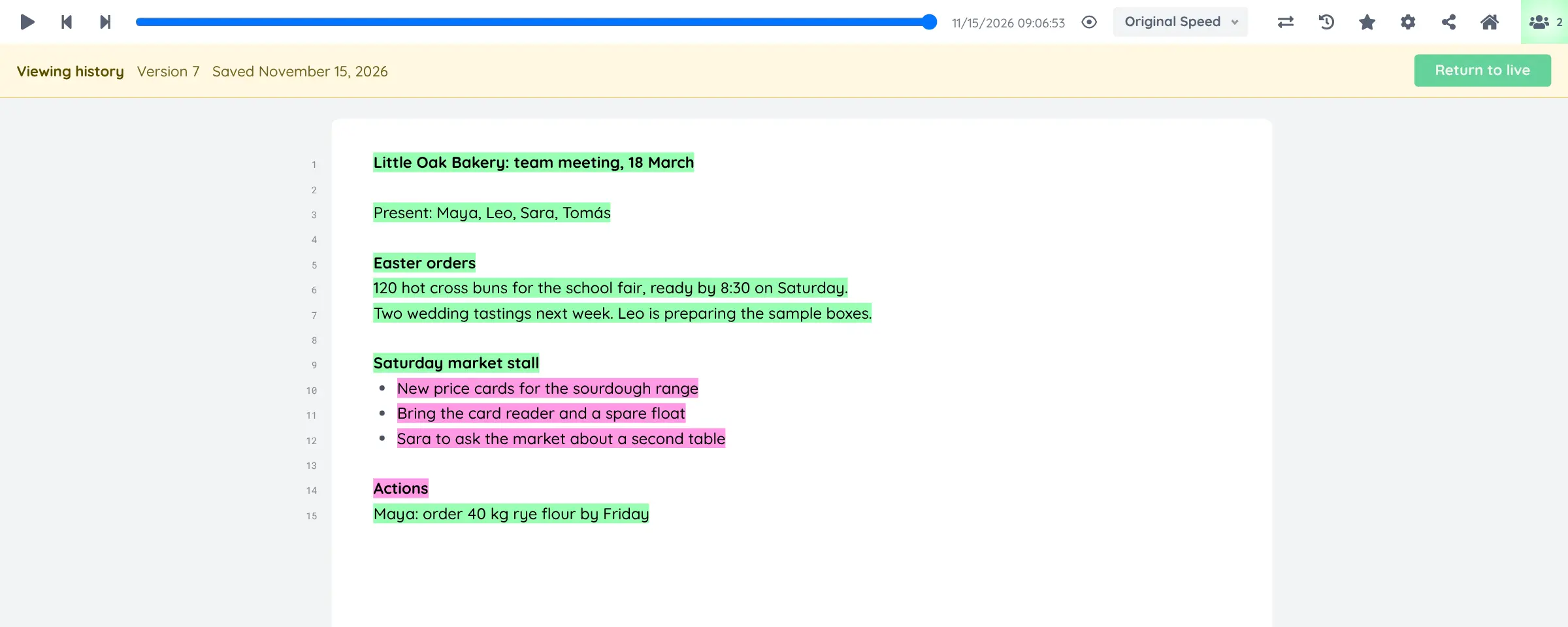
Etherpad is a free, open-source online editor where your team writes the same document at the same time and sees every change live, a self-hosted alternative to Google Docs or Dropbox Paper for shared writing. Each person's words are highlighted in their own colour, and every change is kept, so the timeslider can replay how a document came together.
There are no accounts for writers. You open a pad, share its link, and people pick a display name and start typing; a chat panel sits beside the text for quick questions. A bakery, for example, could open a pad for each weekly team meeting, let everyone add their updates at once, and download the finished notes as a Word file or PDF.
The editor is deliberately simple: bold, italic, lists and indents out of the box, with plugins for headings, comments, tables and more, installed from the admin page. It works in any web browser, including on phones, but has no app.
Cloudgate installs Etherpad on a server Cloudgate provides or one you connect, together with its database, and gives it a secure web address. Anyone with that address can create pads, so share it with your team only, and sign in at the admin page with the password Cloudgate shows you.
What you can do with Etherpad
- Write together, live Everyone with the pad's link types in the same document at once and sees each other's changes as they happen.
- See who wrote what Each person's text is highlighted in their own colour, so authorship is clear at a glance.
- Replay the whole history The timeslider plays back every change, and you can view or copy any earlier version.
- Chat beside the document A chat panel next to the pad keeps quick questions out of the text.
- Import and export Bring in text, HTML or Word files, and download a pad as Word, PDF, HTML or plain text.
- Add what you need Install plugins for headings, comments, tables, font colours and more from the admin page.
- No sign-up for writers People open a pad by its link and pick a name, with no account to create.
Replaces Google Docs and Dropbox Paper
Etherpad does the same job as Google Docs and Dropbox Paper. Here is what changes when you switch.
- Your documents stay on your own server, not in a Google or Dropbox account
- Colour-coded authorship and a full, playable history for every pad
- No accounts needed, so guests can join a meeting's notes in seconds
- A simpler editor than Google Docs; headings, comments and tables come from plugins
- No phone app and no offline mode
- Anyone who has a pad's link can edit it, so keep pad names hard to guess
What happens when you click Deploy?
You do not need a server or any technical knowledge. Four steps, and Etherpad is running at its own web address.
- Step 1 Click Deploy and create your account
Deploy takes you to Cloudgate. Create an account, or log in if you have one. Etherpad itself is free.
- Step 2 Choose a server
No server? Get one from Cloudgate: pick a size and a country, and Cloudgate gets it ready. Already have one? Connect it instead.
- Step 3 Cloudgate sets up Etherpad
It prepares the server, makes the passwords the app needs and starts it. There is nothing to install and nothing to write down.
- Step 4 Open your app and sign in
Your app gets a free web address to start, without https. Add your own domain, like app.yourshop.com, and Cloudgate secures it with https for you.
New to Cloudgate? See what Cloudgate is
Run Cloudgate yourself? Deploy from your own console
In your Cloudgate console, open Templates and choose Etherpad.
Questions
What is Etherpad?
Etherpad is a free, open-source online editor where several people write the same document at the same time in their web browsers. Each author's text is shown in their own colour, and every change is saved so you can replay the document's history.
Is Etherpad free?
Yes, Etherpad is free and open source under the Apache 2.0 licence, with no paid edition or upsells. You pay only for the server it runs on.
Is Etherpad a good alternative to Google Docs?
Yes, Etherpad works well for writing together in real time, such as meeting notes, drafts and workshops. It is a simpler editor than Google Docs, with plain formatting unless you add plugins, but your documents stay on your own server and no one needs a Google account.
Do people need an account to use Etherpad?
No, anyone with a pad's link can open it, choose a display name and start writing. Only the admin signs in, at your Etherpad address followed by /admin, with the username admin and the password Cloudgate created, shown on the app's variables page, to manage plugins, settings and pads.
Can I export an Etherpad document to Word or PDF?
Yes, you can download any Etherpad pad as a Word file, a PDF, HTML or plain text, and you can import text, HTML and Word files into a pad.
Are Etherpad pads private?
An Etherpad pad is private only in the sense that people need its link, because anyone who has the link can read and edit it. Give important pads long, hard-to-guess names, and share their links only with the people who should see them.
Is Etherpad a good alternative to Dropbox Paper?
Yes, for shared notes and drafts written together live. Etherpad has no folders, tasks or Dropbox storage, but you can move a Paper document across by exporting it as a Word file and importing it into a pad.
Do I need technical skills to run Etherpad?
No. Click Deploy, create your Cloudgate account and choose a server, and Cloudgate sets up Etherpad and gives it a web address. You use it in your browser like any other online tool.
Do I need my own server for Etherpad?
No. When you deploy Etherpad, hosted Cloudgate can provide a server. If you already rent one, you can connect it instead.
Can I move my data from Google Docs to Etherpad?
Most people export from Google Docs and import into Etherpad. The official guides at docs.etherpad.org walk through it.
Related apps

Write notes together in real time and share them with a link.

A self-hosted, Notion-style editor for writing documents together.
Write and edit documents together, end-to-end encrypted.

A self-hosted Markdown knowledge base for maths, diagrams and teams.