
HedgeDoc
Write notes together in real time and share them with a link.
No server needed to start: Cloudgate can provide one. What happens when you click Deploy

What is HedgeDoc?
HedgeDoc is a self-hosted collaborative Markdown editor and HackMD alternative: write notes together live, add diagrams and maths, and present them as slides.
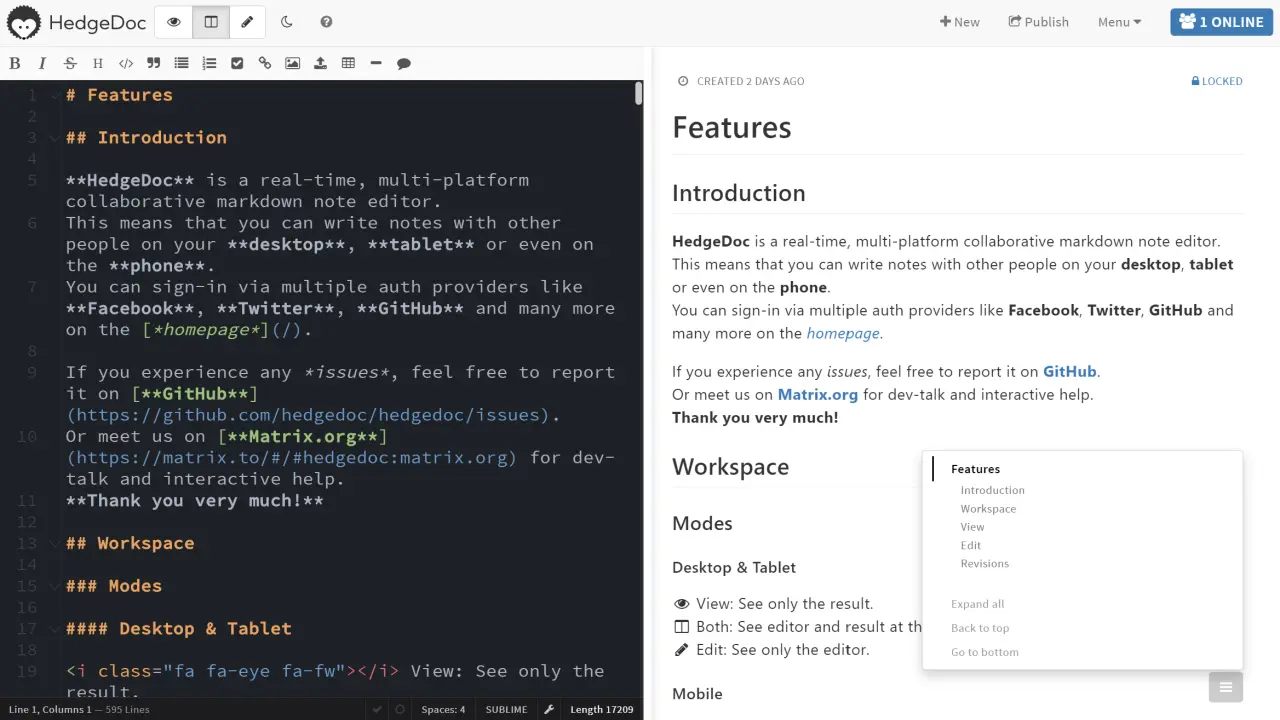
HedgeDoc is a self-hosted collaborative Markdown editor: a free, open-source alternative to HackMD, where several people write the same note in real time and share it with a link. You type on one side and see the formatted note on the other, with headings, checklists, tables, diagrams and maths.
Notes are quick to start and easy to share. Each note's owner decides who can read or edit it, can publish a tidy read-only page, and can present the note as slides. Every change is kept, so an earlier version is always a click away. A small agency, for example, could open one note for each client call, let everyone add to the agenda and action points during the meeting, then send the client the published link.
HedgeDoc works in any browser on a computer, tablet or phone. You can download notes as Markdown or HTML files and paste images straight into them. It grew out of HackMD's open-source edition, so HackMD users will find it familiar; it is a good fit for meeting notes rather than a full wiki like Notion.
Cloudgate installs HedgeDoc on a server Cloudgate provides or one you connect, together with the database it needs, and gives it a secure web address. Register your account first, then share the address with your team.
What you can do with HedgeDoc
- Write together at the same time Your team types in the same note at once and everyone sees the changes as they happen.
- See the result as you type Write in Markdown on one side and see the formatted note, with headings, tables and checklists, on the other.
- Share with the right people Choose per note who can read and who can edit, or publish a clean read-only page.
- Present from a note Turn a note into slides and present it straight from the browser.
- Add diagrams and formulas Draw flow charts, sequence diagrams and Mermaid diagrams, and write maths formulas, inside a note.
- Go back to any version Browse a note's history, see what changed and restore an earlier version.
- Download your notes Save any note as a Markdown or HTML file, and drag or paste images straight into it.
Replaces HackMD and Dropbox Paper
HedgeDoc does the same job as HackMD and Dropbox Paper. Here is what changes when you switch.
- No price per seat, however many people you invite
- Your notes and uploaded images stay on your own server
- The same idea as HackMD, because HedgeDoc grew out of HackMD's open-source edition
- No team workspaces, comments or GitHub sync like HackMD's paid plans
- No folders or page tree; you find notes through your history, tags and links
- Notes are written in Markdown, not with a block editor like Notion's
- No phone app; it works in your phone's browser
What happens when you click Deploy?
You do not need a server or any technical knowledge. Four steps, and HedgeDoc is running at its own web address.
- Step 1 Click Deploy and create your account
Deploy takes you to Cloudgate. Create an account, or log in if you have one. HedgeDoc itself is free.
- Step 2 Choose a server
No server? Get one from Cloudgate: pick a size and a country, and Cloudgate gets it ready. Already have one? Connect it instead.
- Step 3 Cloudgate sets up HedgeDoc
It prepares the server, makes the passwords the app needs and starts it. There is nothing to install and nothing to write down.
- Step 4 Open your app and sign in
Your app gets a free web address to start, without https. Add your own domain, like app.yourshop.com, and Cloudgate secures it with https for you.
New to Cloudgate? See what Cloudgate is
Run Cloudgate yourself? Deploy from your own console
In your Cloudgate console, open Templates and choose HedgeDoc.
Questions
Is HedgeDoc free?
Yes, HedgeDoc is free and open source under the AGPL-3.0 licence. There is no paid edition and no price per user; you pay only for your server.
Is HedgeDoc a good alternative to HackMD?
Yes. HedgeDoc started as the open-source edition of HackMD, so it works the same way, with real-time Markdown editing, a side-by-side preview, published notes and slides. HackMD's paid plans add team workspaces, comments and GitHub sync, which HedgeDoc does not have.
Can people read a HedgeDoc note without an account?
Yes. Each HedgeDoc note's owner chooses whether guests without an account can read it through its link, or keeps it for signed-in people only or private. In this setup, creating and editing notes needs an account.
How do I sign in to HedgeDoc the first time?
Open your HedgeDoc address, choose Sign in, then Register with your email and a password. Anyone who can reach the address can register the same way, so share it only with your team.
Can I move my notes from HackMD to HedgeDoc?
Yes, one note at a time. Copy or download a note's Markdown from HackMD and paste it into a new HedgeDoc note. Both apps use Markdown, so headings, lists, tables and links come across; there is no bulk import.
Can I turn a HedgeDoc note into slides?
Yes. In HedgeDoc, separate the slides with a line of three dashes, then open the note in slide mode to present it in the browser.
Is this HedgeDoc 2?
No. Cloudgate installs HedgeDoc 1, the current stable version. HedgeDoc 2 is a rewrite that is still being built and tested.
Do I need technical skills to run HedgeDoc?
No. Click Deploy, create your Cloudgate account and choose a server, and Cloudgate sets up HedgeDoc and gives it a web address. You use it in your browser like any other online tool.
Do I need my own server for HedgeDoc?
No. When you deploy HedgeDoc, hosted Cloudgate can provide a server. If you already rent one, you can connect it instead.
Related apps

Write together in real time, with each author in their own colour.

Catch quick thoughts and keep notes, with AI search if you want it.

Markdown notes you find by search and tags, not folders.

Obsidian-style Markdown notes in your browser, on your own server.