D

Open-source alternatives to Dropbox Paper

Etherpad is a free, open-source Dropbox Paper alternative for meeting notes and drafts that a team writes together live, shared by link with no accounts needed. Paper now lives inside Dropbox and its per-user plans; self-hosted Etherpad or HedgeDoc keeps your notes on your server, though neither has folders or tasks.

2 alternatives Free apps Our pick: Etherpad

At a glance

App Good for Code Import from Dropbox Paper Ease of use
Etherpad Teams and classes that write meeting notes and drafts together in real time Code Open source Import from Dropbox Paper Partly Easy
HedgeDoc Teams writing meeting notes and shared docs together in real time Code Open source Import from Dropbox Paper Partly Easy

Why look for an alternative to Dropbox Paper?

Dropbox Paper is Dropbox's tool for writing together: meeting notes, project briefs and drafts that a team edits at the same time, with comments and media. Dropbox has since folded Paper into Dropbox itself.

Teams look for an alternative because Paper now lives inside Dropbox, so shared notes come with a Dropbox account and its per-user team plans, and every note is stored on Dropbox's servers. A self-hosted Etherpad or HedgeDoc does the live co-writing on your own server, with no price per user.

The alternatives, compared

Etherpad

Our pick

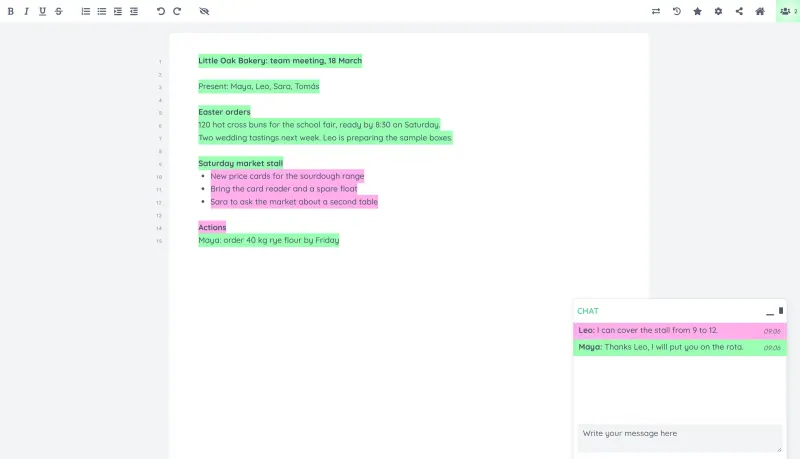
Write together in real time, with each author in their own colour.

Covers Paper's shared writing and meeting notes: everyone types in the same pad at once, each writer's text is shown in their own colour, a chat sits beside the pad and the timeslider replays every change. Writers need no account, only the pad's link. It has no folders, tasks or embeds, and headings, comments and tables need plugins.
Easy Open source

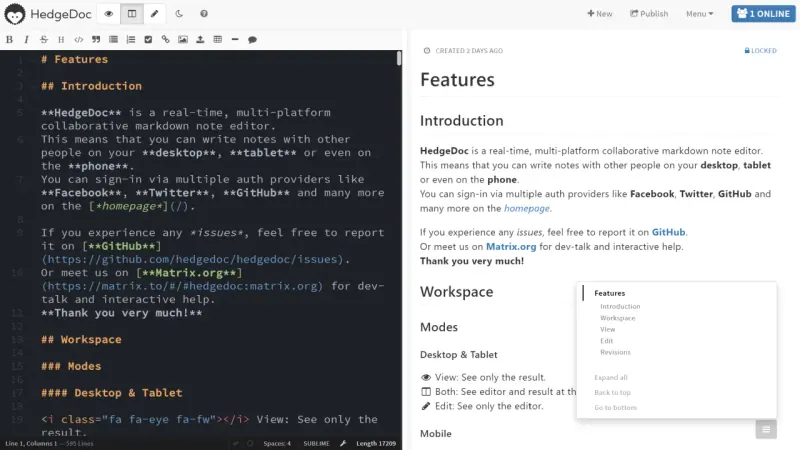
Write notes together in real time and share them with a link.

Shared notes written together in Markdown, with the formatted note shown beside the text, tables, task lists, diagrams, slides and read-only publishing, and per-note permissions. It suits people happy to type Markdown. It has no folders or page tree, no comments and no phone app.

Easy Open source

Moving from Dropbox Paper

Neither app imports from Dropbox Paper directly. Export each Paper doc you still need as a Word file and import it into a new Etherpad pad, where simple formatting such as bold and lists comes across. For HedgeDoc, copy the text of each doc into a new note and tidy the formatting in Markdown. Images and embeds do not come across, and links to old Paper docs stop pointing anywhere useful, so update them in the docs you move. Move the docs your team still uses and leave old ones in Dropbox.

Questions

What is the best open-source alternative to Dropbox Paper?

Start with Etherpad. Both are free and open source.

Should I choose Etherpad or HedgeDoc?

Choose Etherpad if your team wants to write together with simple buttons for formatting and no accounts. Choose HedgeDoc if your team is happy writing Markdown and wants tables, diagrams, slides and published read-only pages.

Is Dropbox Paper still available?

Dropbox has folded Paper into Dropbox itself, so Paper docs now sit among your Dropbox files. Teams that only used Paper for shared notes can move those notes to a self-hosted editor such as Etherpad or HedgeDoc.

Can I import Dropbox Paper docs into Etherpad or HedgeDoc?

Partly. Neither Etherpad nor HedgeDoc imports from Dropbox Paper directly. Export each Paper doc as a Word file and import it into a new Etherpad pad, where bold and lists come across, or copy the text into a HedgeDoc note and tidy it in Markdown. Images and embeds do not come across.

Are these Dropbox Paper alternatives really free?

Yes, Etherpad and HedgeDoc are free. To run them you need Cloudgate and a server. Use hosted Cloudgate, which can also provide the server, or install Cloudgate on a server of your own for free. Cloudgate's plans and prices are at cloudgate.octabyte.io/pricing. One server can run several apps.

Do I need a developer to replace Dropbox Paper?

No. Cloudgate installs the app you choose on your server and gives it a secure web address, and you use it in your browser instead of Dropbox Paper.