
ERPNext
ERP for your books, stock, orders and production.
No server needed to start: Cloudgate can provide one. What happens when you click Deploy

What is ERPNext?
Self-hosted ERPNext runs accounting, stock, buying, selling, manufacturing and projects in one open-source ERP, with no fee per user.
ERPNext is a self-hosted, open-source ERP that runs a whole business in one web app: accounting, buying, selling, stock, manufacturing, projects and point of sale. It is a free alternative to NetSuite, SAP Business One and, for growing companies, QuickBooks, with no fee per user.
It suits businesses that have outgrown basic bookkeeping and want their orders, warehouses and production in the same place as their books. A furniture maker, for example, could turn a customer's quote into a sales order, plan the work from a bill of materials, take the timber out of stock as it is used, and see the profit on that order in its accounts.
ERPNext works in any web browser, including on a phone. You can bring in customers, items and balances from spreadsheets, export any report to Excel or PDF, and add your own fields, forms and reports without code. HR and payroll are a separate app.
Cloudgate installs ERPNext on a server Cloudgate provides or one you connect, together with its database and background workers, and gives it a secure web address. The first start takes several minutes; then sign in as Administrator with the generated password, and the setup wizard walks you through your company. ERPNext is made by Frappe Technologies; Cloudgate is not affiliated with Frappe.
What you can do with ERPNext
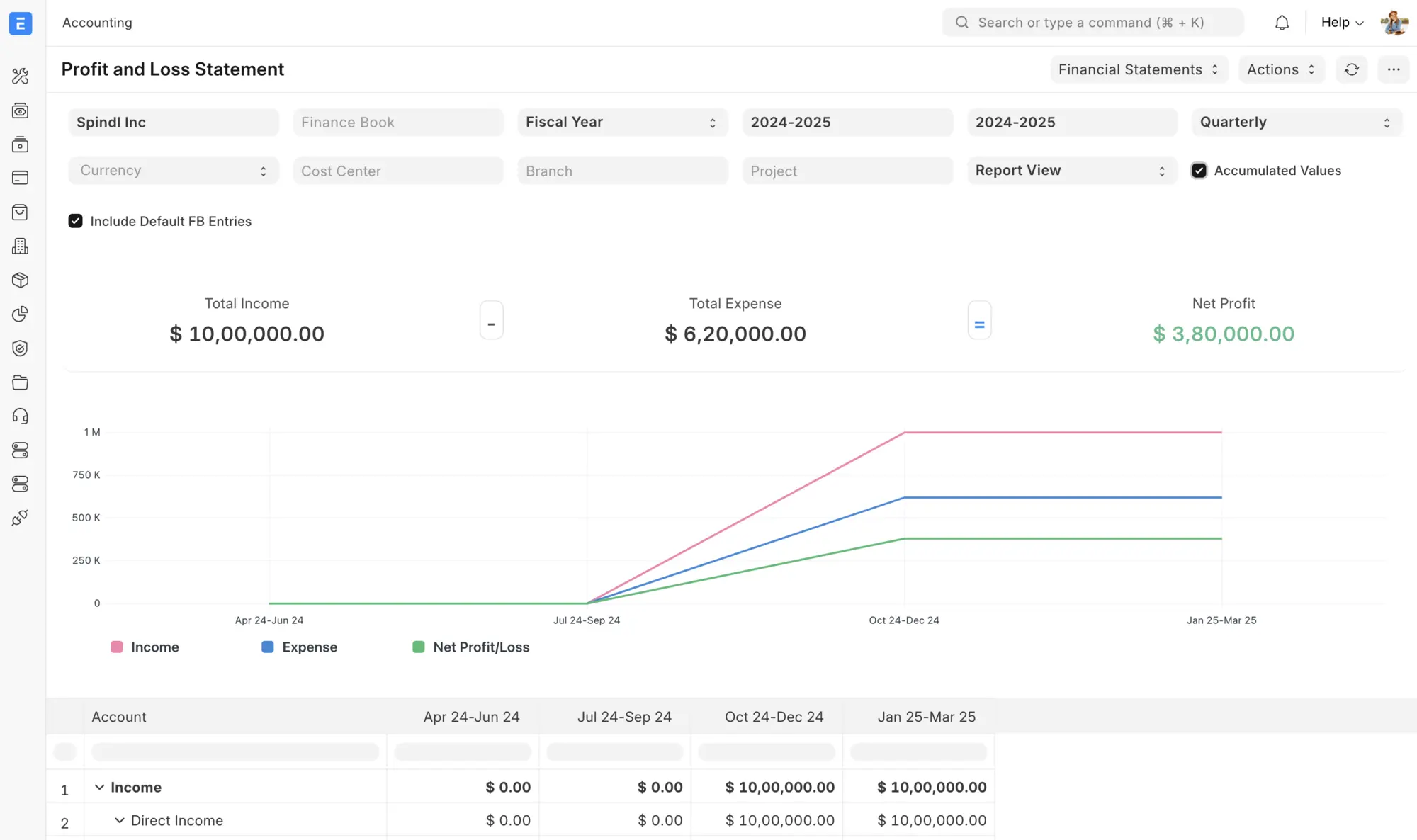
- Keep your books A general ledger, invoices, payments, bank reconciliation, budgets and cost centres, with profit and loss, balance sheet and cash flow reports.
- Sell and buy Follow leads to quotes, sales orders and deliveries, and suppliers from quotes to purchase orders and receipts.
- Manage stock across warehouses Track items in several warehouses with batches, serial numbers, reorder levels and stock valuation.
- Plan production Bills of materials, work orders, job cards, capacity planning and subcontracting for businesses that make what they sell.
- Run projects and assets Projects with tasks, timesheets and profitability, plus fixed assets with depreciation and maintenance schedules.
- Sell at the counter A point of sale screen, with quality checks and a support desk for customer issues in the same system.
- Run several companies Keep more than one company and currency in one ERPNext, with branches and separate finance books.
- Shape it without code Add custom fields, forms, print formats, reports, dashboards and approval steps, and set who can see what.
Replaces NetSuite, SAP Business One and QuickBooks Online
ERPNext does the same job as NetSuite, SAP Business One and QuickBooks Online. Here is what changes when you switch.
- No fee per user and no features held back for a paid edition
- Finance, stock, orders and production in one system you control
- Your business data stays on your own server
- Custom fields, reports and workflows without paying for a developer
- It takes real setup time, and many businesses work with an implementation partner
- Fewer partners and ready-made integrations than NetSuite or SAP Business One
- HR and payroll are a separate app, and there is no US payroll or tax filing
- You look after backups and upgrades yourself
What happens when you click Deploy?
You do not need a server or any technical knowledge. Four steps, and ERPNext is running at its own web address.
- Step 1 Click Deploy and create your account
Deploy takes you to Cloudgate. Create an account, or log in if you have one. ERPNext itself is free.
- Step 2 Choose a server
No server? Get one from Cloudgate: pick a size and a country, and Cloudgate gets it ready. Already have one? Connect it instead.
- Step 3 Cloudgate sets up ERPNext
It prepares the server, makes the passwords the app needs and starts it. There is nothing to install and nothing to write down.
- Step 4 Open your app and sign in
Your app gets a free web address to start, without https. Add your own domain, like app.yourshop.com, and Cloudgate secures it with https for you.
New to Cloudgate? See what Cloudgate is
Run Cloudgate yourself? Deploy from your own console
In your Cloudgate console, open Templates and choose ERPNext.
Questions
Is ERPNext free?
Yes, ERPNext is free and open source under the GPL-3.0 licence, with no paid edition and no features held back. You pay only for your server; its makers, Frappe, earn money from hosting, support plans and implementation.
Is ERPNext a good alternative to NetSuite?
Yes, for small and mid-sized companies that need the core of an ERP. ERPNext covers finance, stock, orders and manufacturing like NetSuite does, with no fee per user, but you run it yourself and it has fewer partners and ready-made integrations.
Is ERPNext a good alternative to SAP Business One?
Yes, for a similar range of work. Like SAP Business One, ERPNext covers finance, sales, purchasing, stock and production, but with no licence fee. SAP Business One has many more implementation partners to help you set it up.
How do I sign in to ERPNext the first time?
Sign in to ERPNext with the username Administrator and the password Cloudgate generated, shown on the app's variables page in Cloudgate. A setup wizard then asks for your language, country, time zone, currency, company name and financial year, and creates a chart of accounts for your country.
Can I move my data from QuickBooks to ERPNext?
Partly. ERPNext no longer has a QuickBooks importer, so you export your accounts, customers, suppliers, items and open invoices to spreadsheets and bring them in with ERPNext's import tools for data, the chart of accounts and opening balances.
Does ERPNext include HR and payroll?
No, not in this template. HR and payroll moved out of ERPNext into a separate app, Frappe HR. ERPNext still keeps employee and department records.
What server size do I need for ERPNext?
ERPNext needs a large server, because it runs its database, background workers and real-time updates alongside the app. Cloudgate asks for a server with 4 GB of memory, which suits a small team; plan for about 8 GB for daily use across a business.
Do I need technical skills to run ERPNext?
No. Click Deploy, create your Cloudgate account and choose a server, and Cloudgate sets up ERPNext and gives it a web address. You use it in your browser like any other online tool.
Do I need my own server for ERPNext?
No. When you deploy ERPNext, hosted Cloudgate can provide a server. If you already rent one, you can connect it instead.
Related apps
CRM, sales, stock and invoicing in one business app.

An ERP for your books, invoices, orders and stock.

ERP for sales, stock, accounting and HR in one place.

CRM, quotes, invoices and stock in one business app.