
AureusERP
ERP for sales, stock, accounting and HR in one place.
No server needed to start: Cloudgate can provide one. What happens when you click Deploy
What is AureusERP?
Self-hosted AureusERP: a free, open-source ERP for sales, CRM, stock, purchasing, manufacturing, point of sale, accounting and HR in one system.
Self-hosted AureusERP is a free, open-source ERP: one system for sales, CRM, purchasing, inventory, manufacturing, point of sale, invoicing and accounting, projects and HR, and an alternative to NetSuite, Zoho One or SAP Business One. It is made by Webkul under the MIT licence, with no paid edition, and each area is a module you switch on only when you need it.
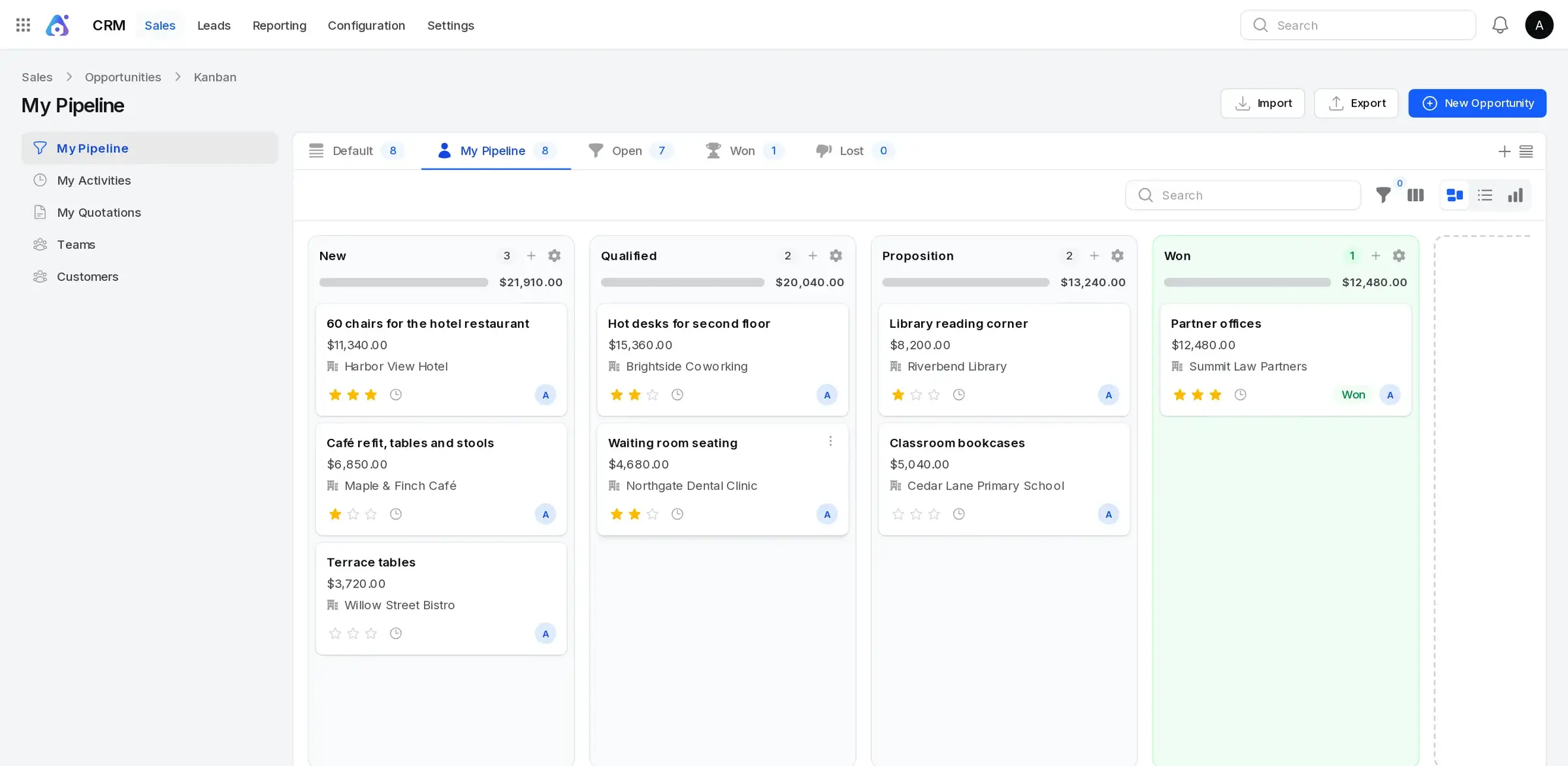
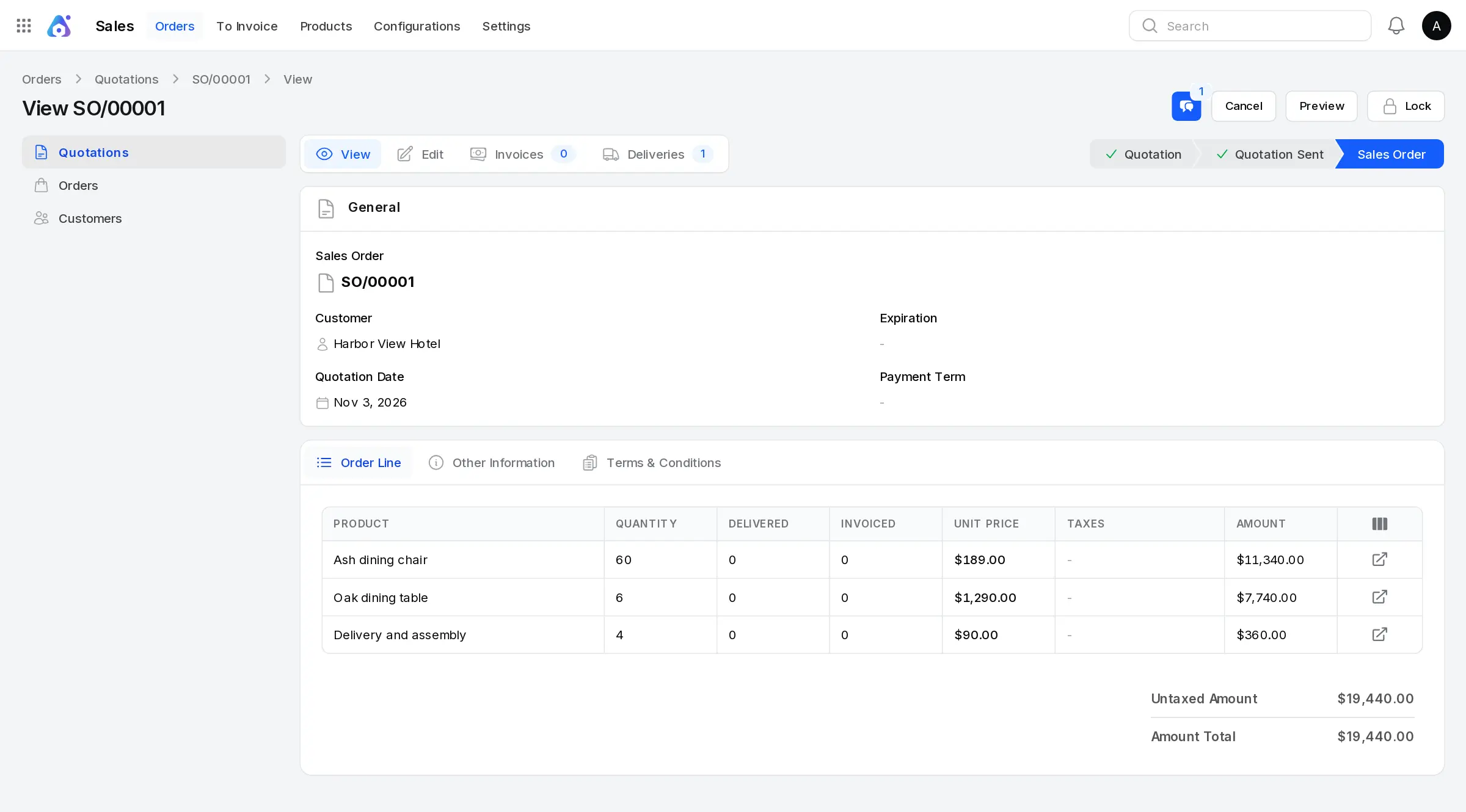
A small furniture workshop, for example, could follow a hotel's order in the CRM, send the quote as a PDF, buy timber with a purchase order, build the chairs with a manufacturing order and send the invoice when they ship, then check what customers still owe in the aged receivables report. Its staff could book time off and log hours in the same system.
AureusERP is young, with its first stable release in 2025, so it has fewer modules and integrations than older ERPs such as Odoo or ERPNext. It works in any web browser, including on a phone, exports lists to CSV or Excel, and comes in English, Arabic, Spanish, French and Brazilian Portuguese.
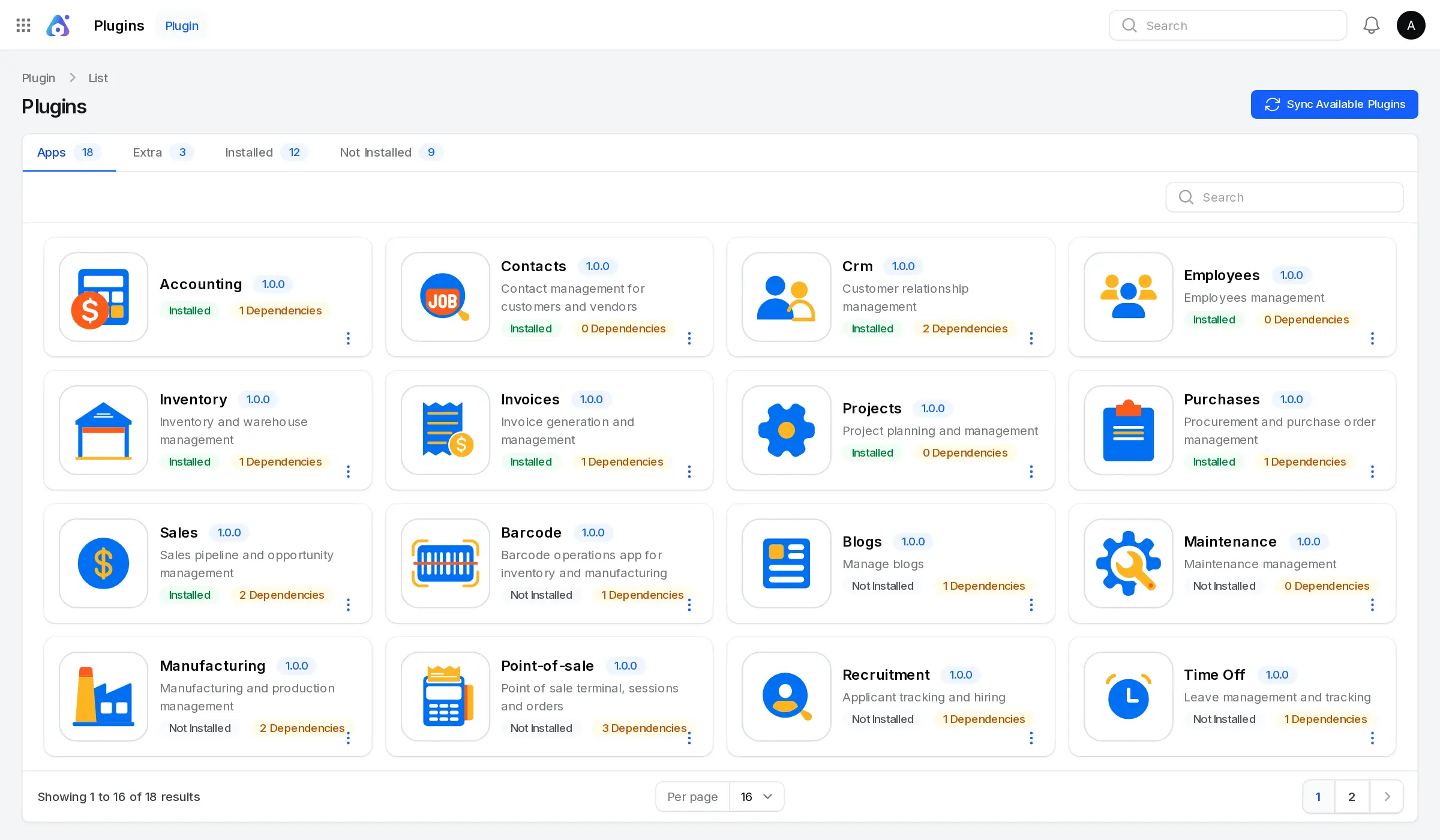
Cloudgate installs AureusERP on a server Cloudgate provides or one you connect, creates your admin account, and gives it a secure web address. Sign in, then switch on the modules you need from the Plugins screen.
What you can do with AureusERP
- Follow leads and close sales A CRM pipeline shows leads and opportunities as cards by stage, and quotations with price lists become sales orders and PDF quotes.
- Buy and keep stock Send purchase orders to suppliers, track stock across several locations and warehouses, and scan barcodes at the counter or in the stockroom.
- Make what you sell Bills of materials, manufacturing orders, work orders and work centres for businesses that build or assemble their products.
- Sell at the till A point of sale screen with registers and sessions, refunds, several payment methods, receipts, and floors and tables for restaurants.
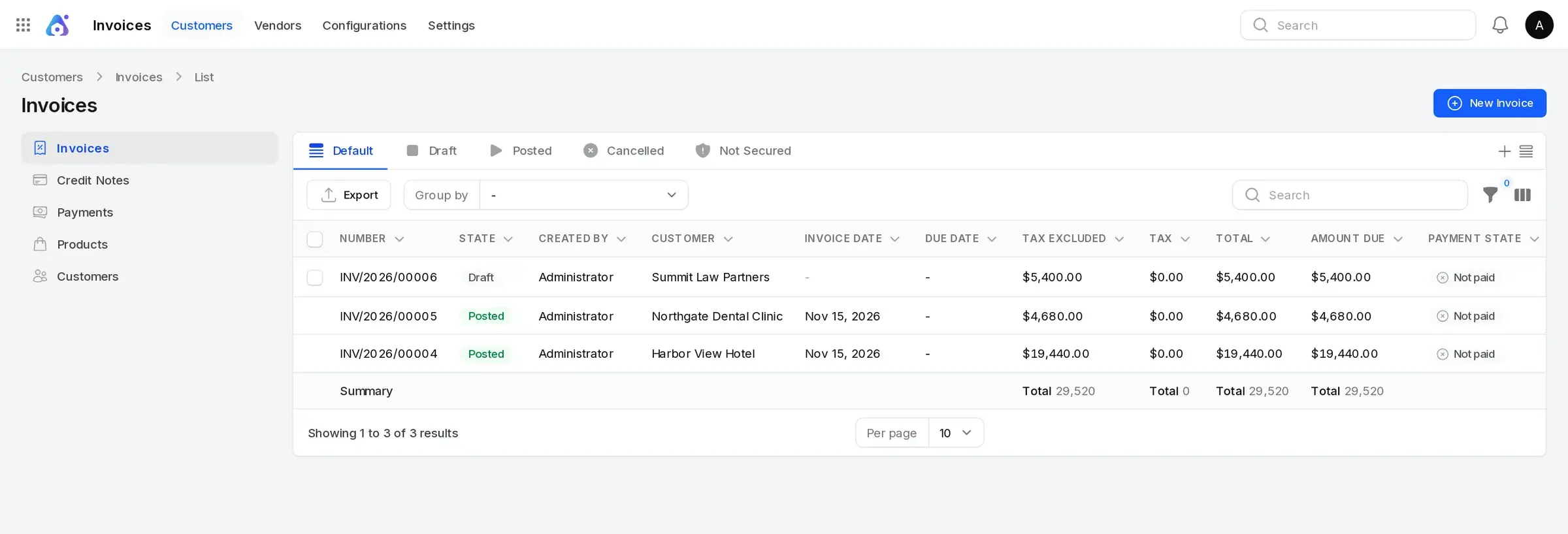
- Invoice and keep the books Customer invoices, credit notes, vendor bills and payments, with a balance sheet, profit and loss, trial balance, general ledger and aged receivables and payables.
- Run projects and people Projects with tasks and timesheets, plus employee records, time off and recruitment.
- Switch on only what you use Each area is a module you install from the Plugins screen, so a small team can start with sales and invoices and add stock or HR later.
- Decide who sees what Roles and permissions control each screen, and several companies can share one installation.
Replaces NetSuite, Zoho One and SAP Business One
AureusERP does the same job as NetSuite, Zoho One and SAP Business One. Here is what changes when you switch.
- Sales, buying, stock, production, a till, invoices and HR in one system, with no fee per user or per module
- MIT open-source licence and no paid edition, so no features are held back
- Your company's records stay on your own server
- You add modules as you grow instead of paying for a bigger plan
- AureusERP is young (its first stable release was in 2025), with far fewer modules, integrations and implementation partners than NetSuite, SAP Business One or Odoo
- There is no phone app; it works in a phone's web browser
- There is no importer for NetSuite, Zoho, Odoo or QuickBooks data
- You look after backups and upgrades yourself
What happens when you click Deploy?
You do not need a server or any technical knowledge. Four steps, and AureusERP is running at its own web address.
- Step 1 Click Deploy and create your account
Deploy takes you to Cloudgate. Create an account, or log in if you have one. AureusERP itself is free.
- Step 2 Choose a server
No server? Get one from Cloudgate: pick a size and a country, and Cloudgate gets it ready. Already have one? Connect it instead.
- Step 3 Cloudgate sets up AureusERP
It prepares the server, makes the passwords the app needs and starts it. There is nothing to install and nothing to write down.
- Step 4 Open your app and sign in
Your app gets a free web address to start, without https. Add your own domain, like app.yourshop.com, and Cloudgate secures it with https for you.
New to Cloudgate? See what Cloudgate is
Run Cloudgate yourself? Deploy from your own console
In your Cloudgate console, open Templates and choose AureusERP.
Questions
Is AureusERP free?
Yes, AureusERP is free and open source under the MIT licence, with no paid edition and no limit on users. You pay only for your server. Its maker, Webkul, sells managed hosting and custom development separately.
Is AureusERP a good alternative to Odoo?
Yes, if you want an Odoo-style ERP with no paid edition. AureusERP has the same kinds of modules, such as CRM, sales, inventory, manufacturing, point of sale, accounting and HR, under the MIT licence. Odoo is much older and has many more apps, partners and phone apps, so AureusERP suits a business that needs the core modules and is happy with a younger project.
Can AureusERP replace NetSuite or SAP Business One?
For a small business, partly. AureusERP covers sales, purchasing, stock, manufacturing, point of sale and accounting with no licence fee, but it has a much smaller set of integrations, partners and industry features than NetSuite or SAP Business One.
Does AureusERP include accounting?
Yes. The AureusERP Accounting module records invoices, bills, payments and journal entries, and has a balance sheet, profit and loss, trial balance, general ledger, partner ledger and aged receivables and payables reports.
How do I sign in to AureusERP the first time?
Open your AureusERP address followed by /admin and sign in with the admin email you entered and the password Cloudgate generated, shown on the app's variables page in Cloudgate. Then open the Plugins screen and install the modules you need, such as Sales, Inventory or Accounting.
Can I move my data from Odoo or another system to AureusERP?
Not automatically. AureusERP has no importer for Odoo, NetSuite or QuickBooks data. CRM leads and opportunities can be imported from CSV files, and most lists can be exported to CSV or Excel.
Is there an AureusERP phone app?
No, there is no phone or desktop app. AureusERP works in any web browser, including on a phone.
Do I need technical skills to run AureusERP?
No. Click Deploy, create your Cloudgate account and choose a server, and Cloudgate sets up AureusERP and gives it a web address. You use it in your browser like any other online tool.
Do I need my own server for AureusERP?
No. When you deploy AureusERP, hosted Cloudgate can provide a server. If you already rent one, you can connect it instead.
Related apps
CRM, sales, stock and invoicing in one business app.

An ERP for your books, invoices, orders and stock.

ERP for your books, stock, orders and production.

CRM, quotes, invoices and stock in one business app.