
DailyTxT
A private, encrypted diary you keep on your own server.
No server needed to start: Cloudgate can provide one. What happens when you click Deploy
What is DailyTxT?
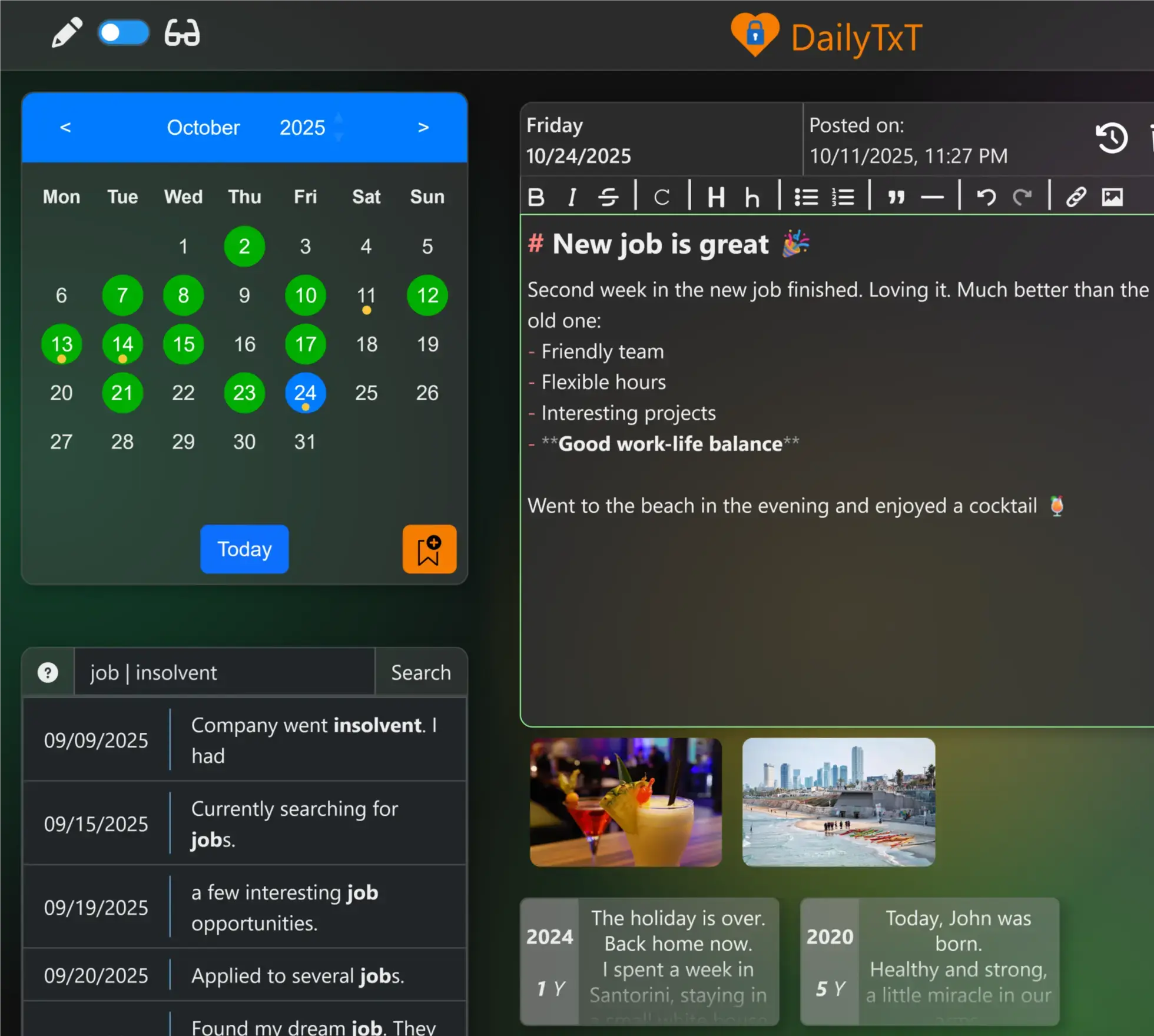
DailyTxT is a self-hosted, encrypted online diary: write one entry a day, add photos and files, tag and search your journal, and look back on past years.
DailyTxT is a free, self-hosted diary app: a private, encrypted online journal you keep on your own server instead of in Day One or Journey. You write one entry per day, attach photos and files, tag entries and search everything you have written, all in your web browser.
Each person's entries and files are stored encrypted with a key that only their password unlocks, so even the person who runs the server cannot read them through the app. Several people can share one installation, each with a separate diary. A family could each keep their own journal, with holiday photos pinned to the places they visited, and every year see what they wrote on the same day before.
DailyTxT works in any browser on a computer or phone and can be added to a phone's home screen like an app; there are no app-store apps. It comes in 11 languages, including English, German, French, Italian, Dutch, Chinese and Japanese, and you can export your diary to a web page or download a backup at any time.
Cloudgate installs DailyTxT on a server Cloudgate provides or one you connect and gives it a secure web address. Create your account, save your backup keys in case you forget your password, then turn off new sign-ups.
What you can do with DailyTxT
- Write one entry a day A calendar shows which days you have written, and the editor saves as you type, with simple formatting and a live preview.
- Add photos and files to any day Drag in photos, receipts or documents; pictures appear in a gallery under the entry and are stored encrypted too.
- Find any memory Search every entry for a word, tag or file name, and tag entries to group them.
- Look back on this day See what you wrote on the same date in earlier years, read a whole month in a calm reading view, and see your writing streaks.
- Pin places on a map Mark where you were each day and show GPS tracks from GPX files.
- Start from a template Save your own entry templates, such as a gratitude list or a travel log, and use one by default.
- One diary per person Each family member gets a separate account with its own encryption key, so no one can read anyone else's entries.
- Export and back up Export your diary with its files to a web page you can open anywhere, or download a backup and import it again later.
Replaces Day One and Journey
DailyTxT does the same job as Day One and Journey. Here is what changes when you switch.
- Your entries and photos stay on your own server, encrypted
- No subscription, and no limit on photos or files per day
- Several people can each keep their own diary on one installation
- Export everything to a readable web page at any time
- No phone or desktop apps; you use it in the browser or add it to your home screen
- Encryption happens on your server, not on your phone, so search works but it is not end-to-end
- A forgotten password locks your entries unless you saved backup keys
- Your Day One or Journey entries do not move across
What happens when you click Deploy?
You do not need a server or any technical knowledge. Four steps, and DailyTxT is running at its own web address.
- Step 1 Click Deploy and create your account
Deploy takes you to Cloudgate. Create an account, or log in if you have one. DailyTxT itself is free.
- Step 2 Choose a server
No server? Get one from Cloudgate: pick a size and a country, and Cloudgate gets it ready. Already have one? Connect it instead.
- Step 3 Cloudgate sets up DailyTxT
It prepares the server, makes the passwords the app needs and starts it. There is nothing to install and nothing to write down.
- Step 4 Open your app and sign in
Your app gets a free web address to start, without https. Add your own domain, like app.yourshop.com, and Cloudgate secures it with https for you.
New to Cloudgate? See what Cloudgate is
Run Cloudgate yourself? Deploy from your own console
In your Cloudgate console, open Templates and choose DailyTxT.
Questions
Is DailyTxT free?
Yes, DailyTxT is free and open source under the MIT licence. There is no paid edition and no limit on entries or users; you pay only for your server.
Is DailyTxT a good alternative to Day One?
Yes, if you want a private daily diary with photos that you keep on your own server. DailyTxT has no phone or desktop apps and no import from Day One, but it covers daily entries, photos, tags, search, places on a map and looking back on past years.
Can anyone else read my DailyTxT diary, even the admin?
No, not through DailyTxT. Each person's entries and files are stored encrypted with a key unlocked by their own password, and the admin panel can manage accounts but cannot open anyone's entries.
What happens if I forget my DailyTxT password?
Your entries stay locked unless you created backup keys first. DailyTxT shows these keys only once when you create them, and any of them works in place of your password, so save them somewhere safe on the first day.
How do I sign in to DailyTxT the first time?
There is no default login; you open your DailyTxT address and create your own account on the sign-up page. Once everyone in your household has an account, turn off new sign-ups in Cloudgate's settings; the separate admin password there can reopen sign-ups for five minutes when needed.
Is there a DailyTxT app for my phone?
No, there is no app-store app, but DailyTxT works in your phone's browser and can be added to your home screen like an app. You can swipe between days and months.
Can I import my Day One entries into DailyTxT?
No, DailyTxT imports only its own backups, so your Day One or Journey history does not move across. Keep your old journal for reading back and start your new entries in DailyTxT.
Do I need technical skills to run DailyTxT?
No. Click Deploy, create your Cloudgate account and choose a server, and Cloudgate sets up DailyTxT and gives it a web address. You use it in your browser like any other online tool.
Do I need my own server for DailyTxT?
No. When you deploy DailyTxT, hosted Cloudgate can provide a server. If you already rent one, you can connect it instead.
Related apps

A self-hosted travel tracker, trip planner and world map in one.

A self-hosted flight tracker for every flight you take, on one map.

A self-hosted baby tracker the whole family can share.

A self-hosted habit tracker with daily ticks and streaks, no goals.