
D

Open-source alternative to Day One

DailyTxT is a free, open-source Day One alternative for keeping a private diary in your browser: one entry a day in Markdown, with photos and files, tags, search and a map of places. Day One’s paid plans add sync across devices and more photos per entry; self-hosted DailyTxT keeps every entry encrypted on your own server with no subscription, though it has no phone apps and no Day One import.

Free app Code: Open source Import from Day One: No Easy

Why look for an alternative to Day One?

Day One is a journaling app for iPhone, Android, Mac, Windows and the web. You write entries with photos, and paid Silver and Gold plans add sync on any number of devices, up to 30 photos per entry and video, with end-to-end encryption on every plan.

People look for an alternative because the features that make Day One work across devices are on a subscription, and the journal lives in Day One's cloud. Some want a diary that stays on a server they control. DailyTxT is free, keeps one encrypted entry per day with photos and files on your own server, and lets several people in a family keep their own diaries, each with their own key. In return, it has no native apps and cannot bring your Day One entries across.

How DailyTxT compares

A private, encrypted diary you keep on your own server.

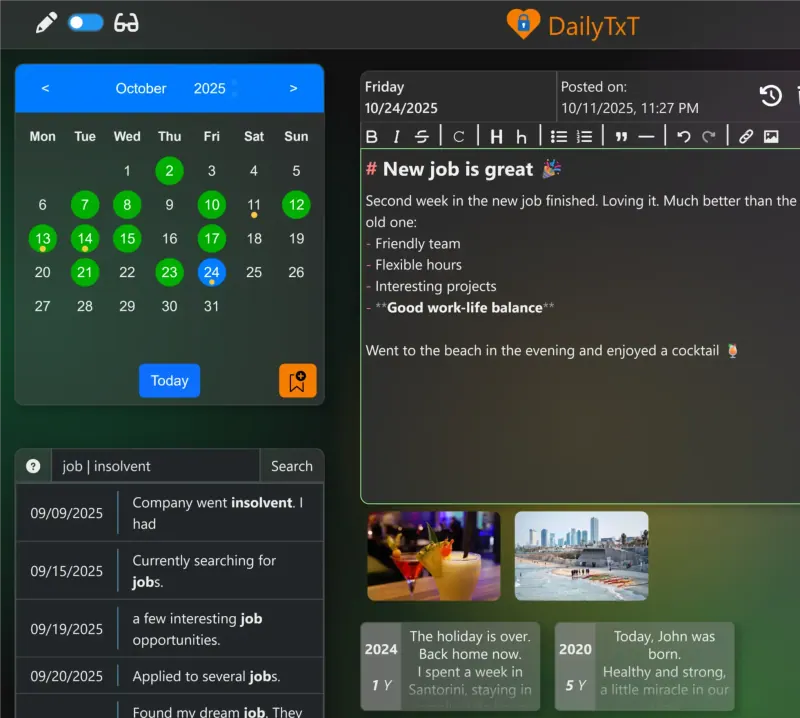
Covers Day One's daily writing: one Markdown entry per day in a calendar, photos and files attached to each day, tags, full-text search, places on a map and cards of entries from earlier years. Entries and files are encrypted on your server, not end to end as in Day One, and it runs in the browser or as a home-screen web app, with no native apps, audio or video recording, widgets or reminders.

What you gain
  • Your entries and photos stay on your own server, encrypted
  • No subscription, and no limit on photos or files per day
  • Several people can each keep their own diary on one installation
What is different
  • No phone or desktop apps; you use it in the browser or add it to your home screen
  • Encryption happens on your server, not on your phone, so search works but it is not end-to-end
  • A forgotten password locks your entries unless you saved backup keys
Easy Open source

Moving from Day One

DailyTxT cannot import Day One journals: it reads only its own backups. Keep Day One, or an export from it, for reading back old entries, and start new ones in DailyTxT. Create your account on DailyTxT's sign-up page, then turn sign-ups off in Cloudgate's settings so nobody else can join. Write down the backup keys DailyTxT shows you, because they are the only way back into your entries if you forget your password. On your phone, add DailyTxT to the home screen so it opens like an app.

Questions

What is the best open-source alternative to Day One?

DailyTxT is the free, open-source alternative to Day One for keeping a private journal in the catalogue today. Covers Day One's daily writing: one Markdown entry per day in a calendar, photos and files attached to each day, tags, full-text search, places on a map and cards of entries from earlier years. Entries and files are encrypted on your server, not end to end as in Day One, and it runs in the browser or as a home-screen web app, with no native apps, audio or video recording, widgets or reminders.

Can I import my Day One journal into DailyTxT?

No. DailyTxT imports only its own backups, so your Day One entries stay in Day One. Most people keep their old journal for reading back and write new entries in DailyTxT.

Is DailyTxT end-to-end encrypted like Day One?

Not end to end. DailyTxT encrypts every entry and file on the server with a key made from your password, so even the server's admin cannot read them, but the encryption happens on the server so that search works.

Is there a DailyTxT app for iPhone or Android?

No native app. DailyTxT works in a phone's browser, and you can add it to your home screen as a web app.

What happens if I forget my DailyTxT password?

Your entries can only be opened again with the backup keys DailyTxT shows you once. Save them somewhere safe; the admin cannot recover your diary.

Is DailyTxT really free compared with Day One?

Yes, DailyTxT is free. To run them you need Cloudgate and a server. Use hosted Cloudgate, which can also provide the server, or install Cloudgate on a server of your own for free. Cloudgate's plans and prices are at cloudgate.octabyte.io/pricing. One server can run several apps.

Do I need a developer to replace Day One?

No. Cloudgate installs DailyTxT on your server and gives it a secure web address, and you use it in your browser instead of Day One.