
Beaver Habit Tracker
A self-hosted habit tracker with daily ticks and streaks, no goals.
No server needed to start: Cloudgate can provide one. What happens when you click Deploy
What is Beaver Habit Tracker?
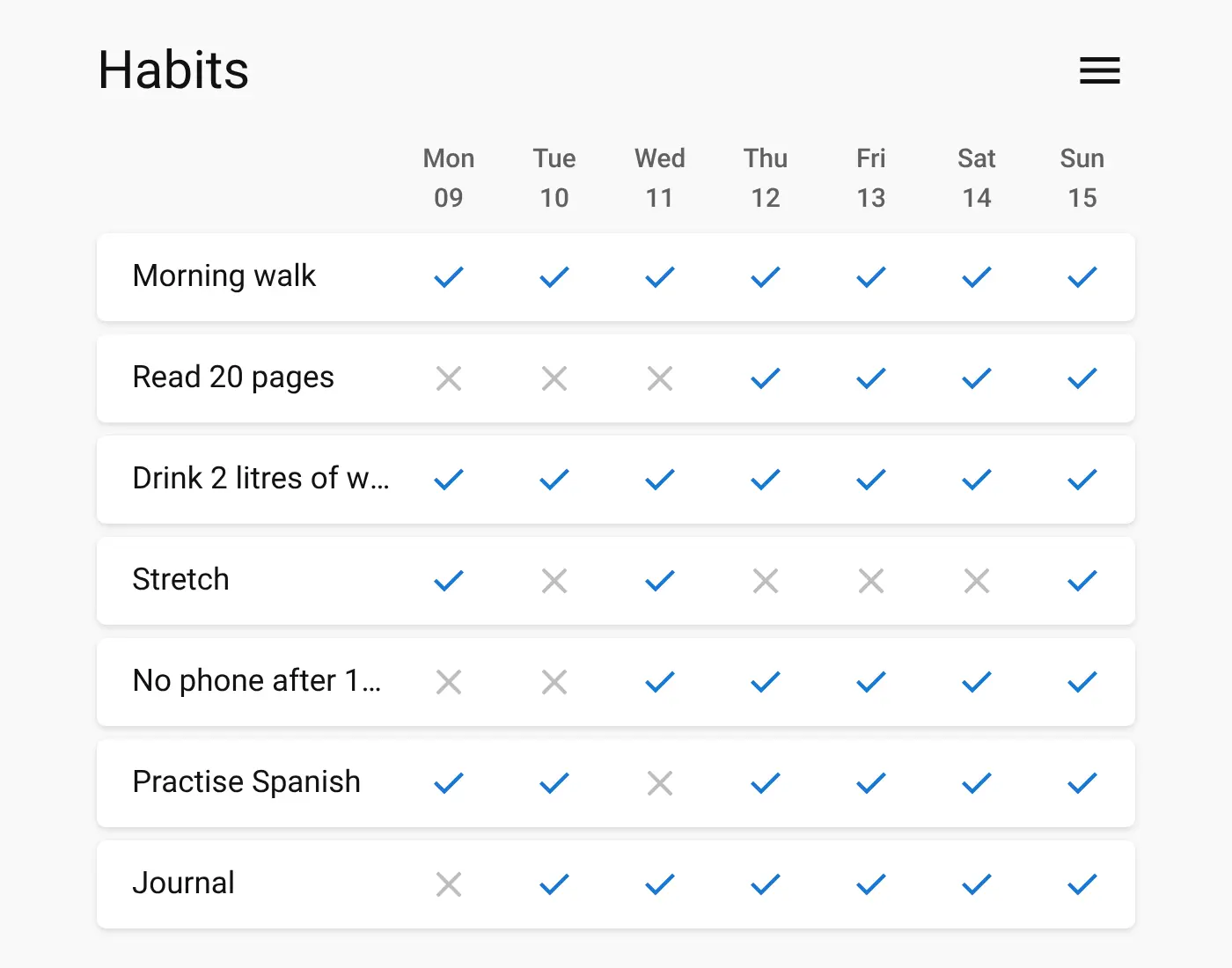
Beaver Habit Tracker is a self-hosted habit tracker: tick off each day on a simple grid and follow your streaks and notes, with no goals.
Beaver Habit Tracker is a free, open-source, self-hosted habit tracker, an alternative to apps like Habitify and Streaks that keeps your habit history on your own server. You list the habits you want to keep, then tick each day you do them on a simple grid. There are no goals, targets or scores, just a record of what you did and how long your streaks are.
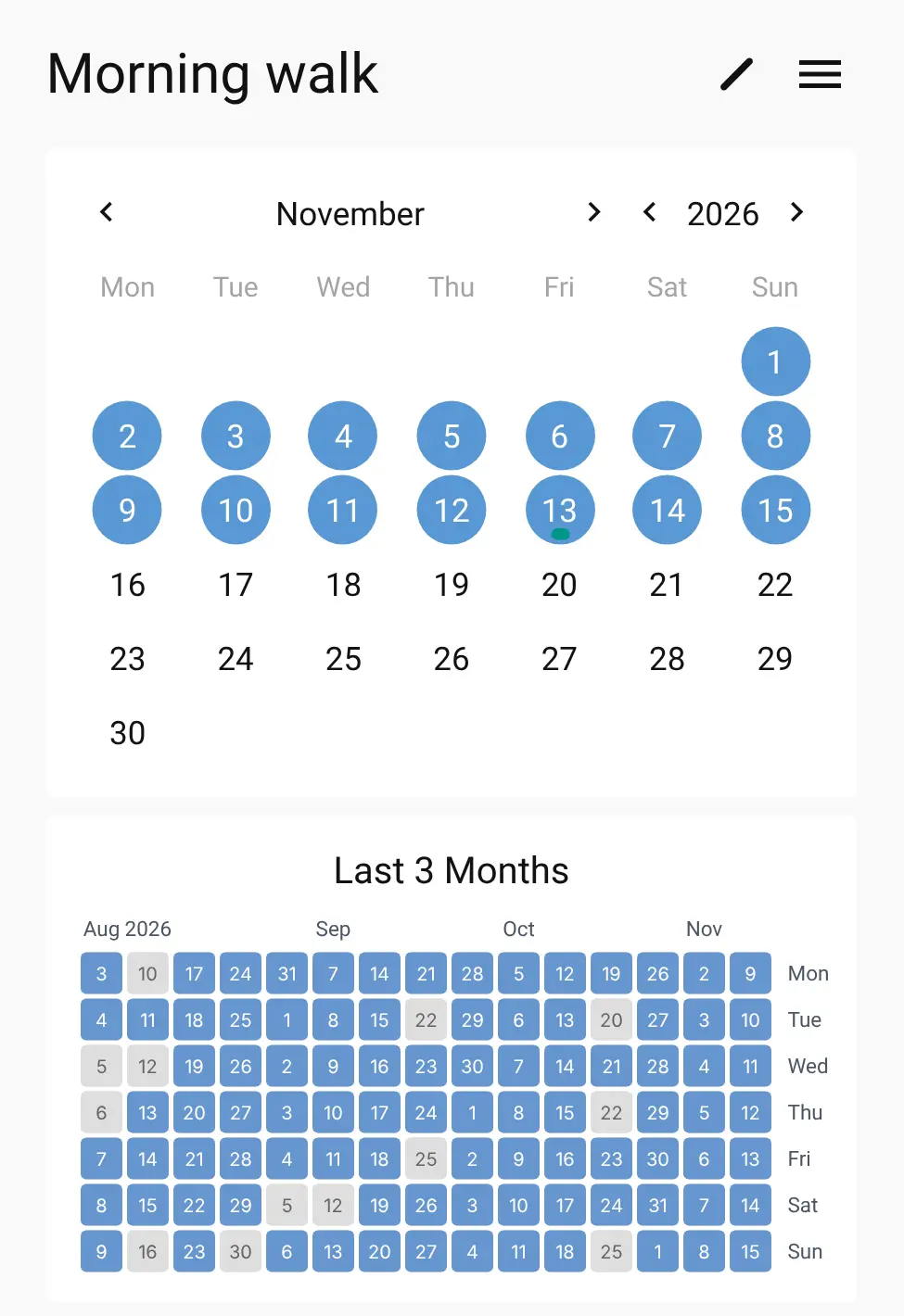
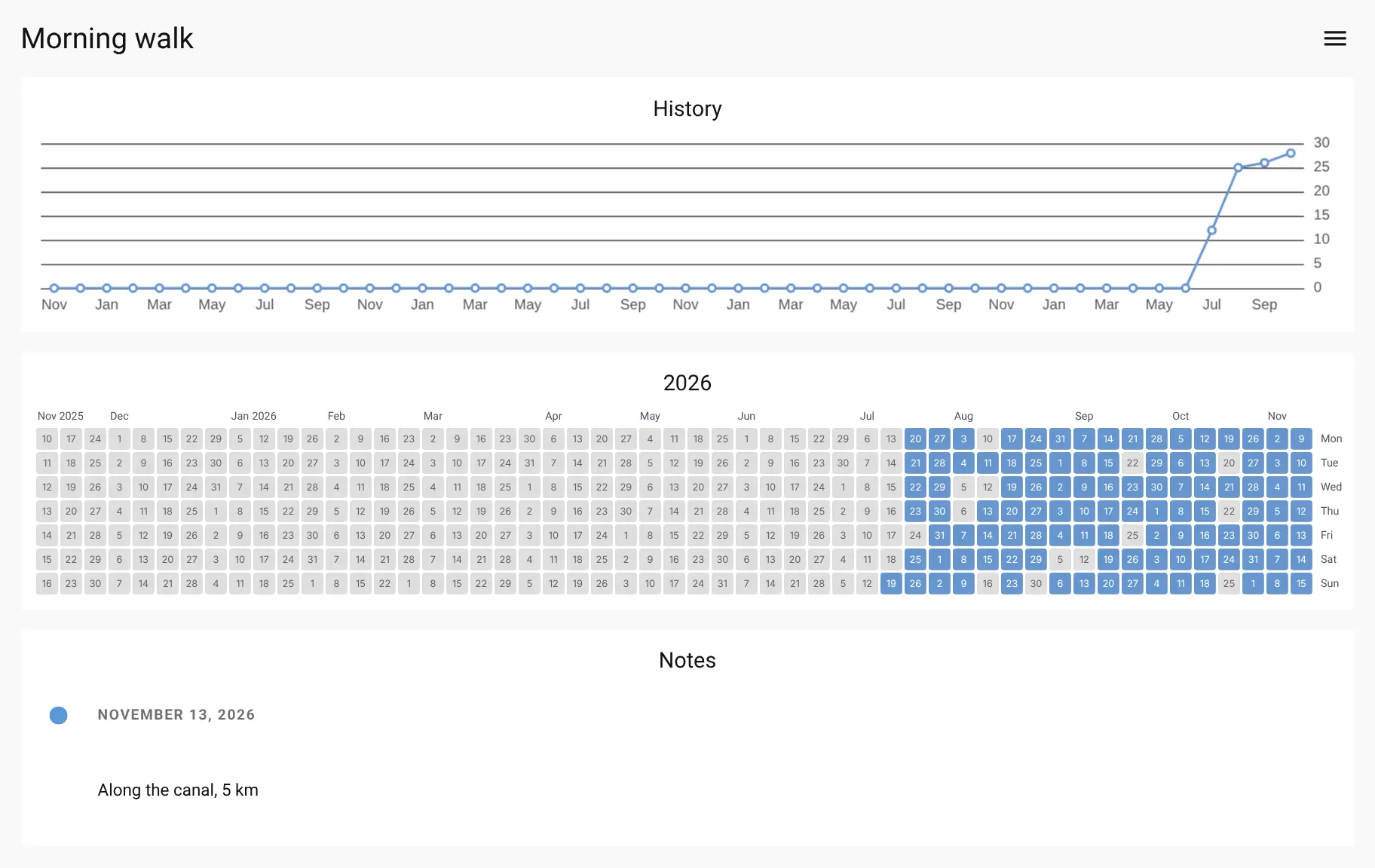
Each habit has its own page with a month calendar, a heatmap of the last three months, a chart of the past year and any notes you added. You can tag habits by time of day, set some to repeat on a schedule rather than daily, and bring in an old history from Loop Habit Tracker. A café owner, for example, could track "Morning walk", "Read 20 pages" and "Accounts done by Friday", and see at a glance which ones slipped this week.
It runs in any browser on a computer or phone, and you can add it to your home screen so it opens like an app. Cloudgate installs Beaver Habit Tracker on a server Cloudgate provides or one you connect and gives it a secure web address. Open it, create your account and add your first habit.
What you can do with Beaver Habit Tracker
- Tick off each day Every habit gets a row and every day a column, so one tap marks it done.
- See your streaks Each habit has a month calendar, a heatmap of the last three months and a chart of the past year.
- Add a note to a day Write a short note on any day, such as how far you walked, and read them back in a timeline.
- Track habits that aren't daily Set a habit to repeat on a schedule, such as every second weekend.
- Sort habits into groups Tag habits by time of day or theme, filter by tag and put them in your own order.
- Bring your history with you Import habits from a JSON file or a CSV export from Loop Habit Tracker, and export everything to JSON.
- Use it on your phone It works in any phone browser and can be added to your home screen like an app.
Replaces Habitify and Streaks
Beaver Habit Tracker does the same job as Habitify and Streaks. Here is what changes when you switch.
- Free, with no limit on habits
- Your habit history stays on your own server
- Works in any browser, on iPhone, Android or a computer
- A plain tick grid, with no goals or scores to chase
- No reminders or notifications
- No goals, timers or mood tracking
- No link to Apple Health or Apple Watch
- Your Habitify or Streaks history does not move across
What happens when you click Deploy?
You do not need a server or any technical knowledge. Four steps, and Beaver Habit Tracker is running at its own web address.
- Step 1 Click Deploy and create your account
Deploy takes you to Cloudgate. Create an account, or log in if you have one. Beaver Habit Tracker itself is free.
- Step 2 Choose a server
No server? Get one from Cloudgate: pick a size and a country, and Cloudgate gets it ready. Already have one? Connect it instead.
- Step 3 Cloudgate sets up Beaver Habit Tracker
It prepares the server, makes the passwords the app needs and starts it. There is nothing to install and nothing to write down.
- Step 4 Open your app and sign in
Your app gets a free web address to start, without https. Add your own domain, like app.yourshop.com, and Cloudgate secures it with https for you.
New to Cloudgate? See what Cloudgate is
Run Cloudgate yourself? Deploy from your own console
In your Cloudgate console, open Templates and choose Beaver Habit Tracker.
Questions
Is Beaver Habit Tracker free?
Yes, Beaver Habit Tracker is free and open source under the BSD-3-Clause licence. When you host it yourself there is no limit on habits and nothing is locked behind a paid plan; you pay only for your server.
Is Beaver Habit Tracker a good alternative to Habitify or Streaks?
Yes, Beaver Habit Tracker is a good alternative if you want a simple daily checklist with streaks that you own. It has no reminders, goals, timers or Apple Health link, so if you rely on those, Habitify or Streaks will suit you better.
How do I sign in to Beaver Habit Tracker the first time?
Beaver Habit Tracker has no default login. Open the app's address, choose Create account and sign up with your email and a password. Anyone who can reach the address can also create an account, each with their own habit list.
Can I import my habits from another app?
Partly. Beaver Habit Tracker imports its own JSON files and CSV files laid out like Loop Habit Tracker's export, but it has no importer for Habitify or Streaks, so you start those habits fresh.
Is there a phone app for Beaver Habit Tracker?
Yes, Beaver Habit Tracker works in any phone browser, and you can add it to your iPhone or Android home screen so it opens like an app. A native iPhone app that can connect to your own server is in beta testing.
Who can see my habits?
Only people with an account on your own Beaver Habit Tracker can see your habits, and each account sees only its own habits. Everything is kept on your server, not with an app company.
What server size do I need for Beaver Habit Tracker?
The smallest server is enough for Beaver Habit Tracker, because it is one light app that keeps its data in a single file, and Cloudgate sets it up for you.
Do I need technical skills to run Beaver Habit Tracker?
No. Click Deploy, create your Cloudgate account and choose a server, and Cloudgate sets up Beaver Habit Tracker and gives it a web address. You use it in your browser like any other online tool.
Do I need my own server for Beaver Habit Tracker?
No. When you deploy Beaver Habit Tracker, hosted Cloudgate can provide a server. If you already rent one, you can connect it instead.
Related apps

A self-hosted habit tracker with tasks and notes in one app.

A habit tracker and to-do list that plays like a game.

A self-hosted travel tracker, trip planner and world map in one.

A self-hosted flight tracker for every flight you take, on one map.