
AnythingLLM
Private AI chat over your own documents, for staff and your website.
No server needed to start: Cloudgate can provide one. What happens when you click Deploy
What is AnythingLLM?
Self-hosted AnythingLLM lets your team ask questions about your own documents, with the source shown for each answer, and adds a chatbot to your website.
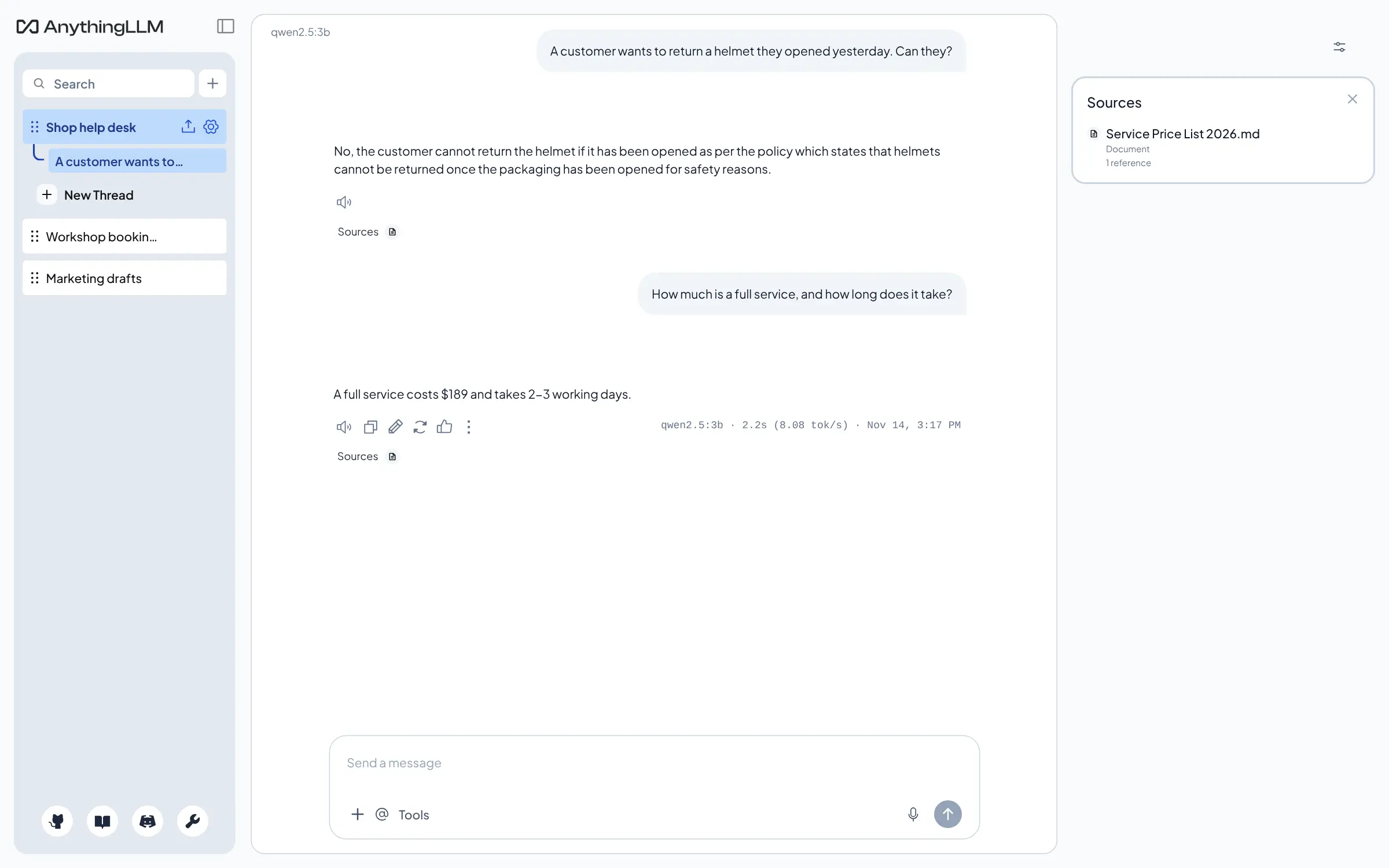
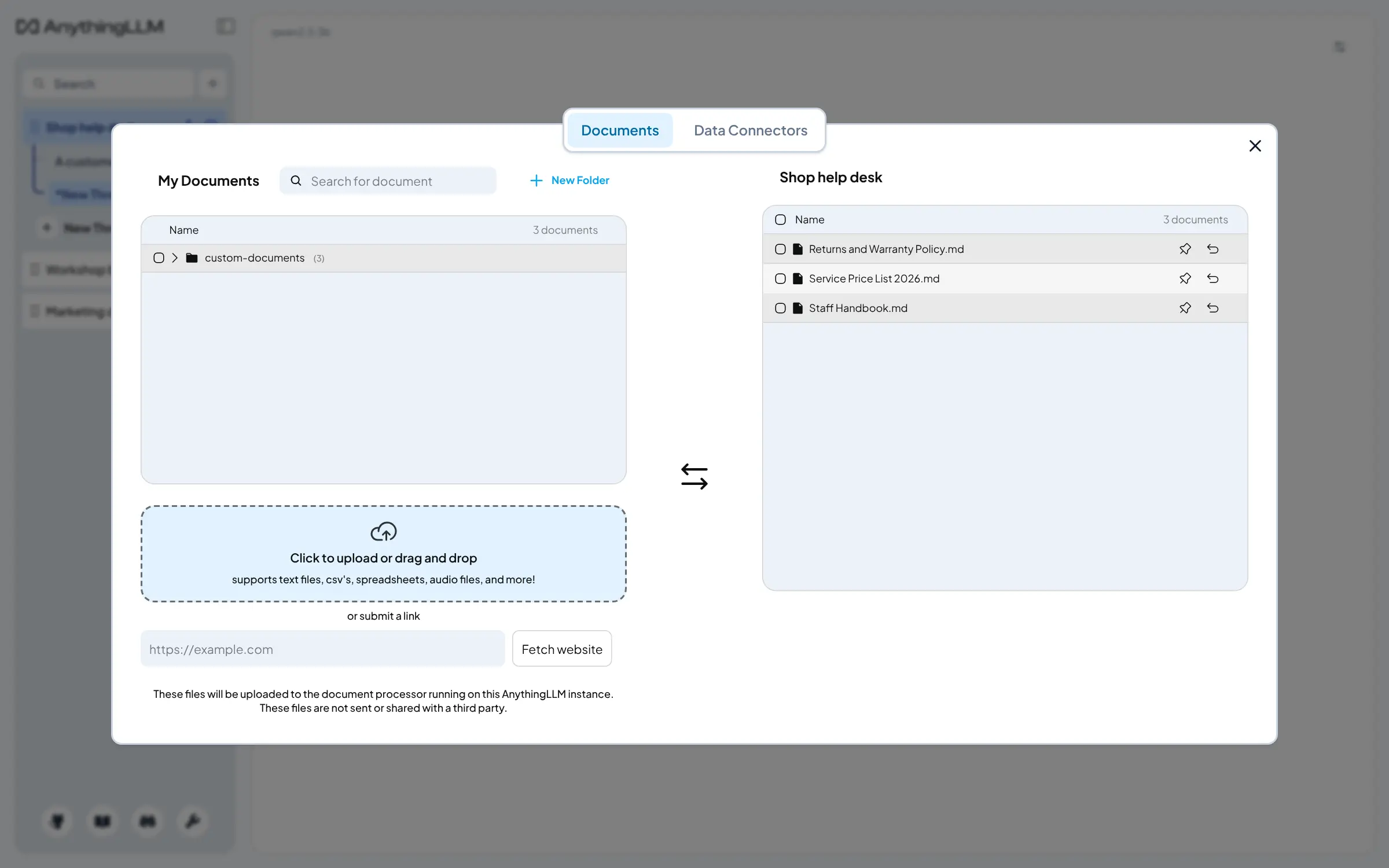
AnythingLLM is a self-hosted AI app for chatting with your own documents, and a free, open-source alternative to Chatbase and ChatGPT for documents. You put files and web pages into workspaces, connect the AI provider you choose, and ask questions in plain words. Each answer shows which document it came from.
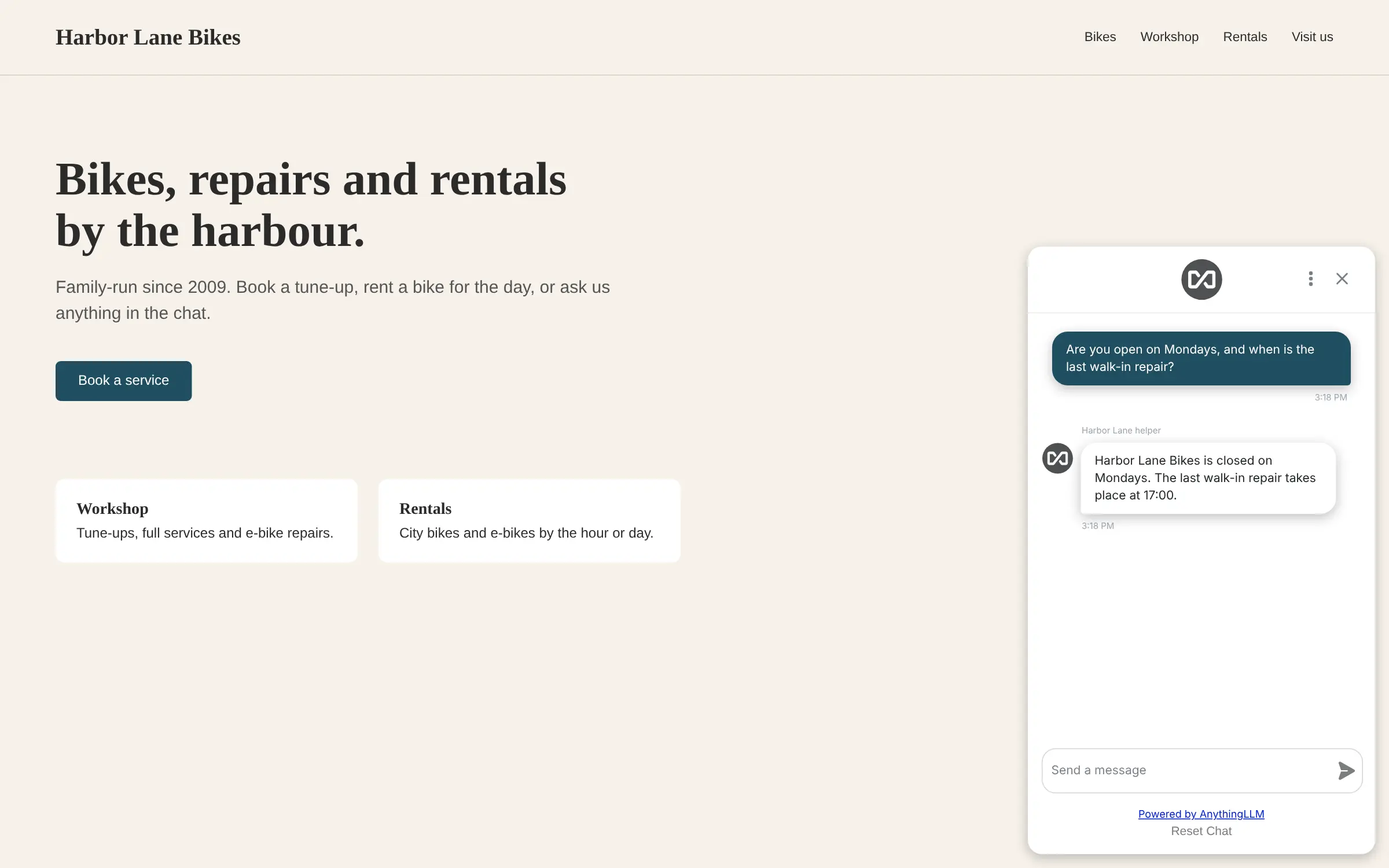
The same workspace can answer your website's visitors. Paste a short snippet into your site and a chat appears in the corner, answering from the documents you chose, with limits on how many chats it takes each day. A bike shop, for example, could load its returns policy, service prices and opening hours, so staff find answers in seconds and customers get them on the website at any hour.
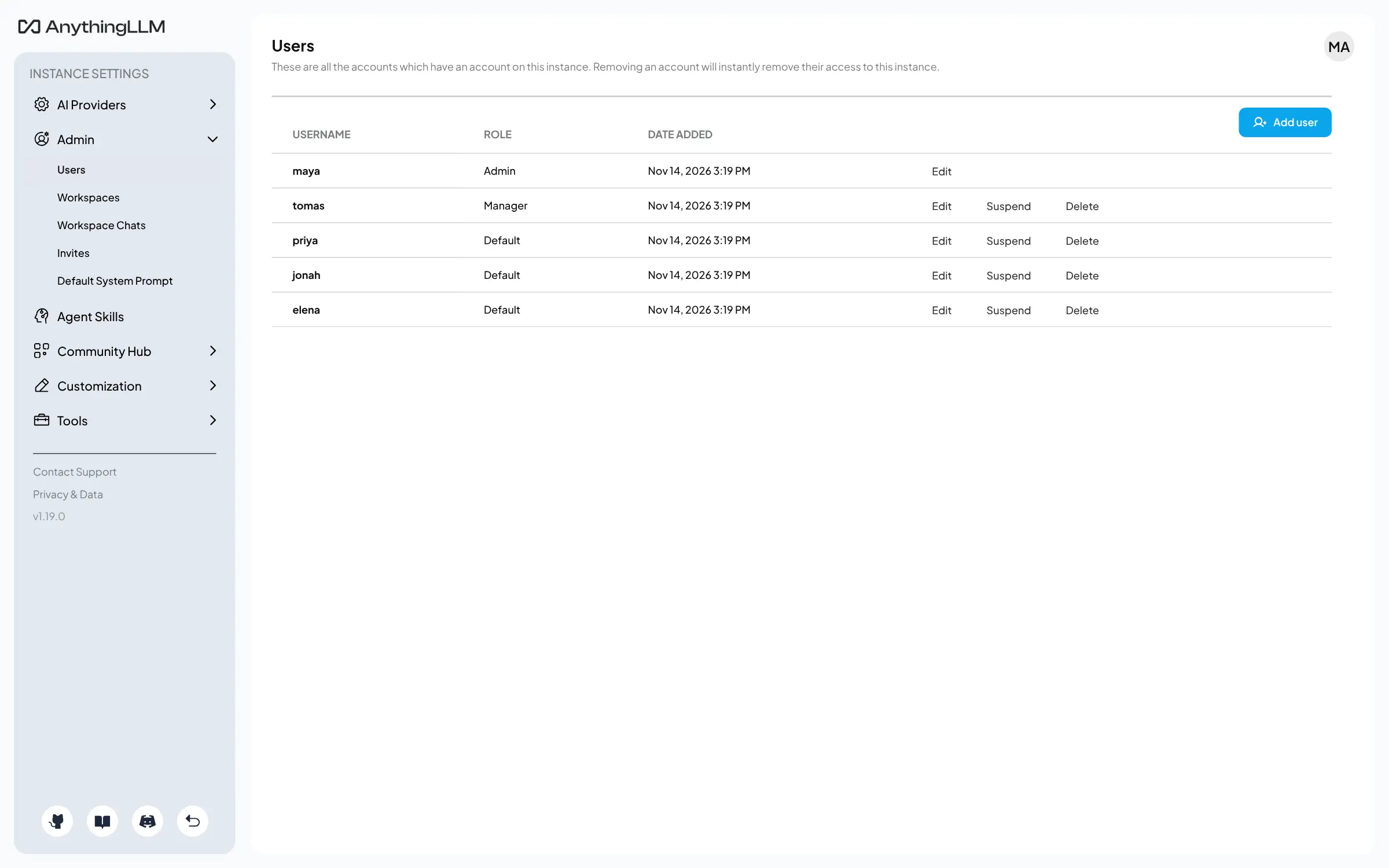
AnythingLLM works with OpenAI, Anthropic, Google Gemini, Mistral, OpenRouter and many other providers, or with a model server you run, such as Ollama. It can also pull in content from GitHub, YouTube, Confluence and Obsidian. Each person gets their own account, and the admin decides who uses which workspace.
Cloudgate installs AnythingLLM on a server Cloudgate provides or one you connect, and gives it a secure web address. The first person to open it connects an AI provider and sets the password or admin account.
What you can do with AnythingLLM
- Ask questions about your documents Upload PDFs, Word files, spreadsheets and text into a workspace, and every answer shows which document it came from.
- Add a chat to your website Paste one snippet into your site and visitors can ask questions that are answered from a workspace's documents.
- Choose your AI provider Connect OpenAI, Anthropic, Google Gemini, Mistral, OpenRouter, a model server such as Ollama, and many more.
- Keep topics apart in workspaces Give each subject, team or client its own workspace, with its own documents, instructions and chat threads.
- Bring in web pages and other sources Fetch a web page by its link, or pull in content from GitHub, YouTube transcripts, Confluence and Obsidian.
- Give each person their own account Admins, managers and regular users each see only what their role and their workspaces allow.
- Let AI agents do tasks Agents can search the web, run on a schedule, and use tools you add, set up without code.
- Make it look like yours Set your own logo and colours for everyone, and style the website chat to match your brand.
Replaces Chatbase and ChatGPT Business
AnythingLLM does the same job as Chatbase and ChatGPT Business. Here is what changes when you switch.
- No price per message or per seat; you pay for the server and the AI you use
- Your documents and chat history stay on your own server
- Staff chat and a website chatbot from the same documents, in one app
- Every answer in the app shows the documents it used
- You need your own AI provider account and API key, or a model server you run
- Answer quality and speed depend on the model you connect
- The website chat answers questions; it has none of Chatbase's lead forms or support-tool integrations
- There is no sign-in with Google or Microsoft accounts; people use a username and password
What happens when you click Deploy?
You do not need a server or any technical knowledge. Four steps, and AnythingLLM is running at its own web address.
- Step 1 Click Deploy and create your account
Deploy takes you to Cloudgate. Create an account, or log in if you have one. AnythingLLM itself is free.
- Step 2 Choose a server
No server? Get one from Cloudgate: pick a size and a country, and Cloudgate gets it ready. Already have one? Connect it instead.
- Step 3 Cloudgate sets up AnythingLLM
It prepares the server, makes the passwords the app needs and starts it. There is nothing to install and nothing to write down.
- Step 4 Open your app and sign in
Your app gets a free web address to start, without https. Add your own domain, like app.yourshop.com, and Cloudgate secures it with https for you.
New to Cloudgate? See what Cloudgate is
Run Cloudgate yourself? Deploy from your own console
In your Cloudgate console, open Templates and choose AnythingLLM.
Questions
Is AnythingLLM free?
Yes, AnythingLLM is free and open source under the MIT licence, and the self-hosted version includes team accounts and the website chat. You pay for your server and for the AI provider you connect. Its maker, Mintplex Labs, also sells a hosted cloud version, which you don't need to self-host it.
Is AnythingLLM a good alternative to Chatbase?
Yes, if you want a chatbot on your website that answers from your own documents without a monthly message limit. You add the documents to a workspace and paste a short snippet into your site, and you can limit how many chats it takes per day and per conversation. Chatbase needs no setup and adds support tools, such as lead forms and integrations, that AnythingLLM's chat does not have.
How is AnythingLLM different from Open WebUI?
AnythingLLM is built around your documents, while Open WebUI is a general ChatGPT-style chat for a team. In AnythingLLM you sort files into workspaces, answers show their sources, and a workspace can become a chat on your website. In Open WebUI, documents are one feature among many. Both connect to the AI provider you choose.
Does AnythingLLM come with an AI model?
No, AnythingLLM installs the app but no AI model. You connect a provider, such as OpenAI, Anthropic or Google Gemini with an API key, or the address of a model server you run, like Ollama. The provider bills its own usage. Turning documents into searchable form runs on your server and needs no provider.
Can I move my chatbot from Chatbase to AnythingLLM?
Not directly, as AnythingLLM has no Chatbase import. Gather the files and web pages you trained your Chatbase agent on and add them to a workspace, then create a chat widget for that workspace and paste its script into your website in place of Chatbase's.
How do I sign in to AnythingLLM the first time?
The first person to open AnythingLLM's web address goes through a short setup that picks the AI provider and then sets a password, or creates the admin account for a team. There is no default password. Until that is done, anyone with the address can use it, so do it right after setup.
Is my data private with AnythingLLM?
Mostly. AnythingLLM stores your documents, accounts and chats on your own server. When someone asks a question, the question and the matching passages from your documents go to the AI provider you connect, so check that provider's data terms, or run your own model server to keep everything in-house.
What server size do I need for AnythingLLM?
A server with 2 GB of memory is enough for AnythingLLM when the AI model runs with a cloud provider, so Cloudgate asks for that size. Disk space grows with the documents you add. Running your own AI models needs a much larger server, usually with a graphics card.
Do I need technical skills to run AnythingLLM?
No. Click Deploy, create your Cloudgate account and choose a server, and Cloudgate sets up AnythingLLM and gives it a web address. You use it in your browser like any other online tool.
Do I need my own server for AnythingLLM?
No. When you deploy AnythingLLM, hosted Cloudgate can provide a server. If you already rent one, you can connect it instead.
Related apps

One AI assistant on your files, for staff, website and WhatsApp.

A self-hosted AI chatbot for your website, answering from your docs.

Build AI chatbots that answer from your documents, on your website.

A ChatGPT-style chat for open AI models.