MaxKB
Build AI chatbots that answer from your documents, on your website.
No server needed to start: Cloudgate can provide one. What happens when you click Deploy
What is MaxKB?
MaxKB is a self-hosted, open-source AI chatbot builder that answers from your documents on your website or for staff, with a visual workflow editor.
MaxKB is a self-hosted, open-source platform for building AI chatbots that answer from your own documents, and an alternative to Chatbase and Botpress. You upload files or sync a website into a knowledge base, connect the AI provider you choose, and publish an agent as a chat on your website or a link for your staff.
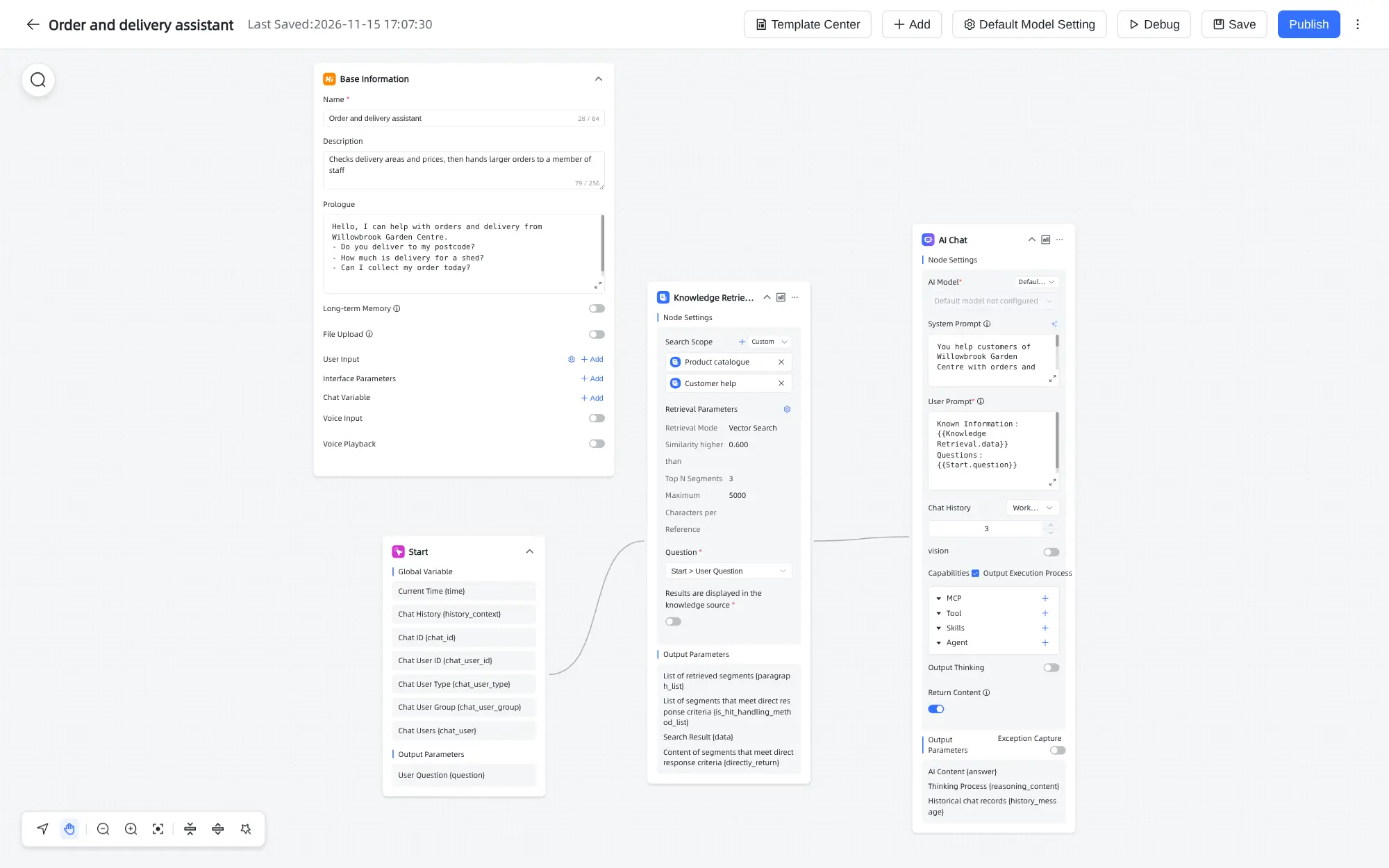
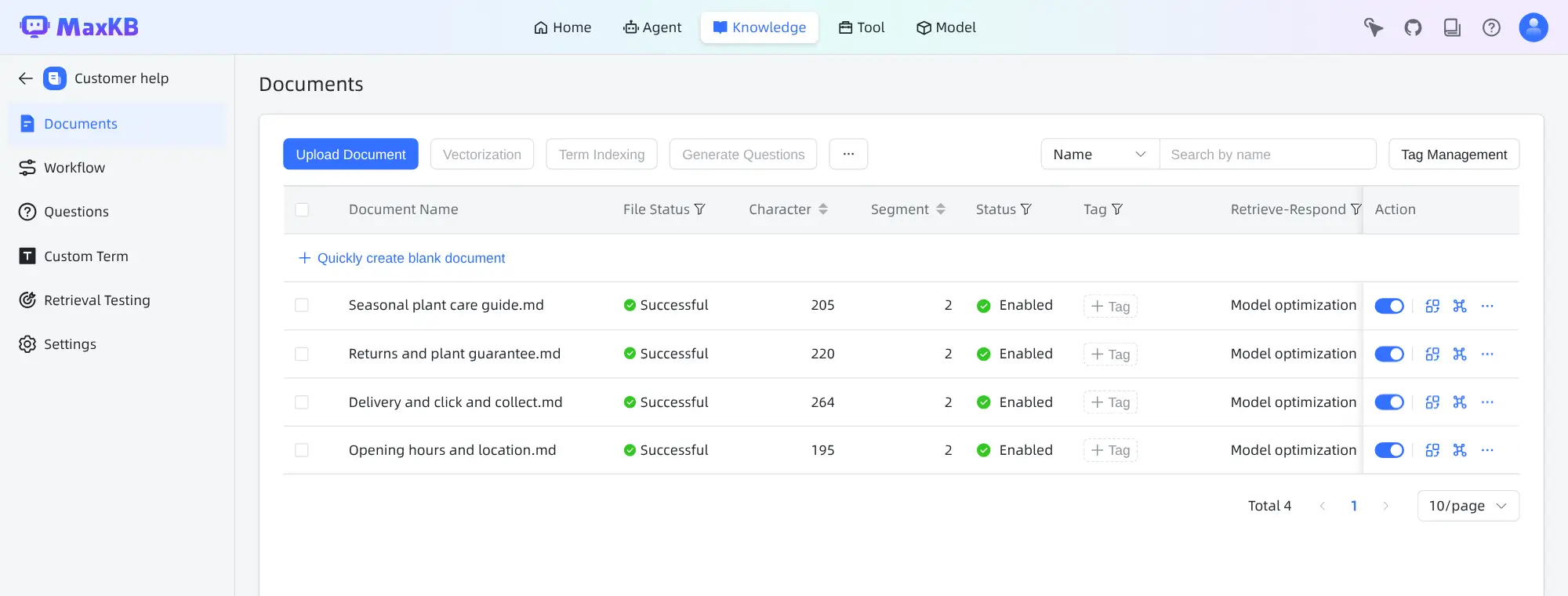
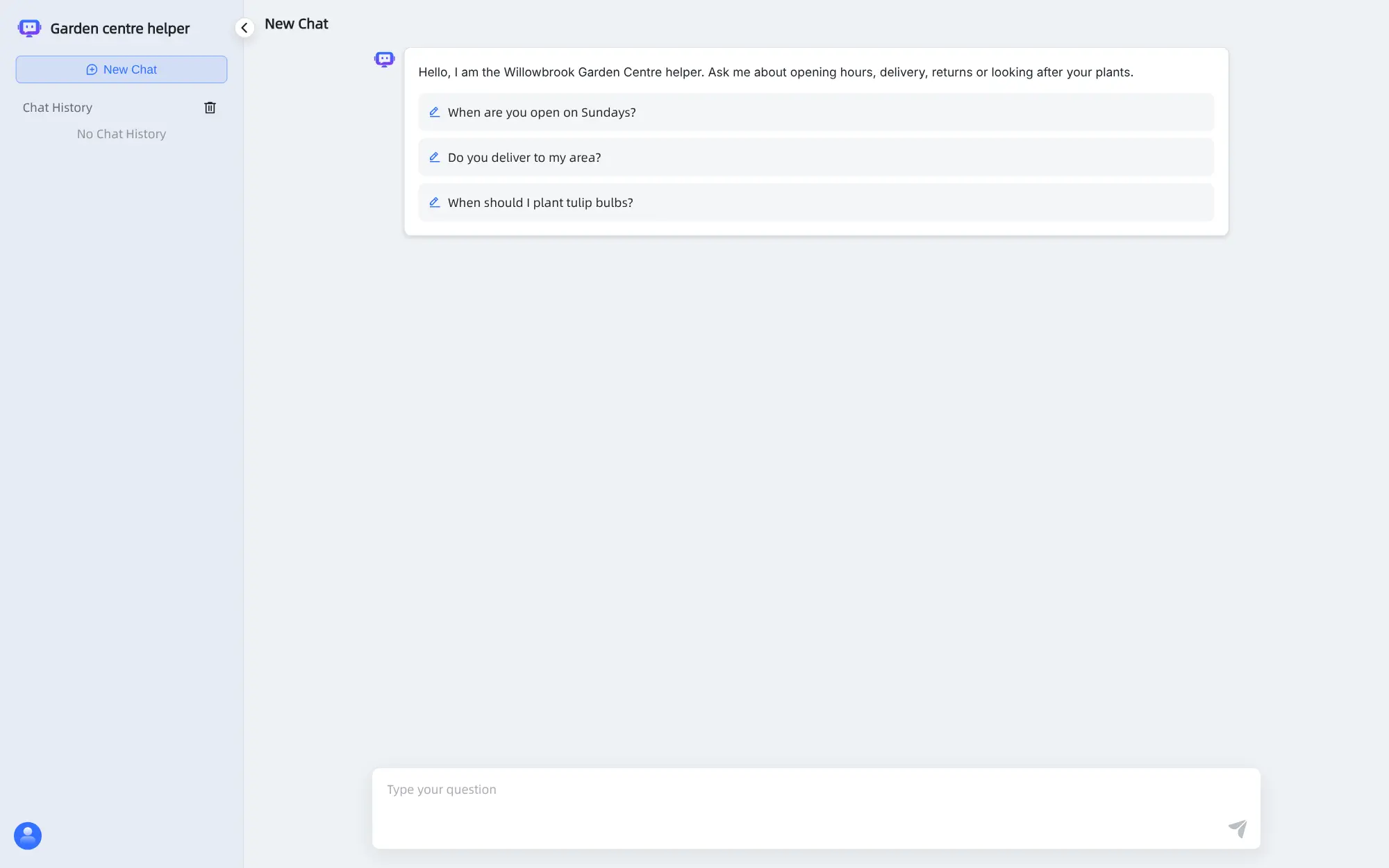
A garden centre, for example, could load its opening hours, delivery prices, returns policy and plant care guides, then put a chat button on its website so customers get answers in the evening and staff stop repeating the same replies. A second agent could check delivery areas and pass larger orders to a person, built step by step in the drag-and-drop workflow editor.
Be clear about the limits before you start: the free Community Edition allows 5 agents, 50 knowledge bases and 2 user accounts. That suits a small business with a few chatbots; more needs MaxKB's paid Pro edition. MaxKB works with OpenAI, Anthropic, Google Gemini, DeepSeek and model servers such as Ollama, and its admin screens are in English or Chinese.
Cloudgate installs MaxKB on a server Cloudgate provides or one you connect, and gives it a secure web address. Sign in as admin with the generated password, choose a new one, and connect your AI provider.
What you can do with MaxKB
- Turn documents into a knowledge base Upload PDFs, Word files, spreadsheets, web pages saved as HTML, Markdown or text, or sync the text of a website by its address.
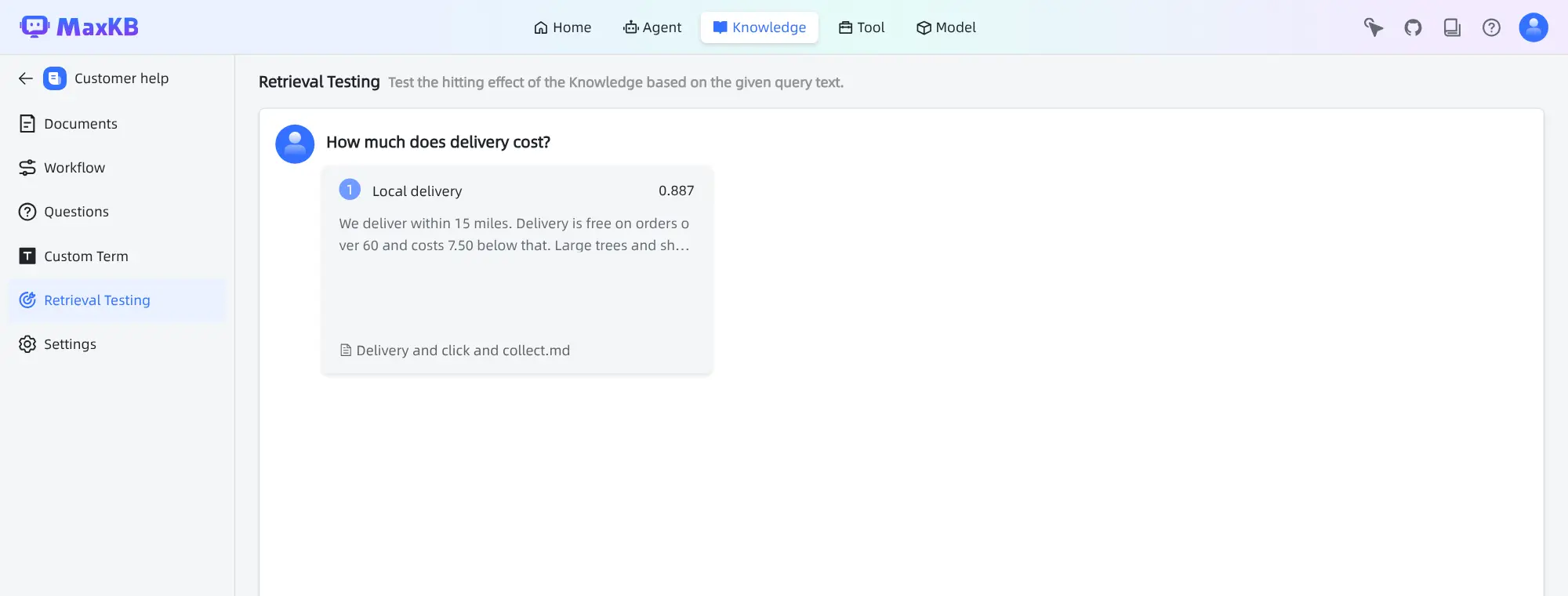
- Check what a question will find Type a question into retrieval testing and see which passages of your documents it finds, before any customer asks it.
- Build an agent in minutes A simple agent needs only an AI model, your knowledge bases, a short instruction and a greeting with suggested questions.
- Design the steps with drag and drop Advanced agents use a visual workflow to search knowledge, ask the AI, branch on what the customer wants, reply or call tools.
- Put the chat on your website Copy embed code for a floating chat button, a full-page chat or a mobile view, or share a public chat link.
- Control who can ask and how much Limit how many questions each visitor can ask per day and choose which websites may embed the chat.
- Choose your AI provider Connect OpenAI, Anthropic Claude, Google Gemini, Azure OpenAI, AWS Bedrock, DeepSeek, or a model server you run, such as Ollama or vLLM.
- See how each agent is used Chat logs and charts show active users, number of chats, AI usage and thumbs-up or thumbs-down feedback.
Replaces Chatbase and Botpress
MaxKB does the same job as Chatbase and Botpress. Here is what changes when you switch.
- No message credits; you pay for your server and the AI provider you connect
- Your documents and chat history stay on your own server
- A visual workflow builder for agents that do more than answer questions
- Retrieval testing shows what a question finds before you go live
- The free edition allows only 5 agents, 50 knowledge bases and 2 user accounts; more needs MaxKB's paid Pro edition
- You need your own AI provider account and API key, or a model server you run
- No Slack, Microsoft Teams or similar channel integrations, custom chat avatar or single sign-on in the free edition
- Fewer English guides and examples, as much of its community writes in Chinese
What happens when you click Deploy?
You do not need a server or any technical knowledge. Four steps, and MaxKB is running at its own web address.
- Step 1 Click Deploy and create your account
Deploy takes you to Cloudgate. Create an account, or log in if you have one. MaxKB itself is free.
- Step 2 Choose a server
No server? Get one from Cloudgate: pick a size and a country, and Cloudgate gets it ready. Already have one? Connect it instead.
- Step 3 Cloudgate sets up MaxKB
It prepares the server, makes the passwords the app needs and starts it. There is nothing to install and nothing to write down.
- Step 4 Open your app and sign in
Your app gets a free web address to start, without https. Add your own domain, like app.yourshop.com, and Cloudgate secures it with https for you.
New to Cloudgate? See what Cloudgate is
Run Cloudgate yourself? Deploy from your own console
In your Cloudgate console, open Templates and choose MaxKB.
Questions
Is MaxKB free?
Yes, the MaxKB Community Edition is free and open source under the GPL-3.0 licence, but it is limited to 5 agents, 50 knowledge bases and 2 user accounts. You pay for your server and the AI provider you connect. Its maker, FIT2CLOUD, sells a yearly Pro licence that removes those limits.
What are the limits of the free MaxKB Community Edition?
The free edition allows at most 5 agents (chatbots), 50 knowledge bases and 2 user accounts, the admin included. When you reach a limit, MaxKB refuses to create another one and points you to the paid Pro edition. Pro also adds single sign-on, team workspaces and roles, chat integrations such as Slack and Lark, and your own logo and chat avatar.
Is MaxKB a good alternative to Chatbase?
Yes, for a business that needs a handful of chatbots answering from its own documents without message credits. MaxKB adds a visual workflow builder and retrieval testing. Chatbase has no five-agent cap, needs no setup and includes support extras, such as integrations and lead capture, that MaxKB's free edition does not have.
Can I put a MaxKB chatbot on my website?
Yes. Every published MaxKB agent has embed code for a floating chat button, a full-page chat or a mobile view, plus a public chat link. You can limit questions per visitor per day and list the websites allowed to embed it.
Does MaxKB come with an AI model?
No, MaxKB includes a model for searching your documents but no AI model to write answers. You connect a provider such as OpenAI, Anthropic or Google Gemini with an API key, or a model server you run, such as Ollama. The bundled search model is tuned for Chinese text, so for English documents you may get better results by adding your provider's embedding model.
How do I sign in to MaxKB the first time?
Sign in with the username admin and the password Cloudgate generated, which is shown on the app's variables page. MaxKB then asks you to choose a new password, with upper and lower case letters, a number and a symbol. There is no sign-up page; the admin adds the second user.
What server size do I need for MaxKB?
MaxKB needs a large server, because its database, cache and document search model run together with the app. Cloudgate sets it up on a large server with 4 GB of memory; MaxKB's makers recommend 4 processor cores and 8 GB for heavier use, and disk space grows with your documents.
Do I need technical skills to run MaxKB?
No. Click Deploy, create your Cloudgate account and choose a server, and Cloudgate sets up MaxKB and gives it a web address. You use it in your browser like any other online tool.
Do I need my own server for MaxKB?
No. When you deploy MaxKB, hosted Cloudgate can provide a server. If you already rent one, you can connect it instead.
Can I move my data from Chatbase to MaxKB?
Most people export from Chatbase and import into MaxKB. The official guides at docs.maxkb.pro walk through it.
Related apps

Private AI chat over your own documents, for staff and your website.
A self-hosted AI chatbot for your website, answering from your docs.

One AI assistant on your files, for staff, website and WhatsApp.

An AI assistant that reads your hardest documents and cites them.