Open-source alternatives to Simplenote

flatnotes is a free, open-source Simplenote alternative: a minimal notes app where you find notes by search and tags, with every note kept as a plain Markdown file on your own server. Simplenote is free but keeps your notes in its own cloud; flatnotes keeps them on your server, though it runs only in a browser, with no phone or desktop app and no shared notes.

2 alternatives Free apps Our pick: flatnotes

At a glance

App Good for Code Import from Simplenote Ease of use
flatnotes One person who wants a simple, private notes site, with notes kept as plain Markdown files Code Open source Import from Simplenote No Easy
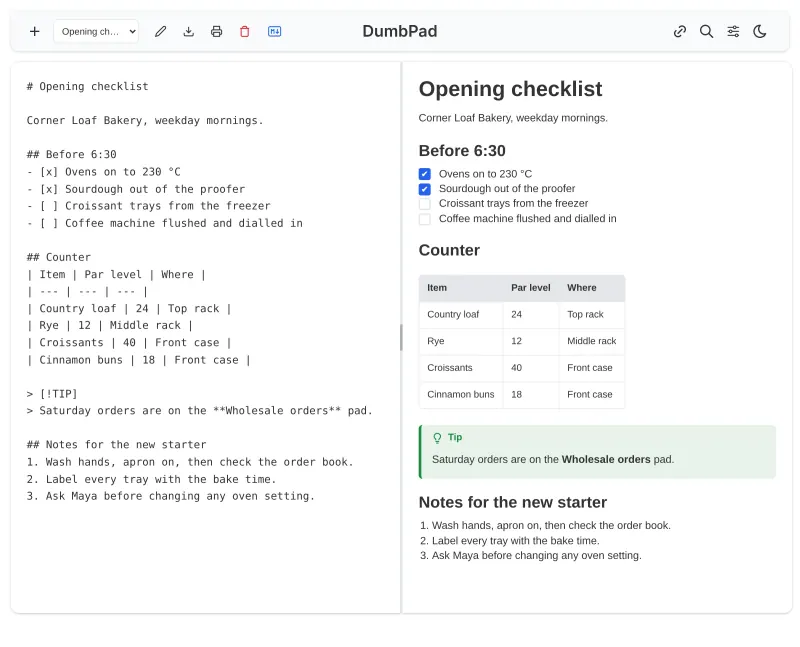
DumbPad One person or a small team that wants a quick shared notepad behind a PIN, with no accounts to manage Code Open source Import from Simplenote Partly Easy

Why look for an alternative to Simplenote?

Simplenote is a free note-taking service from Automattic, the company behind WordPress.com. It keeps plain-text notes, with tags and search instead of notebooks, in sync across its web, phone and desktop apps.

People look for an alternative because their notes live in Simplenote's cloud rather than on a server they control, and because they want more than plain text without giving up the simplicity. A self-hosted flatnotes keeps the same search-and-tags way of working, adds Markdown formatting, tables, pictures and links between notes, and stores every note as a plain file that any other app can open. DumbPad is simpler still: a few named notepads behind one PIN, saved as plain text files, that several people can edit at once.

The alternatives, compared

flatnotes

Our pick

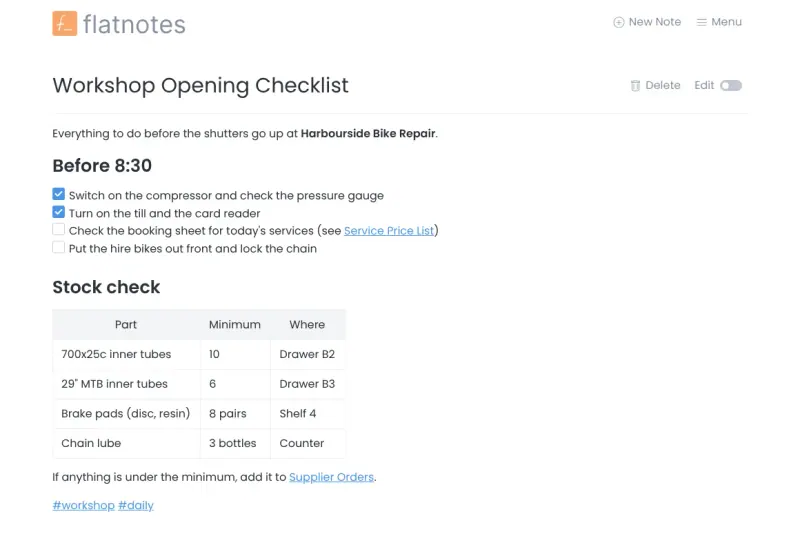
Markdown notes you find by search and tags, not folders.

Works in the same minimal way: no notebooks, just notes you find by searching and by tags. It adds Markdown or a visual editor, tables, pictures and links between notes, and keeps every note as a plain Markdown file on your server. Simplenote has phone and desktop apps and lets you share notes and edit them with others; flatnotes runs in a browser and has one account.

What you gain
  • Your notes live on your own server, not in someone else's cloud
  • Every note is a plain Markdown file you can take to any other app
  • The same notes in any browser, on any computer or phone, with nothing to install
What is different
  • There is no phone or desktop app; you use flatnotes in a browser
  • It has one account, with no sharing of single notes and no editing together
  • There are no folders or notebooks; you organise with search and tags
Easy Open source

A simple self-hosted notepad that saves as you type, behind a PIN.

An even simpler notepad in the browser: named notepads that save as you type, Markdown with a side-by-side preview, search across every notepad, and one shared PIN instead of accounts. Two or more people can edit the same notepad at once and see each other's changes. It has no tags, pictures or phone app, and keeps each notepad as a plain text file on your server.

What you gain
  • Your notes stay on your own server, as plain text files
  • Nothing to sign up for; open the page, type the PIN and write
  • Several people can edit the same notepad at once and watch it change
What is different
  • One shared PIN instead of personal accounts, so everyone with it sees every notepad
  • No pictures, attachments, tags, folders or reminders
  • No phone or desktop app; it runs in the browser and can be added to a home screen
Easy Open source

Moving from Simplenote

flatnotes has no import tool. Export your notes from Simplenote, then make each one a Markdown file with a .md ending and put the files in flatnotes' notes folder on your server, all at the top level, since flatnotes does not read subfolders. If you used Simplenote's tags, write them into each note as hashtags such as #recipes, so flatnotes' tag search finds them. For a handful of notes it is quicker to paste them into new notes in the browser. On your phone, add flatnotes to your home screen from the browser so it opens like an app.

DumbPad has no import tool either. Paste the notes you use most into new notepads in the browser, one notepad per note or per topic. For many notes, whoever runs the server can copy Simplenote's exported text files into DumbPad's data folder, where each file shows up as a notepad. Choose a PIN at setup and share it only with the people who should see the notes.

Questions

What is the best open-source alternative to Simplenote?

Start with flatnotes. Both are free and open source.

Does flatnotes sync notes across devices like Simplenote?

Yes, in the sense that every device opens the same notes from your server in its browser. There is no app that keeps a copy offline, so you need a connection to read or write notes.

Does flatnotes have tags like Simplenote?

Yes. Write a hashtag such as #work anywhere in a note, then search by that tag to see every note that has it.

Can I share a note or edit it with someone else?

Not in flatnotes, which has one account and no sharing of single notes. DumbPad lets several people edit the same notepad at the same time and see each other's changes, but everyone uses the one PIN and sees every notepad.

Should I choose flatnotes or DumbPad?

Choose flatnotes for a lasting collection of notes with tags, pictures and links between notes. Choose DumbPad for a quick shared scratch pad behind a PIN, with no accounts, where two people can type in the same notepad at once.

Are these Simplenote alternatives really free?

Yes, flatnotes and DumbPad are free. To run them you need Cloudgate and a server. Use hosted Cloudgate, which can also provide the server, or install Cloudgate on a server of your own for free. Cloudgate's plans and prices are at cloudgate.octabyte.io/pricing. One server can run several apps.

Do I need a developer to replace Simplenote?

No. Cloudgate installs the app you choose on your server and gives it a secure web address, and you use it in your browser instead of Simplenote.