M

Open-source alternative to Microsoft To Do

OpenTodo is the free, open-source Microsoft To Do alternative we recommend: a to-do list with quick add, Today and Upcoming, shared lists and a calendar for time blocking, which works offline on every device and syncs through your own server. Microsoft To Do is free but keeps your lists in your Microsoft account; OpenTodo keeps them on your server and imports them with a short script, though it is a young project and its iPhone app is a first release.

Free app Code: Open source Import from Microsoft To Do: Partly Easy

Why look for an alternative to Microsoft To Do?

Microsoft To Do is Microsoft's free to-do list for Windows, Mac, phones and the web, the successor to Wunderlist. It has My Day, lists with steps, reminders, recurring tasks and shared lists, and it syncs tasks with Outlook through your Microsoft account.

People look for an alternative when they want their lists outside a Microsoft account, need more than a list, such as projects, a calendar to plan the day or a focus timer, or share lists with family members who don't use Microsoft. A self-hosted OpenTodo keeps every list on your server, works offline on every device and has no paid plan.

How OpenTodo compares

An offline-first, self-hosted Todoist alternative with time blocking.

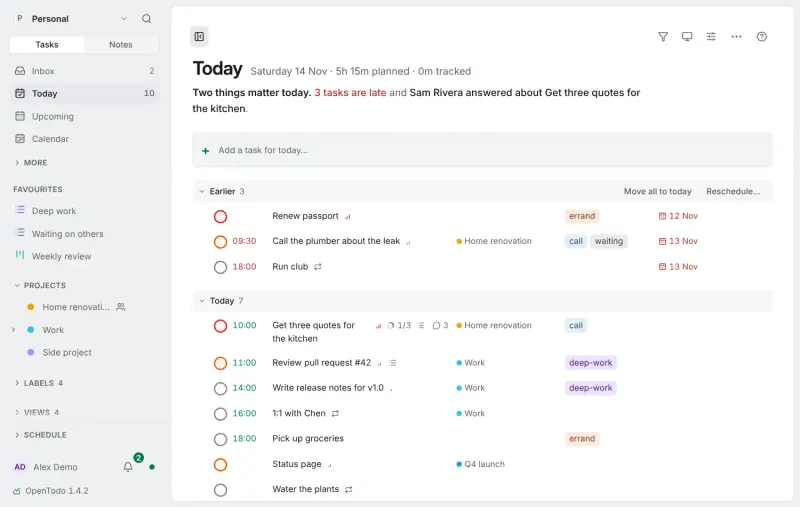
Covers what people use To Do for, a daily list, reminders, recurring tasks, steps and shared lists, and adds projects as boards or timelines, time blocking on a day or week calendar, a focus timer and habits, offline on every device. It imports your lists with a short PowerShell script that reads them from your Microsoft account. It is not part of Microsoft 365, so tasks flagged in Outlook stop flowing in, its iPhone app is a first release and its Android app is downloaded from GitHub.
Easy Open source

Moving from Microsoft To Do

Microsoft To Do has no export, so OpenTodo's Microsoft To Do guide gives a short PowerShell script that reads your lists through Microsoft Graph and saves them as one JSON file. Run it, then create the owner account on OpenTodo's first visit, open Settings, then Data, then Import data, and upload the file. Each list becomes a project, steps become subtasks, and due dates, reminders, importance and most repeat rules come across; file attachments do not, and To Do has no due times to bring. Check the preview before importing; a whole import can be undone.

Then install OpenTodo on your phone, from the App Store on iPhone and iPad or as an Android app from GitHub, and invite the people you shared lists with through invitation links. Share each project with them as viewer, editor or admin.

Questions

What is the best open-source alternative to Microsoft To Do?

OpenTodo is the free, open-source alternative to Microsoft To Do for to-do lists in the catalogue today. Covers what people use To Do for, a daily list, reminders, recurring tasks, steps and shared lists, and adds projects as boards or timelines, time blocking on a day or week calendar, a focus timer and habits, offline on every device. It imports your lists with a short PowerShell script that reads them from your Microsoft account. It is not part of Microsoft 365, so tasks flagged in Outlook stop flowing in, its iPhone app is a first release and its Android app is downloaded from GitHub.

Can I import my Microsoft To Do lists into OpenTodo?

Yes, with a script. Microsoft To Do has no export, so you run the short PowerShell script from OpenTodo's guide, which saves your lists as a file, then import that file with its steps, due dates, reminders and repeat rules.

Does OpenTodo have something like My Day?

Yes. OpenTodo's Today view lists what is due and what is late, and you can drag tasks onto a day calendar to plan the hours.

Do I need a Microsoft account for OpenTodo?

No. OpenTodo runs on your own server, and everyone signs in with an account there, invited by the owner. It can also use single sign-on through OpenID Connect.

Does OpenTodo have phone apps?

Yes. There is an iPhone and iPad app in the App Store, still a first release, an Android app downloaded from GitHub, and a web app that installs on any phone. All of them work offline and sync through your server.

Is OpenTodo really free compared with Microsoft To Do?

Yes, OpenTodo is free. To run them you need Cloudgate and a server. Use hosted Cloudgate, which can also provide the server, or install Cloudgate on a server of your own for free. Cloudgate's plans and prices are at cloudgate.octabyte.io/pricing. One server can run several apps.

Do I need a developer to replace Microsoft To Do?

No. Cloudgate installs OpenTodo on your server and gives it a secure web address, and you use it in your browser instead of Microsoft To Do.