
M

Open-source alternative to Microsoft Project

OpenProject is a free, open-source Microsoft Project alternative for planning in the browser with Gantt charts, phases, milestones and dependencies, plus agile boards, time tracking and budgets. Microsoft Project is a per-user subscription, and Microsoft retired Project Online in September 2026; OpenProject’s Community edition has no user fee, though resource and portfolio management are paid add-ons.

Free app Code: Open source Import from Microsoft Project: No Some setup

Why look for an alternative to Microsoft Project?

Microsoft Project is Microsoft's project planning software, built around Gantt charts, task dependencies, resources and baselines, sold as per-user subscriptions alongside Microsoft Planner.

Organisations look for an alternative for cost and change. Every planner needs a paid licence, and Microsoft retired its Project Online service on 30 September 2026, pushing its customers to move their plans somewhere else. OpenProject plans projects with Gantt charts in the browser, with no fee per user in its Community edition, and keeps the plans on your own server.

How OpenProject compares

Gantt charts, agile boards and time tracking for projects.

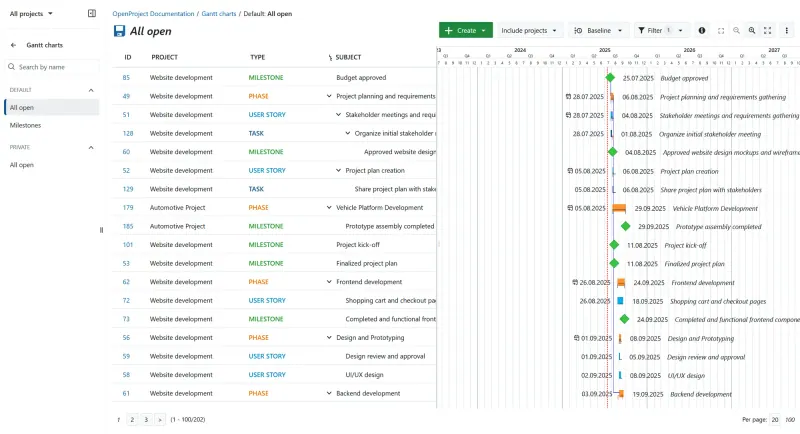
Plans projects on Gantt charts with phases, milestones and dependencies across one or several projects, with work packages, time and cost tracking, budgets, meetings and wikis in the browser. It also has agile boards and sprints. Resource management, portfolios and the team planner are paid Enterprise add-ons, and it has no Microsoft Project file importer.

What you gain
  • No per-user fee in the Community edition, however many people join
  • Gantt planning, agile boards, time tracking and meetings in one tool
  • Everyone works in a web browser, with no desktop software to install
What is different
  • Single sign-on, the Team planner, portfolio and resource management and custom branding are paid Enterprise add-ons
  • The Jira import is in beta and works only with Jira Data Center; there is no importer for Jira Cloud, Asana or monday.com
  • OpenProject is a larger tool than most task apps; it needs a bigger server and its many modules take time to learn
Some setup Open source

Moving from Microsoft Project

OpenProject cannot read Microsoft Project files. Export your plan from Microsoft Project to Excel, then recreate the active projects in OpenProject: create work packages for the phases and tasks, set start and finish dates, and link them with relations so the Gantt chart keeps your dependencies. Set up your team and roles first, and add time tracking and budgets once the plan is in place.

Questions

What is the best open-source alternative to Microsoft Project?

OpenProject is the free, open-source alternative to Microsoft Project for project planning with Gantt charts in the catalogue today. Plans projects on Gantt charts with phases, milestones and dependencies across one or several projects, with work packages, time and cost tracking, budgets, meetings and wikis in the browser. It also has agile boards and sprints. Resource management, portfolios and the team planner are paid Enterprise add-ons, and it has no Microsoft Project file importer.

Does OpenProject have Gantt charts like Microsoft Project?

Yes. OpenProject's Gantt charts show phases, milestones and dependencies, and you can plan across several projects at once, in the free Community edition.

What can I use now that Project Online has been retired?

OpenProject runs in the browser on your own server, so it can take the place of Project Online for planning and tracking. Its free Community edition covers Gantt charts, work packages, time tracking and budgets; portfolio and resource management are paid add-ons.

Can OpenProject open Microsoft Project files?

No. OpenProject has no importer for Microsoft Project files, so plans made in Microsoft Project are rebuilt in OpenProject as work packages on its Gantt chart, with their phases, milestones and dependencies.

Is OpenProject really free compared with Microsoft Project?

Yes, OpenProject is free. To run them you need Cloudgate and a server. Use hosted Cloudgate, which can also provide the server, or install Cloudgate on a server of your own for free. Cloudgate's plans and prices are at cloudgate.octabyte.io/pricing. One server can run several apps.

Do I need a developer to replace Microsoft Project?

No. Cloudgate installs OpenProject on your server and gives it a secure web address, and you use it in your browser instead of Microsoft Project.