M

Open-source alternatives to Microsoft Exchange

Group-Office is a free, open-source Microsoft Exchange alternative for a team’s shared calendars, contacts, tasks and email, synced to phones and Outlook through Exchange’s own ActiveSync. Exchange is licensed per user, in Microsoft’s cloud or on your own Windows server; Group-Office and EGroupware have no fee per user, though neither is a mail server, so they work with the mailboxes you already have.

2 alternatives Free apps Our pick: Group-Office

At a glance

App Good for Code Import from Microsoft Exchange Ease of use
Group-Office Small offices sharing email, calendars and contacts, synced to Outlook and phones Code Open source Import from Microsoft Exchange Partly Some setup
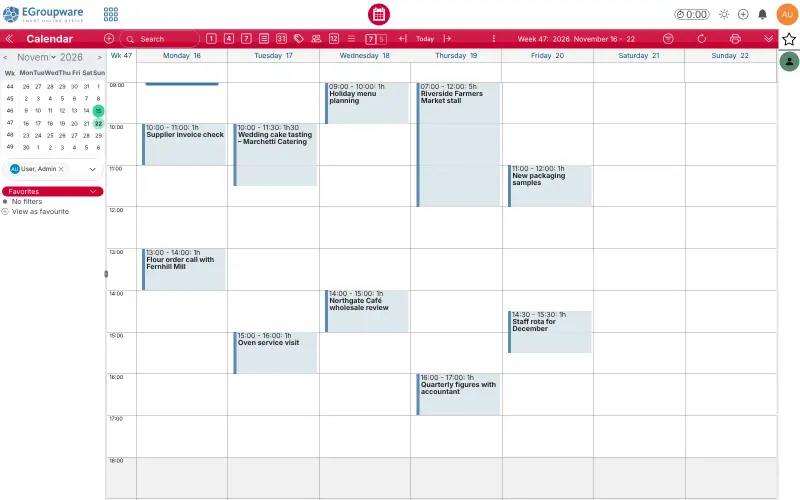
EGroupware Offices that want shared calendars, contacts and tasks on their own server, synced to phones and Outlook Code Open source Import from Microsoft Exchange Partly Some setup

Why look for an alternative to Microsoft Exchange?

Microsoft Exchange is Microsoft's server for company email, shared calendars and contacts. It runs as Exchange Online in Microsoft's cloud or as Exchange Server on your own Windows servers, and Outlook and phones connect to it directly.

People look for an alternative because Exchange is licensed per user, and running Exchange Server yourself means Windows servers, licences and upkeep, while Exchange Online keeps everything in Microsoft's cloud. Many small offices mainly need the shared calendars and contacts. Group-Office and EGroupware give a team those on its own server with no fee per user and sync them to phones and Outlook; they work with the mailboxes you already have instead of hosting mail themselves.

The alternatives, compared

Group-Office

Our pick

Shared email, calendars and contacts for your office.

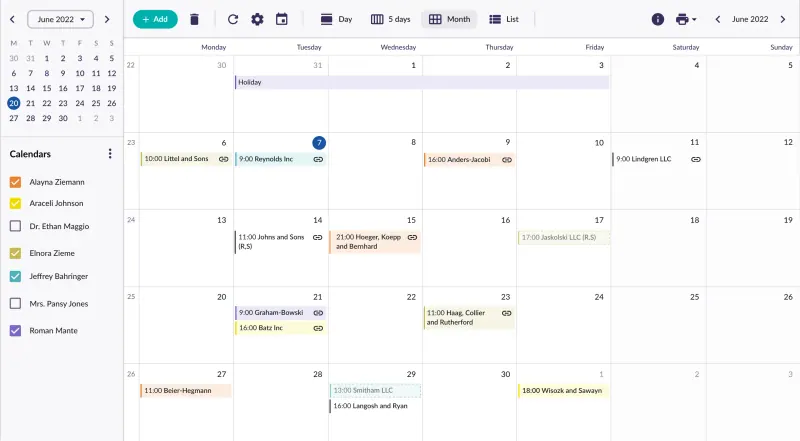
Shares calendars, address books, tasks, notes and files across a team in one web app, with webmail for your existing mailboxes, and syncs them to iPhone, Android and Outlook through ActiveSync, the same protocol Exchange uses, in the free edition. It is not a mail server, so you keep a mailbox provider, and projects, time tracking and tickets are paid add-ons.

What you gain
  • The free Community edition has no fee per user and no user limit
  • Your emails, calendars and customer contacts stay on your own server
  • Phones and Outlook keep working, through the same Exchange sync they already use
What is different
  • It does not host mailboxes, so you keep a mail provider for your addresses
  • No Word or Excel editors, chat or video calls of its own; those need separate apps it connects to
  • Projects, time tracking, support tickets, kanban boards, newsletters and invoicing are paid add-ons
Some setup Open source

Groupware for shared calendars, contacts and tasks.

Shares calendars, address books, tasks and files, and adds projects, time sheets, room and equipment booking and a help-desk tracker in the free edition, with a mail client for your existing mail server. Phones sync over CalDAV and CardDAV or basic ActiveSync, and Outlook connects through a free CalDAV add-in rather than as an Exchange account. It is not a mail server either.

What you gain
  • No fee per user, with your calendars, contacts and files on your own server
  • Calendar, contacts, tasks, projects, time sheets and files in one web app
  • Open standards (CalDAV, CardDAV, WebDAV) instead of one vendor's apps
What is different
  • It is not a mail server; email needs a mailbox provider or mail server you already have
  • No app-store phone app; phones use the mobile web view or sync into their own calendar and contacts apps
  • Kanban boards, e-invoices, Active Directory or single sign-on, and an audit log are in the paid EPL edition
Some setup Open source

Moving from Microsoft Exchange

Neither app has an Exchange migration tool, and neither hosts mailboxes, so keep your mail with a provider that offers IMAP and SMTP, or move your mailboxes to one first. With Group-Office, export contacts as vCard files and calendars as .ics files from Outlook and import them into the address book and calendar, then copy mail between mailboxes with a tool such as imapsync if you change provider. Add each person's mailbox in Group-Office, and on phones and in Outlook add an Exchange account with the Group-Office sign-in. With EGroupware, import contacts as vCard or CSV and calendars as iCal files, connect your mail server in its admin settings, then set up DAVx5 on Android, the built-in accounts on iPhone and Mac, or the CalDAV add-in in Outlook.

Questions

What is the best open-source alternative to Microsoft Exchange?

Start with Group-Office. Both are free and open source.

Do Group-Office and EGroupware replace the Exchange mail server?

No. Both are groupware with a mail client: they read and send mail through an IMAP and SMTP server you already have. They replace the shared calendars, contacts and tasks that Exchange provides.

Can Outlook connect to them like it does to Exchange?

Group-Office, yes: Outlook connects through ActiveSync, Exchange's own sync protocol, in the free edition. EGroupware connects Outlook through a free CalDAV add-in, Outlook CalDAV Synchronizer, rather than as an Exchange account.

Should I choose Group-Office or EGroupware?

Choose Group-Office if you want phones and Outlook to sync the way they did with Exchange. Choose EGroupware if you also want projects, time sheets, resource booking and a ticket tracker free in the same app, and are happy to sync over CalDAV and CardDAV.

Are these Microsoft Exchange alternatives really free?

Yes, Group-Office and EGroupware are free. To run them you need Cloudgate and a server. Use hosted Cloudgate, which can also provide the server, or install Cloudgate on a server of your own for free. Cloudgate's plans and prices are at cloudgate.octabyte.io/pricing. One server can run several apps.

Do I need a developer to replace Microsoft Exchange?

No. Cloudgate installs the app you choose on your server and gives it a secure web address, and you use it in your browser instead of Microsoft Exchange.