Open-source alternatives to Google Calendar

Davis is a free, open-source Google Calendar alternative that keeps your calendars, reminder lists and contacts on your own server and syncs them to the calendar and contacts apps already on your phone and computer. Google Calendar keeps your schedule on Google’s servers; Davis keeps it on yours, though it has no web calendar of its own, no video meeting links and no booking pages.

3 alternatives Free apps Our pick: Davis

At a glance

App Good for Code Import from Google Calendar Ease of use
Davis Small offices and families who want shared calendars and contacts on their own server Code Open source Import from Google Calendar No Some setup
Baïkal Small offices where one person sets up everyone's calendars and contacts from a browser Code Open source Import from Google Calendar Yes Some setup
Radicale Households and small offices that want private calendars and contacts synced to their phones Code Open source Import from Google Calendar Yes Some setup

Why look for an alternative to Google Calendar?

Google Calendar is Google's online calendar, free with a personal Google account and part of Google Workspace for businesses. Together with Google Contacts, it keeps your events and address book in sync on every phone and computer you sign in to, and adds booking pages, Meet links and invitations.

People look for an alternative because their whole schedule and address book live on Google's servers, tied to a Google account, and businesses pay for Workspace per user. Davis, Radicale and Baïkal are calendar and contacts servers you run yourself: your events and contacts stay on your own server and sync with the apps you already use, over the open CalDAV and CardDAV standards. Radicale is the smallest, Baïkal adds a browser admin panel so one person can set up everyone in an office, and Davis adds shared calendars and email invitations. The trade-off is that none has a Google-style calendar website, video meeting links or booking pages.

The alternatives, compared

Davis

Our pick

CalDAV server for calendars and contacts on every phone.

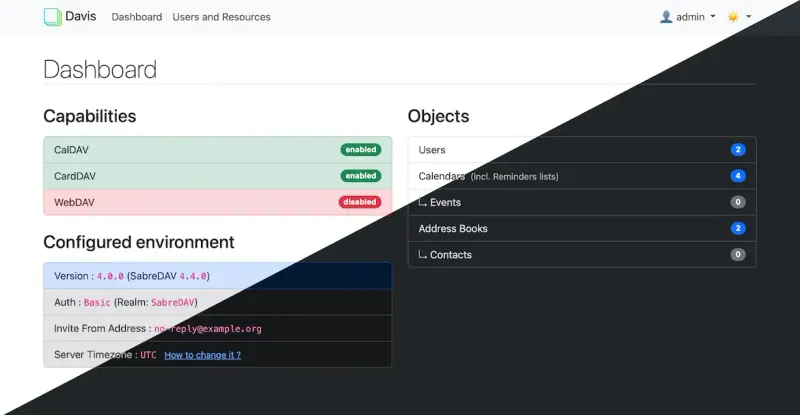
Syncs calendars, to-do lists and address books with Apple's Calendar and Contacts apps, Thunderbird and, through the DAVx5 app, Android, with calendars shared between people, public calendar links, a birthday calendar from your contacts, and email invitations once a mail server is set up. It is a sync server, not a calendar website: you view and edit events in your own apps, and it has no video meeting links or booking pages.

What you gain
  • Your calendars and contacts stay on your own server, not with Google or Apple
  • Free and open source, with no paid plan and no fee per person
  • Works with the calendar and contacts apps people already use
What is different
  • No calendar in the browser; people see and edit events in their phone or computer apps
  • Android phones need a sync app such as DAVx5
  • No built-in import; you bring calendars and contacts across through your apps
Some setup Open source

Calendar and contacts sync, managed from one admin page.

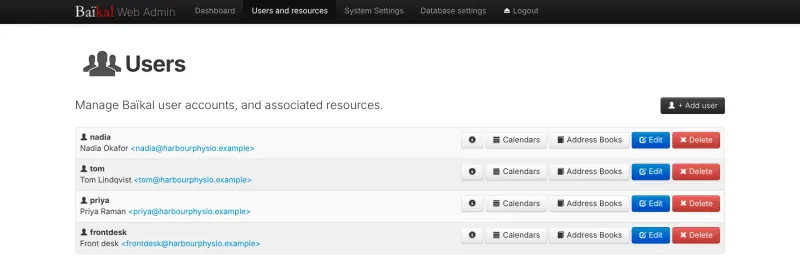
Keeps everyone's calendars, to-do lists and contacts on your server and syncs them to iPhone, iPad and Mac built-in apps, Android through DAVx5, Thunderbird and other CalDAV and CardDAV apps. Its browser page is an admin panel where one person adds each user and creates their calendars and address books, which suits a small office. Like Radicale it has no web calendar, booking pages or meeting links, and files are imported through a calendar app, not in the browser.

What you gain
  • Your team's calendars and contacts are stored on your own server, not in a Google or Apple account
  • Add or remove a colleague's account from a web page, with no fee per person
  • Keep using the calendar and contacts apps already on your phones and computers
What is different
  • There is no calendar or contacts view in the browser; people see and edit them in their apps
  • There is no upload button; you bring old calendars in through a calendar app on a computer
  • Android phones need the separate DAVx5 app
Some setup Open source

Calendars, tasks and contacts, synced to every phone.

Keeps calendars, to-do lists and contacts on your server and syncs them to the apps you already use: iPhone, iPad and Mac through their built-in apps or a downloadable profile, Android through DAVx5, and Thunderbird, GNOME and KDE on the desktop. It has no web calendar of its own, no booking pages and no video meeting links, and sharing calendars between people is off in this template.

What you gain
  • Your calendars and contacts are stored on your own server, not in a Google or Apple account
  • Keep using the calendar and contacts apps already on your phone and computer
  • No limits on how many calendars, task lists or address books you create
What is different
  • There is no calendar in the browser; you view and edit events and contacts in apps
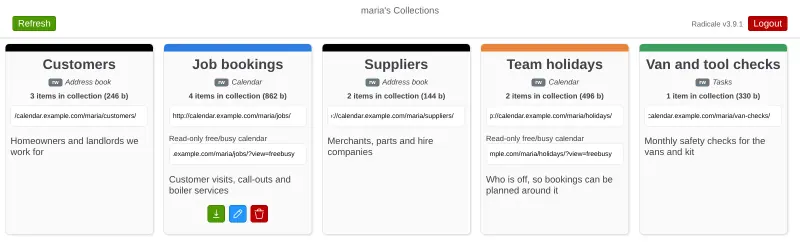
  • Many apps can't create new calendars, so you add those on Radicale's web page
  • Adding more people takes a short command on the server, not a button in the web page
Some setup Open source

Moving from Google Calendar

Start the same way for every app: in Google Calendar's settings, export your calendars, which gives you one .ics file per calendar, and export your contacts from Google Contacts as a vCard (.vcf) file.

With Radicale, upload each file as a new calendar or address book on Radicale's web page. Then add the Radicale account on each device: on an iPhone or Mac, download the setup profile from the Radicale web page; on Android, install DAVx5 and sign in with your Radicale address and password.

With Davis, create an account for each person and the calendars and address books they need in the Davis dashboard. With Baïkal, sign in to the admin page and add a user for each person with a calendar and an address book. Add that account on each phone and computer: on an iPhone or Mac as a CalDAV and a CardDAV account in the system settings (for Baïkal, the server's address ends in /dav.php), in Thunderbird as a network calendar and address book, and on Android with the DAVx5 app. Neither has an upload button, so import the .ics and .vcf files from a calendar and contacts app connected to the new account, such as Apple Calendar or Thunderbird.

When everything shows up on every device, remove the Google account from each device's calendar and contacts settings and stop adding events in Google Calendar.

Questions

What is the best open-source alternative to Google Calendar?

Start with Davis. All 3 are free and open source.

Can I see my calendar in a web browser with Davis, Radicale or Baïkal?

No. Davis's dashboard, Radicale's web page and Baïkal's admin panel manage people, calendars and address books, but none of them shows events. You view and edit events in the calendar apps on your phone and computer, which sync with the server.

Do they work on Android phones?

Yes, with a sync app. Android has no built-in CalDAV or CardDAV account, so install an app such as DAVx5, which then fills Android's own calendar and contacts apps.

Can my family or team share a calendar?

Yes, with Davis: a calendar can be shared with other people on the same server as read-only or read and write, and published as a read-only link. Sharing is switched off in the Radicale template, though each Radicale calendar has a read-only free/busy link that shows when you are busy without showing what the events are.

Can Davis send meeting invitations?

Yes, once a mail server is set up. Invitations are emailed to attendees, and each person needs their email address set in the dashboard.

Should I choose Davis, Radicale or Baïkal?

Radicale if each person sets up their own account and you want to upload calendar and contacts files in the browser. Baïkal if one person manages everyone's accounts, calendars and address books from a browser admin panel, as in a small office. Davis if you want shared calendars, public calendar links and email invitations.

Are these Google Calendar alternatives really free?

Yes, Davis, Baïkal and Radicale are free. To run them you need Cloudgate and a server. Use hosted Cloudgate, which can also provide the server, or install Cloudgate on a server of your own for free. Cloudgate's plans and prices are at cloudgate.octabyte.io/pricing. One server can run several apps.

Do I need a developer to replace Google Calendar?

No. Cloudgate installs the app you choose on your server and gives it a secure web address, and you use it in your browser instead of Google Calendar.