
F

Open-source alternative to Fathom

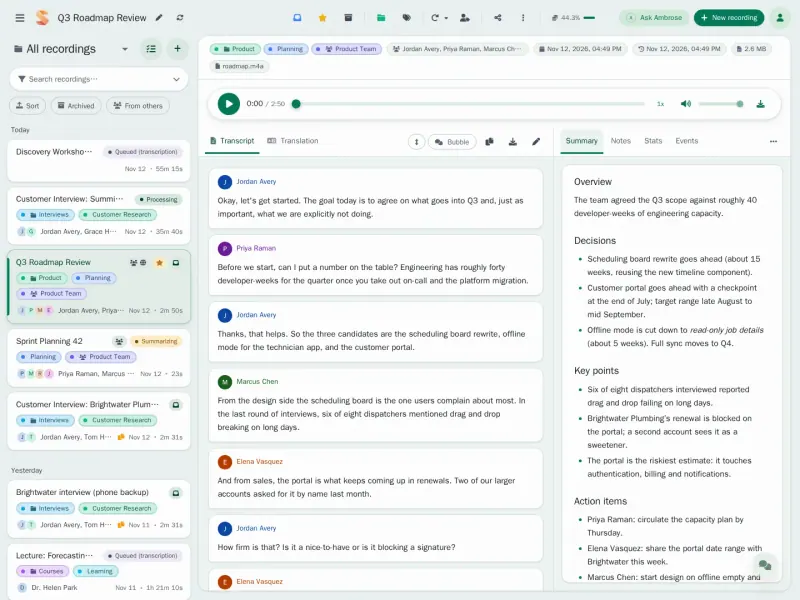
Speakr is a free, open-source Fathom alternative that writes transcripts, summaries and action items from your meeting recordings and keeps them on your own server. Fathom records Zoom, Google Meet and Microsoft Teams calls with a bot that joins for you; Speakr has no bot, so you record in the browser or upload the recording.

Free app Code: Open source Import from Fathom: No Some setup

Why look for an alternative to Fathom?

Fathom is an AI note taker for video calls: it records Zoom, Google Meet and Microsoft Teams meetings with a bot that joins for you, then writes a transcript, a summary and action items.

People look for an alternative when they would rather not have a bot record client and team calls onto someone else's servers, or want the notes in a place they control. A self-hosted Speakr keeps recordings, transcripts and summaries on your own server, though you start the recording yourself.

How Speakr compares

Meeting transcripts, AI summaries and action items.

Does what Fathom does after the call: a transcript with speaker labels, a summary with action items, and answers to questions about a meeting. It has no bot and no Zoom, Meet or Teams integration, so you record the call from your browser or upload the recording. Transcripts and summaries come from the AI service you connect, such as OpenAI.
Some setup Open source

Moving from Fathom

Speakr cannot import from Fathom. For new meetings, open Speakr in a browser tab before the call and record your microphone and the call's audio together, or upload the recording your meeting app saves. Upload any past recordings you still need as audio or video files. Then adjust the summary prompt so the notes follow the layout your team is used to.

Questions

What is the best open-source alternative to Fathom?

Speakr is the free, open-source alternative to Fathom for AI meeting notes in the catalogue today. Does what Fathom does after the call: a transcript with speaker labels, a summary with action items, and answers to questions about a meeting. It has no bot and no Zoom, Meet or Teams integration, so you record the call from your browser or upload the recording. Transcripts and summaries come from the AI service you connect, such as OpenAI.

Does Speakr record Zoom calls by itself, like Fathom?

No. Speakr has no meeting bot or Zoom integration. You record the call from your browser, or upload the recording Zoom saves.

Is this Fathom Analytics?

No. This page is about Fathom, the AI note taker for video calls. Fathom Analytics is a different product for website statistics.

Can I export Speakr's notes?

Yes. Transcripts and notes export to Word or Markdown, and Speakr can save them automatically to an Obsidian or Logseq folder.

Is Speakr really free compared with Fathom?

Yes, Speakr is free. To run them you need Cloudgate and a server. Use hosted Cloudgate, which can also provide the server, or install Cloudgate on a server of your own for free. Cloudgate's plans and prices are at cloudgate.octabyte.io/pricing. One server can run several apps.

Do I need a developer to replace Fathom?

No. Cloudgate installs Speakr on your server and gives it a secure web address, and you use it in your browser instead of Fathom.