
Open-source alternatives to Dropbox File Requests

Sharry is a free, open-source alternative to Dropbox File Requests: give anyone a hard-to-guess upload page and they can send you files without an account, straight to your own server. Dropbox file requests save what people send into a folder in your Dropbox; Sharry has no storage plan behind it and also sends files out by link, though it does not sync folders.

2 alternatives Free apps Our pick: Sharry

At a glance

App Good for Code Ease of use
Sharry Small teams that send work to clients and collect documents back Code Open source Easy
WulfVault Teams that send large files to clients and need a record of who downloaded what Code Open source Easy

Why look for an alternative to Dropbox File Requests?

Dropbox file requests let you send someone a link so they can upload files straight into a folder in your Dropbox.

People look for an alternative when they collect documents from clients often but do not use Dropbox for anything else, or want those documents on their own server. A self-hosted Sharry gives each request its own upload page, and the same app sends files back out by expiring link. WulfVault does the same with upload request links, and keeps a download history for every file it sends.

The alternatives, compared

Sharry

Our pick

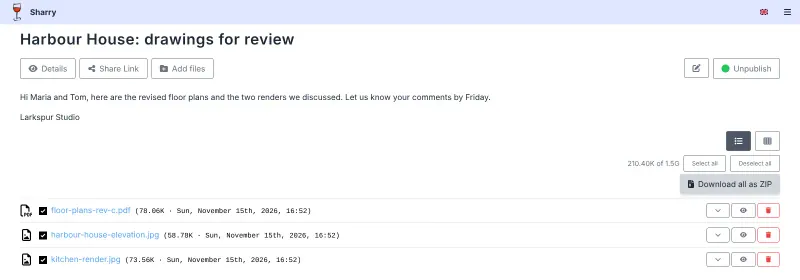
Send files by link, and let clients upload files to you.

Its alias pages work like a file request: a hard-to-guess upload page where anyone can send you files without signing up, which you can disable, delete or give an end date. You can let teammates see what arrives, and the same app sends files out by link with an expiry, password and view limit. There is no folder sync or storage behind it, and without an email server set up it cannot notify you of new uploads.
Easy Open source

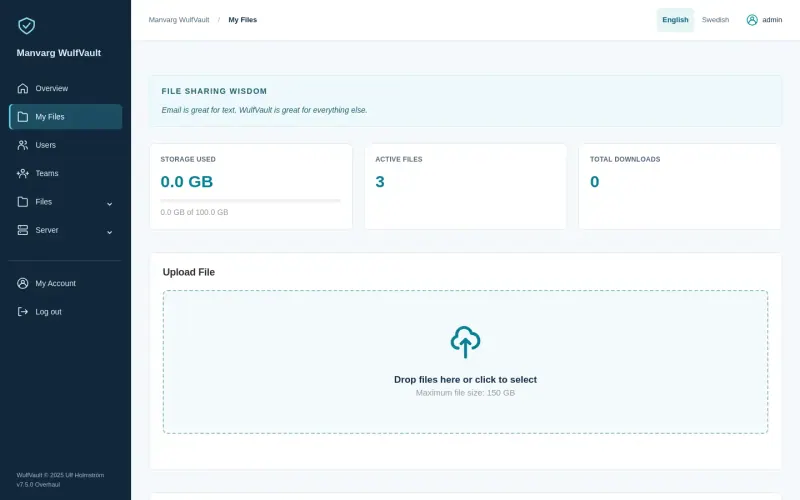
Send large files by link and see who downloaded each one.

Its upload request links work like a file request: send one to a client or supplier and the files they upload arrive in your account. The same app sends large files out by link with a password, an expiry and a download history for each file, with teams, storage quotas and an audit log. There is no folder sync or storage behind it, and email needs your own mail server set up.

Easy Open source

Moving from Dropbox File Requests

Nothing needs to move: files already collected stay in your Dropbox. In Sharry, create an alias page for each kind of request, such as one per client or project, give it an end date if you like, and send its link instead of the Dropbox request link. Add teammates as members of an alias so they see the uploads too. Each upload is limited to 1.5 GB by default, the same limit as for shares you send.

In WulfVault, create an upload request link for each kind of request and send it instead of the Dropbox request link; the files arrive in your account, within your storage quota.

Questions

What is the best open-source alternative to Dropbox File Requests?

Start with Sharry. Both are free and open source.

Do people need an account to send me files?

Not with Sharry. Anyone with an alias page's link can upload files to you without signing up. Only you and your team need Sharry accounts.

Will Sharry tell me when someone uploads files?

Only once email is set up. This template does not configure a mail server, so check the alias page in Sharry until you add one.

Should I choose Sharry or WulfVault?

Sharry if you mainly collect files and want teammates to see what arrives on each upload page. WulfVault if you also send large files out and need a record of who downloaded each one, with teams, storage quotas and an audit log.

Are these Dropbox File Requests alternatives really free?

Yes, Sharry and WulfVault are free. To run them you need Cloudgate and a server. Use hosted Cloudgate, which can also provide the server, or install Cloudgate on a server of your own for free. Cloudgate's plans and prices are at cloudgate.octabyte.io/pricing. One server can run several apps.

Do I need a developer to replace Dropbox File Requests?

No. Cloudgate installs the app you choose on your server and gives it a secure web address, and you use it in your browser instead of Dropbox File Requests.