C

Open-source alternative to ChatPDF

Kotaemon is a free, open-source ChatPDF alternative for asking questions about your PDFs and other files, with each answer citing the passage it came from, highlighted in a built-in viewer. ChatPDF’s free plan analyses two documents a day; self-hosted Kotaemon has no daily limit of its own and keeps your files on your server, though you connect your own AI provider or a local model.

Free app Code: Open source Import from ChatPDF: No Some setup

Why look for an alternative to ChatPDF?

ChatPDF is a hosted service for chatting with your PDF files: you upload a document, ask questions about it and get answers that point to the pages they came from.

People look for an alternative because of its limits and where the files go. ChatPDF's free plan analyses two documents a day, with unlimited documents on its paid Plus plan, and every file you upload is processed on its service. A self-hosted Kotaemon has no document limit of its own, keeps your files on your server, and can run on a local model so nothing leaves it.

How Kotaemon compares

Chat with your documents and see the cited passage in each answer.

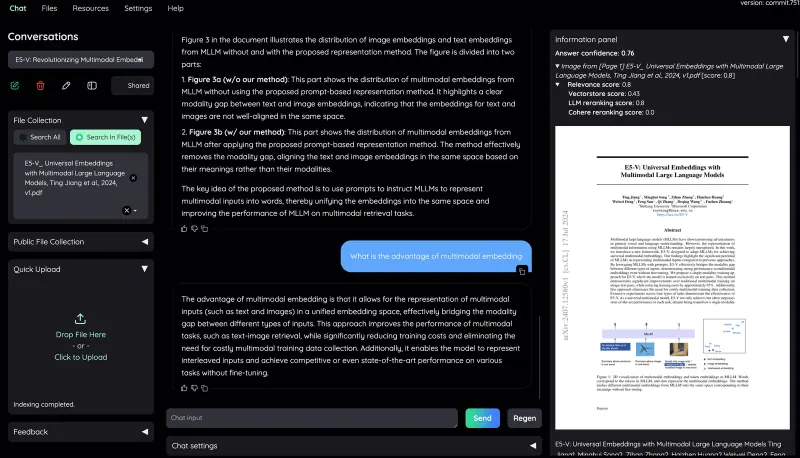
Does ChatPDF's job: upload PDFs, ask questions and get answers that cite their sources, which open in a built-in PDF viewer with the passage highlighted and a relevance score. It asks across several documents at once, has user accounts with private and shared collections, and works with the AI provider you choose or a local model. It needs your own AI key or model and some setup, and Word files need its larger full image.

What you gain
  • No daily document limit of its own
  • Your files stay on your server, not with a chat service
  • Several users, with shared collections and shared conversations
What is different
  • You connect your own AI provider key or run a local model
  • This edition reads PDF, web page, spreadsheet and text files, not Word files
  • Chats from ChatPDF or NotebookLM do not move across
Some setup Open source

Moving from ChatPDF

There is nothing to import: keep the original files you uploaded to ChatPDF and upload them again. Sign in to Kotaemon as admin, then in Resources add an AI model, either an API key from a provider such as OpenAI, Groq or Cohere or a local model through Ollama, and an embedding model. Upload your PDFs in the Files tab, into a private or shared collection, and start asking questions. Add accounts for the people who will use it, so each person has their own chats and files.

Questions

What is the best open-source alternative to ChatPDF?

Kotaemon is the free, open-source alternative to ChatPDF for chatting with your PDFs in the catalogue today. Does ChatPDF's job: upload PDFs, ask questions and get answers that cite their sources, which open in a built-in PDF viewer with the passage highlighted and a relevance score. It asks across several documents at once, has user accounts with private and shared collections, and works with the AI provider you choose or a local model. It needs your own AI key or model and some setup, and Word files need its larger full image.

Does Kotaemon limit how many documents I can use?

No. Kotaemon has no daily or monthly document limit of its own; the limits are your server's disk space and what your AI provider charges.

Can Kotaemon run without sending my files to an AI company?

Yes, with a local model through Ollama or llama.cpp. With a cloud provider, the parts of your files used for each answer are sent to that provider.

Can several people share documents in Kotaemon?

Yes. Each user has an account, files can go in private or shared collections, and a conversation can be shared with other users.

Is Kotaemon really free compared with ChatPDF?

Yes, Kotaemon is free. To run them you need Cloudgate and a server. Use hosted Cloudgate, which can also provide the server, or install Cloudgate on a server of your own for free. Cloudgate's plans and prices are at cloudgate.octabyte.io/pricing. One server can run several apps.

Do I need a developer to replace ChatPDF?

No. Cloudgate installs Kotaemon on your server and gives it a secure web address, and you use it in your browser instead of ChatPDF.