
A

Open-source alternative to Auvik

LibreNMS is a free, open-source Auvik alternative for watching your network: it finds devices automatically, draws network maps from neighbour data, graphs traffic and health, and sends alerts. Auvik is a cloud service priced per network device by quote; self-hosted LibreNMS has no per-device fee and keeps the data on your server, though config backups need a separate tool such as Oxidized.

Free app Code: Open source Import from Auvik: No Some setup

Why look for an alternative to Auvik?

Auvik is cloud network monitoring and management for IT teams and managed service providers. A collector installed on each site feeds Auvik's cloud, which draws network maps automatically, keeps an inventory, backs up device configs and sends alerts. It is priced per network device, by quote.

People look for an alternative when per-device pricing grows with every switch and access point, or when they want their network data on a server they control. A self-hosted LibreNMS discovers, maps, graphs and alerts on your network with no per-device fee. It takes more setup than Auvik and has no vendor support, so it suits teams comfortable running their own tools.

How LibreNMS compares

Network monitoring for switches, routers and servers.

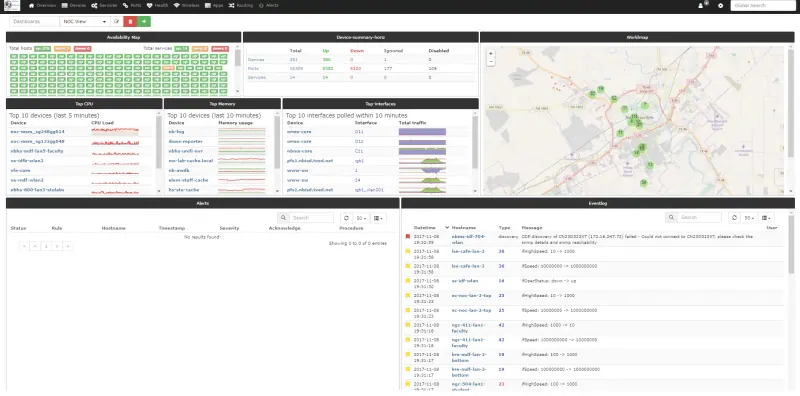
Discovers your network over SNMP, LLDP, CDP and other neighbour protocols, draws a map of how devices connect, graphs traffic and device health, and alerts through more than 50 channels, on your own server with no per-device fee. Auvik is a managed cloud service with a polished, automatic map and built-in config backup; LibreNMS needs more setup, backs up configs only through a separate tool such as Oxidized, and needs a VPN or site link to reach each office from a cloud server.
Some setup Open source

Moving from Auvik

There is no importer for Auvik. Connect the LibreNMS server to each site you watch, through a VPN or site-to-site link if it runs in the cloud, and turn on SNMP on your devices. Add one core device per site under Devices and switch on auto-discovery, so LibreNMS finds the rest from neighbour data and draws the map. Set up alert channels such as email, Slack or Microsoft Teams, and alert rules for the problems you care about. If you used Auvik's config backup, set up Oxidized alongside LibreNMS. Run both until the alerts match, then remove Auvik's collectors.

Questions

What is the best open-source alternative to Auvik?

LibreNMS is the free, open-source alternative to Auvik for network monitoring and mapping in the catalogue today. Discovers your network over SNMP, LLDP, CDP and other neighbour protocols, draws a map of how devices connect, graphs traffic and device health, and alerts through more than 50 channels, on your own server with no per-device fee. Auvik is a managed cloud service with a polished, automatic map and built-in config backup; LibreNMS needs more setup, backs up configs only through a separate tool such as Oxidized, and needs a VPN or site link to reach each office from a cloud server.

Can LibreNMS monitor several sites or clients?

Yes, as long as the server can reach each site's devices, through a VPN or site-to-site link. Larger networks can spread the polling over several pollers.

Does LibreNMS back up switch and router configs like Auvik?

Not on its own. LibreNMS shows config backups from Oxidized or RANCID, which are separate tools you install next to it.

Does LibreNMS draw a network map automatically?

Yes. It builds a map from neighbour and ARP data, and you can also draw your own maps showing each link's status and use.

Is LibreNMS really free compared with Auvik?

Yes, LibreNMS is free. To run them you need Cloudgate and a server. Use hosted Cloudgate, which can also provide the server, or install Cloudgate on a server of your own for free. Cloudgate's plans and prices are at cloudgate.octabyte.io/pricing. One server can run several apps.

Do I need a developer to replace Auvik?

No, but someone who looks after your network should set it up. Cloudgate installs LibreNMS and creates the admin account; you then turn on SNMP on each device and connect the server to your sites, through a VPN if it runs in the cloud, before adding devices in the browser.