

Open-source alternatives to Adobe Lightroom

PhotoPrism is a free, open-source Adobe Lightroom alternative for organising a large photo library, RAW files included, with search by place, label, face, date and camera. Lightroom comes with an Adobe subscription and keeps your library in Adobe’s cloud; self-hosted PhotoPrism catalogues it on your own disk, but it does not edit photos.

2 alternatives Free apps Our pick: PhotoPrism

At a glance

App Good for Code Import from Adobe Lightroom Ease of use
PhotoPrism Families and photographers who want a big photo library searchable by place, subject and face Code Open source Import from Adobe Lightroom Partly Easy
Damselfly Photographers with large folder-based libraries who want fast search and keyword tagging, not phone backup Code Open source Import from Adobe Lightroom Partly Some setup

Why look for an alternative to Adobe Lightroom?

Adobe Lightroom is Adobe's photo software for organising and editing photos, with a library stored in Adobe's cloud and synced across computers and phones, sold as part of an Adobe subscription.

People look for an alternative for the library side: a large collection fills the cloud storage that comes with the plan, and the subscription has to continue to keep using it. A self-hosted PhotoPrism keeps a searchable catalogue of the whole library on your own disk, though you still need a separate editor for adjustments. Damselfly does the same for photographers who organise by keyword, writing tags into the files themselves.

The alternatives, compared

PhotoPrism

Our pick

A self-hosted photo library that finds any picture by place or face.

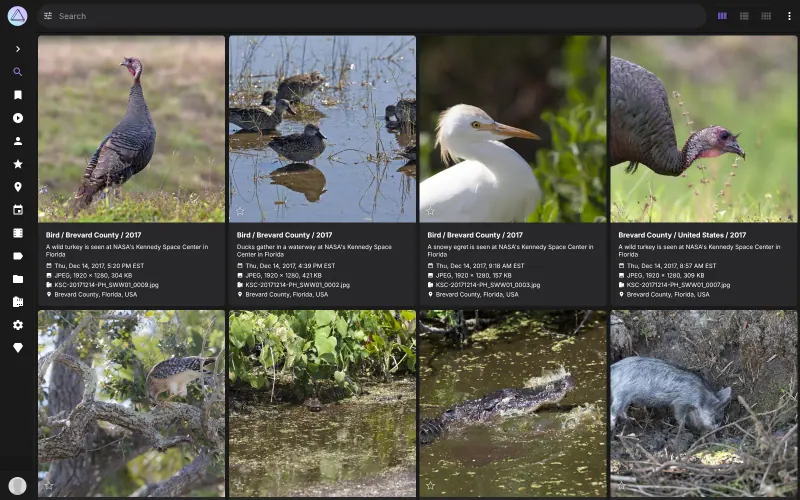
Catalogues a large library, RAW files included, reads dates, places, camera details and XMP sidecars, labels photos by content and recognises faces, with search filters you can combine and a world map. It is an organiser, not an editor: there are no develop tools, so keep a photo editor for adjustments. It has no phone app of its own; phones back up through apps such as PhotoSync.
Easy Open source

A self-hosted photo manager for fast search and keyword tagging.

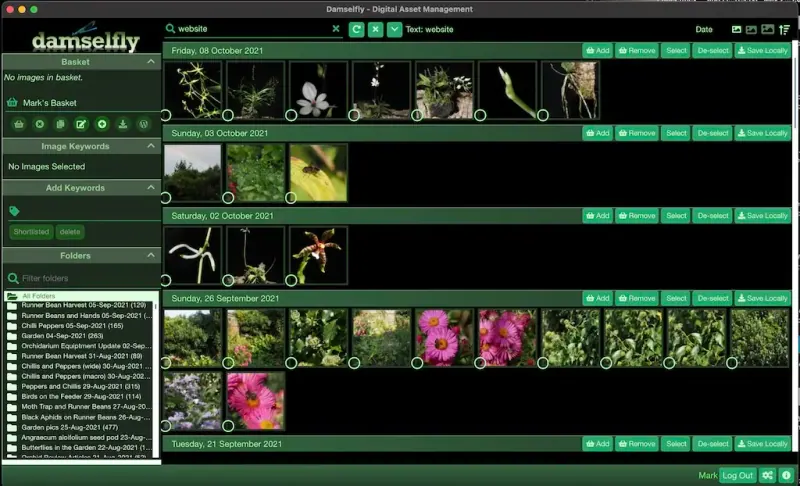
A catalogue for large folder-based libraries, RAW files included, built around fast keyword tagging in the style of Google Picasa: keywords are written into the image files so they travel with them, and faces and objects are recognised on your own server. It searches by date, face, object, camera and lens, shows a map, and has a basket for downloading or exporting a selection. It does not edit photos or handle video, and has no phone app or browser upload: you copy photos onto the server.

What you gain
  • No subscription, and your catalogue lives on your own server
  • Keywords are saved in the photo files, so they travel with them
  • Faces and objects are recognised on your server, not in a cloud
What is different
  • Damselfly organises photos but does not edit them
  • Lightroom catalogues can't be imported, though keywords already saved in your files are read
  • There is no upload button or phone app; photos are copied onto the server
Some setup Open source

Moving from Adobe Lightroom

PhotoPrism cannot read a Lightroom catalogue, but it reads your files and the XMP sidecars Lightroom can write. In Lightroom, save metadata to the files or to XMP sidecars, then export or copy your originals into PhotoPrism's folder, or upload them in the browser. Let PhotoPrism index the library, which takes a while for large collections, then check that dates, places and keywords came across. Albums and collections do not carry over, so rebuild the ones you need.

Damselfly reads keywords already stored in the image files, so save your metadata to the files in Lightroom first. Then copy your photo folders onto the server's pictures folder, for example over SFTP or with a sync tool, since there is no upload button. Damselfly indexes them in the background and runs face and object recognition, which takes a while for a large library. Register your account inside Damselfly to tag and download.

Questions

What is the best open-source alternative to Adobe Lightroom?

Start with PhotoPrism. Both are free and open source.

Can PhotoPrism or Damselfly edit photos like Lightroom?

No. Both organise and search photos; neither has editing tools. Edit in a photo editor and let them catalogue the results.

Should I choose PhotoPrism or Damselfly?

PhotoPrism for most people: it has browser upload, albums and sharing, and phones can back up to it through apps. Choose Damselfly if you tag a large folder library with keywords and want them written into the files, Picasa-style, and don't need phone backup or upload in the browser.

Does PhotoPrism handle RAW files?

Yes. It shows RAW files alongside JPEGs, videos and Live Photos, and reads metadata from Exif and XMP.

Can several people use one PhotoPrism library?

They share one library: the free edition has admin and guest roles only. For separate libraries, run a separate copy for each person.

Are these Adobe Lightroom alternatives really free?

Yes, PhotoPrism and Damselfly are free. To run them you need Cloudgate and a server. Use hosted Cloudgate, which can also provide the server, or install Cloudgate on a server of your own for free. Cloudgate's plans and prices are at cloudgate.octabyte.io/pricing. One server can run several apps.

Do I need a developer to replace Adobe Lightroom?

No. Cloudgate installs the app you choose on your server and gives it a secure web address, and you use it in your browser instead of Adobe Lightroom.