
XWiki
A self-hosted enterprise wiki with structured pages and permissions.
No server needed to start: Cloudgate can provide one. What happens when you click Deploy
What is XWiki?
XWiki is a self-hosted enterprise wiki for team docs and intranets, with page trees, real-time editing, forms and fine-grained permissions.
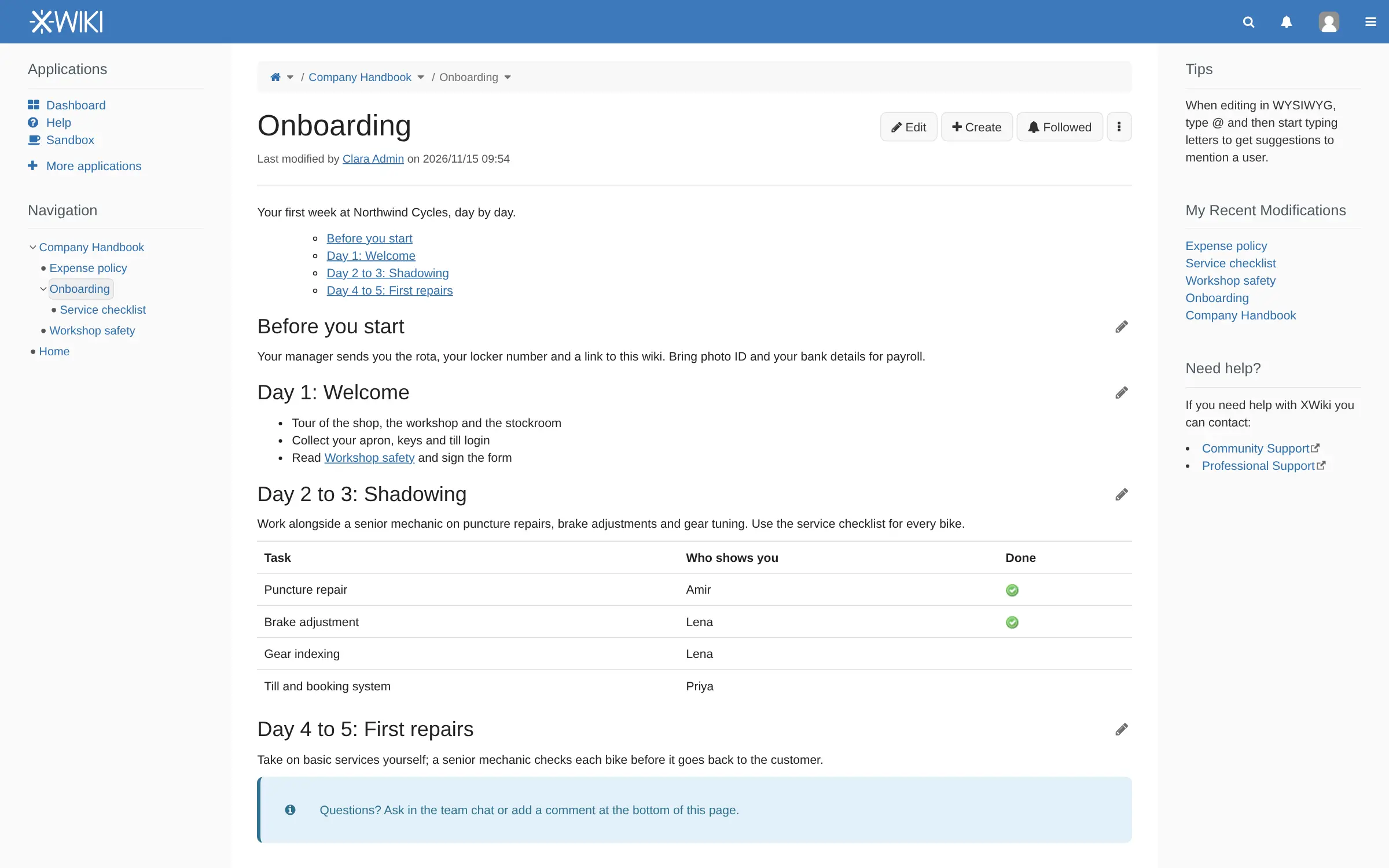
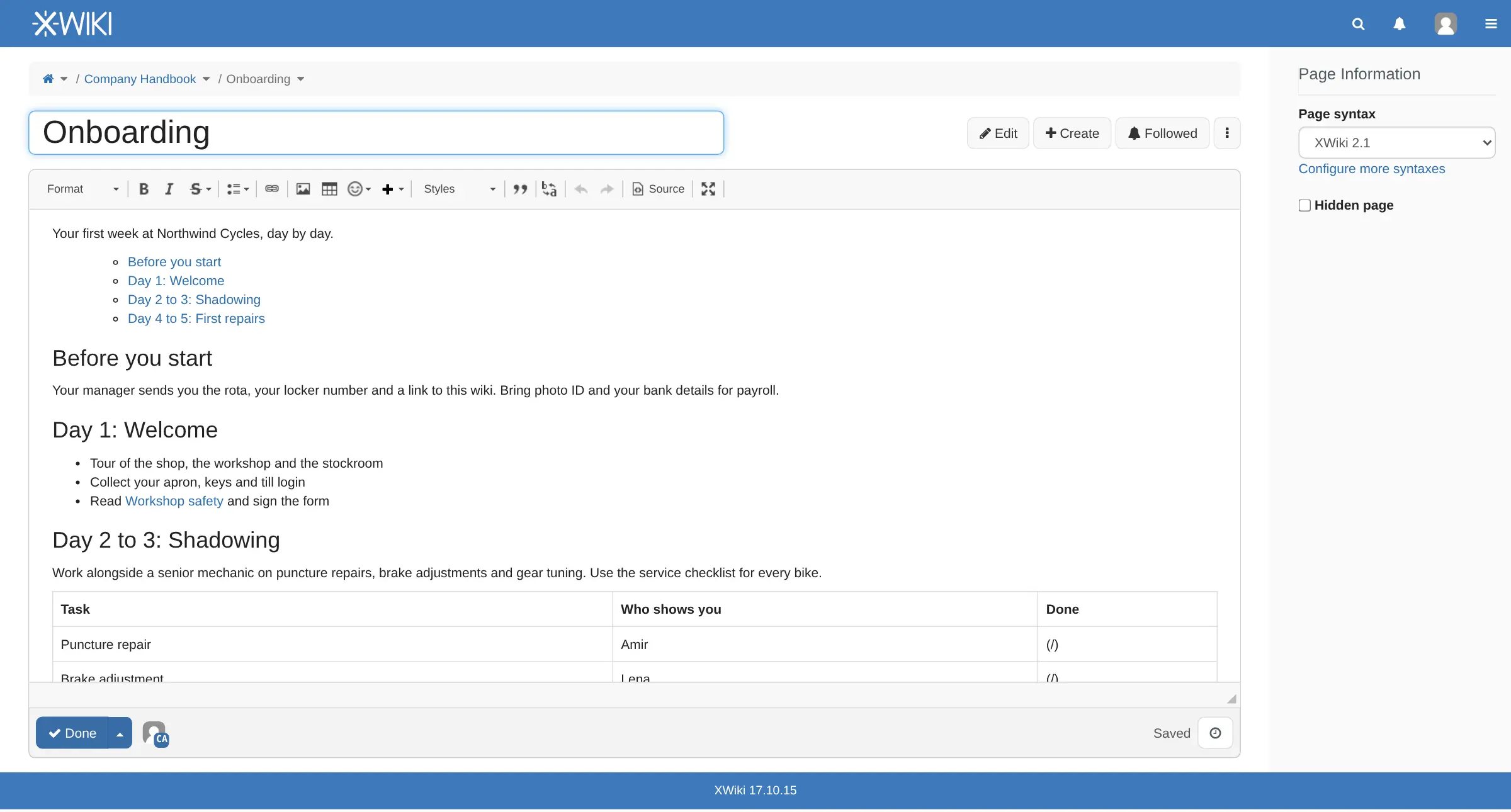
XWiki is a free, open-source, self-hosted enterprise wiki for team documentation, handbooks and intranets, and one of the closest open-source alternatives to Confluence. Pages sit in a tree, each with its own permissions, and colleagues can edit the same page at the same time in a visual editor, with every version kept.
What sets XWiki apart from simpler wikis is structure. You can give pages templates and forms, and App Within Minutes builds small apps without code, such as a supplier list or an equipment register that people fill in through a form and browse as a table. A bike shop, for example, could keep its staff handbook, workshop procedures and a register of tools and who has them in one wiki, with the finance pages visible only to the managers.
XWiki also imports office documents, exports pages to PDF, and has a free importer for Confluence space exports. Free community extensions add more; some add-ons are paid XWiki Pro apps.
Cloudgate installs XWiki on a server Cloudgate provides or one you connect, with its database, and gives it a secure web address. On the first visit you create the admin account and install the XWiki Standard flavor. XWiki needs a large server.
What you can do with XWiki
- Organize pages in a tree Nest pages inside pages, like a Confluence page tree, and find your way with the navigation tree and breadcrumbs.
- Write together in real time Edit in a word-processor-style editor while colleagues edit the same page, with every version kept and easy to restore.
- Build simple apps without code App Within Minutes turns a form you design into a table of entries, such as a supplier list or an equipment register.
- Decide exactly who sees what Give people and groups view, edit or delete rights on one page, a branch of pages or the whole wiki.
- Find anything Search looks inside pages and attached files, and tags, comments and annotations help people find and discuss content.
- Import and export documents Bring in office documents as wiki pages and export pages to PDF.
- Stay up to date Follow pages, mention colleagues with @, and get notified when something you follow changes.
- Add more with extensions Install free community extensions from the wiki's own extension manager.
Replaces Confluence
XWiki does the same job as Confluence. Here is what changes when you switch.
- No per-user price for the wiki itself, and no user limit
- Your documentation and intranet stay on your own server
- Structured pages, forms and no-code apps come with the free wiki
- A free, open-source importer for Confluence space exports
- XWiki needs a larger server than most wikis, and the first setup takes several minutes
- Some add-ons, such as Confluence-compatible macros, diagrams, a task manager and calendars, are paid XWiki Pro apps
- It has more options than a simple wiki, so expect some time to learn it
- Large Confluence moves may need the makers' paid migration tools and support
What happens when you click Deploy?
You do not need a server or any technical knowledge. Four steps, and XWiki is running at its own web address.
- Step 1 Click Deploy and create your account
Deploy takes you to Cloudgate. Create an account, or log in if you have one. XWiki itself is free.
- Step 2 Choose a server
No server? Get one from Cloudgate: pick a size and a country, and Cloudgate gets it ready. Already have one? Connect it instead.
- Step 3 Cloudgate sets up XWiki
It prepares the server, makes the passwords the app needs and starts it. There is nothing to install and nothing to write down.
- Step 4 Open your app and sign in
Your app gets a free web address to start, without https. Add your own domain, like app.yourshop.com, and Cloudgate secures it with https for you.
New to Cloudgate? See what Cloudgate is
Run Cloudgate yourself? Deploy from your own console
In your Cloudgate console, open Templates and choose XWiki.
Questions
Is XWiki free?
Yes. XWiki is free, open-source software under the LGPL-2.1 licence, and the wiki, its editor, page tree, permissions, search and App Within Minutes cost nothing. Its makers, XWiki SAS, sell support and paid XWiki Pro apps, which you do not need to run the wiki.
Is XWiki a good alternative to Confluence?
Yes. XWiki is one of the closest open-source matches to Confluence, with a page tree, real-time editing, version history, fine-grained permissions and structured pages. It needs a bigger server than Confluence-style wikis such as Outline or BookStack.
Can I move my Confluence spaces to XWiki?
Yes. XWiki can import a Confluence space export with a free, open-source importer. For large or complex migrations, its makers sell a supported Confluence migrator and Confluence-compatible macros.
How do I set up XWiki the first time?
Open your XWiki address right after setup. XWiki's Distribution Wizard asks you to create the admin account, then to install the XWiki Standard flavor, which downloads the wiki's apps from the internet and takes several minutes. When it finishes, your wiki opens on its home page.
What server size does XWiki need?
XWiki needs a large server, with about 4 GB of memory, which is what Cloudgate asks for. It runs on Java with a built-in search engine and office converter, so it is heavier than wikis such as BookStack or Wiki.js.
How is XWiki different from BookStack or MediaWiki?
XWiki is built for structured company knowledge, with forms, no-code apps and permissions on any page or branch. BookStack is simpler and lighter, organized as books and chapters, and MediaWiki suits large, open, Wikipedia-style community wikis.
Which XWiki features cost money?
XWiki Pro apps cost money, among them Confluence-compatible macros, diagrams, a task manager, calendars, meetings, forums and Active Directory sign-in. Everything described on this page is in the free wiki.
Do I need technical skills to run XWiki?
No. Click Deploy, create your Cloudgate account and choose a server, and Cloudgate sets up XWiki and gives it a web address. You use it in your browser like any other online tool.
Do I need my own server for XWiki?
No. When you deploy XWiki, hosted Cloudgate can provide a server. If you already rent one, you can connect it instead.
Related apps

A simple self-hosted wiki in Markdown, with every change kept.

A simple self-hosted wiki, organised like books on a shelf.

An open-source team wiki with spaces, live editing and diagrams.

A self-hosted wiki that keeps every page as a plain text file.