
Wealthfolio
A self-hosted tracker for investments, net worth and spending.
No server needed to start: Cloudgate can provide one. What happens when you click Deploy
What is Wealthfolio?
Self-hosted Wealthfolio tracks your investments, returns, dividends, net worth and spending in one private dashboard on your own server.
Wealthfolio is a self-hosted, open-source portfolio tracker that brings your investments, net worth and spending into one private dashboard, and a free alternative to Sharesight, Empower or Kubera. You record your trades, dividends and deposits, and it shows what you own, how each account is doing, your returns against a benchmark, and the income your investments pay.
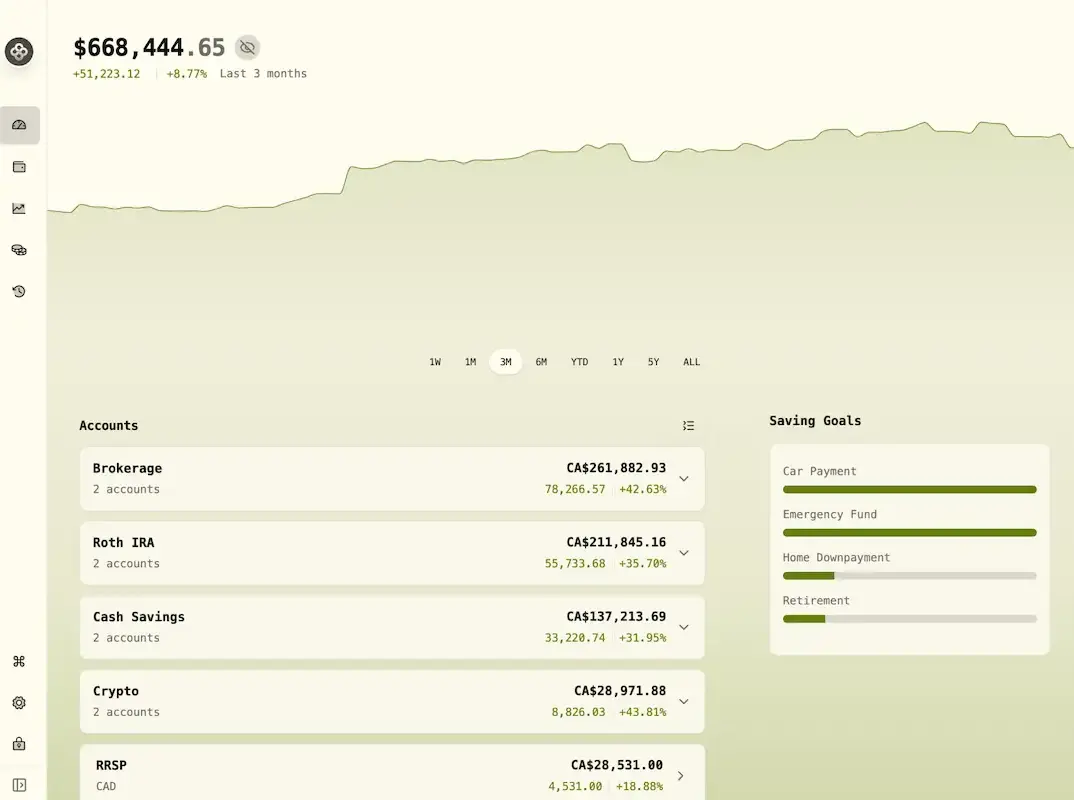
It goes beyond shares: you can add your home, car, loans and mortgage for a full net worth, sort your spending into a budget, and set goals such as an emergency fund or retirement. A couple running a small café, for example, could track their retirement accounts, a brokerage account and the café's loan in one place, and see each month whether they are on course for their savings goal.
Prices come free from Yahoo Finance, and you can add other providers with your own key. There is no automatic link to your bank or broker in this edition: you import your broker's CSV file or add trades by hand. Wealthfolio has no analytics or tracking inside the app.
Cloudgate installs Wealthfolio on a server Cloudgate provides or one you connect and gives it a secure web address. Sign in with the password shown in the Cloudgate console; it works in any browser, including on your phone.
What you can do with Wealthfolio
- See all your accounts together Brokerage, retirement, savings and crypto accounts in one dashboard, with your total value and how it changed.
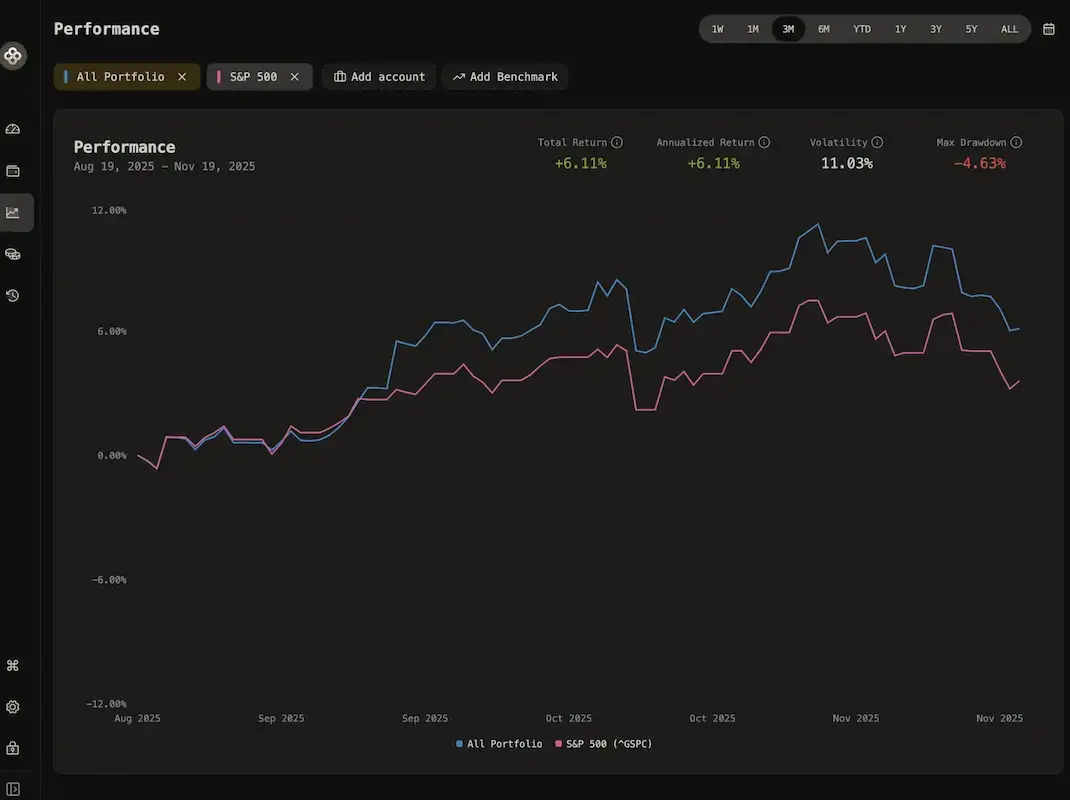
- Measure your real returns Time-weighted and money-weighted returns, compared with a benchmark such as the S&P 500.
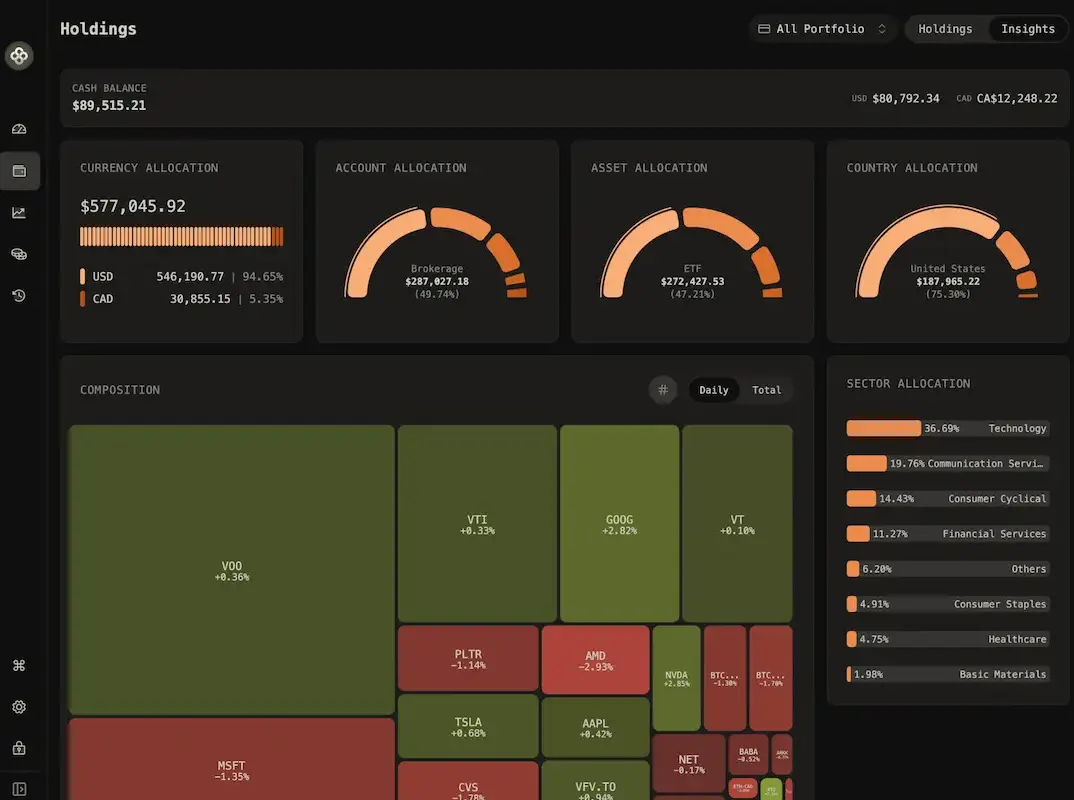
- Know what you own Break your holdings down by currency, account, asset type, country and sector, with a map of what rose or fell today.
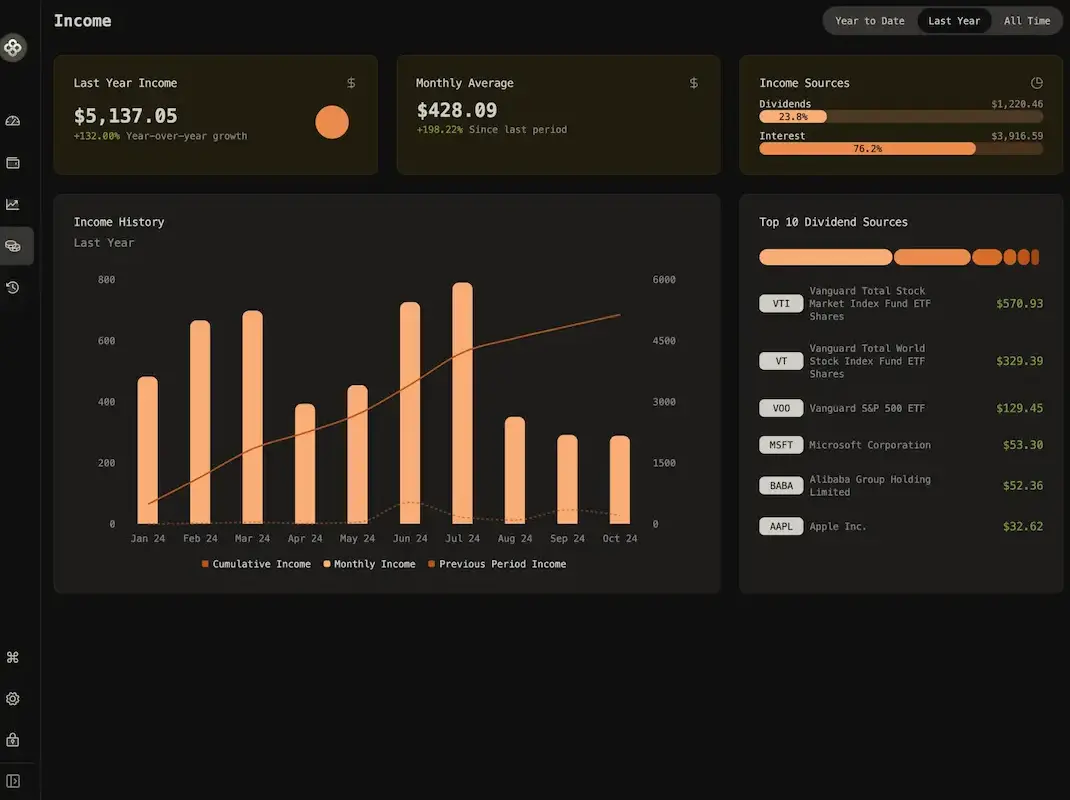
- Watch your income grow Follow dividends and interest month by month and see which holdings pay you the most.
- Count your whole net worth Add your home, car, loans and mortgage next to your investments for one honest total.
- Keep a budget Sort your spending into categories with rules, set budgets and see where your money goes.
- Plan ahead Set saving goals, plan for retirement or early retirement, and get a plan to rebalance towards your target mix.
- Import from your broker Load trades from your broker's CSV file, matching its columns once per account, and export everything as CSV or JSON.
Replaces Sharesight, Empower and Kubera
Wealthfolio does the same job as Sharesight, Empower and Kubera. Here is what changes when you switch.
- No subscription and no limit on holdings or accounts
- Your financial history stays on your own server, with no bank or broker logins shared
- Investments, net worth, spending and goals in one app
- No analytics or tracking inside the app
- No automatic bank or broker syncing; you enter trades or import a CSV file
- One password for one person, with no separate accounts for each family member
- Prices beyond Yahoo Finance need your own key from another data provider
What happens when you click Deploy?
You do not need a server or any technical knowledge. Four steps, and Wealthfolio is running at its own web address.
- Step 1 Click Deploy and create your account
Deploy takes you to Cloudgate. Create an account, or log in if you have one. Wealthfolio itself is free.
- Step 2 Choose a server
No server? Get one from Cloudgate: pick a size and a country, and Cloudgate gets it ready. Already have one? Connect it instead.
- Step 3 Cloudgate sets up Wealthfolio
It prepares the server, makes the passwords the app needs and starts it. There is nothing to install and nothing to write down.
- Step 4 Open your app and sign in
Your app gets a free web address to start, without https. Add your own domain, like app.yourshop.com, and Cloudgate secures it with https for you.
New to Cloudgate? See what Cloudgate is
Run Cloudgate yourself? Deploy from your own console
In your Cloudgate console, open Templates and choose Wealthfolio.
Questions
Is Wealthfolio free?
Yes, Wealthfolio is free and open source under the AGPL-3.0 licence, with no limit on accounts or holdings. Its makers sell an optional Wealthfolio Connect subscription for automatic broker syncing, syncing between devices and cloud backups, which you don't need to run it.
Is Wealthfolio a good alternative to Sharesight?
Yes, if you want a private portfolio tracker with no holding limit and no monthly fee. Wealthfolio shows performance against a benchmark, dividends and allocations, but as Cloudgate installs it, it does not connect to your broker, so you import a CSV file or enter trades yourself.
Is Wealthfolio a good alternative to Empower (Personal Capital)?
Yes, Wealthfolio tracks investments and net worth without linking your bank and broker logins to a finance company. It also covers loans, property, spending and retirement planning, but you keep it up to date yourself instead of syncing accounts.
How do I sign in to Wealthfolio the first time?
Open your Wealthfolio address and enter the password shown in the Cloudgate console; there is no username and no sign-up page. Wealthfolio has one password for one person, so share it only with someone who should see all your finances.
Can I import my trades into Wealthfolio?
Yes, Wealthfolio imports buys, sells, dividends and deposits from CSV files, such as a statement from your broker. You match the file's columns to Wealthfolio's once, and it remembers that for the account next time.
Where does Wealthfolio get its prices?
Wealthfolio gets prices for shares, ETFs, crypto and exchange rates from Yahoo Finance by default, with no key needed. You can add other providers, such as Alpha Vantage or Finnhub, with your own key from them, or enter prices yourself.
Is there a Wealthfolio phone app?
Yes, Wealthfolio has apps for iPhone and Android, but they keep their own data and don't share it with your self-hosted Wealthfolio. On your phone, open your Wealthfolio address in the browser instead; you can add it to your home screen.
Do I need technical skills to run Wealthfolio?
No. Click Deploy, create your Cloudgate account and choose a server, and Cloudgate sets up Wealthfolio and gives it a web address. You use it in your browser like any other online tool.
Do I need my own server for Wealthfolio?
No. When you deploy Wealthfolio, hosted Cloudgate can provide a server. If you already rent one, you can connect it instead.
Related apps

A self-hosted portfolio tracker for stocks, ETFs and crypto.

Personal finance manager for spending and investments.

A self-hosted Mint alternative for budgets, spending and goals.

Personal finance: net worth, spending and budgets.