
Sure
Personal finance: net worth, spending and budgets.
No server needed to start: Cloudgate can provide one. What happens when you click Deploy

What is Sure?
Sure is a self-hosted personal finance app: all your accounts, net worth, spending and budgets in one private dashboard, with imports from Mint and YNAB.
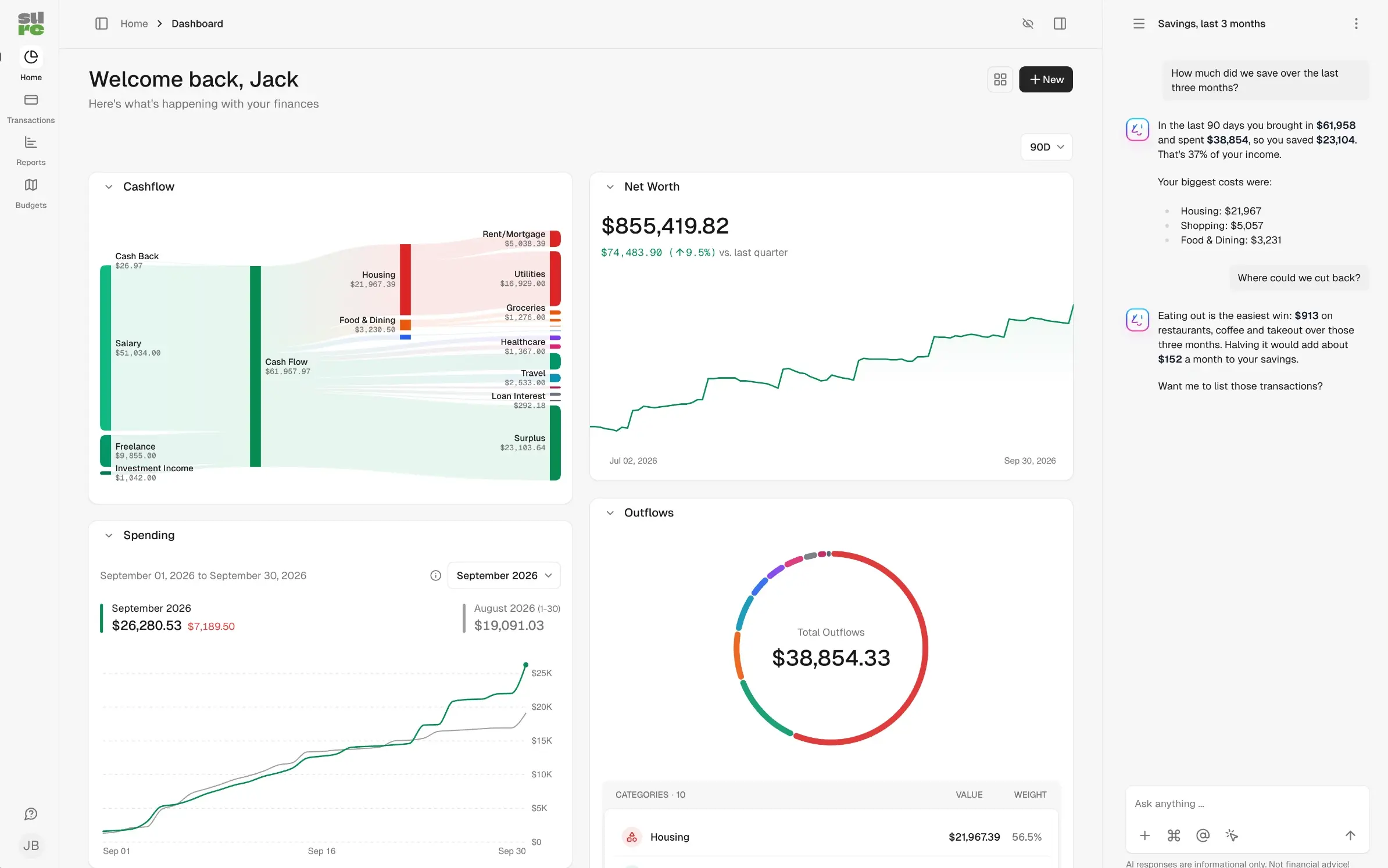
Sure is a free, open-source personal finance app you can self-host as an alternative to Monarch Money, Quicken or YNAB. It brings your bank accounts, credit cards, loans, investments and property into one place, and shows your net worth, cash flow, spending and budgets, with your data on your own server. Sure is a community fork of Maybe Finance, whose company stopped maintaining it in 2025.
A couple, for example, could add their current accounts, two pensions, the mortgage and a car loan, then watch their net worth month by month. Rules sort the supermarket, fuel and energy bills into categories, budgets show when eating out runs over, and the optional AI assistant can answer "where could we cut back?".
Sure can sync with your banks through providers you set up yourself, such as Plaid or SimpleFIN, some of which charge a fee. You can also import history from Mint, YNAB, QIF files or CSV, or enter transactions by hand. It runs in any web browser, and a basic companion app for iPhone and Android shows your balances.
Cloudgate installs Sure on a server Cloudgate provides or one you connect, with the database it needs and a secure web address. The first person to sign up becomes the admin, so create your account right after setup.
What you can do with Sure
- See your net worth over time Bank accounts, cards, loans, investments, crypto, property and vehicles add up to one net worth chart.
- Follow where your money goes The dashboard shows a cash-flow chart from income to spending, your spending against last month and outflows by category.
- Sort transactions automatically Categories, merchants, tags and rules file each transaction for you, and recurring payments are tracked.
- Set budgets and goals Give each category a monthly limit, track how you're doing, and save towards your goals.
- Track your investments Holdings, trades and cost basis for your investment accounts, in any currency.
- Bring your history with you Import from Mint, YNAB, QIF files or any CSV, and export everything as CSV files whenever you like.
- Ask questions about your money An optional AI assistant answers questions such as how much you saved last quarter, using an AI provider you choose.
- Share it with your family Invite your partner or family into the same household, with two-step sign-in and passkeys.
Replaces Monarch, Quicken and YNAB
Sure does the same job as Monarch, Quicken and YNAB. Here is what changes when you switch.
- No subscription; the app is free and you pay only for your server
- Your financial data is stored on your own server, not in a finance company's cloud
- Import your history from Mint, YNAB or a QIF file from Quicken
- Use the AI assistant only if you want it, with an AI provider you pick
- Bank sync isn't built in; you set up a provider such as Plaid or SimpleFIN yourself, and some charge
- Budgets are per category, not YNAB's give-every-dollar-a-job method
- The phone app is basic, showing only sign-in and account balances; the full app is in the browser
- It's a young community project with frequent releases
What happens when you click Deploy?
You do not need a server or any technical knowledge. Four steps, and Sure is running at its own web address.
- Step 1 Click Deploy and create your account
Deploy takes you to Cloudgate. Create an account, or log in if you have one. Sure itself is free.
- Step 2 Choose a server
No server? Get one from Cloudgate: pick a size and a country, and Cloudgate gets it ready. Already have one? Connect it instead.
- Step 3 Cloudgate sets up Sure
It prepares the server, makes the passwords the app needs and starts it. There is nothing to install and nothing to write down.
- Step 4 Open your app and sign in
Your app gets a free web address to start, without https. Add your own domain, like app.yourshop.com, and Cloudgate secures it with https for you.
New to Cloudgate? See what Cloudgate is
Run Cloudgate yourself? Deploy from your own console
In your Cloudgate console, open Templates and choose Sure.
Questions
Is Sure free?
Yes, Sure is free, open-source software under the AGPL-3.0 licence, with no paid edition or locked features. You pay only for your server and, if you use them, for a bank-sync provider or an AI provider.
Is Sure a good alternative to Monarch Money?
Yes, Sure is the same kind of app as Monarch, with every account, your net worth, cash flow, budgets and an optional AI assistant in one place. Monarch connects to your banks for you; with Sure you set up a bank-sync provider yourself, or import files from your bank.
Does Sure connect to my bank?
Yes, Sure connects through a bank-sync provider that you sign up for yourself, such as Plaid or SimpleFIN, and some of them charge a fee. Without one, you import transactions from CSV or QIF files or enter them by hand.
Can Sure import my data from Mint, YNAB or Quicken?
Yes, Sure has importers for Mint and YNAB exports and for QIF files, which Quicken can export. It also imports transactions, accounts and trades from any CSV file.
How do I sign in to Sure the first time?
The first person to sign up becomes the admin, so open Sure's web address right after setup and create your account. Anyone who can reach the address can sign up until you turn on the "Turn off new sign-ups" setting in Cloudgate, so do that once your household has joined.
Is there a Sure phone app?
Partly. There is a companion app for iPhone and Android, but it only covers signing in and account balances; for everything else you use Sure in a web browser, on a phone or a computer.
Is my financial data private with Sure?
Yes, Sure stores your accounts and transactions on your own server, not in a finance company's cloud. Data leaves it only for services you choose to connect, such as a bank-sync provider or an AI provider for the optional assistant.
Do I need technical skills to run Sure?
No. Click Deploy, create your Cloudgate account and choose a server, and Cloudgate sets up Sure and gives it a web address. You use it in your browser like any other online tool.
Do I need my own server for Sure?
No. When you deploy Sure, hosted Cloudgate can provide a server. If you already rent one, you can connect it instead.
Related apps

Track every account, budget and bill in one private money manager.

A self-hosted, multi-currency money tracker that skips budgeting.

A self-hosted Mint alternative for budgets, spending and goals.
A private expense tracker for your household, on phone and desktop.