
solidtime
Time tracking for freelancers and teams, with billable rates.
No server needed to start: Cloudgate can provide one. What happens when you click Deploy
What is solidtime?
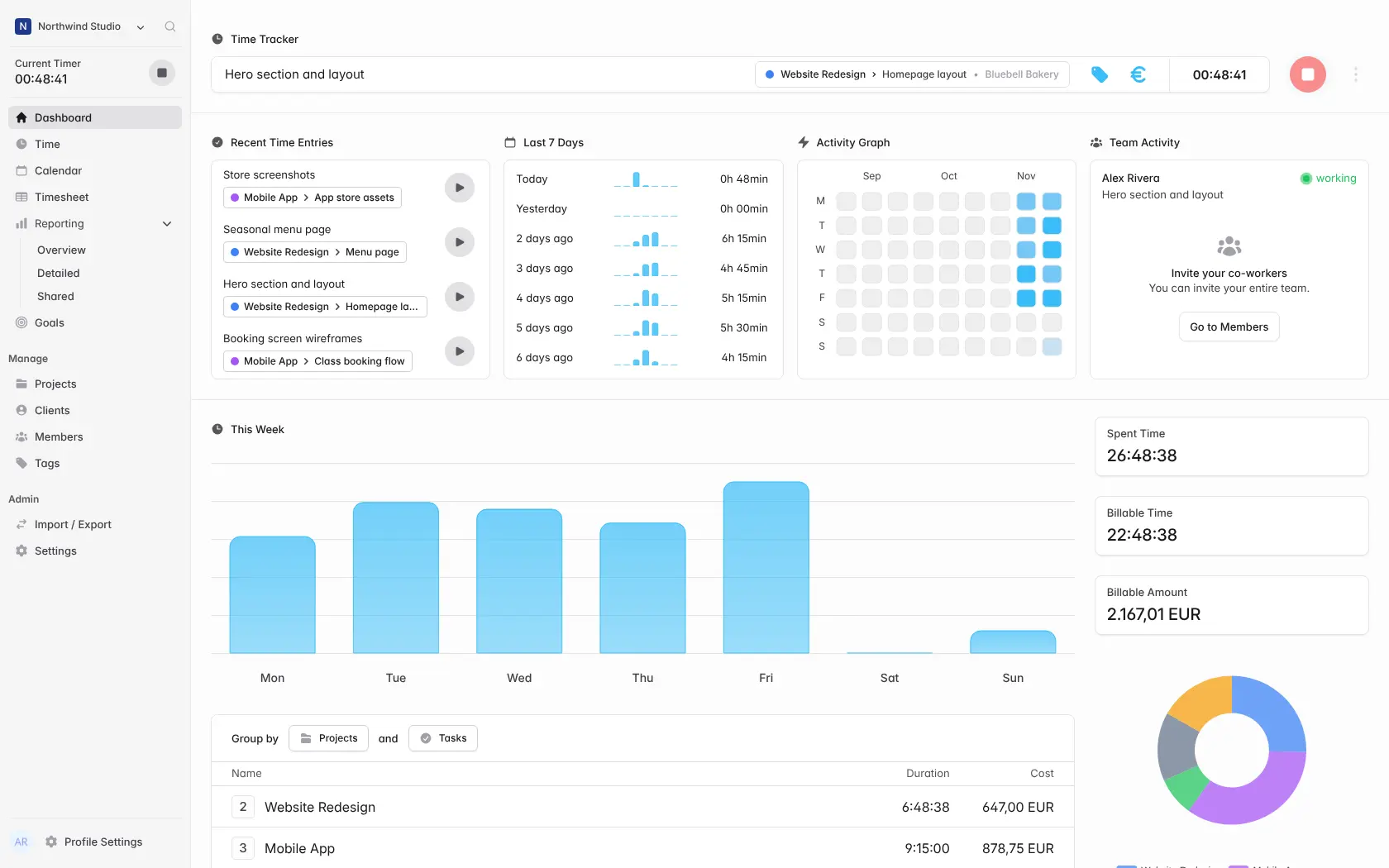
solidtime is open-source, self-hosted time tracking: a timer, calendar and timesheets, billable rates by client and project, and exportable reports.
solidtime is a free, open-source, self-hosted time tracker that records the hours you and your team spend on each client and project, works out what they're worth at your rates, and reports where the time went. It covers the time tracking people use Toggl Track, Clockify or Harvest for, on your own server with no per-user fee.
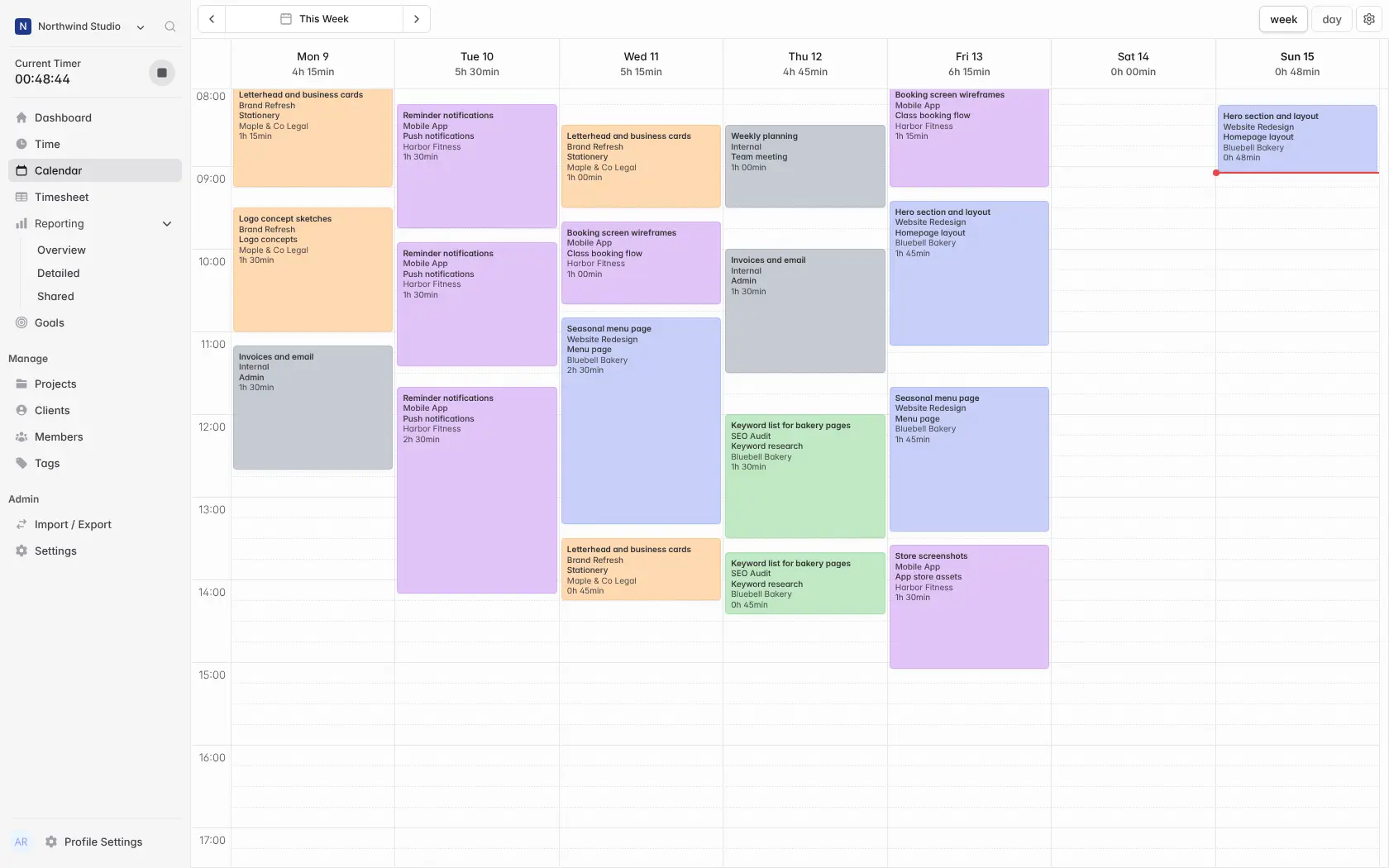
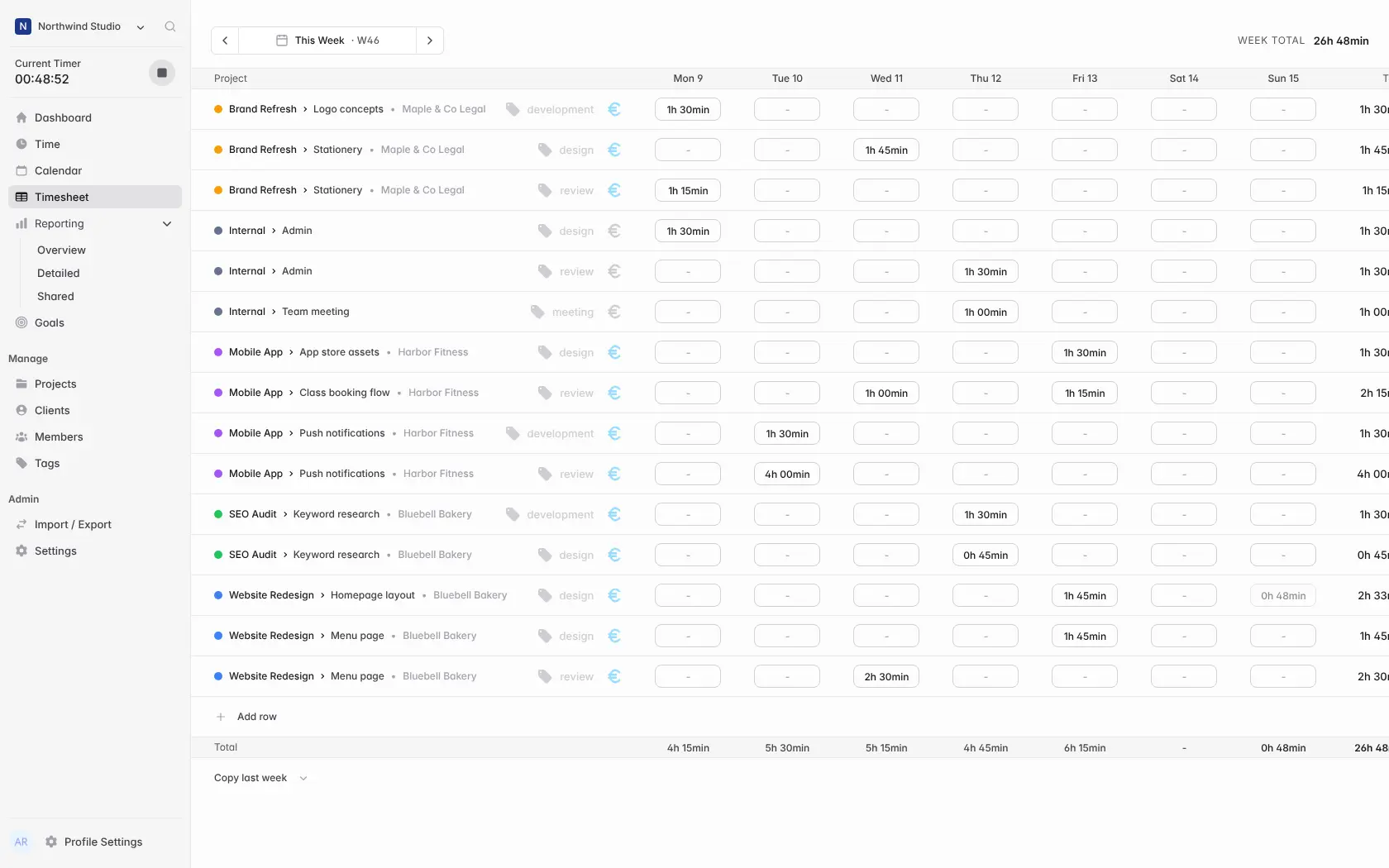
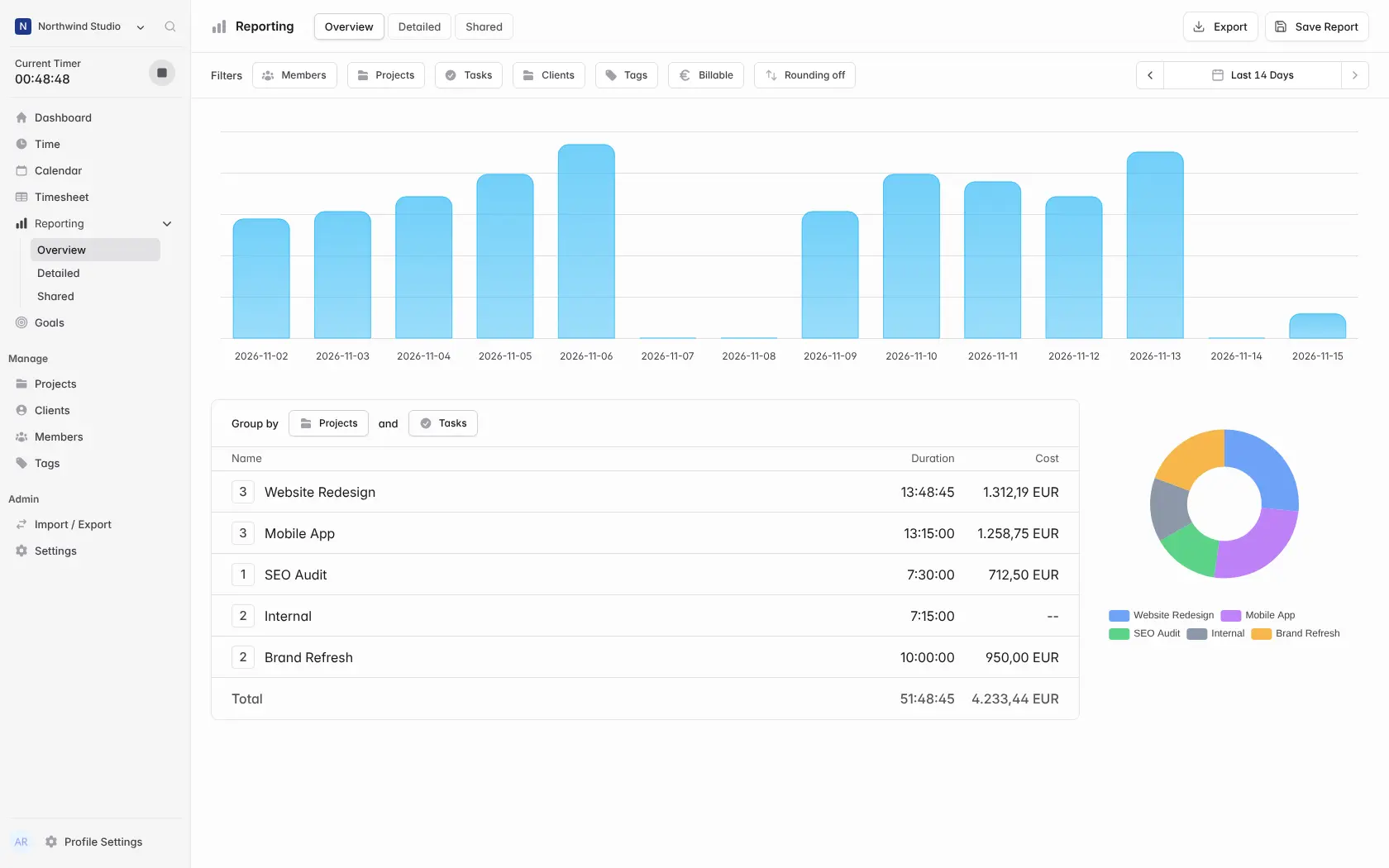
You start a timer when you begin a task, drag entries onto a week calendar, or fill in a weekly timesheet, and book the time to a client, project and task. solidtime adds up billable amounts at the rate you set for each person or project, and its reports can be saved, shared or exported. A small design studio, for example, could track every job for a local bakery and a gym, then export last month's billable hours per client to bill them.
There are free desktop apps and browser extensions, but no phone app; the web app works in a phone's browser. Built-in importers bring your Toggl, Clockify or Harvest history across. Invoicing needs solidtime's paid Business licence.
Cloudgate installs solidtime on a server Cloudgate provides or one you connect, together with its database, and gives it a secure web address. Sign in with your admin email and the password Cloudgate created, add your clients and projects, and start the timer.
What you can do with solidtime
- Track time your way Start a timer, drag entries onto a week calendar, or fill in a weekly timesheet, with breaks if you want them.
- Book hours to clients and projects Organise work by client, project, task and tag, and mark each entry billable or not.
- Set billable rates Give each organization, person, project or person on a project its own hourly rate.
- See where the time went Group reports by project, task, client, person or tag, save and share them, and export to PDF, CSV or Excel.
- Keep an eye on the week The dashboard shows the running timer, recent entries, this week's hours and the billable amount by project.
- Work as a team Invite people as owner, admin, manager or employee, and run several organizations from one account.
- Bring your history with you Import clients, projects and time entries from Toggl, Clockify or Harvest, or from a CSV file.
Replaces Toggl Track, Clockify and Harvest
solidtime does the same job as Toggl Track, Clockify and Harvest. Here is what changes when you switch.
- No per-user monthly fee for timers, timesheets, rates and reports
- Your timesheets and client data stay on your server
- Built-in importers bring your Toggl, Clockify or Harvest data across
- Free desktop apps for Mac, Windows and Linux, and browser extensions
- Invoicing and the audit log need a paid licence when you host it yourself
- No phone apps; the web app works in a phone's browser
- Fewer connections to other tools, and no expenses or scheduling
- Still a young project, before version 1.0
What happens when you click Deploy?
You do not need a server or any technical knowledge. Four steps, and solidtime is running at its own web address.
- Step 1 Click Deploy and create your account
Deploy takes you to Cloudgate. Create an account, or log in if you have one. solidtime itself is free.
- Step 2 Choose a server
No server? Get one from Cloudgate: pick a size and a country, and Cloudgate gets it ready. Already have one? Connect it instead.
- Step 3 Cloudgate sets up solidtime
It prepares the server, makes the passwords the app needs and starts it. There is nothing to install and nothing to write down.
- Step 4 Open your app and sign in
Your app gets a free web address to start, without https. Add your own domain, like app.yourshop.com, and Cloudgate secures it with https for you.
New to Cloudgate? See what Cloudgate is
Run Cloudgate yourself? Deploy from your own console
In your Cloudgate console, open Templates and choose solidtime.
Questions
Is solidtime free?
Yes, the self-hosted solidtime is free and open source under the AGPL-3.0 licence, with all its core features. Invoicing and the audit log are not included; they come with solidtime's paid On-Premise Business licence. You pay for your server and, only if you want those extras, the licence.
Is solidtime a good alternative to Toggl Track?
Yes, solidtime is one of the closest self-hosted matches to Toggl Track, with a one-click timer, a week calendar, reports, a desktop app and browser extensions. Toggl has phone apps and many more connections to other tools, and solidtime can import your Toggl data directly.
How is solidtime different from Kimai?
solidtime has a more modern, Toggl-like look, official desktop apps and browser extensions, and built-in importers for Toggl, Clockify and Harvest. Kimai includes invoicing in its free core, while solidtime charges for it when self-hosted, and Kimai is the older, more established project.
How do I sign in to solidtime the first time?
Sign in with the admin email you entered during setup and the password Cloudgate generated for you, which you'll find on the app's variables page in Cloudgate. That account owns your first organization and can also open solidtime's admin panel.
Can I import my data from Toggl, Clockify or Harvest?
Yes, solidtime has built-in importers for Toggl, Clockify and Harvest that bring across clients, projects and time entries from those apps' exports. It also imports a generic CSV file and solidtime's own exports.
Is there a solidtime desktop or phone app?
There are free desktop apps for macOS, Windows and Linux and browser extensions for Chrome and Firefox, but no phone app; the web app works in a phone's browser. Before the desktop app or extensions can connect to your own solidtime, the person who runs the server has to register them once with a solidtime command.
Can solidtime create invoices?
Not in the free self-hosted edition. Invoicing comes with solidtime's paid On-Premise Business licence; without it you can still export billable hours and amounts as PDF, CSV or Excel reports and invoice from another tool.
Do I need technical skills to run solidtime?
No. Click Deploy, create your Cloudgate account and choose a server, and Cloudgate sets up solidtime and gives it a web address. You use it in your browser like any other online tool.
Do I need my own server for solidtime?
No. When you deploy solidtime, hosted Cloudgate can provide a server. If you already rent one, you can connect it instead.
Related apps

Simple, self-hosted time tracking for freelancers and small teams.
Time tracking that turns your hours into invoices.
Time tracking with invoices, expenses and mileage.

Time tracking on a timeline, with tags and PDF reports.