
big-AGI
One private AI chat for many models, using your own API keys.
No server needed to start: Cloudgate can provide one. What happens when you click Deploy
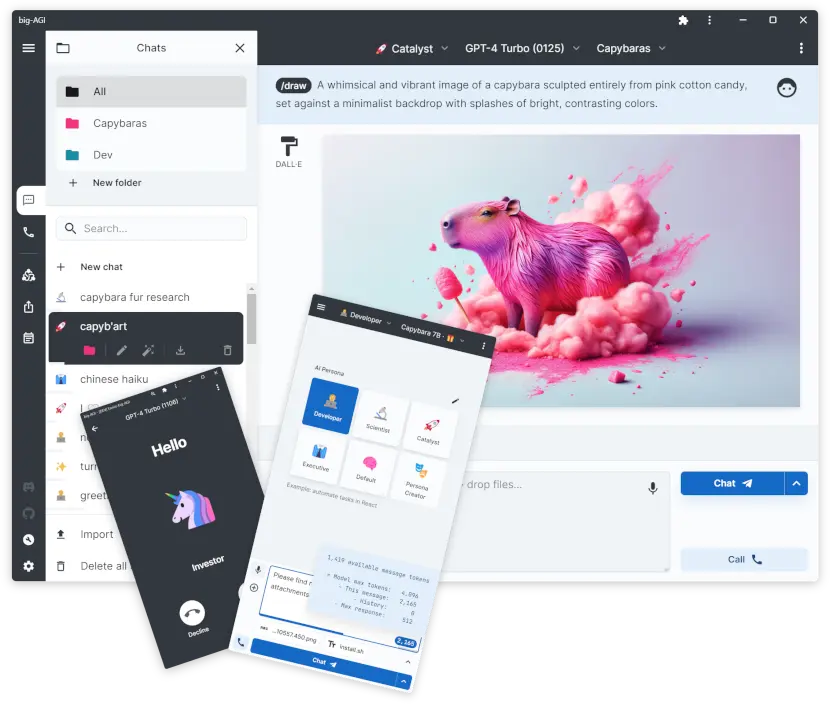

What is big-AGI?
big-AGI is a self-hosted AI chat app that uses your own API keys to talk to OpenAI, Anthropic, Google and other models in one place, instead of ChatGPT Plus.
big-AGI is a free, open-source AI chat app that you self-host and connect to your own API keys, so one private chat window can use models from OpenAI, Anthropic, Google, Mistral, DeepSeek, xAI and others in place of a ChatGPT Plus subscription. You pay each AI provider only for what you use.
Its best-known feature, Beam, asks several models the same question and shows the answers side by side, then lets you merge the best parts. You also get personas, image making, web search with sources on supported models, voice chat, file attachments and diagrams. A small marketing agency, for example, could ask three models for a client's tagline ideas at once, keep the strongest lines, and pay per use instead of keeping three monthly subscriptions.
big-AGI keeps your chats, settings and keys in your own browser rather than on the server, so each device has its own chats. It works in any browser and can be installed on a phone like an app.
Cloudgate installs big-AGI on a server Cloudgate provides or one you connect and gives it a secure web address. big-AGI has no login of its own, so Cloudgate adds one: sign in as admin with the password shown on the app's variables page, then add your API keys.
What you can do with big-AGI
- Chat with many AI models in one place Connect OpenAI, Anthropic, Google Gemini, Mistral, DeepSeek, xAI, OpenRouter and more, or a model running on your own computer, and switch between them in any chat.
- Compare answers with Beam Ask several models the same question side by side, then merge the best parts into one answer.
- Use ready-made personas Pick an assistant such as Developer, Scientist or Executive, or write your own instructions for a custom one.
- Make and edit images Create and edit pictures from a chat with image models from OpenAI or Google.
- Search the web and talk out loud Get answers with web sources on models that support it, and talk to a persona by voice with spoken replies.
- Work with files and long chats Attach files, draw diagrams, split the screen between two chats, sort chats into folders and search them all.
- See what is sent The AI Inspector shows the exact request that goes to the AI provider.
Replaces ChatGPT Plus and TypingMind
big-AGI does the same job as ChatGPT Plus and TypingMind. Here is what changes when you switch.
- Pay each AI provider for what you use instead of a monthly chat subscription
- Many providers' models side by side, with no lock-in to one company
- Free and open source under the MIT licence
- Your chats are kept in your own browser, not in a chat company's account
- You need your own API key from each AI provider you want to use
- Chats stay in the browser you used, with no sync between your devices
- No separate user accounts; everyone shares one sign-in
- No ChatGPT extras such as memory, custom GPTs or phone apps
What happens when you click Deploy?
You do not need a server or any technical knowledge. Four steps, and big-AGI is running at its own web address.
- Step 1 Click Deploy and create your account
Deploy takes you to Cloudgate. Create an account, or log in if you have one. big-AGI itself is free.
- Step 2 Choose a server
No server? Get one from Cloudgate: pick a size and a country, and Cloudgate gets it ready. Already have one? Connect it instead.
- Step 3 Cloudgate sets up big-AGI
It prepares the server, makes the passwords the app needs and starts it. There is nothing to install and nothing to write down.
- Step 4 Open your app and sign in
Your app gets a free web address to start, without https. Add your own domain, like app.yourshop.com, and Cloudgate secures it with https for you.
New to Cloudgate? See what Cloudgate is
Run Cloudgate yourself? Deploy from your own console
In your Cloudgate console, open Templates and choose big-AGI.
Questions
Is big-AGI free?
Yes, big-AGI is free and open source under the MIT licence. You pay only for your server and for what you use through each AI provider's API key. A separate hosted version at big-agi.com has a paid Pro plan, but the self-hosted app needs no licence.
Is big-AGI a good alternative to ChatGPT Plus?
Yes, if you are happy to use your own API keys. big-AGI gives you a ChatGPT-style chat with OpenAI's models and many others, image making, web search and voice, and you pay per use instead of a monthly fee. It has no ChatGPT memory, custom GPTs or phone apps.
What is Beam in big-AGI?
Beam is the big-AGI feature that sends one question to several AI models at once and shows their answers side by side. You can then merge the best parts into one reply, which helps to check facts and compare models.
Where are my big-AGI chats stored?
big-AGI stores your chats, settings and API keys in your own web browser, not on the server. The server only passes your messages to the AI provider. Clearing your browser data erases your chats, so make a backup from the app before you do.
How do I sign in to big-AGI?
Cloudgate puts a sign-in in front of big-AGI, because the app has no login of its own, so your browser asks for a username and password. Use the username admin and the password Cloudgate creates, shown on the app's variables page. Everyone you share it with uses the same sign-in, and each person's chats stay in their own browser.
Can I import my ChatGPT chats into big-AGI?
No, big-AGI imports only its own backup files. You can export your chats from big-AGI as a backup or as Markdown at any time.
Can big-AGI use AI models on my own computer?
Yes, big-AGI connects to Ollama, LM Studio, LocalAI and any service that speaks the OpenAI API, as long as your big-AGI server can reach that computer over the network. Those programs run the models; big-AGI is the chat window.
What server size do I need for big-AGI?
A small server is enough, because big-AGI is one light web app with no database and the AI work happens at the AI provider or on your own model server.
Do I need technical skills to run big-AGI?
No. Click Deploy, create your Cloudgate account and choose a server, and Cloudgate sets up big-AGI and gives it a web address. You use it in your browser like any other online tool.
Do I need my own server for big-AGI?
No. When you deploy big-AGI, hosted Cloudgate can provide a server. If you already rent one, you can connect it instead.
Related apps

AI chat and agents for many models, formerly LobeChat.

AI chat for your team, with every major AI model.

A self-hosted AI agent with its own computer that does tasks for you.

Private AI chat over your own documents, for staff and your website.