Orthanc
Your own DICOM server to store and view medical images.
No server needed to start: Cloudgate can provide one. What happens when you click Deploy
What is Orthanc?
Orthanc is a free, self-hosted DICOM server (mini-PACS) to store, search and view X-ray, CT and MRI images in your browser, instead of a cloud PACS.
Orthanc is a free, open-source DICOM server that you can self-host as a small PACS, an alternative to cloud PACS services such as PostDICOM or Ambra Health. It keeps your medical images, such as X-rays, CT, MRI and ultrasound studies, in one archive on your own server, and lets your team search, view, download and share them from a web browser.
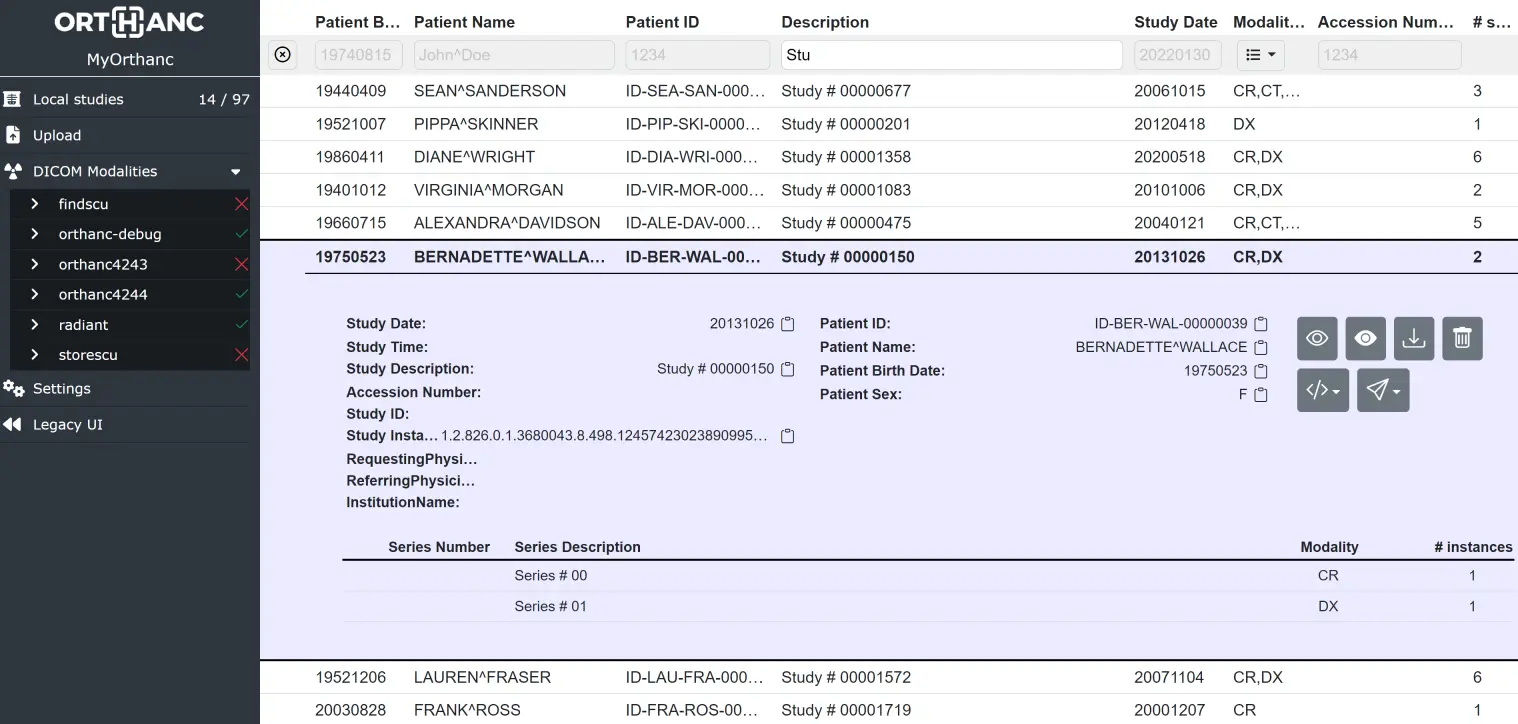
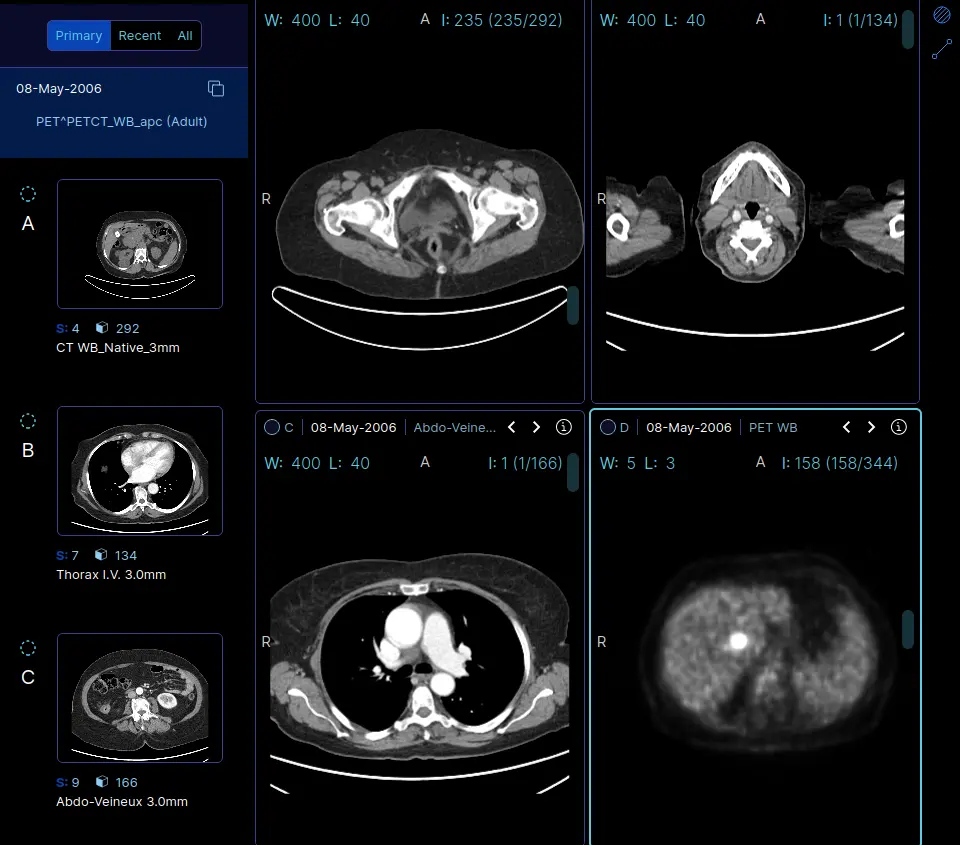
The web interface lists every study with filters for patient, date and modality, and opens images in the Stone Web Viewer or the OHIF viewer with nothing to install. A veterinary clinic, for example, could upload the X-rays from each visit and pull up a patient's earlier images on any computer in the practice before a follow-up appointment.
Orthanc follows the DICOM and DICOMweb standards, so it works with scanners, other PACS, desktop viewers such as Horos and 3D Slicer, and research tools that use its REST API. It is software for storing and viewing images; it does not claim medical device certification, and keeping patient data private is up to you.
Cloudgate installs Orthanc on a server Cloudgate provides or one you connect, with its database and a secure web address. Sign in with the password Cloudgate creates and upload your first studies.
What you can do with Orthanc
- Keep every study in one archive Store X-ray, CT, MRI, ultrasound and other DICOM images on your own server, with no storage fee.
- Find a study in seconds Search the study list by patient name, patient ID, date, modality or accession number.
- View images in the browser Open any study in the Stone Web Viewer or the OHIF viewer, with nothing to install on each computer.
- Upload from a disc or folder Drag DICOM files, folders or ZIP archives into the web page to add them to the archive.
- Download, edit and anonymize Download a study as a ZIP, correct patient or study details, or make an anonymized copy to share.
- Exchange images with other systems Send and receive studies with scanners, other PACS and viewers using the DICOM and DICOMweb standards.
- Automate with the REST API Every action is also available to scripts and other software, which suits research and custom workflows.
Replaces PostDICOM
Orthanc does the same job as PostDICOM. Here is what changes when you switch.
- Images stay on a server you control, in the place you choose
- No monthly fee that grows with the storage you use
- Free and open source, with no locked features
- Works with standard DICOM viewers, scanners and research tools
- You are responsible for backups, security and privacy rules such as HIPAA or GDPR
- The project does not claim any medical device certification
- The basic login gives each user full access; per-user roles and share links need extra setup
- No worklists or reporting; it stores and shows images only
What happens when you click Deploy?
You do not need a server or any technical knowledge. Four steps, and Orthanc is running at its own web address.
- Step 1 Click Deploy and create your account
Deploy takes you to Cloudgate. Create an account, or log in if you have one. Orthanc itself is free.
- Step 2 Choose a server
No server? Get one from Cloudgate: pick a size and a country, and Cloudgate gets it ready. Already have one? Connect it instead.
- Step 3 Cloudgate sets up Orthanc
It prepares the server, makes the passwords the app needs and starts it. There is nothing to install and nothing to write down.
- Step 4 Open your app and sign in
Your app gets a free web address to start, without https. Add your own domain, like app.yourshop.com, and Cloudgate secures it with https for you.
New to Cloudgate? See what Cloudgate is
Run Cloudgate yourself? Deploy from your own console
In your Cloudgate console, open Templates and choose Orthanc.
Questions
Is Orthanc free?
Yes, Orthanc is free and open source, with the core under the GPL-3.0 licence and its plugins under the AGPL-3.0. There is no paid edition; you pay only for your server and its storage.
Is Orthanc a good alternative to PostDICOM or another cloud PACS?
Yes, if you want to keep your images on your own server and have someone to look after it. Orthanc stores, searches and shows DICOM studies like a small PACS, but backups, security and privacy compliance become your job instead of the vendor's.
How do I sign in to Orthanc the first time?
Open your Orthanc address and sign in with the username orthanc and the password Cloudgate creates, shown on the app's variables page. There is no setup wizard; the archive starts empty and you add studies with the Upload page.
Can my X-ray or CT machine send images to Orthanc?
Yes, Orthanc accepts images sent over the standard DICOM network, but this install only opens the web address. You can upload studies in the browser straight away; for a scanner to send images directly, its DICOM connection to the server has to be set up, ideally over a VPN.
Can I view the images without installing a viewer?
Yes, studies open in the Stone Web Viewer or the OHIF viewer in any modern browser. Orthanc also works with desktop viewers such as Horos, 3D Slicer and Weasis.
Is Orthanc a certified medical device?
No, the Orthanc project does not claim any medical device certification, such as CE marking or FDA clearance. Whether and how you use it with patients, and meeting rules such as HIPAA or GDPR, is your responsibility.
What server size do I need for Orthanc?
A small server runs Orthanc, because it is a light program with a PostgreSQL database. Disk space matters most, since medical images are large, so plan storage for the studies you expect to keep.
Do I need technical skills to run Orthanc?
No. Click Deploy, create your Cloudgate account and choose a server, and Cloudgate sets up Orthanc and gives it a web address. You use it in your browser like any other online tool.
Do I need my own server for Orthanc?
No. When you deploy Orthanc, hosted Cloudgate can provide a server. If you already rent one, you can connect it instead.
Can I move my data from PostDICOM to Orthanc?
Most people export from PostDICOM and import into Orthanc. The official guides at orthanc.uclouvain.be walk through it.
Related apps

View and measure X-ray, CT and MRI scans in your web browser.

Health data, from clinic forms to dashboards and maps.

FHIR backend for teams building their own health apps.

Glucose following for family and carers, with alarms.