
Open Notebook
A private NotebookLM for your own documents, with the AI you choose.
No server needed to start: Cloudgate can provide one. What happens when you click Deploy
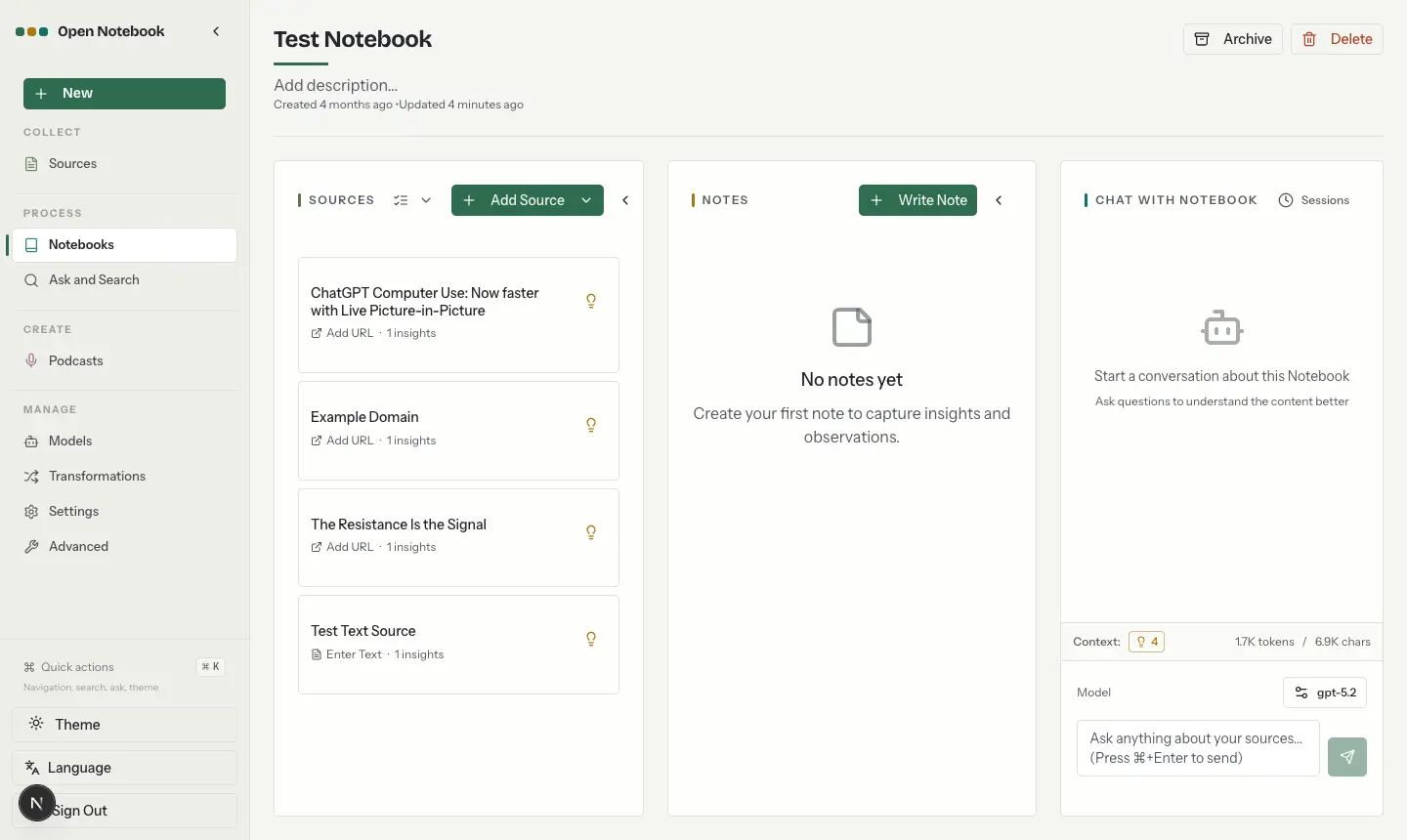

What is Open Notebook?
Self-hosted Open Notebook: an open-source NotebookLM alternative to chat with your documents, take notes and make podcasts with the AI you choose.
Open Notebook is a free, open-source, self-hosted research notebook and a private alternative to Google NotebookLM, which Google renamed Gemini Notebook in July 2026. You collect PDFs, Office files, web pages, YouTube videos and audio into notebooks, then chat with them, get summaries, write notes, search them and turn them into podcast-style audio.
The difference is that you choose the AI. Connect OpenAI, Anthropic, Google, Mistral or one of many other providers with your own key, or run local models with Ollama so nothing leaves your machines. Answers cite the sources they came from, and you decide which documents the AI may read. A consultant, for example, could load a client's reports and interview recordings into one notebook, ask what the main risks are, and listen to a two-voice summary on the way to the meeting.
Open Notebook is for one person: one shared password protects it, with no separate accounts. It runs in the web browser; there is no phone app. You pay your AI provider for what you use, and Open Notebook itself costs nothing.
Cloudgate installs Open Notebook and its database on your server, gives it a secure web address and creates its password. Sign in, add an AI key under Manage > Models, and start your first notebook.
What you can do with Open Notebook
- Gather sources in notebooks Keep the PDFs, Office files, web pages, YouTube videos and audio for each project together in one notebook.
- Chat with your sources Ask questions about a whole notebook or one document and get answers that cite the sources they used.
- Choose what the AI reads Pick exactly which sources and notes go into each conversation.
- Turn research into a podcast Generate an audio conversation about your sources with one to four speakers you set up yourself.
- Summarise new sources automatically Reusable prompts write a summary or pull out key points from every document you add.
- Search everything Find any passage by its words or its meaning, across all your notebooks.
- Keep notes beside your sources Write notes yourself, let the AI draft them, or save a useful answer as a note.
- Use the AI you prefer Connect OpenAI, Anthropic, Google, Mistral, OpenRouter and many more, or run local models with Ollama.
Replaces NotebookLM
Open Notebook does the same job as NotebookLM. Here is what changes when you switch.
- Your documents and notes stay on your own server
- Use any AI provider, or local models that keep everything private
- Podcasts with one to four speakers instead of two hosts
- No Google account needed
- You add your own AI provider key and pay that provider for what you use
- One person per install, with one shared password and no sharing between accounts
- Less polished than NotebookLM, and it takes a few minutes of setup
- Notebooks don't import from NotebookLM; you add your sources again
What happens when you click Deploy?
You do not need a server or any technical knowledge. Four steps, and Open Notebook is running at its own web address.
- Step 1 Click Deploy and create your account
Deploy takes you to Cloudgate. Create an account, or log in if you have one. Open Notebook itself is free.
- Step 2 Choose a server
No server? Get one from Cloudgate: pick a size and a country, and Cloudgate gets it ready. Already have one? Connect it instead.
- Step 3 Cloudgate sets up Open Notebook
It prepares the server, makes the passwords the app needs and starts it. There is nothing to install and nothing to write down.
- Step 4 Open your app and sign in
Your app gets a free web address to start, without https. Add your own domain, like app.yourshop.com, and Cloudgate secures it with https for you.
New to Cloudgate? See what Cloudgate is
Run Cloudgate yourself? Deploy from your own console
In your Cloudgate console, open Templates and choose Open Notebook.
Questions
Is Open Notebook free?
Yes, Open Notebook is free and open source under the MIT licence, with no paid edition. You pay only for your server and for the AI provider you connect, or nothing extra if you run local models.
Is Open Notebook a good alternative to NotebookLM?
Yes, if you want NotebookLM's way of working on your own server. Google renamed NotebookLM to Gemini Notebook in July 2026; Open Notebook offers the same idea of sources in notebooks, chat with citations and audio overviews, but you choose the AI provider and keep your documents. It is less polished and needs your own AI key.
Which AI keys do I need for Open Notebook?
Open Notebook needs at least one language model and one embedding model, which powers search. Add a provider's API key under Manage > Models, add the two models and let the app assign them as defaults. Podcasts also need a text-to-speech model, and audio files need a speech-to-text model.
Can Open Notebook run with local AI models?
Yes, Open Notebook works with Ollama, LM Studio and other OpenAI-compatible servers, so your documents need not leave your own machines. Local models need a server with much more memory.
How do I sign in to Open Notebook the first time?
Open the Open Notebook web address and enter the password Cloudgate generated for it, shown on the app's variables page in Cloudgate. There are no user accounts to create; the same password protects the whole app.
Can several people use one Open Notebook?
No, Open Notebook is built for one person. It has a single shared password and no user accounts, roles or sharing, so give each person their own install.
What server size do I need for Open Notebook?
Open Notebook asks for at least 4 GB of free memory, and recommends 8 GB or more. Running local AI models on the same server needs much more.
Do I need technical skills to run Open Notebook?
No. Click Deploy, create your Cloudgate account and choose a server, and Cloudgate sets up Open Notebook and gives it a web address. You use it in your browser like any other online tool.
Do I need my own server for Open Notebook?
No. When you deploy Open Notebook, hosted Cloudgate can provide a server. If you already rent one, you can connect it instead.
Can I move my data from NotebookLM to Open Notebook?
Most people export from NotebookLM and import into Open Notebook. The official guides at github.com walk through it.
Related apps

A self-hosted AI second brain that answers from your own notes.

A private NotebookLM that also writes and edits your Office files.

Chat with your documents and see the cited passage in each answer.

Ask questions of your team's documents, in a chat you can reshape.