Notifuse
Newsletters, email automations and app emails together.
No server needed to start: Cloudgate can provide one. What happens when you click Deploy
What is Notifuse?
Self-hosted Notifuse sends newsletters, automated email sequences and your app's emails, with a drag-and-drop editor, lists and A/B tests.
Notifuse is a self-hosted email platform and an alternative to Mailchimp, Brevo or Klaviyo for newsletters, automated email sequences and your app's emails, with no price per contact. You design emails in a drag-and-drop editor, keep contacts in lists and segments, send campaigns with A/B tests, and see deliveries, opens and clicks for each one.
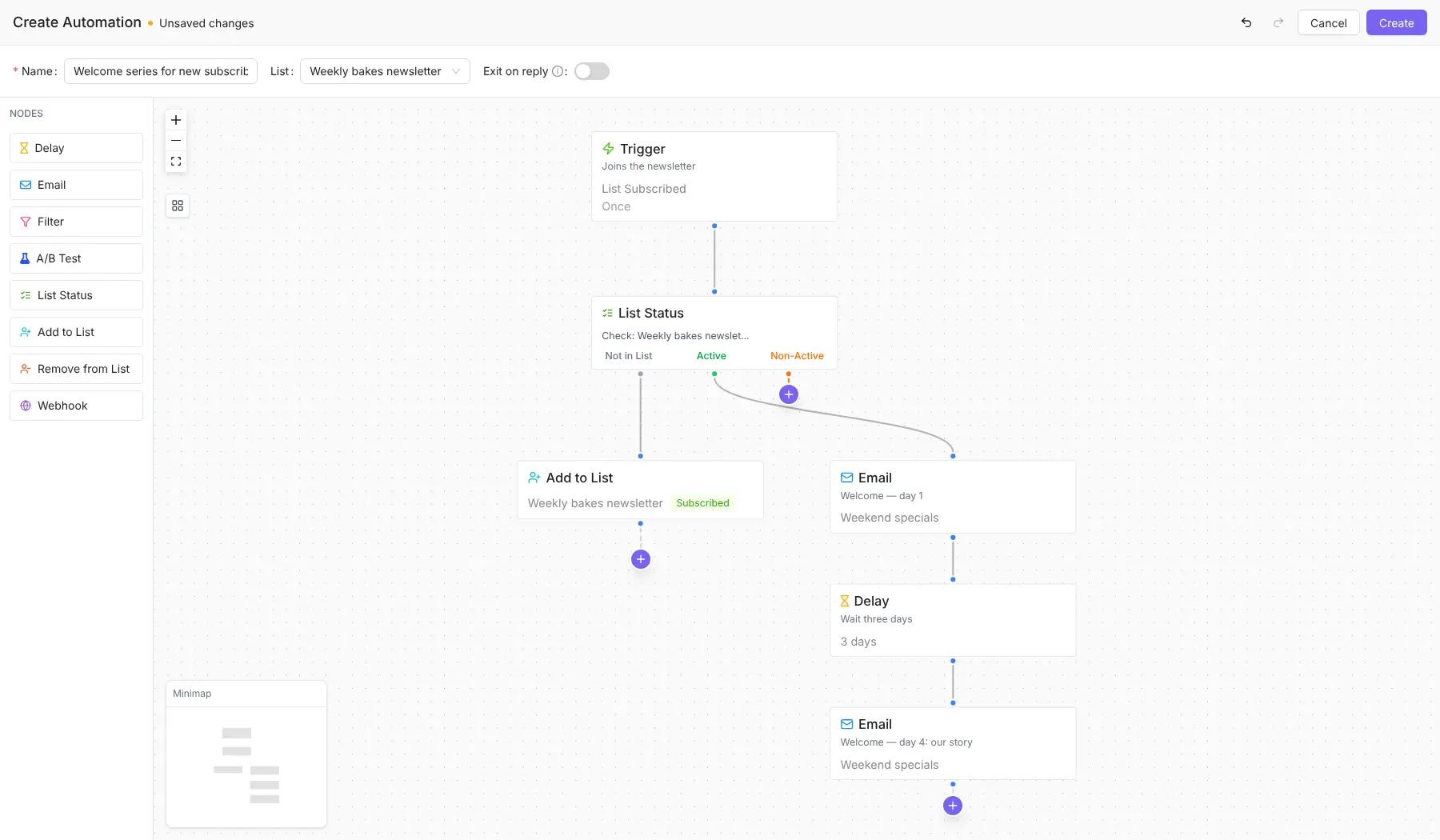
It suits small businesses and app makers who want marketing and one-to-one emails in the same place. A bakery could send a weekly newsletter of weekend bakes, welcome each new subscriber with two emails three days apart, and send order confirmations from its online shop, all from one list of contacts.
Notifuse sends through a service you connect, such as Amazon SES, Mailgun, Postmark, SendGrid or any SMTP account, and your website or app can add contacts and send emails through its API or Zapier. It is source-available rather than open source: free to run for your own business, with a few extras, such as single sign-on and more than three workspaces, behind a paid key.
Cloudgate installs Notifuse on a server Cloudgate provides or one you connect and gives it a secure web address. You then finish the setup wizard, sign in with the code it emails you, and add your sending service.
What you can do with Notifuse
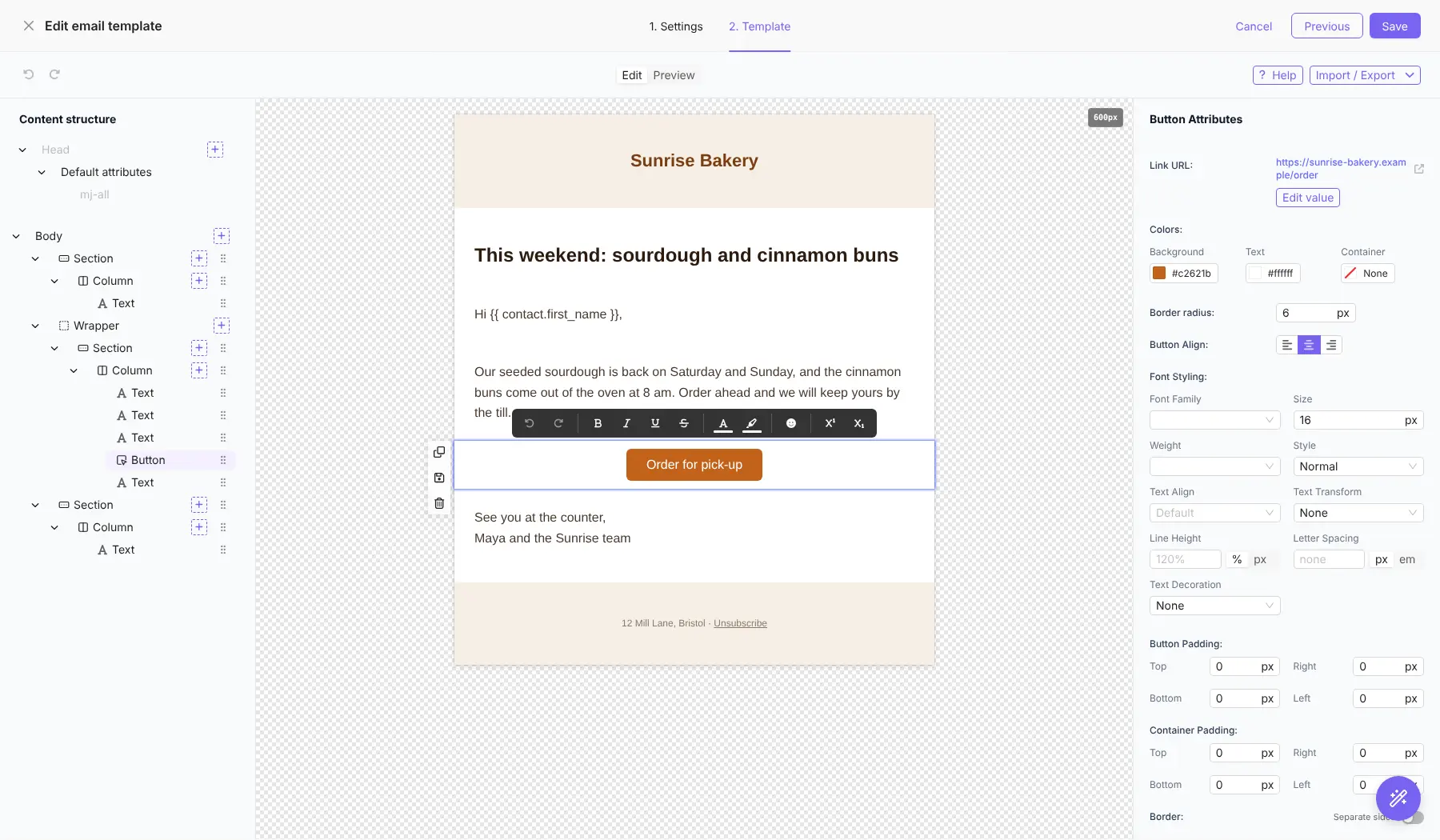
- Design emails by drag and drop Build responsive emails from sections, text, images and buttons, greet each reader by name, or paste in your own MJML code.
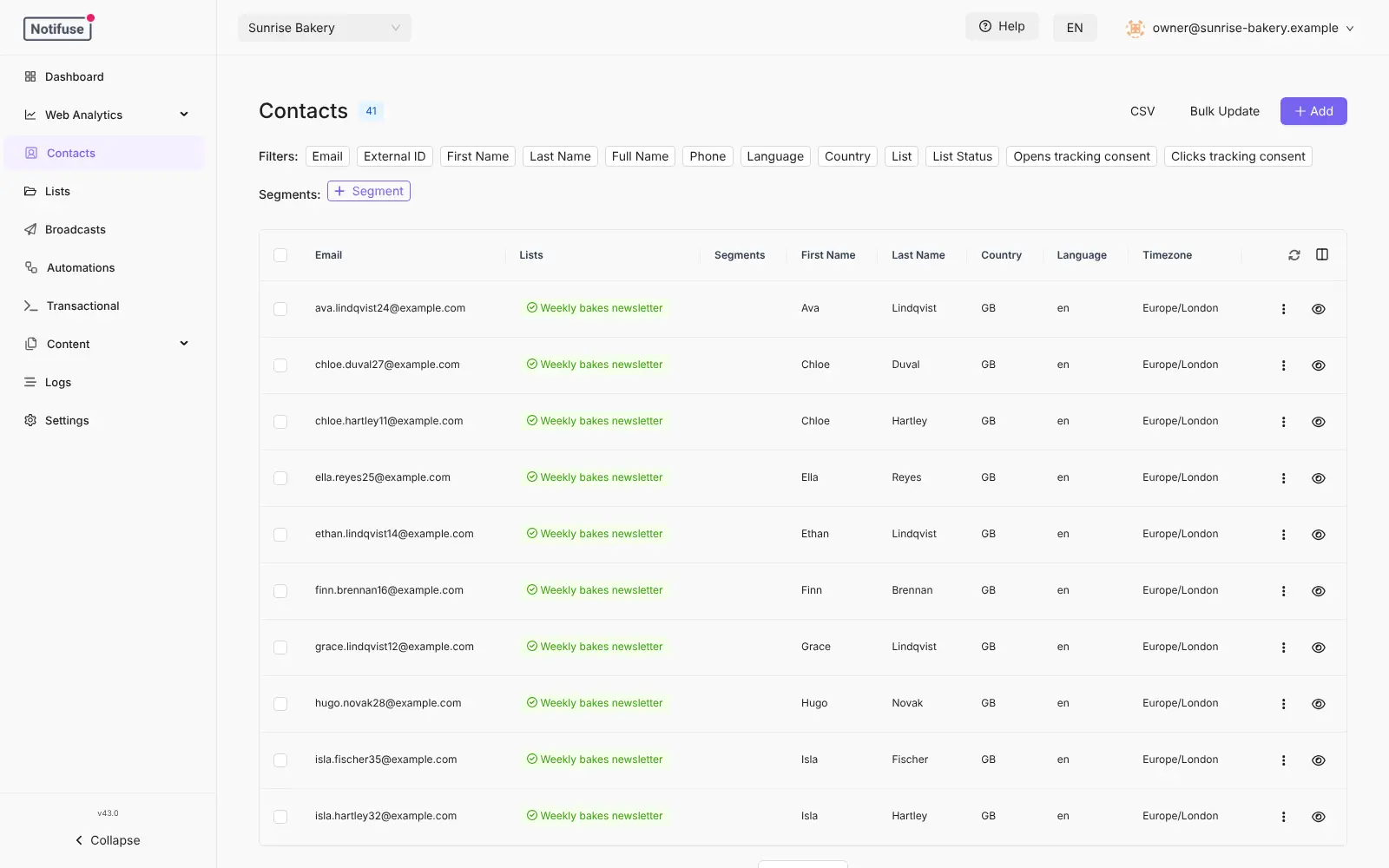
- Keep contacts in lists and segments Import a CSV, add custom fields, and send only to the contacts who match a segment, such as customers in one country.
- Send and test campaigns Schedule a broadcast to a list, test two subject lines or designs, and let the better one go to everyone else.
- Automate email sequences Draw a journey on a canvas, such as a welcome email, a three-day wait and a follow-up, with branches, filters and webhook steps.
- Send your app's emails Receipts, password resets and other one-to-one emails go out through an API from your website or app, or from Zapier.
- See opens and clicks, with consent Each campaign shows deliveries, opens, clicks and unsubscribes, and contacts can refuse open and click tracking.
- Let subscribers manage their lists Every email can link to a preference page where people choose their lists or unsubscribe.
- Track your website too Cookieless website analytics and a simple blog are built in, on the same server.
Replaces Mailchimp, Brevo, MailerLite and Customer.io
Notifuse does the same job as Mailchimp, Brevo, MailerLite and Customer.io. Here is what changes when you switch.
- No price per contact or per email, however big your list grows
- Newsletters, automations and app emails in one tool
- Your contacts and their history stay on your own server
- You choose the email sending service and its price
- You set up a sending service and your domain's sender records yourself
- Source-available, not open source; single sign-on, audit logs and more than three workspaces need a paid key
- No ready-made template gallery, landing pages or SMS
- Signing in depends on a working SMTP server, since it uses emailed codes
What happens when you click Deploy?
You do not need a server or any technical knowledge. Four steps, and Notifuse is running at its own web address.
- Step 1 Click Deploy and create your account
Deploy takes you to Cloudgate. Create an account, or log in if you have one. Notifuse itself is free.
- Step 2 Choose a server
No server? Get one from Cloudgate: pick a size and a country, and Cloudgate gets it ready. Already have one? Connect it instead.
- Step 3 Cloudgate sets up Notifuse
It prepares the server, makes the passwords the app needs and starts it. There is nothing to install and nothing to write down.
- Step 4 Open your app and sign in
Your app gets a free web address to start, without https. Add your own domain, like app.yourshop.com, and Cloudgate secures it with https for you.
New to Cloudgate? See what Cloudgate is
Run Cloudgate yourself? Deploy from your own console
In your Cloudgate console, open Templates and choose Notifuse.
Questions
Is Notifuse free?
Yes, Notifuse is free to self-host, for your own business and in production, with no limit on emails, contacts or team members. It is source-available under the Business Source License, not open source, and each version becomes open source (AGPL) four years after release. Six extras need a paid licence key, such as more than three workspaces, single sign-on and audit logs.
Is Notifuse a good alternative to Mailchimp?
Yes, if you want newsletters, A/B tests and automated sequences without a price per contact. Notifuse also sends your app's emails, such as receipts and password resets. Mailchimp delivers the email for you and has more ready-made designs, landing pages and integrations; with Notifuse you connect a sending service yourself.
Do I need an email sending service?
Yes. Notifuse writes, schedules and tracks your emails, and a sending service delivers them, such as Amazon SES, Mailgun, Postmark, Mailjet, SparkPost, SendGrid or any SMTP account. Set up the SPF and DKIM records that service gives you on your domain, so your emails reach inboxes.
Can I import my contacts from Mailchimp?
Yes. Export your audience from Mailchimp as a CSV file and import it into Notifuse, which matches columns such as email, first name and last name and adds everyone to the lists you pick. Campaigns and templates don't move over, so you rebuild your designs in the editor.
How do I sign in the first time?
Open your app's address and finish the setup wizard with your admin email and SMTP server details. Notifuse then emails a six-digit code to that address each time you sign in. Next, create a workspace for your business and add your email sending service in its settings.
Should I choose Notifuse, listmonk or Keila?
Choose Notifuse if you want automated email journeys and app emails as well as newsletters. Choose listmonk or Keila if you only send newsletters and want open-source software; Keila has a friendlier editor and sign-up forms, and listmonk suits very large lists.
Is my data private?
Yes. Your contacts, emails and statistics are stored on your own server, and the licence key check works offline. The sending service you choose sees only the emails it delivers. Notifuse can send anonymous usage statistics, which you can turn off.
Do I need technical skills to run Notifuse?
No. Click Deploy, create your Cloudgate account and choose a server, and Cloudgate sets up Notifuse and gives it a web address. You use it in your browser like any other online tool.
Do I need my own server for Notifuse?
No. When you deploy Notifuse, hosted Cloudgate can provide a server. If you already rent one, you can connect it instead.
Related apps

Newsletters with a friendly editor and sign-up forms.

Newsletters and mailing lists with no fee per subscriber.

Send newsletters to any size of list, without paying per subscriber.

Email campaigns, lead scoring and automation, no per-contact fee.