
LearnHouse
Online courses with assignments and certificates.
No server needed to start: Cloudgate can provide one. What happens when you click Deploy




What is LearnHouse?
LearnHouse is a self-hosted, open-source LMS for online courses with graded assignments, certificates and communities, instead of Teachable or TalentLMS.
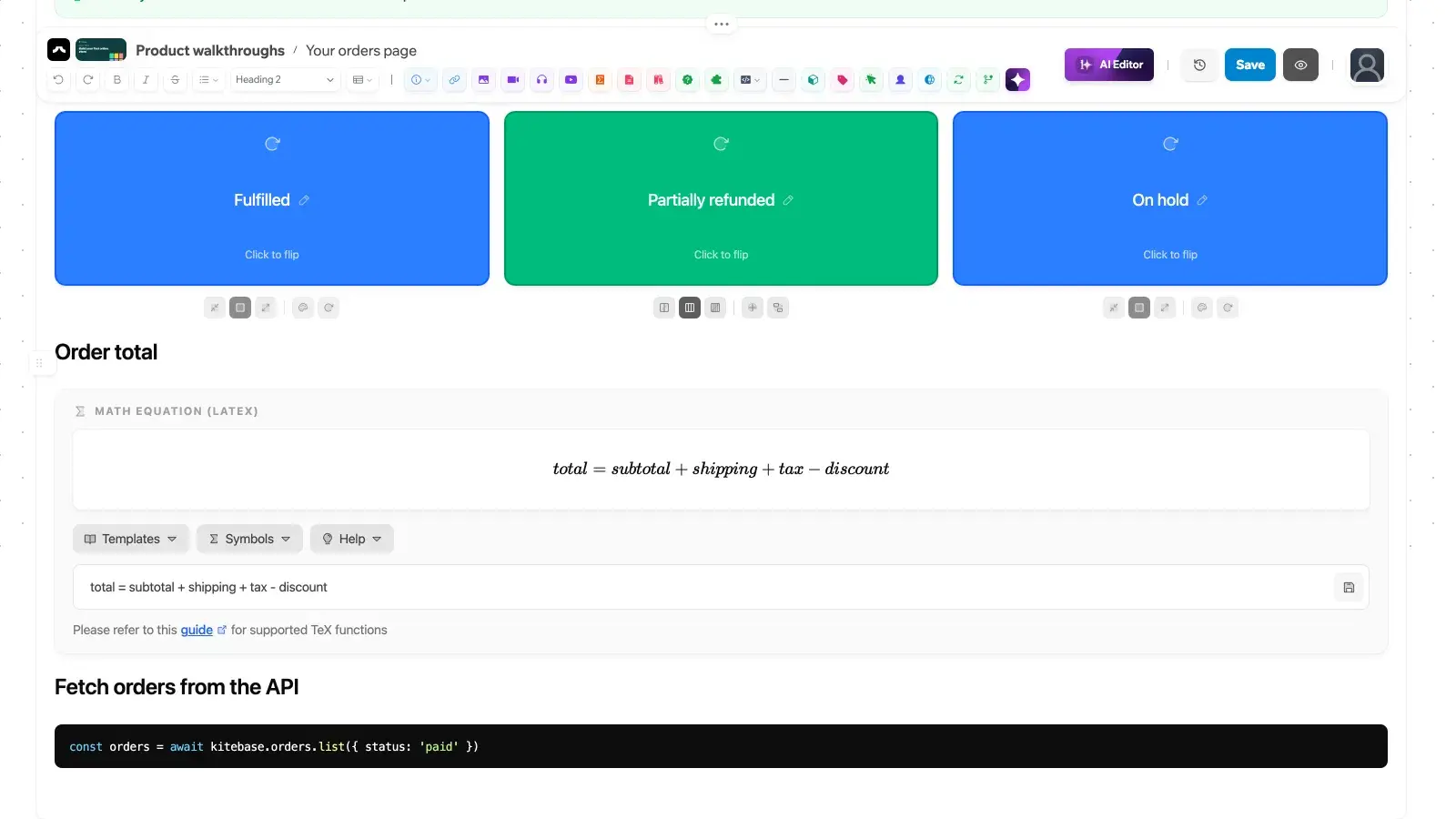
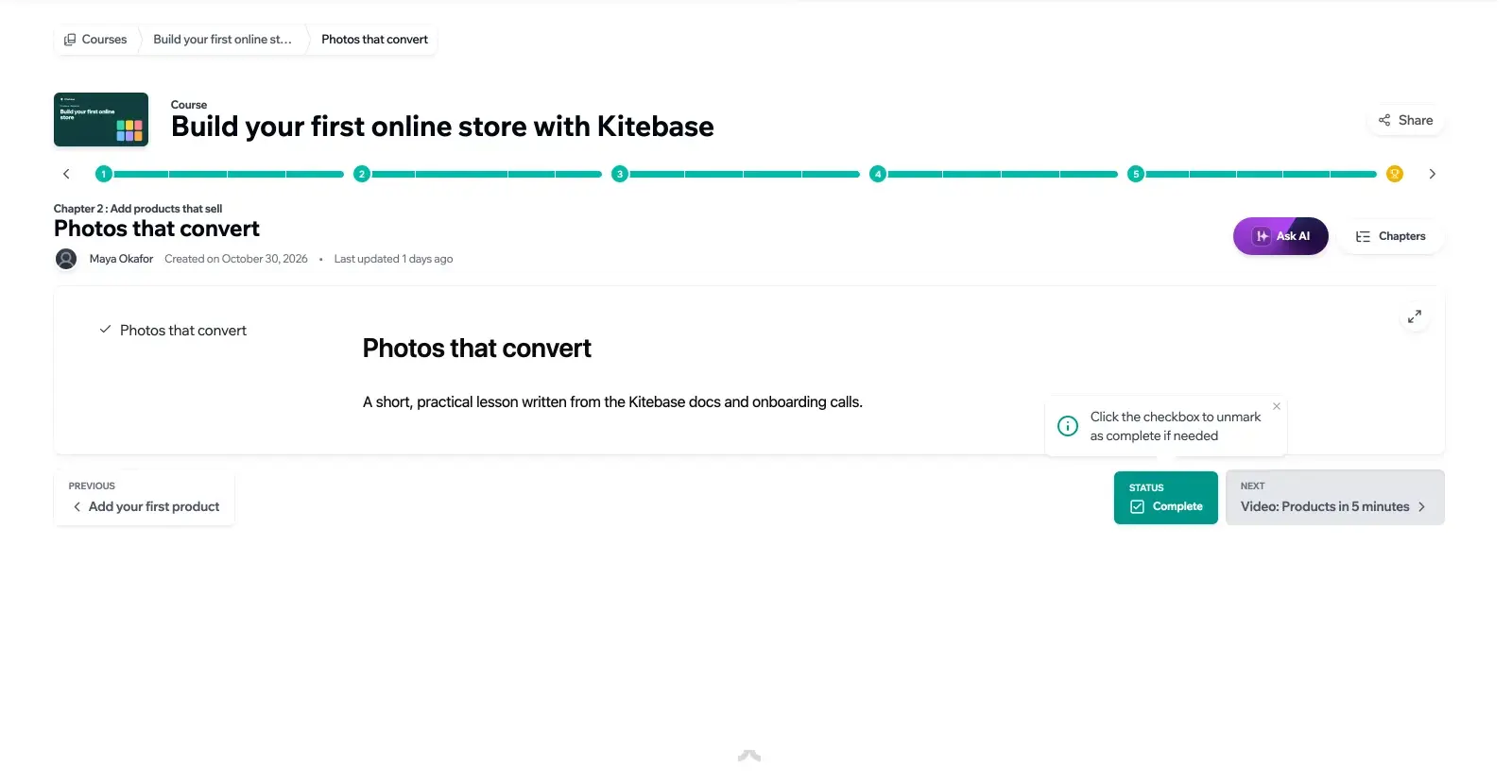
LearnHouse is a free, open-source learning management system (LMS) for running online courses on your own server, a self-hosted alternative to Teachable, Thinkific and TalentLMS for schools, trainers and teams. You write lessons in a block editor much like a document, set assignments that are graded automatically or by hand, and award certificates when learners finish a course or a learning path.
Next to the courses, learners get discussion communities, podcasts and shared whiteboards, and you can release chapters on a schedule. A small company could, for example, move its staff onboarding into LearnHouse: one learning path of three short courses, a quiz at the end of each, and a certificate that the new hire and their manager can check online.
If your courses live in Moodle, Canvas, Blackboard, Brightspace or Open edX today, LearnHouse can import their exports. AI help for writing courses and answering learners is optional and uses your own AI provider. Selling courses, analytics, single sign-on and live classes are part of a paid Enterprise licence.
Cloudgate installs LearnHouse on a server Cloudgate provides or one you connect, with the database it needs, and gives it a secure web address. Sign in with your admin email and the password shown in Cloudgate, then add your logo and your first course.
What you can do with LearnHouse
- Write lessons like a document A block editor for text, video, PDFs, images, quizzes, flip cards, maths and code, with version history.
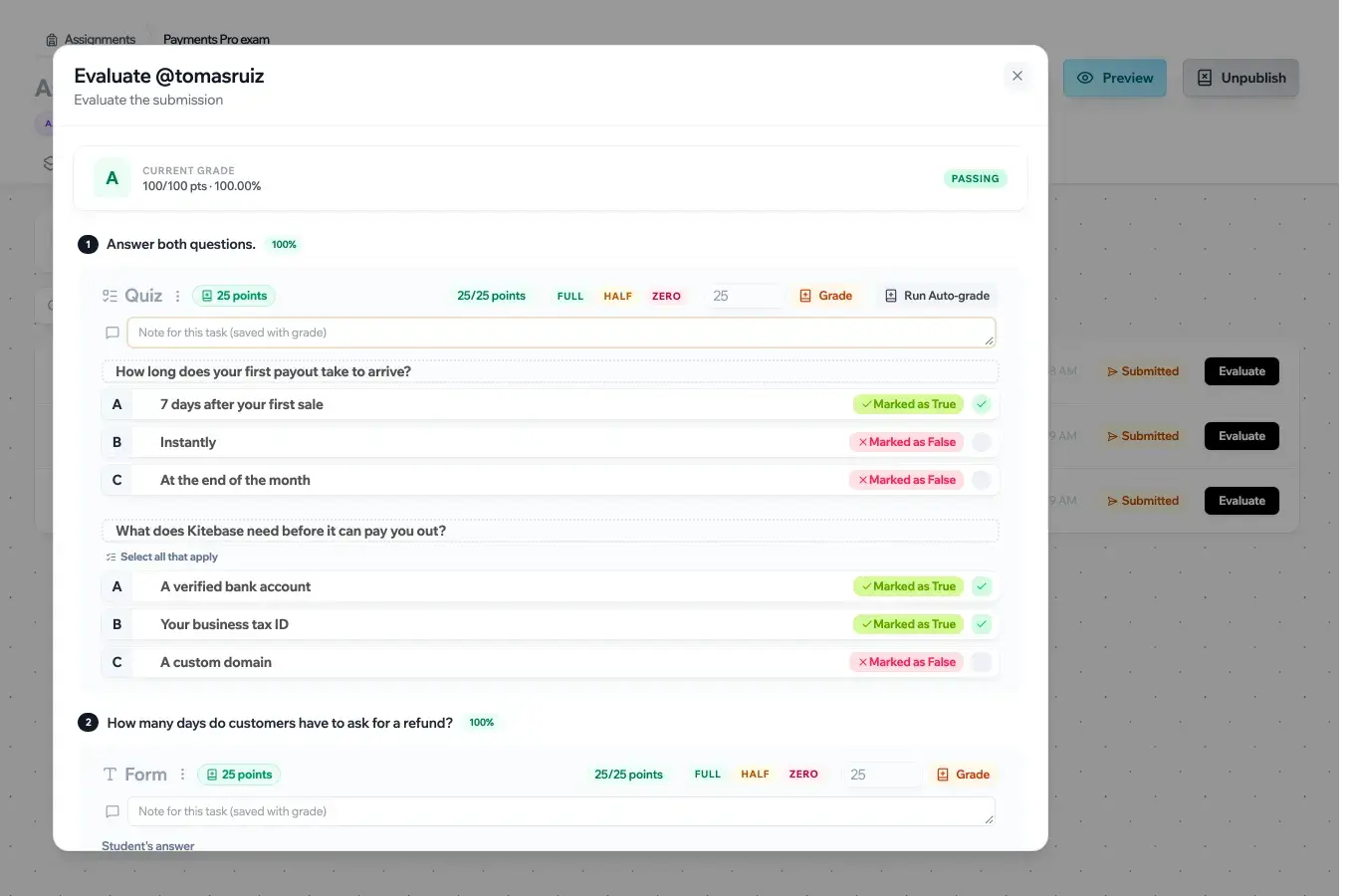
- Set and grade assignments Quizzes, forms, file uploads and short answers, marked automatically or by hand with notes for each learner.
- Award certificates Learners who finish a course or a learning path get a certificate with a public page anyone can check.
- Plan the order of learning Group courses into collections and learning paths, and release chapters on a schedule.
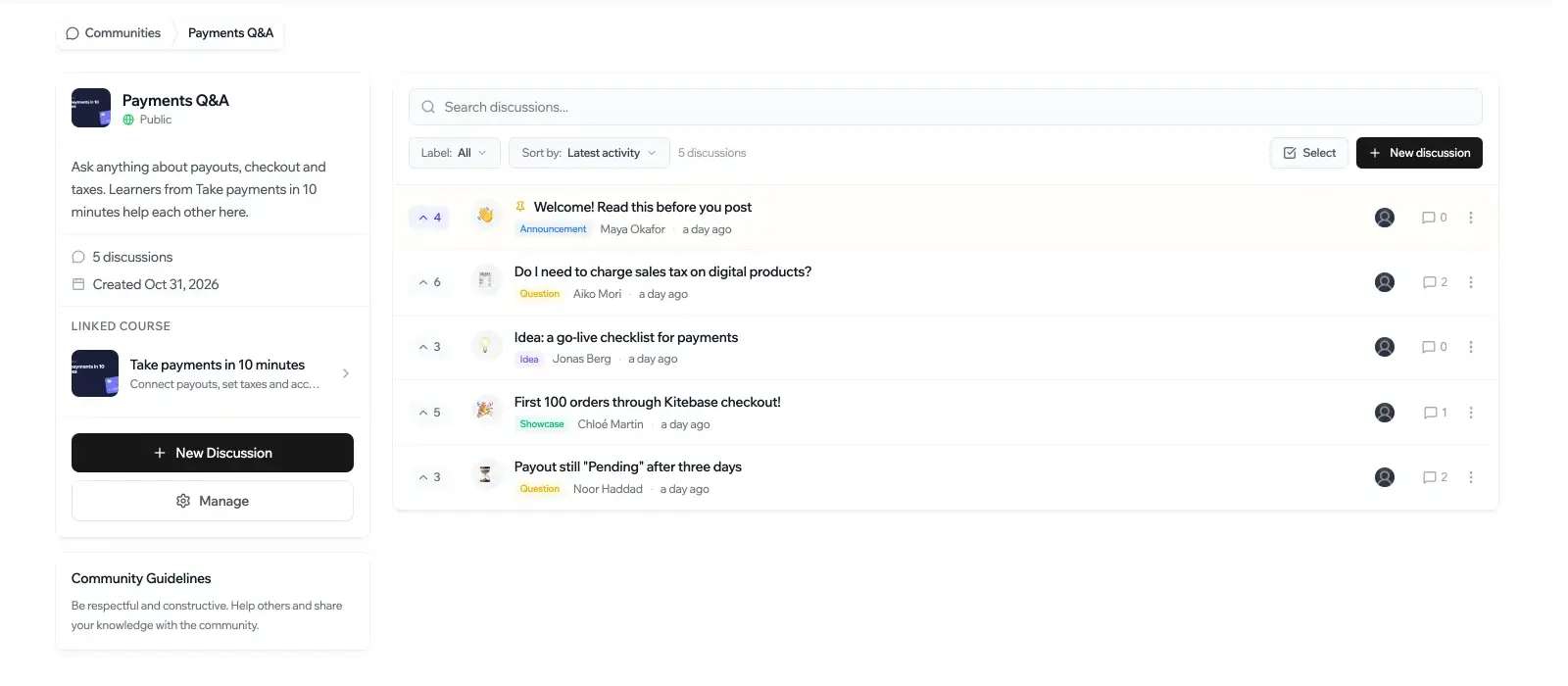
- Give learners a place to talk Discussion communities linked to your courses, plus podcasts and shared whiteboards for group work.
- Bring your courses with you Import course exports from Moodle, Canvas, Blackboard, Brightspace and Open edX, or build a course from a folder of files.
- Make it yours Your logo, colours, landing page and domain, in 22 interface languages.
Replaces Teachable and Thinkific
LearnHouse does the same job as Teachable and Thinkific. Here is what changes when you switch.
- No monthly fee per course or per learner
- Your courses, learners and their results stay on your server
- Graded assignments, certificates and communities in the free edition
- Courses from Moodle, Canvas and other platforms can be imported
- Selling courses needs the paid Enterprise licence when you host it yourself
- No course analytics, single sign-on, SCORM or live classes in the free edition
- No phone apps; learners use it in the browser
- Courses from Teachable or Thinkific do not import, so you rebuild them
What happens when you click Deploy?
You do not need a server or any technical knowledge. Four steps, and LearnHouse is running at its own web address.
- Step 1 Click Deploy and create your account
Deploy takes you to Cloudgate. Create an account, or log in if you have one. LearnHouse itself is free.
- Step 2 Choose a server
No server? Get one from Cloudgate: pick a size and a country, and Cloudgate gets it ready. Already have one? Connect it instead.
- Step 3 Cloudgate sets up LearnHouse
It prepares the server, makes the passwords the app needs and starts it. There is nothing to install and nothing to write down.
- Step 4 Open your app and sign in
Your app gets a free web address to start, without https. Add your own domain, like app.yourshop.com, and Cloudgate secures it with https for you.
New to Cloudgate? See what Cloudgate is
Run Cloudgate yourself? Deploy from your own console
In your Cloudgate console, open Templates and choose LearnHouse.
Questions
Is LearnHouse free?
Yes, LearnHouse is free and open source under the AGPL-3.0 licence, with no limit on courses or learners when you host it yourself. Payments, analytics, single sign-on, SCORM, live classes, messages and audit logs are part of a paid Enterprise licence.
Can I sell courses with self-hosted LearnHouse?
No, not with the free edition. Selling courses through a store and checkout is an Enterprise feature when you host LearnHouse yourself, so the free edition suits free courses, school classes and staff training.
Is LearnHouse a good alternative to Teachable or Thinkific?
Yes, if you want to run courses on your own server rather than sell them. LearnHouse gives you lessons, graded assignments, certificates and communities with no fee per learner, but taking payments needs its paid Enterprise licence.
Can I import my courses from Moodle or Canvas?
Yes, LearnHouse imports course exports from Moodle, Canvas, Blackboard, D2L Brightspace, Open edX and any Common Cartridge file, and turns quizzes into assignments or quiz blocks. It does not import from Teachable or Thinkific, and SCORM packages need the Enterprise licence.
How do I sign in to LearnHouse the first time?
LearnHouse creates one admin account when it is installed. Sign in with the admin email you entered at setup and the password Cloudgate created for it, shown in Cloudgate, then invite your teachers and learners from the dashboard.
Does LearnHouse have AI features?
Yes, optionally. LearnHouse can draft courses, help in the editor and answer learners' questions from your own course content once you connect an AI provider such as OpenAI, Anthropic, Google Gemini or a local Ollama; the provider bills you for what you use.
What server size do I need for LearnHouse?
LearnHouse needs at least 2 GB of memory, and the project recommends 4 GB and two processor cores. Video and file uploads use disk space, so plan for 20 GB or more.
Do I need technical skills to run LearnHouse?
No. Click Deploy, create your Cloudgate account and choose a server, and Cloudgate sets up LearnHouse and gives it a web address. You use it in your browser like any other online tool.
Do I need my own server for LearnHouse?
No. When you deploy LearnHouse, hosted Cloudgate can provide a server. If you already rent one, you can connect it instead.
Related apps

Sell courses and memberships, with a community, on your own server.

Sell online courses and downloads from your own website.

An LMS for courses, online exams and staff training.

LMS for staff training, compliance and customer courses.