
Kokoro-FastAPI
Text to speech with natural voices, no GPU needed.
No server needed to start: Cloudgate can provide one. What happens when you click Deploy


What is Kokoro-FastAPI?
Self-hosted Kokoro-FastAPI turns text into natural speech with 54 voices in 8 languages, in a browser player or through an OpenAI-compatible speech API.
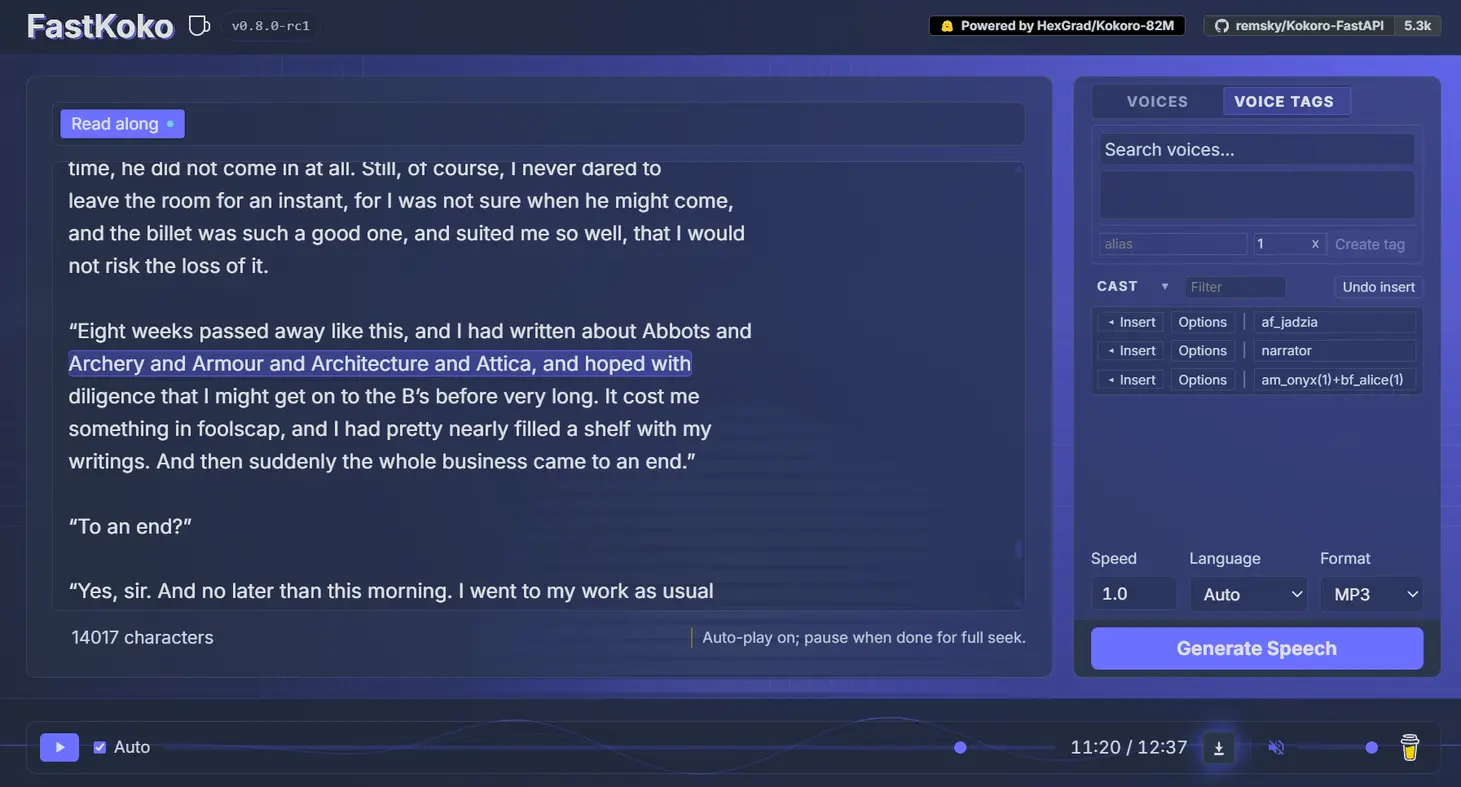
Kokoro-FastAPI is a free, open-source text-to-speech server that turns written text into natural-sounding speech, a self-hosted alternative to ElevenLabs and OpenAI's text to speech. It runs the open Kokoro TTS voice model on your own server, without a graphics card, and has a simple web player at /web/ on its address: paste your text, choose one of 54 voices, and play or download the audio.
It suits anyone who makes a lot of spoken audio and is tired of paying by the character. A training company, for example, can turn each lesson script into an MP3 voice-over, give the narrator and a customer different voices in the same file, and fix how a product name is pronounced, without any limit on how many lessons it records. Long texts are read in one go, with the words highlighted as they are spoken.
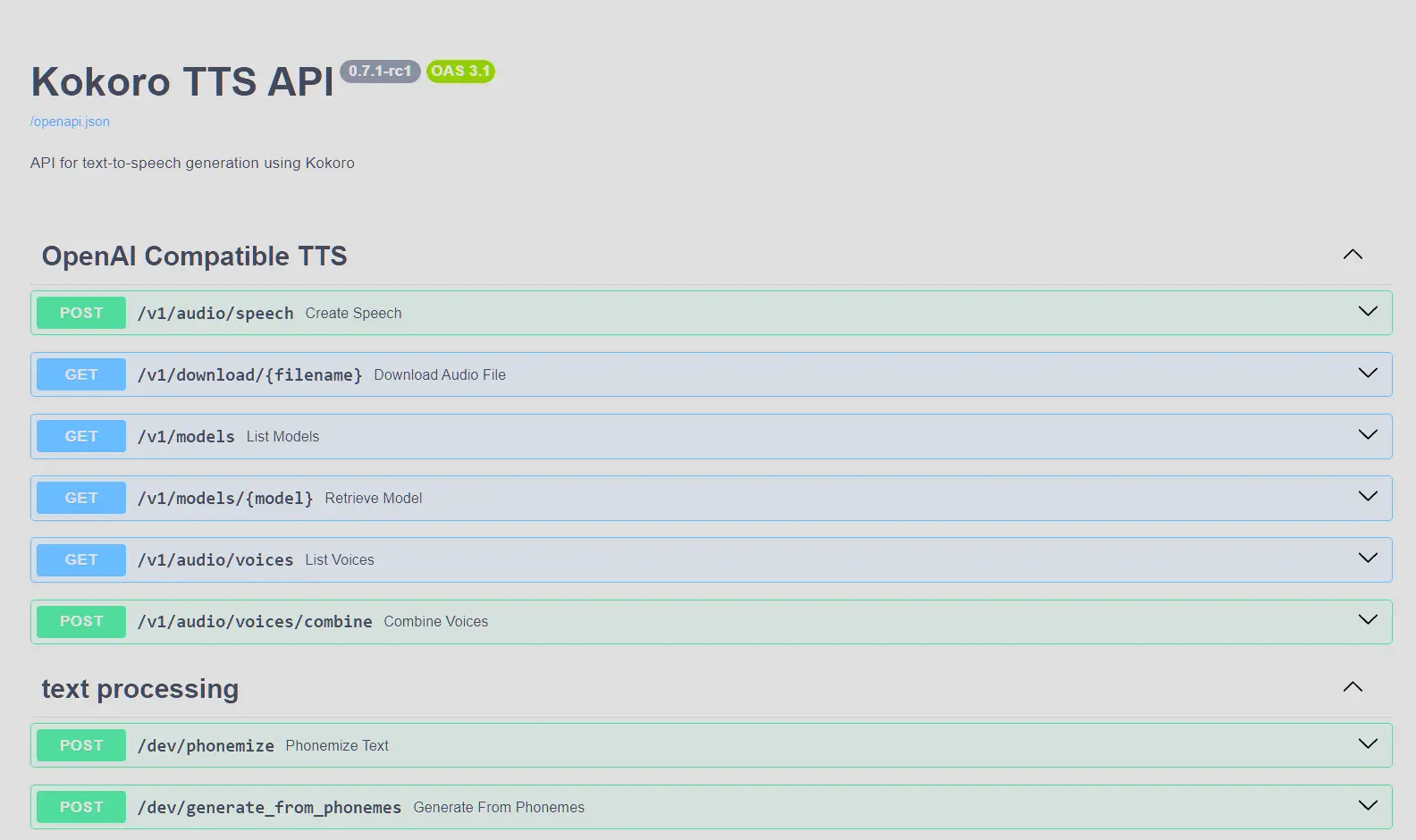
Kokoro-FastAPI also answers the same requests as OpenAI's speech service, so tools that already speak through OpenAI, such as Open WebUI, community add-ons for Home Assistant and audiobook makers, can use it instead. Cloudgate installs it on a server Cloudgate provides or one you connect and gives it a secure web address. Your text stays on your server.
What you can do with Kokoro-FastAPI
- Turn text into speech in the browser Paste a script, choose a voice, speed and audio format, then play the result or download it.
- Read along with long texts Long articles and chapters are read in one go, and the player highlights each sentence as it is spoken.
- Choose from 54 voices in 8 languages American and British English, Spanish, French, Hindi, Italian, Japanese, Brazilian Portuguese and Mandarin Chinese.
- Blend voices into your own Mix two or more voices in the proportions you like and save the mix under a short name.
- Write dialogue for several speakers Tag who says each line, add pauses and fix how a word is pronounced, all in the text itself.
- Download the format you need Save audio as MP3, WAV, Opus, FLAC, AAC or raw PCM, with word timings for captions if you want them.
- Plug it into apps that speak Apps and tools built for OpenAI's text to speech, such as Open WebUI and community add-ons for Home Assistant, can use it by changing one address.
Replaces ElevenLabs and OpenAI Text to Speech
Kokoro-FastAPI does the same job as ElevenLabs and OpenAI Text to Speech. Here is what changes when you switch.
- No per-character or monthly fee, however much audio you make
- The text you turn into speech stays on your own server
- Apps written for OpenAI's speech API work with a change of address
- The voices and the model are open source, and you may use the audio commercially
- No voice cloning; you choose from the built-in voices or blend them
- Fewer languages and voices than ElevenLabs, and non-English voices are thinner
- On a server without a graphics card, long texts take a while to generate
- No user accounts; anyone with the address can use the web player unless you set an API key, which also turns the player off
What happens when you click Deploy?
You do not need a server or any technical knowledge. Four steps, and Kokoro-FastAPI is running at its own web address.
- Step 1 Click Deploy and create your account
Deploy takes you to Cloudgate. Create an account, or log in if you have one. Kokoro-FastAPI itself is free.
- Step 2 Choose a server
No server? Get one from Cloudgate: pick a size and a country, and Cloudgate gets it ready. Already have one? Connect it instead.
- Step 3 Cloudgate sets up Kokoro-FastAPI
It prepares the server, makes the passwords the app needs and starts it. There is nothing to install and nothing to write down.
- Step 4 Open your app and sign in
Your app gets a free web address to start, without https. Add your own domain, like app.yourshop.com, and Cloudgate secures it with https for you.
New to Cloudgate? See what Cloudgate is
Run Cloudgate yourself? Deploy from your own console
In your Cloudgate console, open Templates and choose Kokoro-FastAPI.
Questions
Is Kokoro-FastAPI free?
Yes, Kokoro-FastAPI is free and open source under the Apache 2.0 licence, and the Kokoro-82M voice model it uses is under Apache 2.0 too, so the audio can be used commercially. There is no paid edition and no character limit. You pay only for your server.
Is Kokoro-FastAPI a good alternative to ElevenLabs?
Yes, for narration and voice-overs with ready-made voices. Kokoro-FastAPI reads text in natural-sounding voices with no per-character bill, and voice-agent tools that talk to ElevenLabs can talk to it. It cannot clone a voice and has fewer languages and voices than ElevenLabs.
Can Kokoro-FastAPI replace OpenAI's text-to-speech API?
Yes, for most uses. Kokoro-FastAPI answers the same speech requests as OpenAI and maps OpenAI's voice names, such as alloy and nova, to its own voices, so existing apps work by changing the address and key. It ignores OpenAI's style instructions.
Can I move my voices from ElevenLabs to Kokoro-FastAPI?
No. Voices, and cloned voices in particular, cannot be exported from ElevenLabs. Pick the closest of Kokoro's 54 voices or mix two into a new one, and point your scripts and apps at Kokoro-FastAPI's OpenAI-compatible speech API.
Does Kokoro-FastAPI need a graphics card?
No. Cloudgate installs the CPU version of Kokoro-FastAPI, which runs on an ordinary server with no graphics card. It is slower than a graphics card or a cloud service, so a long text takes a while to generate.
Which languages does Kokoro-FastAPI speak?
Kokoro-FastAPI speaks eight languages with 54 voices in all. American and British English have the most voices and the best quality; Spanish, French, Hindi, Italian, Japanese, Brazilian Portuguese and Mandarin Chinese have fewer, and French has one.
How do I sign in to Kokoro-FastAPI the first time?
You don't. Kokoro-FastAPI has no accounts. Add /web/ to the web address to open the player; anyone with that address can make audio. If you only need it for other apps, set an API key during setup; the browser player then stops working.
Does Kokoro-FastAPI send my text to an outside service?
No. Kokoro-FastAPI runs the voice model on your own server, so the text you type and the audio it makes are not sent to an outside service.
Do I need technical skills to run Kokoro-FastAPI?
No. Click Deploy, create your Cloudgate account and choose a server, and Cloudgate sets up Kokoro-FastAPI and gives it a web address. You use it in your browser like any other online tool.
Do I need my own server for Kokoro-FastAPI?
No. When you deploy Kokoro-FastAPI, hosted Cloudgate can provide a server. If you already rent one, you can connect it instead.
Related apps
Turn your e-books into audiobooks with AI voices on your own server.

A self-hosted AI agent with its own computer that does tasks for you.

Private AI chat over your own documents, for staff and your website.

One private AI chat for many models, using your own API keys.