ebook2audiobook
Turn your e-books into audiobooks with AI voices on your own server.
No server needed to start: Cloudgate can provide one. What happens when you click Deploy


What is ebook2audiobook?
Self-hosted ebook2audiobook turns EPUB, PDF and other e-books into M4B audiobooks with chapters, using AI voices and voice cloning on your server.
ebook2audiobook is free, open-source, self-hosted software that turns an e-book into an audiobook with chapters, using AI voices that run on your own server instead of a paid service such as ElevenLabs. Its default voice model, XTTSv2, is licensed for non-commercial use only.
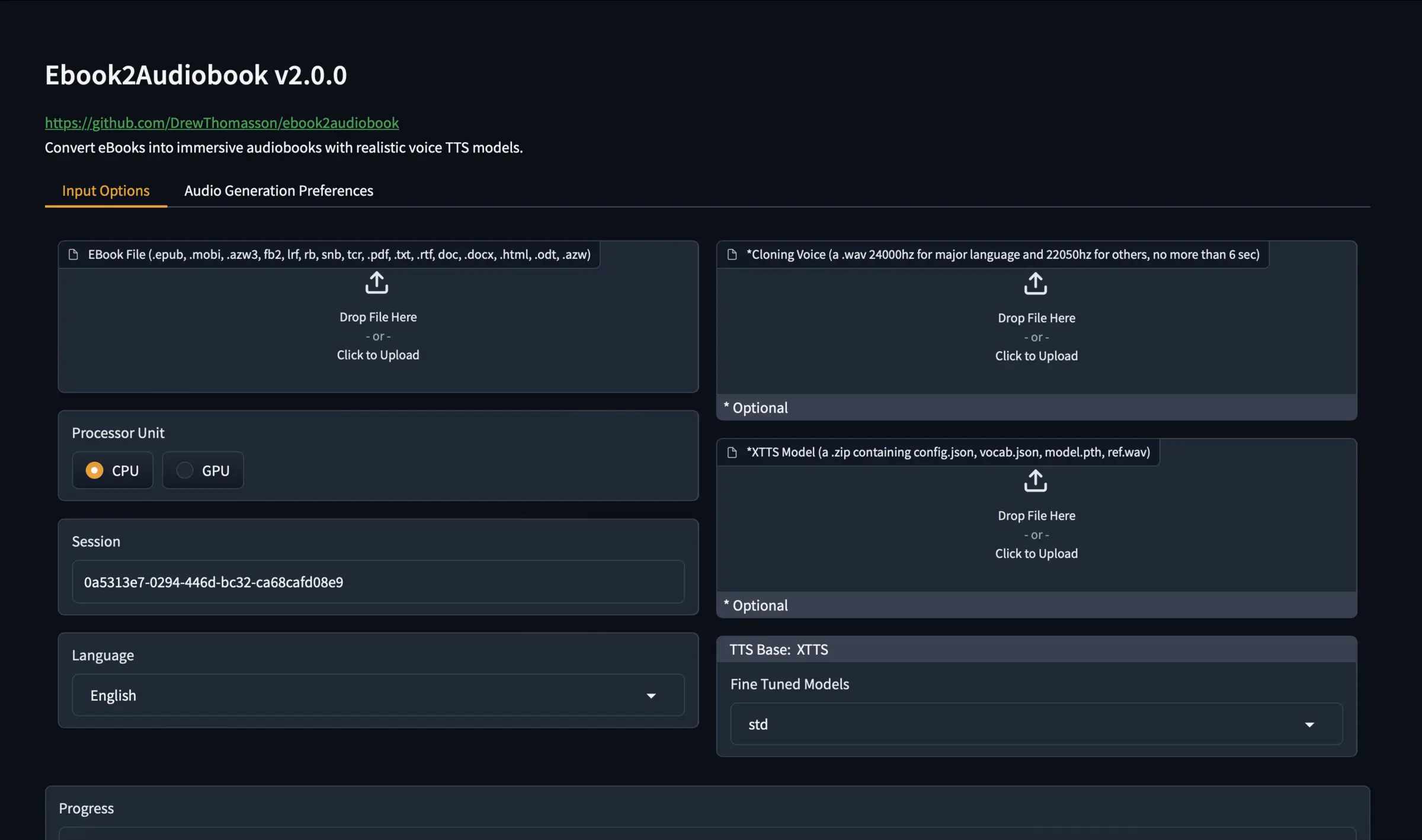
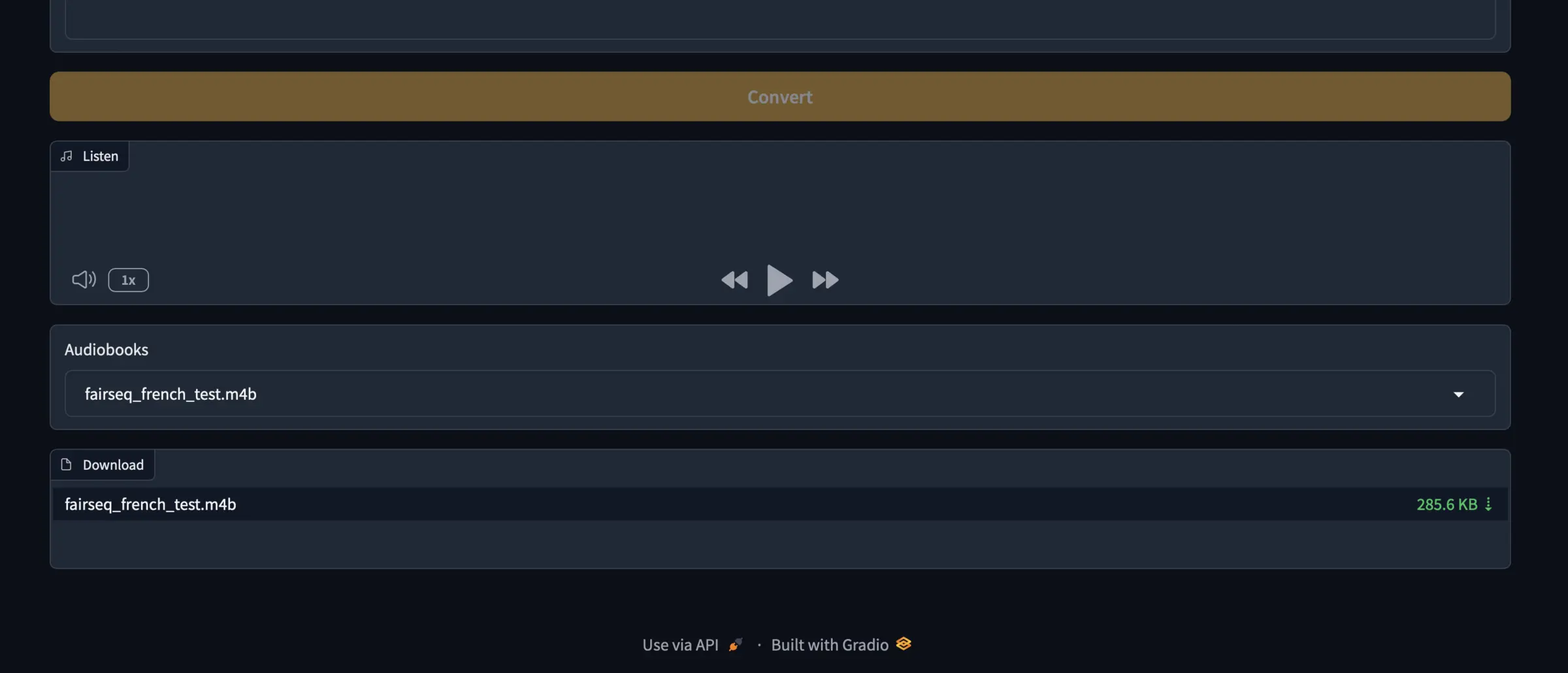
You upload a book file in a web page, choose the language and a voice, or upload a short recording to clone one, and download the result as an M4B audiobook or another audio format. A teacher, for example, could turn an out-of-copyright novel into an audiobook for students who prefer to listen, without sending the text anywhere.
It reads EPUB, MOBI, AZW3, PDF, Word and many other formats, supports more than a thousand languages through dozens of speech engines, and its M4B files play in Audiobookshelf and most audiobook apps. Conversion is slow without a graphics card, and copy-protected Kindle or Audible books can't be used.
Cloudgate installs ebook2audiobook on a server Cloudgate provides or one you connect and gives it a secure web address. The page has no login, so anyone with the address can use it: keep it private.
What you can do with ebook2audiobook
- Convert a whole book Upload an EPUB, MOBI, AZW3, PDF, DOCX, ODT, TXT or HTML file and get an audiobook with chapters and metadata.
- Choose your audio format Download an M4B audiobook with chapters, or MP3, M4A, FLAC, OGG, WAV and other formats.
- Clone a voice Upload a short voice recording and the book is read in a voice like it, or pick one of the built-in voices.
- Many languages Read books aloud in more than a thousand languages, and translate the text before reading if you need to.
- Pick the voice engine Switch between dozens of speech engines, such as XTTSv2, Piper, Kokoro, Bark and VITS, to trade quality for speed.
- Keep books private The text is turned into speech on your server, so nothing is sent to an outside voice service.
Replaces ElevenLabs
ebook2audiobook does the same job as ElevenLabs. Here is what changes when you switch.
- No fee per character or per book, and no monthly plan
- Your books and voice samples stay on your server
- Whole books in one go, with chapters, in the format you choose
- Many engines and languages to choose from
- The default voice model is for non-commercial use only
- Voice quality depends on the engine and language you pick
- Slow without a graphics card; a novel can take hours
- No login, so anyone with the address can use it
What happens when you click Deploy?
You do not need a server or any technical knowledge. Four steps, and ebook2audiobook is running at its own web address.
- Step 1 Click Deploy and create your account
Deploy takes you to Cloudgate. Create an account, or log in if you have one. ebook2audiobook itself is free.
- Step 2 Choose a server
No server? Get one from Cloudgate: pick a size and a country, and Cloudgate gets it ready. Already have one? Connect it instead.
- Step 3 Cloudgate sets up ebook2audiobook
It prepares the server, makes the passwords the app needs and starts it. There is nothing to install and nothing to write down.
- Step 4 Open your app and sign in
Your app gets a free web address to start, without https. Add your own domain, like app.yourshop.com, and Cloudgate secures it with https for you.
New to Cloudgate? See what Cloudgate is
Run Cloudgate yourself? Deploy from your own console
In your Cloudgate console, open Templates and choose ebook2audiobook.
Questions
Is ebook2audiobook free?
Yes. ebook2audiobook is free, open-source software under the Apache 2.0 licence. You pay only for your server, but check the licence of the voice model you use.
Can I sell audiobooks made with ebook2audiobook?
Not with the default voice. The default XTTSv2 model in ebook2audiobook is under the Coqui Public Model License, which allows non-commercial use only. For commercial work, choose another engine and check that engine's own licence, and only convert books you have the rights to.
Is ebook2audiobook a good alternative to ElevenLabs?
Yes, for turning whole books you own into audiobooks without paying per character, with the text kept private. ElevenLabs is a paid cloud service that is quicker to use; ebook2audiobook runs on your own server, more slowly without a graphics card, with no running fee.
Does ebook2audiobook have a login?
No, ebook2audiobook has no login. Anyone who has the web address can convert books and download the audiobooks on it, so keep the address private.
How long does it take to convert a book?
It depends on the engine and the server. On an ordinary server without a graphics card, a full novel with the default XTTSv2 voice can take several hours, and books are converted one at a time. This template converts on the processor only; ebook2audiobook's graphics-card version is much faster but needs a server with an NVIDIA card.
Is there anything to import from ElevenLabs?
No. ebook2audiobook reads your e-book files directly: upload a book you have the right to convert, choose a language and a voice, or upload a short recording of a voice you may use, and start the conversion.
What server size does ebook2audiobook need?
ebook2audiobook needs at least 2 GB of memory, with 8 GB recommended, and plenty of disk, because the app takes about 10 GB and its voice models several more. Plan for 20 GB or more of free space.
Can I listen to the audiobooks in Audiobookshelf?
Yes. Download the M4B file and add it to your Audiobookshelf library, or have ebook2audiobook upload it to an Audiobookshelf server from its command line.
Do I need technical skills to run ebook2audiobook?
No. Click Deploy, create your Cloudgate account and choose a server, and Cloudgate sets up ebook2audiobook and gives it a web address. You use it in your browser like any other online tool.
Do I need my own server for ebook2audiobook?
No. When you deploy ebook2audiobook, hosted Cloudgate can provide a server. If you already rent one, you can connect it instead.
Related apps

Text to speech with natural voices, no GPU needed.

A self-hosted AI agent with its own computer that does tasks for you.

Private AI chat over your own documents, for staff and your website.

One private AI chat for many models, using your own API keys.