
Kept
Inventory of what you own, where it is and who has it.
No server needed to start: Cloudgate can provide one. What happens when you click Deploy




What is Kept?
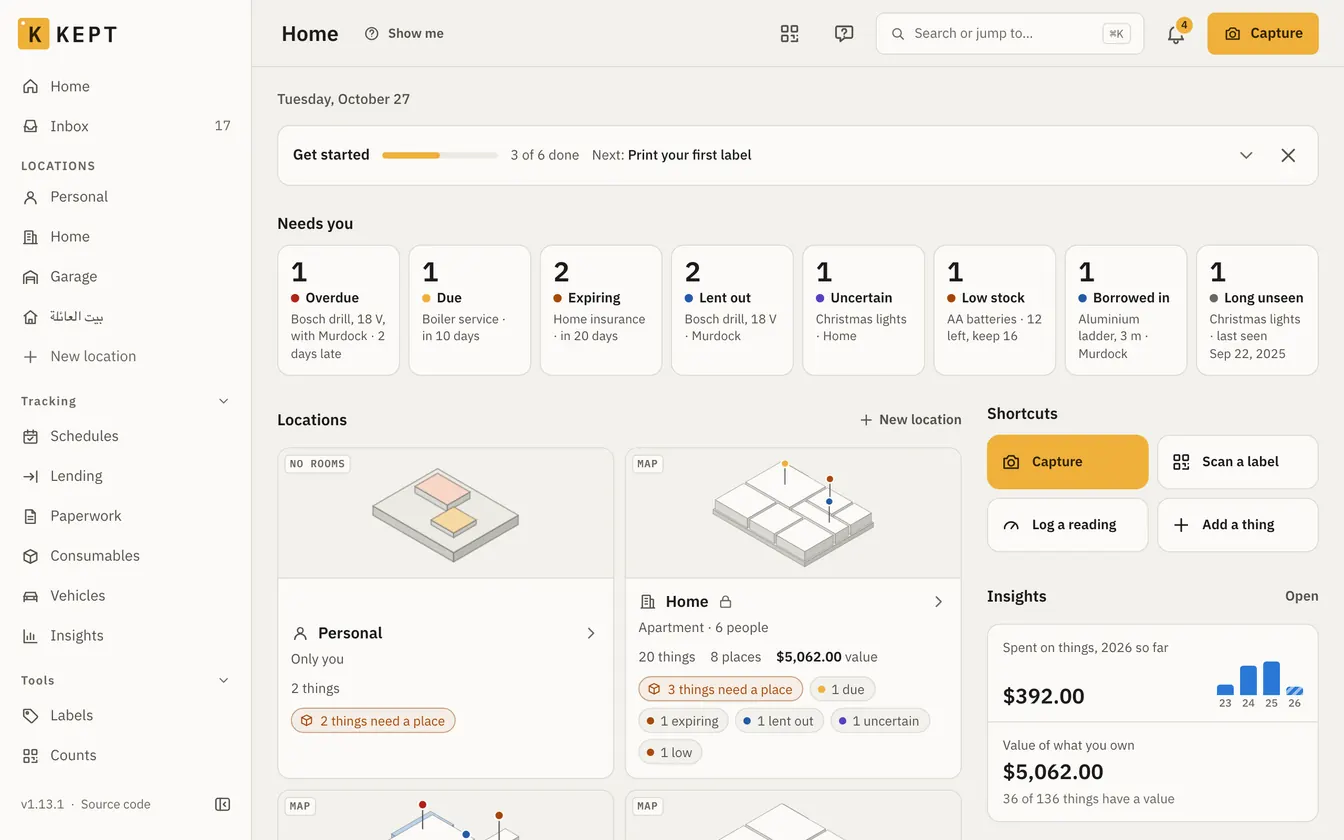
Kept is a self-hosted inventory app for homes and small teams: where things are, QR labels, low stock, lending and offline phone use.
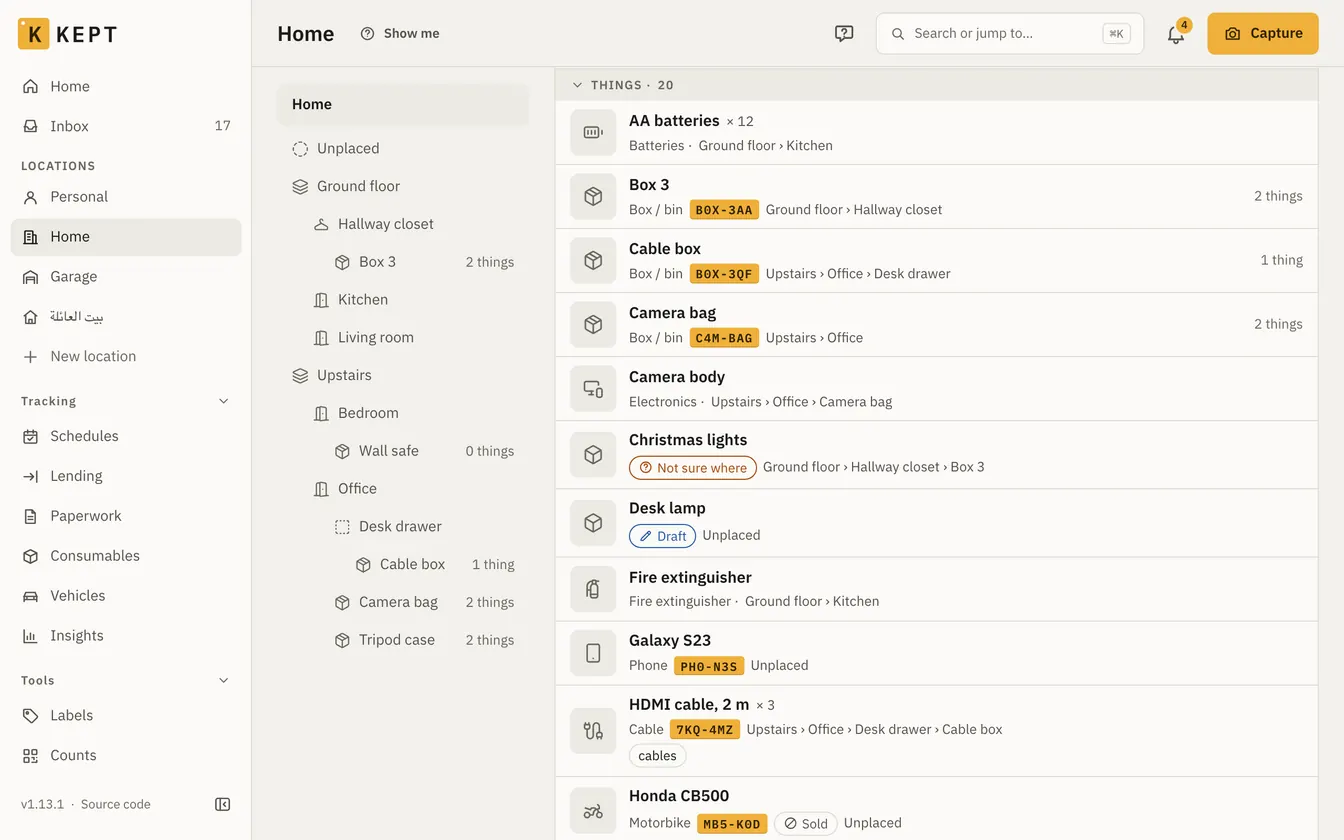
Kept is a self-hosted inventory app: a free, open-source alternative to Sortly for keeping track of what you own, where it is, who has borrowed it and what is running low. You set up locations such as a home, an office or a storage unit, nest rooms, shelves and boxes inside them, and add each thing with photos, quantities, receipts and warranties.
A small cleaning business, for example, could label each storage box with a QR code, scan it to see what's inside, set a minimum for gloves and cleaning products so it hears when they run low, and record which staff member took the carpet cleaner and when it is due back.
Kept works in any browser and installs on a phone, where it captures, scans and searches offline. Each location is shared with its own people and roles. It imports spreadsheets and HomeBox backups, connects to Home Assistant and Paperless-ngx, and can use an AI provider you choose, though it works fully without one.
Cloudgate installs Kept on a server Cloudgate provides or one you connect, and gives it a secure web address, so the phone camera and offline app just work. Enter the setup code from the app's logs, create the admin account, then invite the people who should share it.
What you can do with Kept
- Know where everything is Put things in locations, rooms, shelves and boxes nested as deep as you like; move a box and what's inside moves with it.
- Keep the details with each thing Add photos, quantities, serial numbers, your own fields, receipts, manuals, warranties and what you paid.
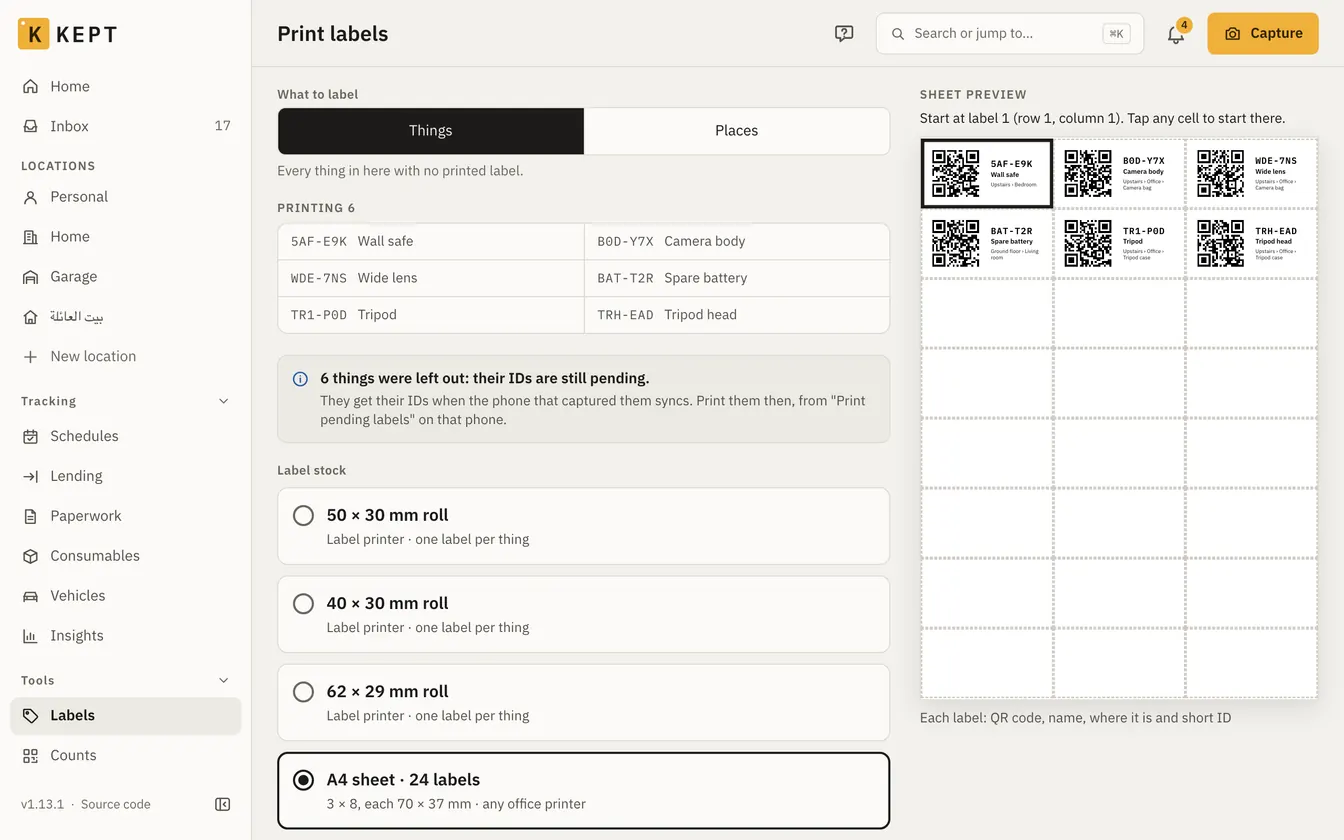
- Print and scan QR labels Print labels on label-printer rolls or office sheets, scan one with your phone to open the box, and count a shelf in one go.
- Know when stock runs low Set a minimum for things you run out of, and get reminders for low stock, warranties and services by email, push or chat.
- Lend things and get them back Record who borrowed what and when it's due back; borrowers need no account.
- Use it on your phone, even offline Install it from the browser to capture, scan and search with no signal, and sync later.
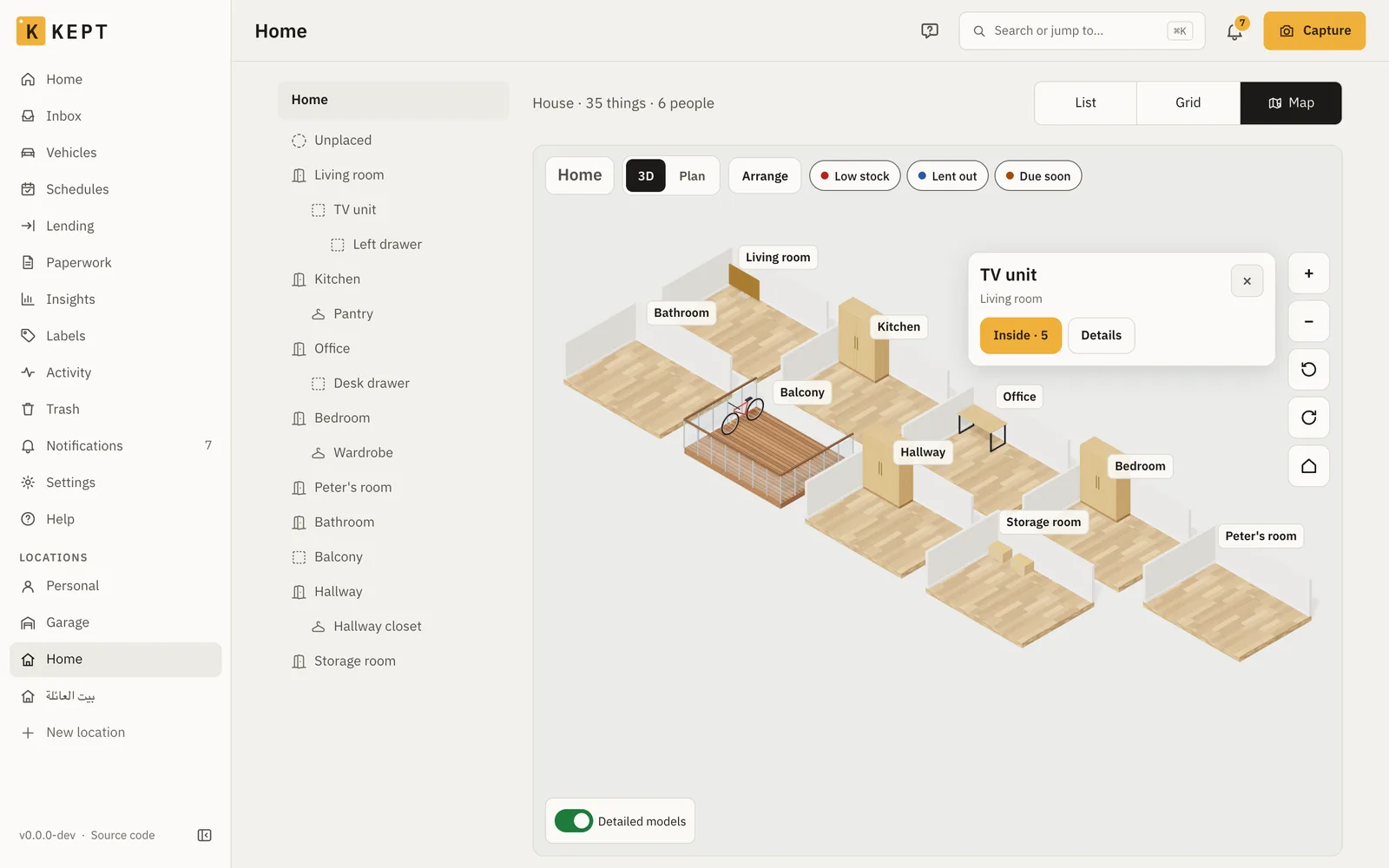
- See each place in 3D Draw a home, office or storage unit as a 3D map of floors, rooms and furniture, with what's inside one tap away.
- Ask an AI assistant, if you want one Connect your own AI provider to fill in a thing's details from a photo or ask in plain words; everything else works without it.
Replaces Sortly
Kept does the same job as Sortly. Here is what changes when you switch.
- No limit on items or users set by a plan, and no subscription
- QR labels, stocktakes, low-stock reminders and lending, all free
- Works offline on a phone, and your photos and receipts stay on your own server
- AGPL-3.0 open source, with every feature included
- No App Store or Google Play app; you install it from the phone's browser
- There is no Sortly importer; you bring items over in a spreadsheet (CSV)
- Made for belongings and household or office stock, not for purchase orders, suppliers or sales
- A young project, mostly built by one maintainer
What happens when you click Deploy?
You do not need a server or any technical knowledge. Four steps, and Kept is running at its own web address.
- Step 1 Click Deploy and create your account
Deploy takes you to Cloudgate. Create an account, or log in if you have one. Kept itself is free.
- Step 2 Choose a server
No server? Get one from Cloudgate: pick a size and a country, and Cloudgate gets it ready. Already have one? Connect it instead.
- Step 3 Cloudgate sets up Kept
It prepares the server, makes the passwords the app needs and starts it. There is nothing to install and nothing to write down.
- Step 4 Open your app and sign in
Your app gets a free web address to start, without https. Add your own domain, like app.yourshop.com, and Cloudgate secures it with https for you.
New to Cloudgate? See what Cloudgate is
Run Cloudgate yourself? Deploy from your own console
In your Cloudgate console, open Templates and choose Kept.
Questions
Is Kept free?
Yes, Kept is free and open source under the AGPL-3.0 licence, and every feature is in it; there is no paid edition. You pay only for your server, and for an AI provider if you choose to connect one.
Is Kept a good alternative to Sortly?
Yes, for a home, office or small team that wants to know what it has and where. Kept has QR labels, quantities, low-stock reminders, stocktakes and offline phone use, with no item or user limit. Sortly has app-store apps and is easier to start with; for parts, suppliers and build orders, InvenTree fits better.
How is Kept different from HomeBox?
Kept does more than HomeBox, though both record what you own and where it is. Kept adds a 3D map, lending, low-stock and warranty reminders, vehicles, offline use on a phone and optional AI, but needs more memory than HomeBox. Kept imports a HomeBox backup with its photos, receipts and tags, and old HomeBox labels still scan.
Do I need an AI API key to use Kept?
No. Everything in Kept works without AI except filling in details from photos, reading receipts, the assistant and search by meaning. If you want them, you connect your own provider, such as OpenAI, Anthropic, Google, Groq or a local Ollama server, and its costs are yours.
Is there a Kept phone app?
No app-store app, but Kept installs from your phone's browser and opens from its own icon. It keeps a copy of your inventory on the phone, so you can capture, scan labels and search offline and sync later.
How do I sign in to Kept the first time?
There is no default password. On its first start Kept writes a one-time setup code to the app's logs; open your Kept address, enter the code and create your account, which becomes the admin. Leave open sign-up off and invite the people who should join.
Can Kept import my items from a spreadsheet?
Yes. Kept imports a CSV file with one thing per row, including quantity, place, serial number, barcode, price and tags, and shows what the import will do before it writes anything. It also imports from HomeBox and from another Kept.
Do I need technical skills to run Kept?
No. Click Deploy, create your Cloudgate account and choose a server, and Cloudgate sets up Kept and gives it a web address. You use it in your browser like any other online tool.
Do I need my own server for Kept?
No. When you deploy Kept, hosted Cloudgate can provide a server. If you already rent one, you can connect it instead.
Related apps
Know what you own, where it is, and when its warranty ends.
Track parts, stock, suppliers and builds for your workshop.

Manage and secure every Mac, PC and Linux computer you own.

Dispatch deliveries, track drivers live and run your own fleet.