
Kan
Simple Trello-style kanban boards for your team, on your own server.
No server needed to start: Cloudgate can provide one. What happens when you click Deploy
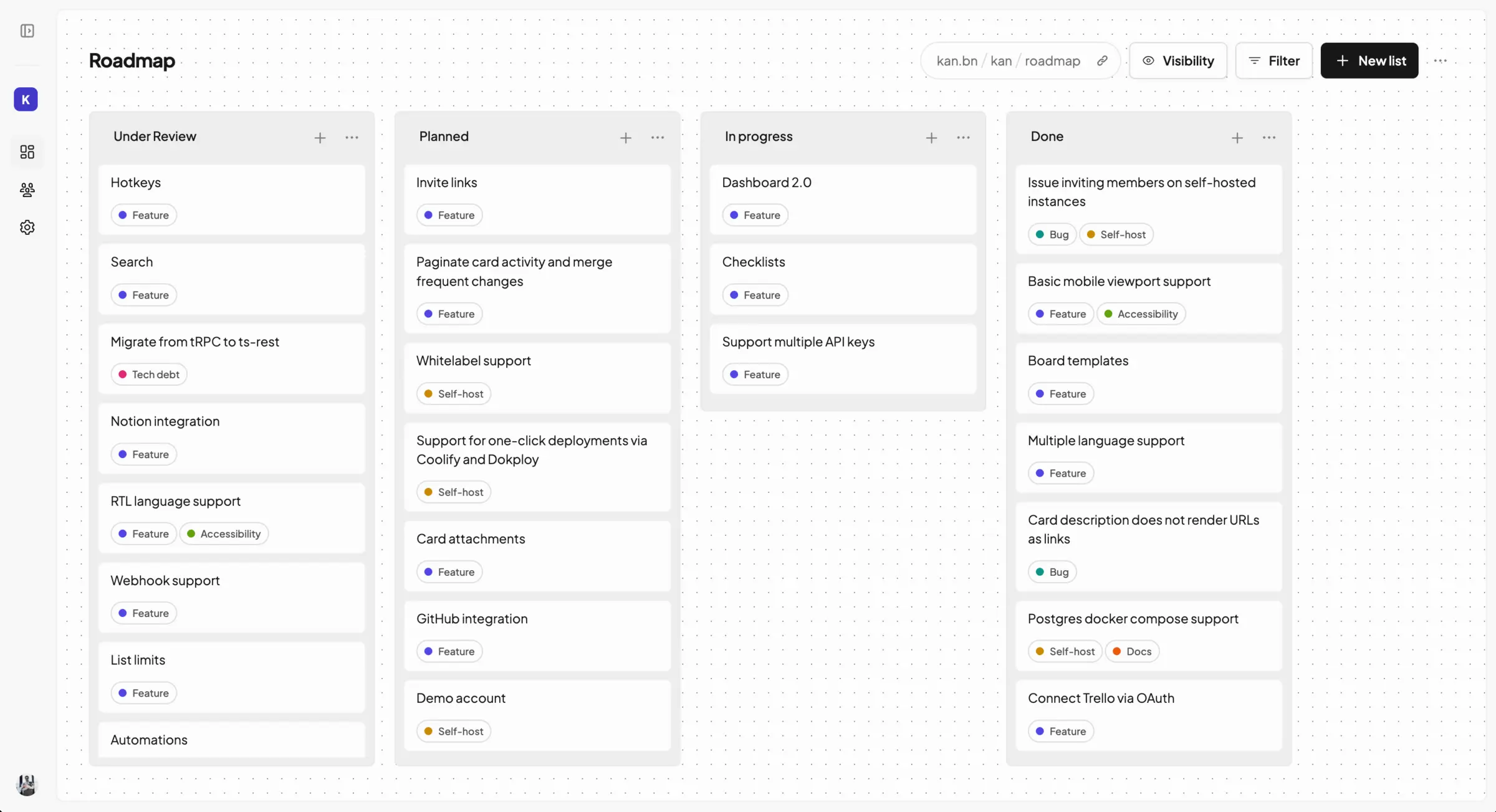

What is Kan?
Self-hosted Kan: an open-source Trello alternative with kanban boards, lists, cards, labels, checklists and comments for your team.
Kan is a free, open-source, self-hosted kanban board and a simple alternative to Trello for planning work with your team. You organise tasks as cards in lists, drag them from stage to stage, and add labels, checklists, due dates and comments to each card.
Teams work together in a workspace, and you decide who can view and edit each board. Every card keeps a history of what changed, and you can save a board as a template to reuse. A small marketing agency, for example, could keep one board per client with lists for Ideas, Writing, Review and Published, and start each new client from the same template.
If you are leaving Trello, Kan can import your boards; on your own server this needs a Trello API key of your own. Kan runs in the web browser, including on a phone, with no separate apps, and it has no automation or Power-Ups yet. A self-hosted Kan has every feature and no limit on members.
Cloudgate installs Kan and its database on your server and gives it a secure web address. Sign up with your email and a password, then switch on Invite-only sign-up so only the people you invite can join.
What you can do with Kan
- Plan work on boards Organise tasks as cards in lists and drag them from one stage to the next.
- Work together Invite your team to a workspace and choose who can see and edit each board.
- Keep the details on the card Add checklists, due dates, labels and comments to every card.
- Find cards fast Filter a board by label or member to see only what matters right now.
- See what changed Every card keeps a history of who moved it, edited it or commented.
- Start from a template Save a board layout you use often and reuse it for the next project.
- Bring your Trello boards Import your boards from Trello with their lists and cards.
Replaces Trello
Kan does the same job as Trello. Here is what changes when you switch.
- Free to self-host, with every feature and no limit on members
- Your boards and cards stay on your own server
- The same boards, lists and cards your team already knows from Trello
- No automation or Power-Ups like Trello's
- Web only, with no phone or desktop apps
- Younger than Trello, with features still being added
- No file attachments on cards in this setup
What happens when you click Deploy?
You do not need a server or any technical knowledge. Four steps, and Kan is running at its own web address.
- Step 1 Click Deploy and create your account
Deploy takes you to Cloudgate. Create an account, or log in if you have one. Kan itself is free.
- Step 2 Choose a server
No server? Get one from Cloudgate: pick a size and a country, and Cloudgate gets it ready. Already have one? Connect it instead.
- Step 3 Cloudgate sets up Kan
It prepares the server, makes the passwords the app needs and starts it. There is nothing to install and nothing to write down.
- Step 4 Open your app and sign in
Your app gets a free web address to start, without https. Add your own domain, like app.yourshop.com, and Cloudgate secures it with https for you.
New to Cloudgate? See what Cloudgate is
Run Cloudgate yourself? Deploy from your own console
In your Cloudgate console, open Templates and choose Kan.
Questions
Is Kan free?
Yes, Kan is free and open source under the AGPL-3.0 licence. A self-hosted Kan has every feature and no limit on members; only the hosted version at kan.bn charges per user.
Is Kan a good alternative to Trello?
Yes, if your team mainly uses Trello for boards, lists and cards. Kan has labels, checklists, due dates, comments and board templates, and imports Trello boards, but it has no automation, Power-Ups or phone apps yet.
Can I import my boards from Trello into Kan?
Yes, Kan imports Trello boards. On your own server the import needs a Trello API key and secret of your own, which you create in your Trello account.
How do I sign in to Kan the first time?
Open Kan's web address, choose Sign up and enter your name, email and a password; no email confirmation is needed. Then set Invite-only sign-up to true on the app's variables page in Cloudgate, so only people you invite can create an account.
Does Kan need an email server?
No, Kan works without one, and password sign-in needs no email. Add an email sending service when you want Kan to send workspace invitations, sign-in links and password resets; until then you can invite teammates with a shareable link.
Is there a Kan phone app?
No, Kan is a web app with no phone or desktop apps. It opens in a phone's web browser.
Can I attach files to cards in Kan?
No, not in this setup. In Kan, file attachments and profile pictures need separate file storage, which this template does not set up.
Do I need technical skills to run Kan?
No. Click Deploy, create your Cloudgate account and choose a server, and Cloudgate sets up Kan and gives it a web address. You use it in your browser like any other online tool.
Do I need my own server for Kan?
No. When you deploy Kan, hosted Cloudgate can provide a server. If you already rent one, you can connect it instead.
Related apps
Kanban boards with swimlanes, calendars and rules.

Project boards with a time tracker on every task.

Trello-style kanban boards that update in real time.

A simple self-hosted Kanban board with limits on work in progress.