
Isso
Simple, private blog comments with no reader accounts or ads.
No server needed to start: Cloudgate can provide one. What happens when you click Deploy
What is Isso?
Self-hosted Isso adds lightweight, private comments to your blog or website, with replies and moderation and no reader accounts, in place of Disqus.
Isso is a self-hosted, open-source comment server for blogs and websites, and a lightweight alternative to Disqus. It adds a comment section under your posts with no ads and no tracking, and keeps every comment on your own server.
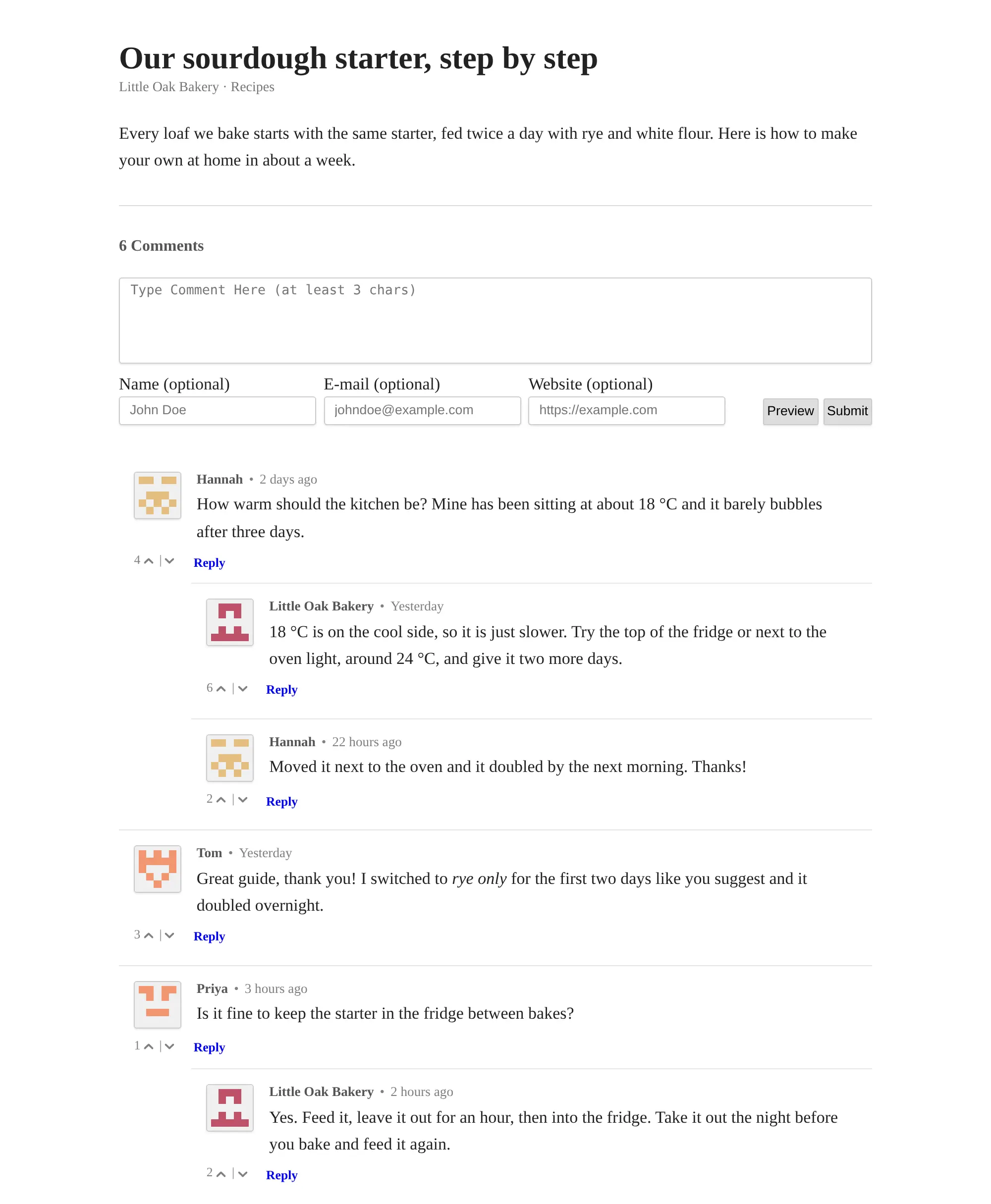
Isso is not a website on its own: it sits inside the site you already have. After setup you paste a short snippet into your site's pages and one line where comments should show. Readers then write in a plain box, with no account to create, and can reply to each other and vote. A small bakery with a recipe blog, for example, could answer questions under each recipe and hold new comments for approval, so spam never appears below its posts.
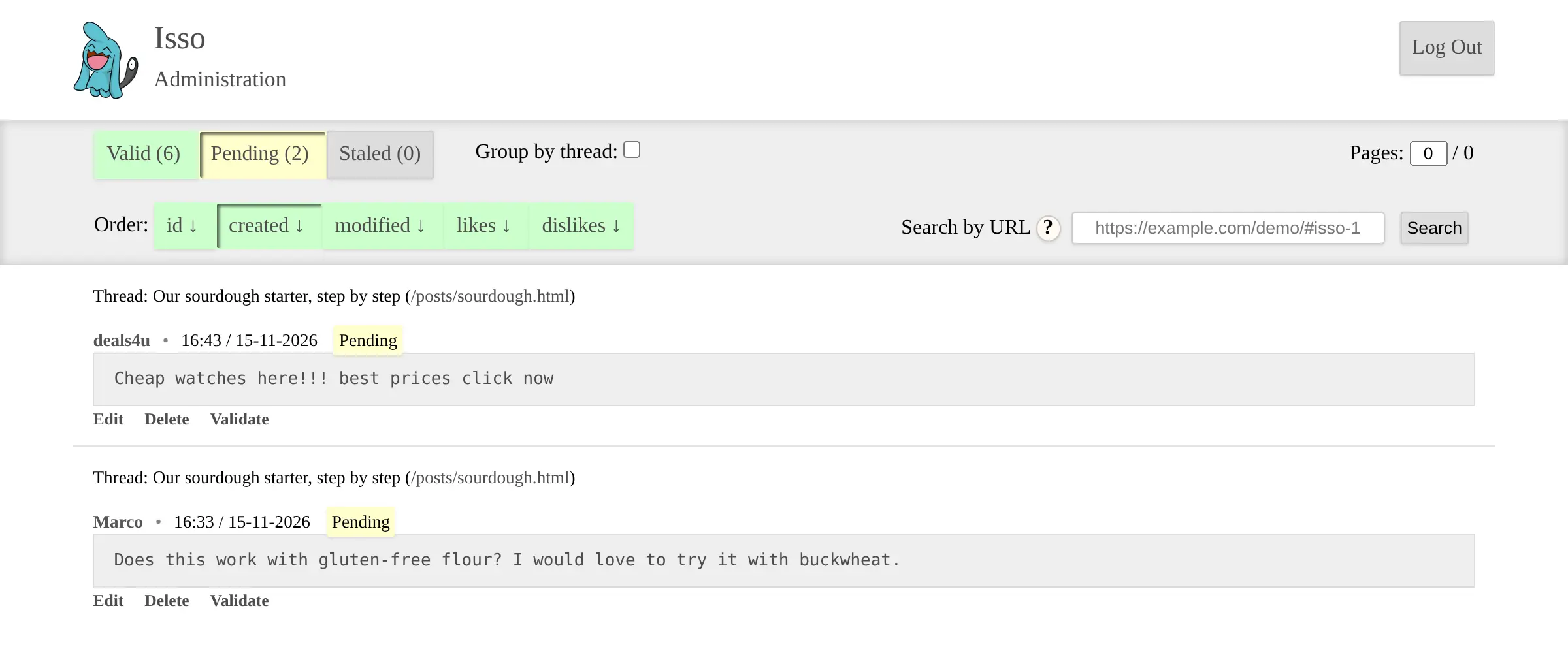
You moderate on Isso's own admin page, protected by a password. Isso is deliberately small: it suits blogs and small sites rather than very busy ones, and it can import comments from Disqus and WordPress.
Cloudgate installs Isso on a server Cloudgate provides or one you connect, gives it a secure web address, and asks which website will show the comments and whether new comments need your approval.
What you can do with Isso
- Add comments to any website Paste one short snippet into your blog, docs or any web page, and a comment box appears there.
- Let readers comment without an account Readers just write; their name, email and website are optional, so nobody has to sign up or sign in.
- Write comments in Markdown Readers format their comments in Markdown, check them with Preview, and can edit or delete their own comment for 15 minutes.
- Hold conversations Readers reply to each other and vote comments up or down, and you choose whether the newest, oldest or most-liked comments show first.
- Approve comments before they appear Choose at setup whether new comments wait for your approval, then publish, edit or delete them on a password-protected admin page.
- Slow down spam Isso limits how many comments one visitor can post in a short time, and only your own website can show and post comments.
- Speak your readers' language The comment box follows each reader's browser language, with more than 30 languages including German, French, Spanish, Japanese and Arabic.
Replaces Disqus
Isso does the same job as Disqus. Here is what changes when you switch.
- No ads under your posts and no tracking of your readers
- Every comment stays on your own server
- Readers can comment without creating an account
- A small, quick comment section that is easy to run
- No social or email sign-in for readers, only an optional name
- No Disqus-wide community or cross-site discovery for your posts
- Spam handling is a rate limit and an approval queue, with no spam filter
- Moving your Disqus comments across is a one-time step done on the server, not a button
What happens when you click Deploy?
You do not need a server or any technical knowledge. Four steps, and Isso is running at its own web address.
- Step 1 Click Deploy and create your account
Deploy takes you to Cloudgate. Create an account, or log in if you have one. Isso itself is free.
- Step 2 Choose a server
No server? Get one from Cloudgate: pick a size and a country, and Cloudgate gets it ready. Already have one? Connect it instead.
- Step 3 Cloudgate sets up Isso
It prepares the server, makes the passwords the app needs and starts it. There is nothing to install and nothing to write down.
- Step 4 Open your app and sign in
Your app gets a free web address to start, without https. Add your own domain, like app.yourshop.com, and Cloudgate secures it with https for you.
New to Cloudgate? See what Cloudgate is
Run Cloudgate yourself? Deploy from your own console
In your Cloudgate console, open Templates and choose Isso.
Questions
Is Isso free?
Yes, Isso is free and open source under the MIT licence, with no paid edition and no ads. You pay only for the server it runs on.
Is Isso a good alternative to Disqus?
Yes, if you want simple comments without ads or tracking and with every comment on your own server. Isso covers replies, votes, Markdown and moderation, but readers cannot sign in with social accounts, spam protection is basic, and its makers say it is not built for very high-traffic websites.
How do I add Isso to my website?
Add one script tag that loads Isso from its web address to your site's pages, and an empty isso-thread section where the comments should show, such as under each blog post. Any site whose HTML or theme you can edit works, static site generators such as Hugo and Jekyll included.
Do readers need an account to comment with Isso?
No, readers can comment without an account. A comment needs only its text; the name, email and website fields are optional, and Isso shows a small generated picture next to each comment instead of a profile photo.
How do I moderate comments in Isso?
Isso has its own admin page at /admin on its web address, where you sign in with the password Cloudgate creates and publish, edit or delete comments and search them by page. If you chose approval at setup, new comments stay hidden until you approve them.
Can I import my Disqus comments into Isso?
Yes, Isso can import the comment export file from Disqus, and it can also import WordPress comments. The import is a one-time step run on the server, not a button in the app, and Disqus votes are not carried over.
What server size do I need for Isso?
The smallest server is enough, because Isso keeps all comments in one small file with no separate database. Its documentation gives an example of 778 comments taking 620 KB.
Do I need technical skills to run Isso?
No. Click Deploy, create your Cloudgate account and choose a server, and Cloudgate sets up Isso and gives it a web address. You use it in your browser like any other online tool.
Do I need my own server for Isso?
No. When you deploy Isso, hosted Cloudgate can provide a server. If you already rent one, you can connect it instead.
Related apps

Ad-free, private comments under your blog posts, on your server.

Ad-free comments for your blog, with an admin panel to moderate.

A self-hosted comment system for blogs, with a moderation dashboard.

Comments for many websites, with moderation rules.