Artalk
A self-hosted comment system for blogs, with a moderation dashboard.
No server needed to start: Cloudgate can provide one. What happens when you click Deploy
What is Artalk?
Artalk is a self-hosted comment system for blogs and websites: threaded replies, spam checks and a moderation dashboard, with no ads.
Artalk is a self-hosted, open-source comment system for blogs and websites, and an ad-free alternative to Disqus. It adds a comment section under your posts and keeps every comment on your own server, with no ads and no tracking of your readers.
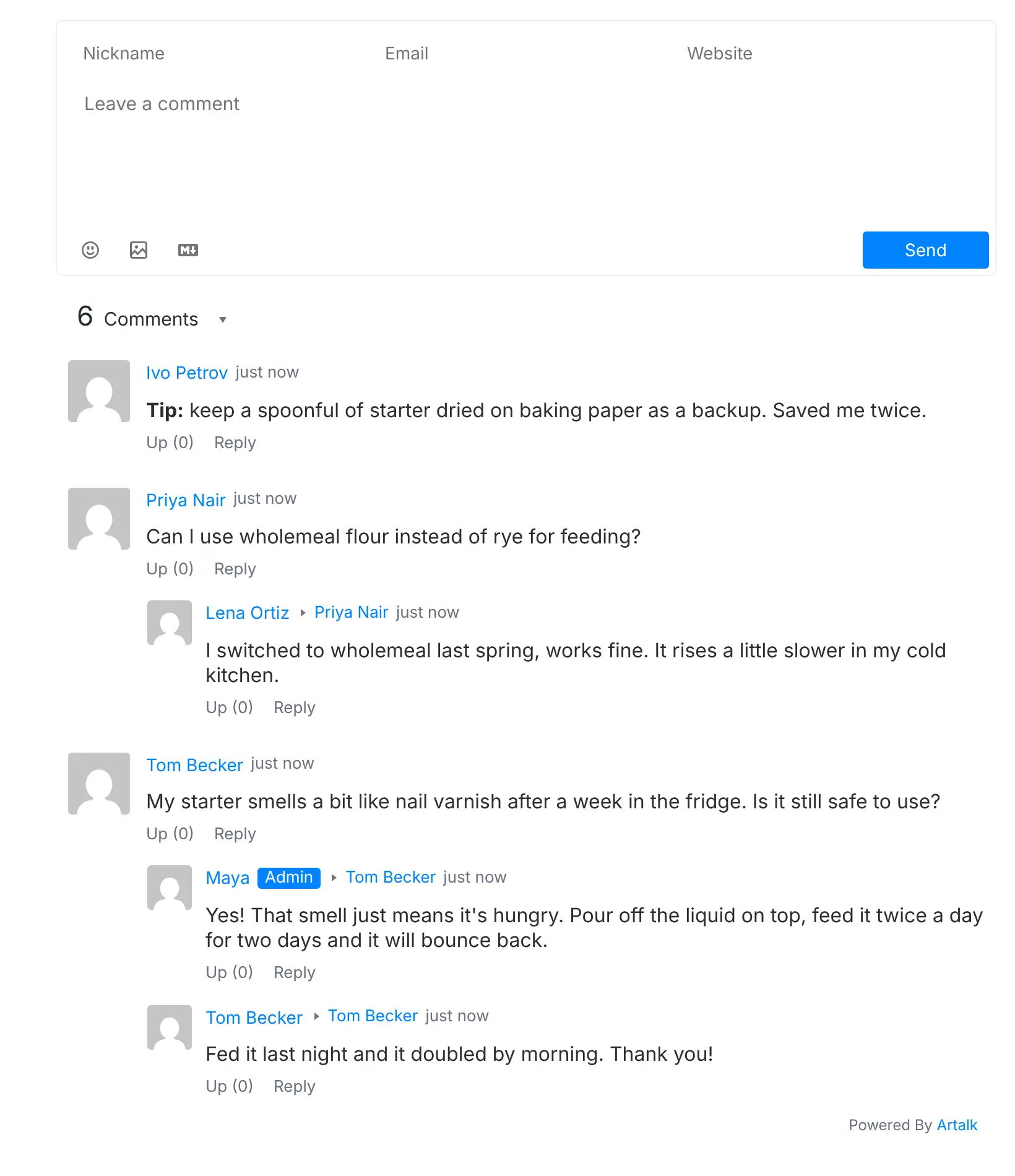
Artalk sits inside the website you already have. After setup you paste a short snippet into your pages where comments should show, much like a Disqus or YouTube embed. Readers can then comment with a name and email, reply to each other, vote and add pictures. A small bakery with a recipe blog, for example, could answer readers' baking questions under each recipe, get an email for every new comment, and hold new comments for review so spam never reaches the page.
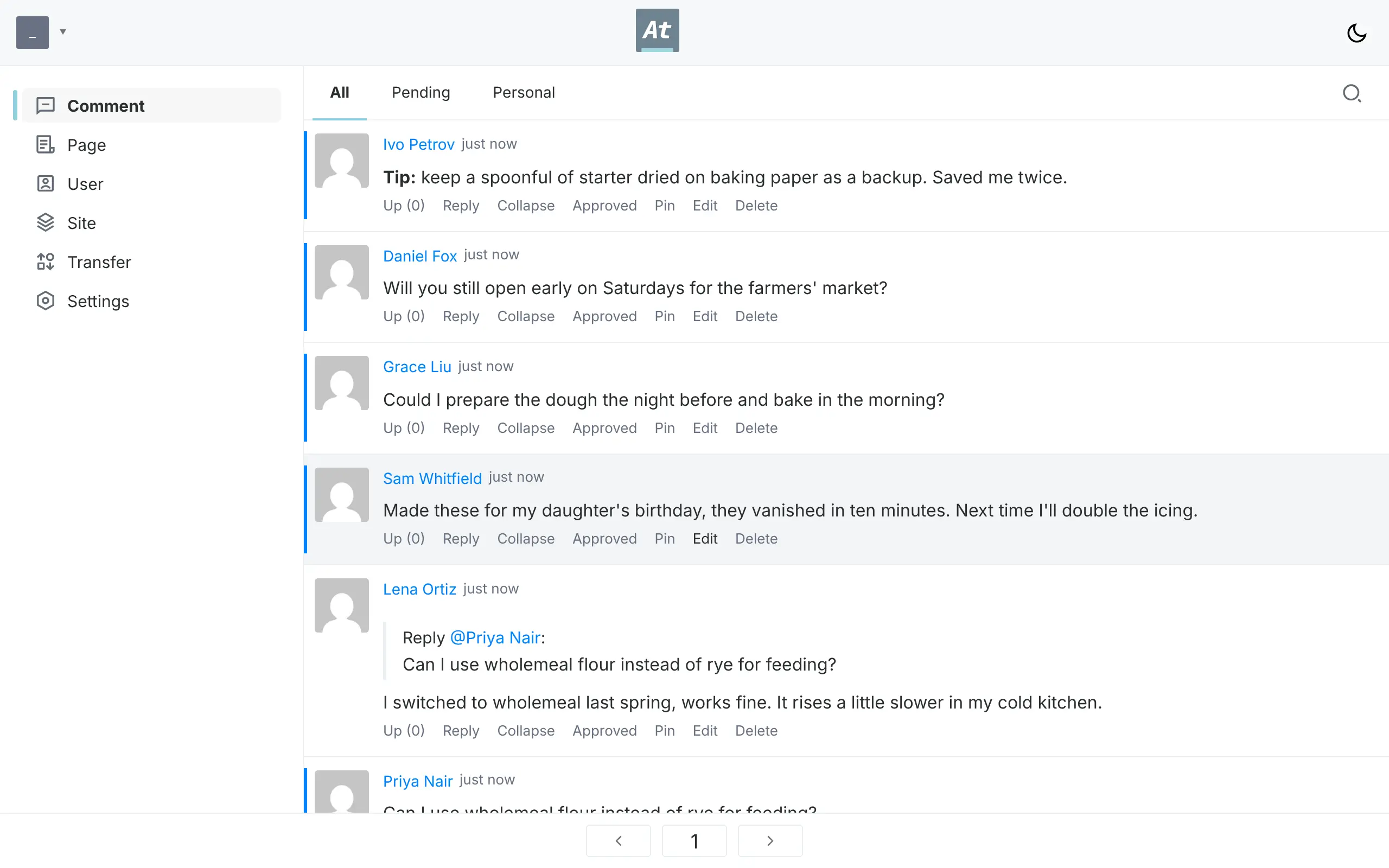
As the admin you work from a dashboard that lists every comment across your pages, with tools to approve, pin, edit or delete, plus settings for email alerts, captchas and reader sign-in. One Artalk can serve several websites, and comments from Disqus, WordPress and other systems can be imported.
Cloudgate installs Artalk on a server Cloudgate provides or one you connect, gives it a secure web address, and asks which website will show the comments.
What you can do with Artalk
- Add comments to any website Paste a short snippet into your blog, shop or docs, and a comment section appears under each page.
- Hold real conversations Readers reply in threads, vote, and add emoji, pictures and Markdown formatting.
- Moderate from one dashboard See every comment in one list, approve the ones waiting for review, and pin, edit, collapse or delete any of them.
- Keep spam out A captcha appears when someone posts too often, and you can check comments with Akismet or a list of blocked words, or hold every new comment for review.
- Hear about new comments Get new comments by email, Telegram or Slack, and let readers get an email when someone replies to them.
- Let readers sign in their way Readers comment with just a name and email, or you turn on accounts with email and password or sign-in with Google, GitHub, Microsoft or Apple.
- Run several websites from one install Add more sites in the dashboard and keep each one's comments separate.
- Show views and comment counts Display how many times a page was viewed and how many comments it has.
Replaces Disqus
Artalk does the same job as Disqus. Here is what changes when you switch.
- No ads under your posts and no tracking of your readers
- Every comment stays on your own server
- A full dashboard with a review queue, spam checks and alerts to email, Telegram or Slack
- Light and dark styles and many languages to match your site
- You paste the snippet into your site and set up email alerts and social sign-in yourself
- No Disqus-wide community or discovery of your posts on other sites
- Moving your Disqus comments takes a conversion step before you import them
- Much of the community and some documentation are in Chinese
What happens when you click Deploy?
You do not need a server or any technical knowledge. Four steps, and Artalk is running at its own web address.
- Step 1 Click Deploy and create your account
Deploy takes you to Cloudgate. Create an account, or log in if you have one. Artalk itself is free.
- Step 2 Choose a server
No server? Get one from Cloudgate: pick a size and a country, and Cloudgate gets it ready. Already have one? Connect it instead.
- Step 3 Cloudgate sets up Artalk
It prepares the server, makes the passwords the app needs and starts it. There is nothing to install and nothing to write down.
- Step 4 Open your app and sign in
Your app gets a free web address to start, without https. Add your own domain, like app.yourshop.com, and Cloudgate secures it with https for you.
New to Cloudgate? See what Cloudgate is
Run Cloudgate yourself? Deploy from your own console
In your Cloudgate console, open Templates and choose Artalk.
Questions
Is Artalk free?
Yes, Artalk is free and open source under the MIT licence, with no paid edition and no ads. You pay only for the server it runs on.
Is Artalk a good alternative to Disqus?
Yes, if you want comments without ads or tracking and with every comment on your own server. Artalk adds replies, voting, spam checks and a moderation dashboard to your site, but it has no network of discussions across websites like Disqus.
How do I add Artalk to my website?
You add Artalk by pasting a short snippet into your website's pages, at the spot where comments should appear, such as under each blog post. Artalk works on any site where you can edit the HTML or theme, including Hugo, Hexo, Astro and WordPress blogs.
How do I sign in to Artalk the first time?
You sign in at your Artalk web address with the admin email you entered during setup and the password Cloudgate created, which the Cloudgate console shows you. To change that password later, change it in Cloudgate, because Artalk resets the admin account to those settings each time it starts.
Can I import my Disqus comments into Artalk?
Yes, with one extra step. Export your comments from Disqus, which emails you a file, convert that file with Artalk's free online converter, then upload the result in the dashboard's Transfer section. WordPress, Commento and other comment systems can be moved the same way.
How does Artalk stop spam?
Artalk shows a captcha when someone posts too often, and it can check each comment with Akismet or a list of blocked words. You can also hold every new comment for review, so nothing appears on your site until you approve it.
What server size do I need for Artalk?
The smallest server is enough for most blogs, because Artalk is one light program that keeps its comments in a single file, with no separate database to run.
Do I need technical skills to run Artalk?
No. Click Deploy, create your Cloudgate account and choose a server, and Cloudgate sets up Artalk and gives it a web address. You use it in your browser like any other online tool.
Do I need my own server for Artalk?
No. When you deploy Artalk, hosted Cloudgate can provide a server. If you already rent one, you can connect it instead.
Related apps

Ad-free comments for your blog, with an admin panel to moderate.

Comments for many websites, with moderation rules.

Comments for news sites, with real moderation tools.
Ad-free, private comments under your blog posts, on your server.