
HortusFox
Plant manager for house plants and gardens, shared.
No server needed to start: Cloudgate can provide one. What happens when you click Deploy

What is HortusFox?
HortusFox is a self-hosted plant manager for house plants and gardens: care records, tasks, supplies and a calendar your household shares.
HortusFox is a free, open-source, self-hosted plant manager for house plants and gardens that a whole household can share, in place of plant-care apps such as Planta or Greg. It keeps your plants, their care, your tasks and your supplies in one place on your own server.
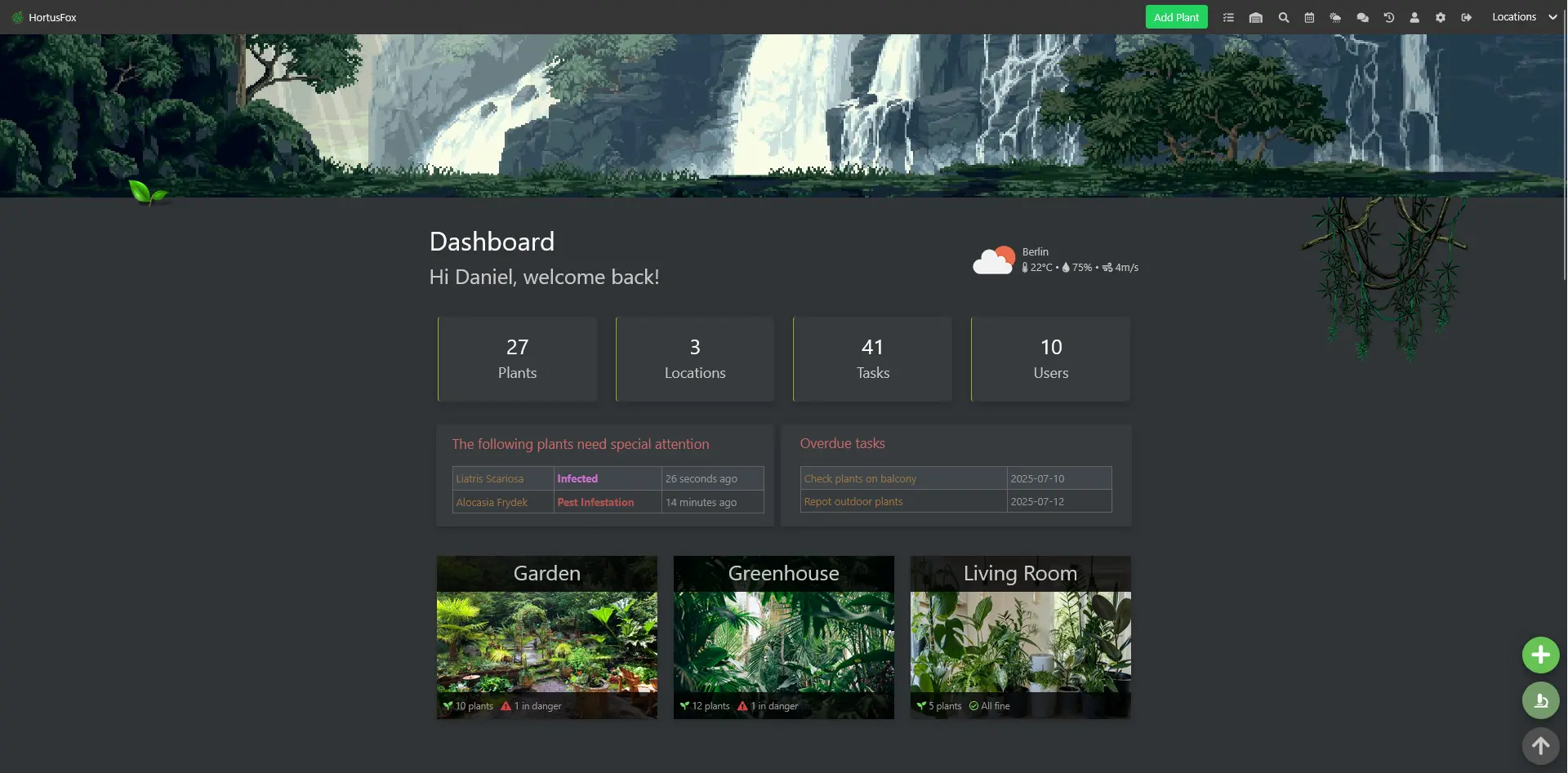
Each plant belongs to a location, such as the garden, the greenhouse or the living room. You note when it was watered, repotted or fertilised, how it is doing, and add photos and notes. Tasks with due dates, a shared calendar and an inventory of soil, fertiliser and tools sit alongside, and the dashboard shows which plants need attention and which tasks are overdue. A couple with a balcony garden, for example, could each mark plants as watered from their phones, see that the basil has pests, and check whether there is still potting soil before buying more.
HortusFox runs in any browser on a computer or phone and comes in twelve languages. It can identify plants from a photo with Pl@ntNet and show the weather, each with a free key from that service. It doesn't build a care schedule for you; you set your own tasks.
Cloudgate installs HortusFox on a server Cloudgate provides or one you connect, and gives it a secure web address. Sign in with your admin email and the password Cloudgate created.
What you can do with HortusFox
- Keep every plant in its place Sort plants by location, such as garden, greenhouse or living room, and see each room's plants as cards or a list.
- Record care as you go Note when a plant was last watered, repotted or fertilised, its light level, humidity and health, or mark a whole room watered at once.
- Keep a journal for each plant Add photos to a gallery, notes, tags and a log, and clone a plant to follow its cuttings.
- See what needs attention The dashboard shows plants that are sick or infested, overdue tasks and which locations have a plant in danger.
- Plan care with tasks and a calendar Create tasks with due dates, repeat them, and keep appointments such as repotting days in a shared calendar.
- Track your supplies Keep an inventory of soil, fertiliser and tools with amounts, photos and printable QR codes.
- Share it with your household Invite family or friends, choose who is an admin, and talk about the plants in a group chat.
- Identify plants and check the weather Name a plant from a photo with Pl@ntNet and see the local weather, each with a free key from that service.
Replaces Planta
HortusFox does the same job as Planta. Here is what changes when you switch.
- Free and open source, with no subscription or paid tier
- One shared workspace for the whole household, with roles and a group chat
- Locations, an inventory of supplies and a calendar alongside your plants
- Your plant photos and notes stay on your own server
- It doesn't suggest a care schedule; you set your own tasks and record care yourself
- There are no native phone apps; you use the website, which can be added to your home screen
- Email reminders need an email account and a regular timer, which take extra setup
- There is no importer from Planta or Greg
What happens when you click Deploy?
You do not need a server or any technical knowledge. Four steps, and HortusFox is running at its own web address.
- Step 1 Click Deploy and create your account
Deploy takes you to Cloudgate. Create an account, or log in if you have one. HortusFox itself is free.
- Step 2 Choose a server
No server? Get one from Cloudgate: pick a size and a country, and Cloudgate gets it ready. Already have one? Connect it instead.
- Step 3 Cloudgate sets up HortusFox
It prepares the server, makes the passwords the app needs and starts it. There is nothing to install and nothing to write down.
- Step 4 Open your app and sign in
Your app gets a free web address to start, without https. Add your own domain, like app.yourshop.com, and Cloudgate secures it with https for you.
New to Cloudgate? See what Cloudgate is
Run Cloudgate yourself? Deploy from your own console
In your Cloudgate console, open Templates and choose HortusFox.
Questions
Is HortusFox free?
Yes, HortusFox is free and open source under the MIT licence, with no paid edition or locked features. You pay only for your server.
Is HortusFox a good alternative to Planta?
Yes, if you want to track plants together and keep your data. HortusFox adds locations, tasks, a supplies inventory and a group chat that a whole household shares. Planta suggests care schedules for you and has phone apps; in HortusFox you set your own tasks and use the website.
How do I sign in to HortusFox the first time?
Sign in to HortusFox with the admin email you entered in Cloudgate and the password Cloudgate created, shown in your app's settings in Cloudgate. Then add your locations and plants, and invite others from the admin area.
Is there a HortusFox app for iPhone or Android?
No, there is no native app, but the HortusFox website works on phones and can be added to your home screen like an app.
Can HortusFox remind me to water my plants?
Yes, HortusFox reminds you with tasks. Overdue tasks always show on the dashboard. Email reminders for overdue and next-day tasks also need an email account for sending and a scheduled job, which take extra setup.
Can HortusFox identify plants?
Yes. HortusFox can name a plant from a photo using the Pl@ntNet service, once you add a free Pl@ntNet key in the admin area.
Can my family use the same HortusFox?
Yes. The HortusFox admin adds each person as a user; everyone shares the same plants, tasks, inventory and calendar, and the admin decides who else gets admin rights.
Do I need technical skills to run HortusFox?
No. Click Deploy, create your Cloudgate account and choose a server, and Cloudgate sets up HortusFox and gives it a web address. You use it in your browser like any other online tool.
Do I need my own server for HortusFox?
No. When you deploy HortusFox, hosted Cloudgate can provide a server. If you already rent one, you can connect it instead.
Can I move my data from Planta to HortusFox?
Most people export from Planta and import into HortusFox. The official guides at github.com walk through it.
Related apps

A self-hosted travel tracker, trip planner and world map in one.

A self-hosted flight tracker for every flight you take, on one map.

A self-hosted baby tracker the whole family can share.

A self-hosted habit tracker with daily ticks and streaks, no goals.