
HeyForm
Conversational forms, quizzes and surveys, no limits.
No server needed to start: Cloudgate can provide one. What happens when you click Deploy

What is HeyForm?
Self-hosted HeyForm builds Typeform-style conversational forms, quizzes and surveys with logic, themes, payments and no response limits.
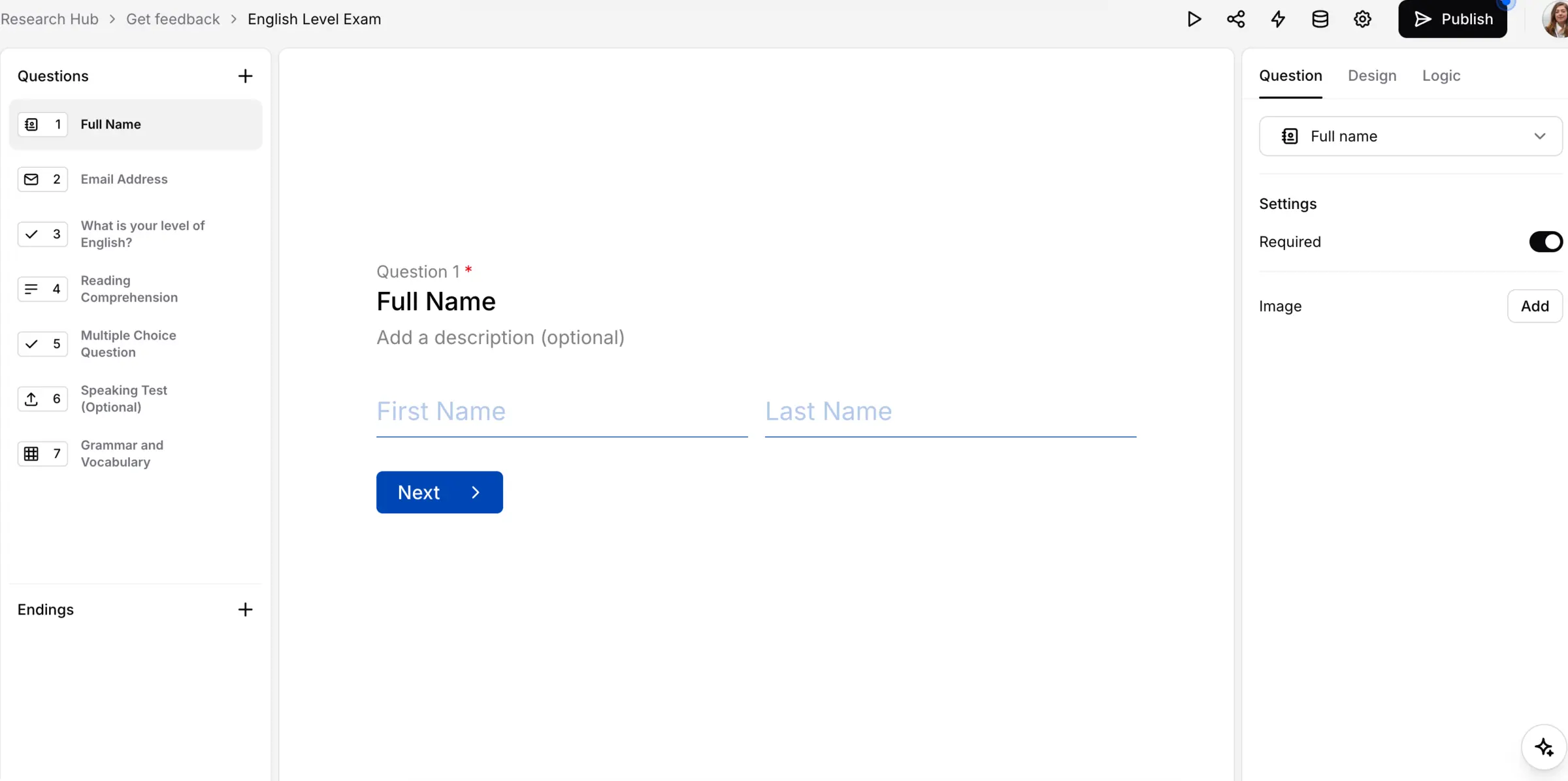
HeyForm is an open-source, self-hosted form builder for conversational forms, surveys, quizzes and polls, a free alternative to Typeform, Google Forms and Jotform. Each form shows one question at a time, with your own colours and fonts, and there is no monthly limit on responses.
You build forms in a drag-and-drop editor with a live preview, pick from more than 25 question types, and use logic to skip questions that don't apply. A language school, for example, could run its placement test as a scored quiz, then send new students to a sign-up form that takes the course deposit through the school's own Stripe account.
Share a form as a link or embed it on your website, then see completion and drop-off rates and export answers as CSV. Webhooks send new answers to Zapier, Make or your own app, and answers can also go to Google Sheets. Writing forms with AI needs your own OpenAI key.
Cloudgate installs HeyForm on a server Cloudgate provides or one you connect, with the database it needs, and gives it a secure web address. The first person to open that address signs up and gets the first workspace. Once your team has joined, turn on "Turn off new sign-ups" in Cloudgate.
What you can do with HeyForm
- Ask one question at a time Forms show one question per screen, Typeform style, so long forms feel like a short conversation.
- Choose from 25+ question types Use text, email, phone, multiple and picture choice, rating, date, file upload, signature and more.
- Show the right next question Skip questions based on earlier answers, reuse an answer later in the form, keep a score or send people to a web page at the end.
- Match your brand Set fonts, colours and backgrounds, add your own styling, and remove the HeyForm branding.
- Share a link or embed it Send a link, or put the form on your website inline, as a pop-up or as a side panel.
- Take payments Add a payment question that charges through your own Stripe account.
- See where people drop off Reports show completion and drop-off rates and a summary for every question, and you can export all answers as CSV.
- Work as a team Invite colleagues into shared workspaces and build forms together.
Replaces Typeform, Google Forms and Jotform
HeyForm does the same job as Typeform, Google Forms and Jotform. Here is what changes when you switch.
- No monthly response limit and no cap on forms
- Answers stay on your own server
- Payments go through your own Stripe account, with no HeyForm commission on top of Stripe's fees
- Custom styling and branding removal are included
- Few built-in integrations; Zapier, Make and other tools connect through webhooks
- Fewer ready-made templates than Typeform or Jotform
- Your existing Typeform, Google Forms or Jotform forms do not move across
- Emails such as password resets and notifications need an email service connected first
What happens when you click Deploy?
You do not need a server or any technical knowledge. Four steps, and HeyForm is running at its own web address.
- Step 1 Click Deploy and create your account
Deploy takes you to Cloudgate. Create an account, or log in if you have one. HeyForm itself is free.
- Step 2 Choose a server
No server? Get one from Cloudgate: pick a size and a country, and Cloudgate gets it ready. Already have one? Connect it instead.
- Step 3 Cloudgate sets up HeyForm
It prepares the server, makes the passwords the app needs and starts it. There is nothing to install and nothing to write down.
- Step 4 Open your app and sign in
Your app gets a free web address to start, without https. Add your own domain, like app.yourshop.com, and Cloudgate secures it with https for you.
New to Cloudgate? See what Cloudgate is
Run Cloudgate yourself? Deploy from your own console
In your Cloudgate console, open Templates and choose HeyForm.
Questions
Is HeyForm free?
Yes, HeyForm is free and open source under the AGPL-3.0 licence. A self-hosted HeyForm has no limits on forms or responses; you pay only for your server. HeyForm's own paid plans are for its hosted cloud version.
Is HeyForm a good alternative to Typeform?
Yes, it is one of the closest open-source matches, with the same one-question-at-a-time style, logic, themes and payments. Typeform has many more built-in integrations and ready-made templates, but HeyForm has no monthly response cap.
How do I sign in to HeyForm the first time?
The first person to open your HeyForm address signs up with a name, email and password and gets the first workspace, so do this right after setup. Invite your team, then turn on "Turn off new sign-ups" in Cloudgate so nobody else can create an account; invitation links still work.
Can HeyForm take payments?
Yes, HeyForm has a payment question that charges through Stripe. You connect your own Stripe account, so the money goes straight to you.
Does HeyForm work with Zapier or Google Sheets?
Yes, through webhooks and a Google Sheets connection. Webhooks send each new answer to Zapier, Make or your own app; HeyForm has no other built-in integrations.
Can I import my Typeform forms into HeyForm?
No, HeyForm cannot import forms from Typeform, Google Forms or Jotform. You rebuild each form in HeyForm's editor, which is quick for most forms.
Can HeyForm write forms with AI?
Yes, HeyForm can write forms with AI, but only if you add your own OpenAI key. Without one, the AI form writer is off and everything else works as normal.
Do I need technical skills to run HeyForm?
No. Click Deploy, create your Cloudgate account and choose a server, and Cloudgate sets up HeyForm and gives it a web address. You use it in your browser like any other online tool.
Do I need my own server for HeyForm?
No. When you deploy HeyForm, hosted Cloudgate can provide a server. If you already rent one, you can connect it instead.
Related apps

Forms and surveys with logic and unlimited answers.

Surveys and feedback forms with unlimited responses.

Survey software for detailed questionnaires.

Let clients book time with you from a simple link.