

Open-source alternatives to Google Forms

Formbricks is a free, open-source Google Forms alternative that adds survey logic, your own styling and pop-up surveys on your website. Google Forms keeps your answers in a Google account and offers simple design and branching; self-hosted Formbricks keeps the answers on your own server, though it needs a server to run.

5 alternatives Free apps Our pick: Formbricks

At a glance

App Good for Code Import from Google Forms Ease of use
Formbricks Product and customer teams running surveys, NPS and website feedback Code Open source Import from Google Forms No Easy
HeyForm Small businesses and teachers who want Typeform-style forms with no response limits Code Open source Import from Google Forms No Easy
KoboToolbox Humanitarian, research and nonprofit field teams surveying offline on phones Code Open source Import from Google Forms No Some setup
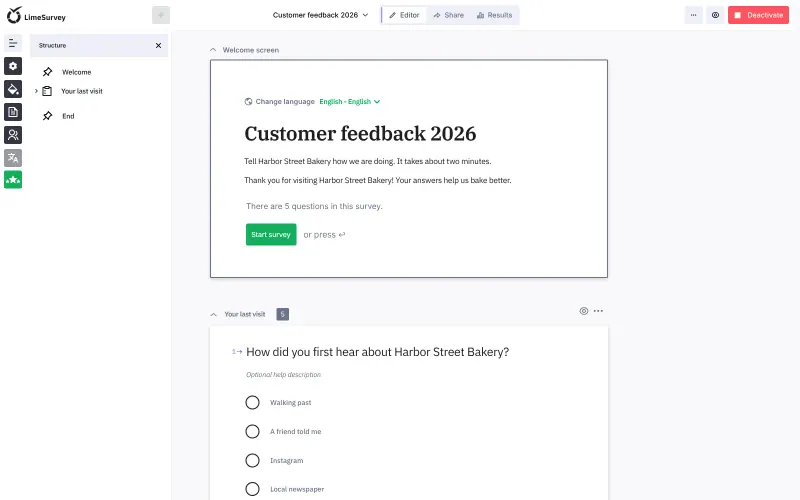
LimeSurvey Researchers, public bodies and teams running detailed surveys with logic, quotas and several languages Code Open source Import from Google Forms No Some setup
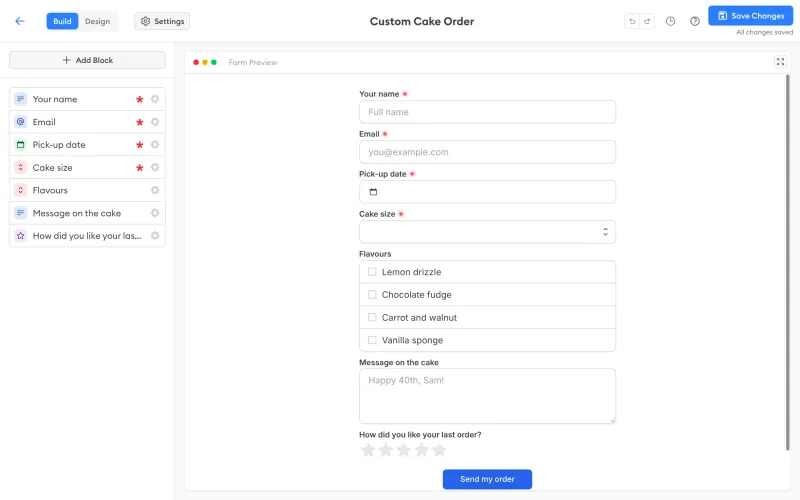
OpnForm Small teams of one or two who want Typeform- or Tally-style forms with unlimited answers Code Open source Import from Google Forms Partly Easy

Why look for an alternative to Google Forms?

Google Forms is Google's free form builder. You add questions, share a link, and answers collect in a summary and a linked Google Sheet; it is popular for sign-ups, quizzes and quick internal surveys.

People look for an alternative because every answer is stored in a Google account, its design options are basic, its branching only jumps between sections, and it cannot show a survey inside your own website or app. A self-hosted survey tool such as Formbricks keeps the answers on your own server and adds logic, styling and website pop-ups, HeyForm adds Typeform-style forms and payments, OpnForm adds classic or one-question-at-a-time forms and can import your Google Forms, and LimeSurvey handles long research questionnaires; in return, you run a server for them. KoboToolbox suits field teams that collect answers offline, with GPS points and photos.

The alternatives, compared

Formbricks

Our pick

Surveys and feedback forms with unlimited responses.

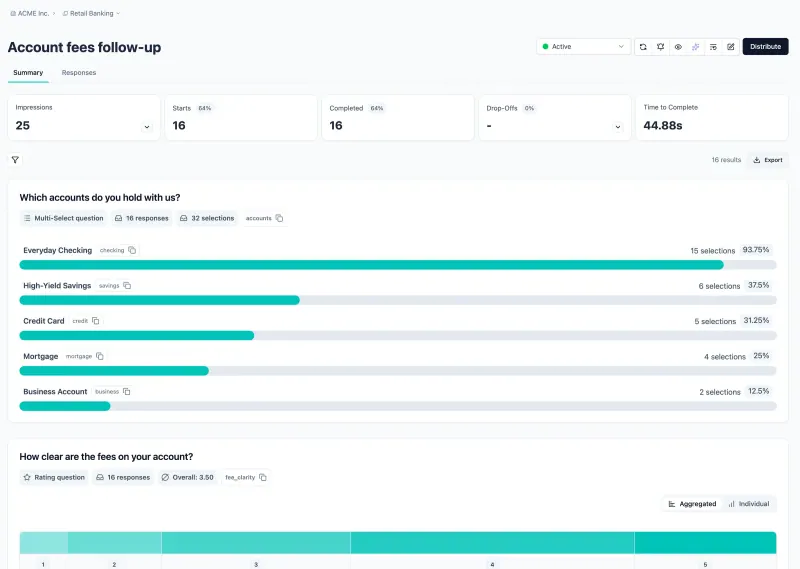
Does everything most people use Google Forms for, and adds conditional logic with scores and variables, custom styling, several languages per survey, webhooks and pop-up surveys inside your own website or web app. It needs its own server, where Google Forms is free with a Google account, and it has no quiz grading. Answers stay on your server, and the Google Sheets integration can still send each response to a sheet.
Easy Open source

Conversational forms, quizzes and surveys, no limits.

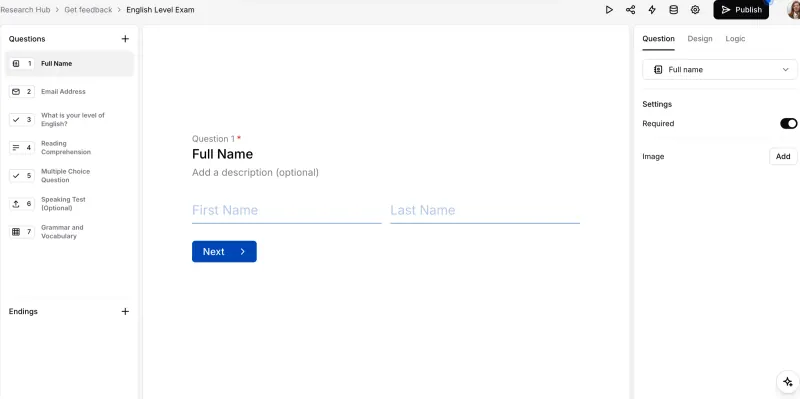
Builds the same sign-ups, quizzes and surveys with more polish: one question at a time, 25+ field types including file upload and signature, logic, themes, payments through your own Stripe account and reports on drop-off, with the answers on your own server. It can send answers to Google Sheets, but that needs your own Google app set up once.

Easy Open source

Field surveys that work offline, on phones and the web.

Built for field data collection rather than quick online forms: forms work offline in the KoboCollect Android app or in web forms that queue answers until a connection returns, with GPS points, photos, skip logic and many languages, and the answers stay on your own server. It takes longer to learn than Google Forms and needs a large server.

Some setup Open source

Survey software for detailed questionnaires.

Far more control than Google Forms: 30+ question types, skip logic and conditions, quotas, many languages per survey, personal invitation links and export to Excel, SPSS or R, with the answers on your own server. It takes longer to learn, it has no link to Google Sheets, and invitations by email need an email server.

Some setup Open source

Forms and surveys with logic and unlimited answers.

Adds what Google Forms lacks, conditional logic, calculations, themes, a custom domain, file uploads, signatures, payments and integrations such as Slack, webhooks and Google Sheets, with the answers on your server. It can import a Google Form's questions, but on a self-hosted copy that needs your own Google app set up once. The free edition allows only 2 users and keeps OpnForm's branding, and it has no graded quiz mode.

Easy Open source

Moving from Google Forms

Formbricks has no import from Google Forms, so you rebuild each form in its editor, starting from one of its survey templates if that helps. Your past responses stay in Google Forms and its linked sheet; download a copy if you want them in one place. If your team works from a response sheet, connect Formbricks' Google Sheets integration so new answers keep arriving there. Then swap the old form links for the new survey links. In this template, file-upload questions and logo or image uploads need S3-compatible storage added first, and teammates join through a copyable invite link because no email server is set up. HeyForm works the same way: rebuild each form in its editor and, if your team works from a response sheet, connect its Google Sheets integration. LimeSurvey has no Google Sheets link, so share its public survey link and download the answers as an Excel or CSV file instead. OpnForm can import a form's questions from its edit link once you have set up your own Google app and connected your Google account; past answers stay in Google Forms, and its Google Sheets integration keeps new ones flowing to a sheet. KoboToolbox has no Google Forms import either: rebuild each form in its form builder or as an XLSForm spreadsheet, deploy it, and share the web-form link or set interviewers up in KoboCollect.

Questions

What is the best open-source alternative to Google Forms?

Start with Formbricks. All 5 are free and open source.

Can HeyForm or Formbricks send responses to Google Sheets?

Yes. Both have a Google Sheets integration that adds each new response to a sheet; in HeyForm it needs your own Google app set up once. Both can also export responses as CSV, and Formbricks as Excel too.

Can I import my Google Forms?

Into OpnForm, partly: it imports a form's questions through Google's API, which on a self-hosted copy needs your own Google app. Past answers are not imported. HeyForm, Formbricks and LimeSurvey have no Google Forms importer, so there you rebuild each form.

Can Formbricks make graded quizzes like Google Forms?

No. Formbricks is built for surveys and feedback, with logic and calculated scores, but it has no quiz mode that grades answers and returns marks.

When should I choose KoboToolbox over Google Forms?

When people collect answers in the field without a reliable connection: KoboToolbox forms work offline on Android phones and in the browser, with GPS points and photos. For quick online sign-ups and surveys, Formbricks or HeyForm is simpler.

Are these Google Forms alternatives really free?

Yes, Formbricks, HeyForm, KoboToolbox, LimeSurvey and OpnForm are free. To run them you need Cloudgate and a server. Use hosted Cloudgate, which can also provide the server, or install Cloudgate on a server of your own for free. Cloudgate's plans and prices are at cloudgate.octabyte.io/pricing. One server can run several apps.

Do I need a developer to replace Google Forms?

No. Cloudgate installs the app you choose on your server and gives it a secure web address, and you use it in your browser instead of Google Forms.