
Glean
A self-hosted RSS reader with a Smart feed, read later and bookmarks.
No server needed to start: Cloudgate can provide one. What happens when you click Deploy
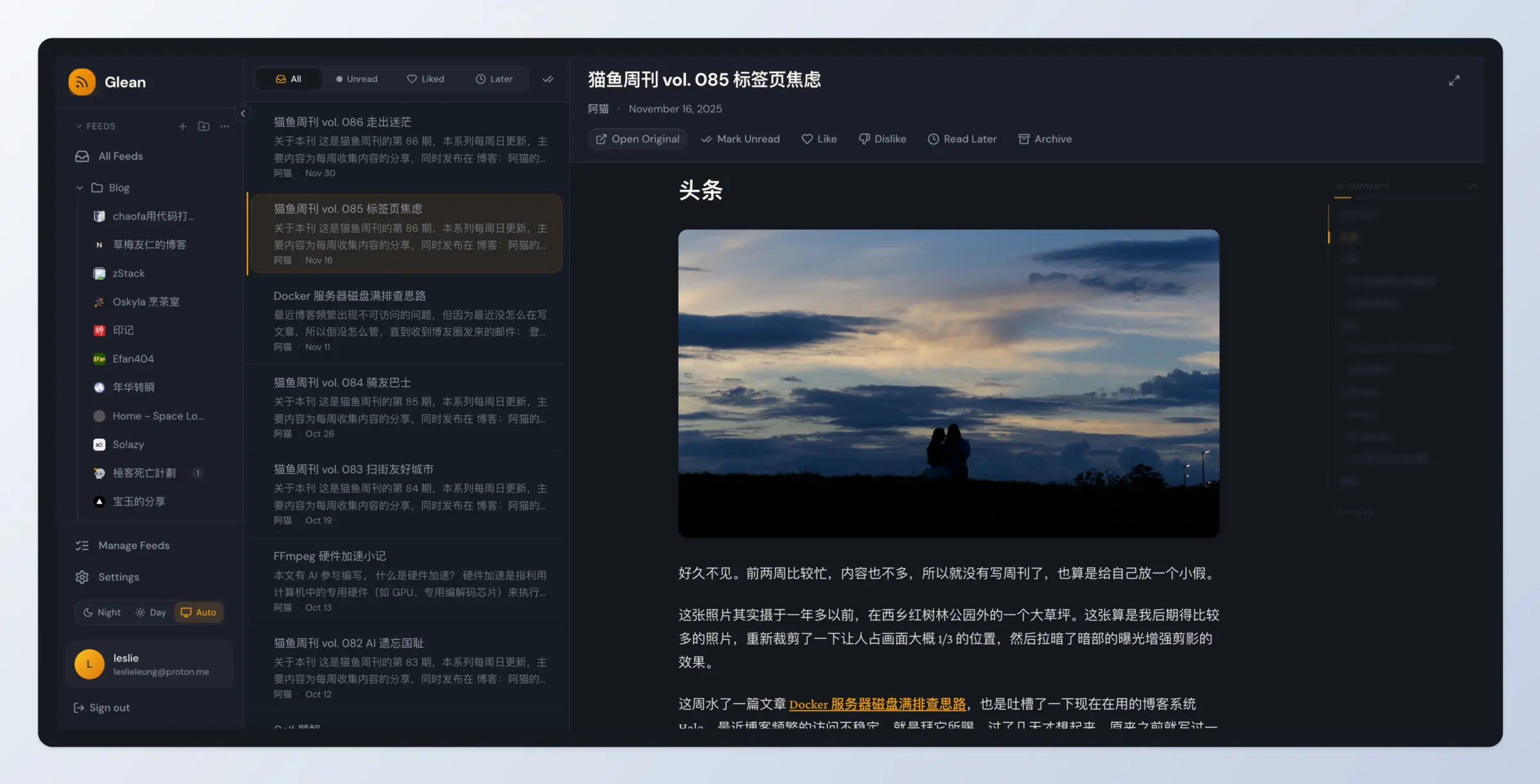

What is Glean?
Glean is a self-hosted, open-source RSS reader with a Smart feed that ranks articles by what you like, plus a read-later list and bookmarks.
Glean is a free, open-source, self-hosted RSS reader that follows the news sites and blogs you choose and puts the articles you care about first, in place of Feedly or Inoreader. It is not the Glean enterprise search product; it is a separate project by Leslie Leung, also called 拾灵. Alongside your feeds it keeps a read-later list and bookmarks, so the articles and pages you want to come back to are in the same app.
Mark articles Like or Dislike and Glean's Smart view learns which sources and authors matter to you. A bakery owner, for example, could follow suppliers, the local paper and twenty food blogs, open the Smart view each morning to see the most useful posts first, and save a recipe article to read later. Several people can share one Glean, each with their own feeds.
It runs in any modern browser, with a desktop app for Windows, macOS and Linux. Bring your feeds from Feedly or Inoreader with an OPML file. Glean is still in development, so expect frequent updates.
Cloudgate installs Glean on a server Cloudgate provides or one you connect, with the database it needs, and gives the reader and its admin dashboard secure web addresses.
What you can do with Glean
- All your feeds in one reader Follow news sites and blogs by RSS or Atom, sorted into folders and tags, and read them in a three-pane view with a contents outline for long articles.
- A Smart feed that learns what you like Mark articles Like or Dislike, and the Smart view puts the unread articles you are most likely to want first, based on the sources and authors you like.
- Read later and bookmarks Put articles on a read-later list that clears itself, and bookmark any web page, not only articles from your feeds.
- The whole article, not a teaser When a feed sends only a summary, Glean fetches the full text from the original page so you can read it in the app.
- New articles every 15 minutes Glean checks your feeds in the background, so new articles are waiting when you open it.
- Move in with OPML Import the feed list you exported from another reader, and export yours whenever you like.
- Accounts and an admin dashboard Each person has their own feeds and reading history, and the admin dashboard shows users and feeds and controls whether new people can sign up.
Replaces Feedly, Inoreader and Pocket
Glean does the same job as Feedly, Inoreader and Pocket. Here is what changes when you switch.
- No subscription and no limit on how many feeds you follow
- Ranking, read later and bookmarks in one free app
- What you read and like stays on your own server
- A desktop app for Windows, macOS and Linux as well as the web app
- A young project that is still in development, with frequent updates
- No phone app, and no sync with third-party reader apps
- AI summaries and auto-tagging are planned, not available yet
- The interface is in English and Chinese only
What happens when you click Deploy?
You do not need a server or any technical knowledge. Four steps, and Glean is running at its own web address.
- Step 1 Click Deploy and create your account
Deploy takes you to Cloudgate. Create an account, or log in if you have one. Glean itself is free.
- Step 2 Choose a server
No server? Get one from Cloudgate: pick a size and a country, and Cloudgate gets it ready. Already have one? Connect it instead.
- Step 3 Cloudgate sets up Glean
It prepares the server, makes the passwords the app needs and starts it. There is nothing to install and nothing to write down.
- Step 4 Open your app and sign in
Your app gets a free web address to start, without https. Add your own domain, like app.yourshop.com, and Cloudgate secures it with https for you.
New to Cloudgate? See what Cloudgate is
Run Cloudgate yourself? Deploy from your own console
In your Cloudgate console, open Templates and choose Glean.
Questions
Is this Glean the same as the Glean enterprise search company?
No. This Glean is a free, open-source RSS reader made by Leslie Leung, also known by its Chinese name 拾灵. It is not related to Glean, the paid AI search for company apps at glean.com; for that, see the Glean alternatives such as Onyx.
Is Glean free?
Yes, the Glean RSS reader is free and open source under the AGPL-3.0 licence, with no paid edition or paid features. You pay only for your server.
Is Glean a good alternative to Feedly or Inoreader?
Yes, if you want to follow and read feeds with no subscription or feed limit, and like a feed that puts what you care about first. Glean is younger than Feedly or Inoreader, has no phone app and does not yet have AI summaries, so FreshRSS or Miniflux are the more settled choices.
Can I import my feeds from Feedly or Inoreader?
Yes. Export your subscriptions from Feedly or Inoreader as an OPML file and import it with Import OPML on Glean's Manage Feeds page. Your feeds and folders come across; saved articles and boards do not.
Does Glean have AI features?
Partly. Glean's Smart view ranks unread articles by what you liked without any AI service. The makers' AI-based ranking needs an extra vector database that this template leaves out, and AI summaries, auto-tagging and keyword extraction are on the project's roadmap but not in the current release.
Does Glean have a phone app?
No, there is no phone app yet, and Glean does not sync with third-party reader apps. You read in the web app in your browser, or in the desktop app for Windows, macOS and Linux from the project's releases page.
How do I sign in to Glean the first time?
Open the reader's web address and sign up with your email and a password. Glean also has a separate admin dashboard at its own web address, where you sign in with the admin username you chose and the password Cloudgate generated, shown on the app's variables page.
Do I need technical skills to run Glean?
No. Click Deploy, create your Cloudgate account and choose a server, and Cloudgate sets up Glean and gives it a web address. You use it in your browser like any other online tool.
Do I need my own server for Glean?
No. When you deploy Glean, hosted Cloudgate can provide a server. If you already rent one, you can connect it instead.
Related apps

A self-hosted RSS reader in the style of Google Reader.

A self-hosted RSS reader for every news site and blog you follow.

A minimalist RSS reader that is fast, quiet and free of clutter.

Turn email newsletters into RSS feeds for any reader.