
DMARC Report Viewer
Read your DMARC reports and see who sends email as your domain.
No server needed to start: Cloudgate can provide one. What happens when you click Deploy
What is DMARC Report Viewer?
Self-hosted DMARC report viewer: see who sends email as your domain and whether it passes SPF and DKIM, from the DMARC and SMTP TLS reports in your mailbox.
DMARC Report Viewer is a free, open-source, self-hosted DMARC report viewer that shows who sends email as your domain and whether that email passes SPF and DKIM, in place of paid services such as dmarcian or EasyDMARC. It reads the DMARC reports that Gmail, Outlook, Yahoo and other mail providers send you, and turns them into charts and tables.
DMARC is a short record on your domain that tells mail providers what to do with email that claims to be from you but fails their checks. Once it's set up, they send you a daily report, as a zipped file that is hard to read. DMARC Report Viewer collects those reports from a mailbox and shows which servers sent as your domain and which failed. A small accounting firm, for example, could see that its newsletter tool fails DKIM before switching its policy to reject fake email, so real newsletters still arrive.
It also reads SMTP TLS reports, which show when other servers could not deliver mail to you securely. It works with any mailbox that offers IMAP with a password, and its pages work in a phone's browser.
Cloudgate installs DMARC Report Viewer on your server, connects it to your reports mailbox and gives it a secure web address protected by a password.
What you can do with DMARC Report Viewer
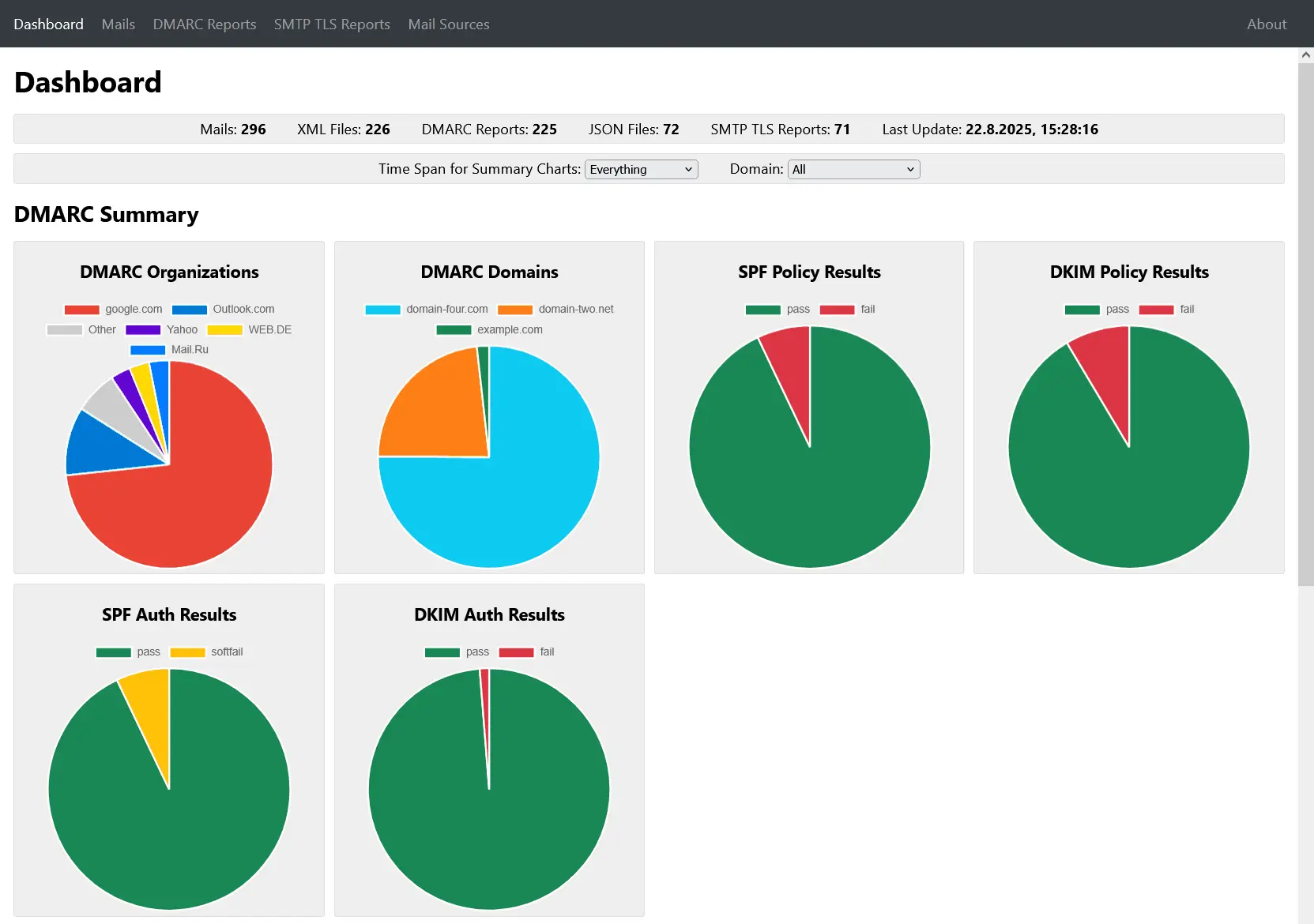
- See every sender at a glance Charts show which mail providers reported on your domain and how much of your email passed or failed SPF and DKIM.
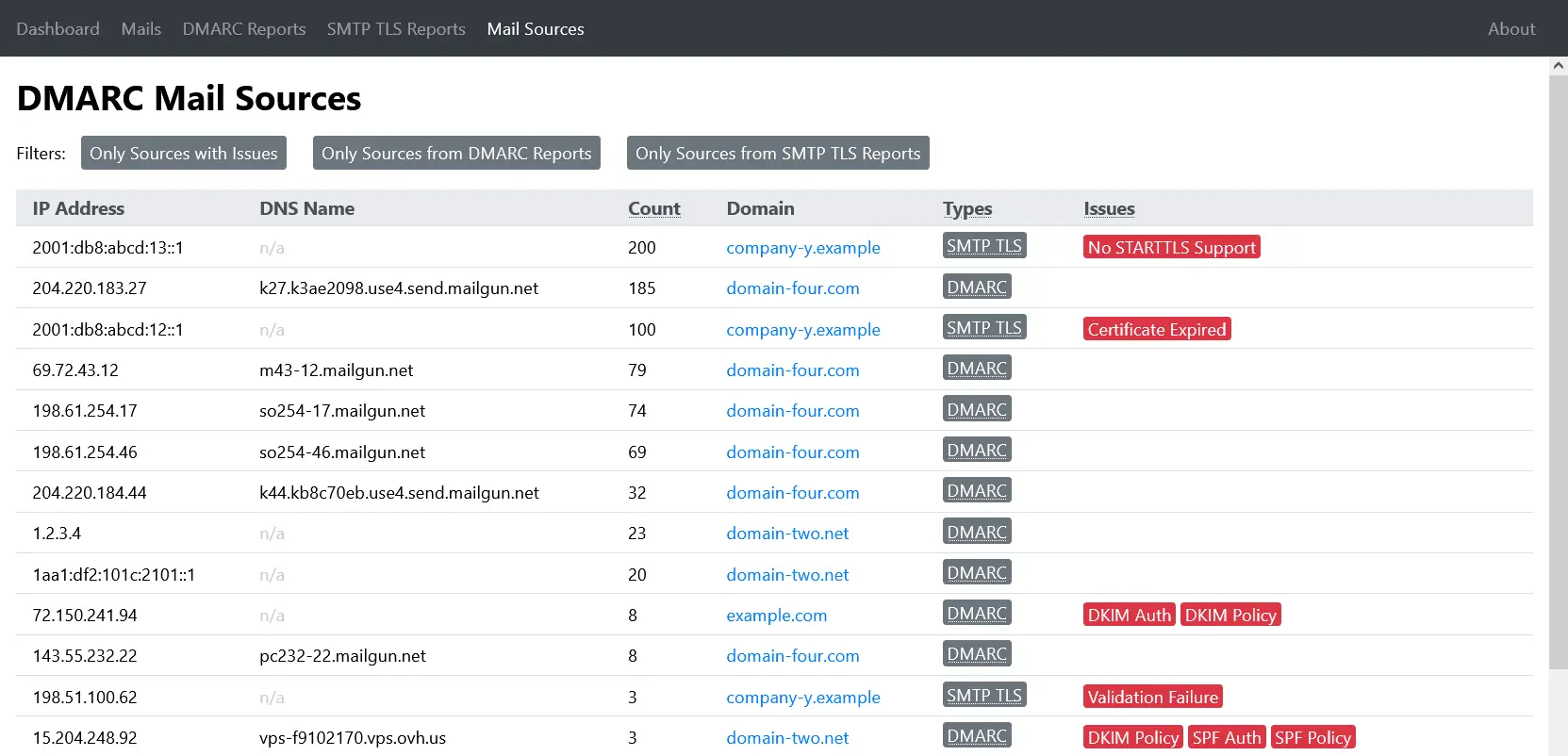
- Spot senders that fail The Mail Sources page ranks every server that sent as your domain and flags the ones failing SPF or DKIM.
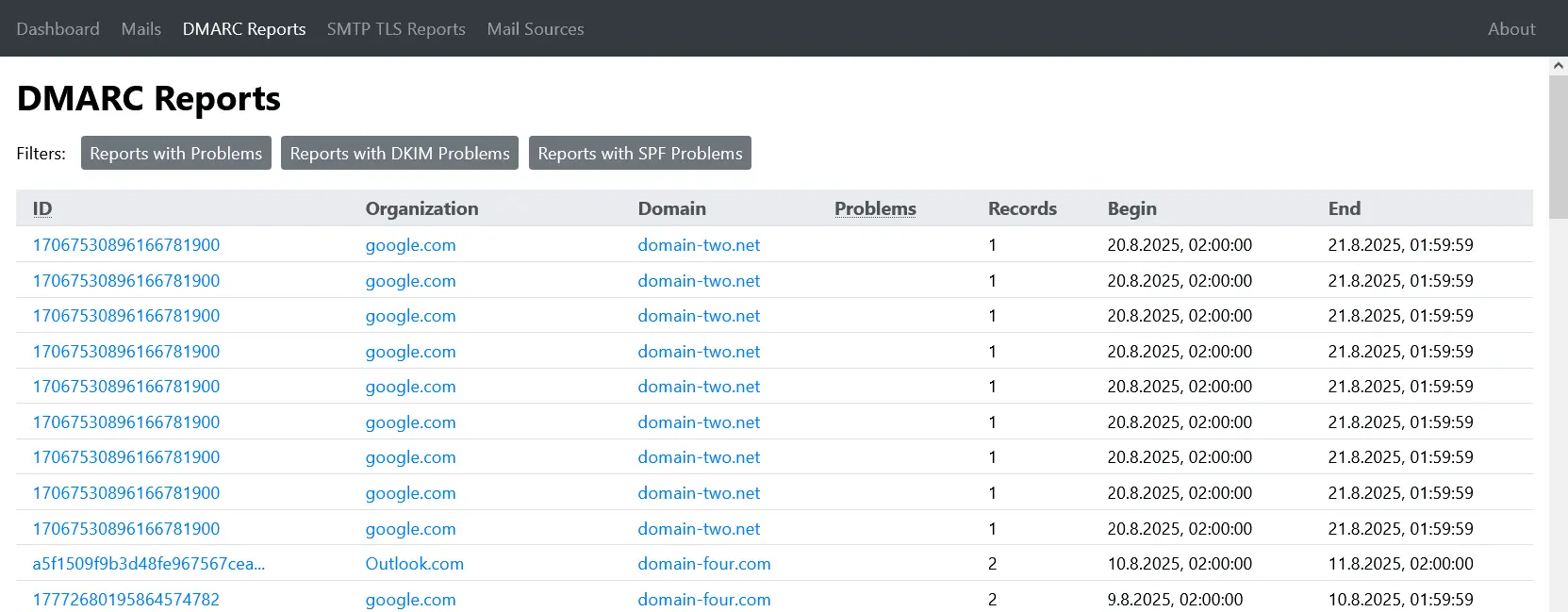
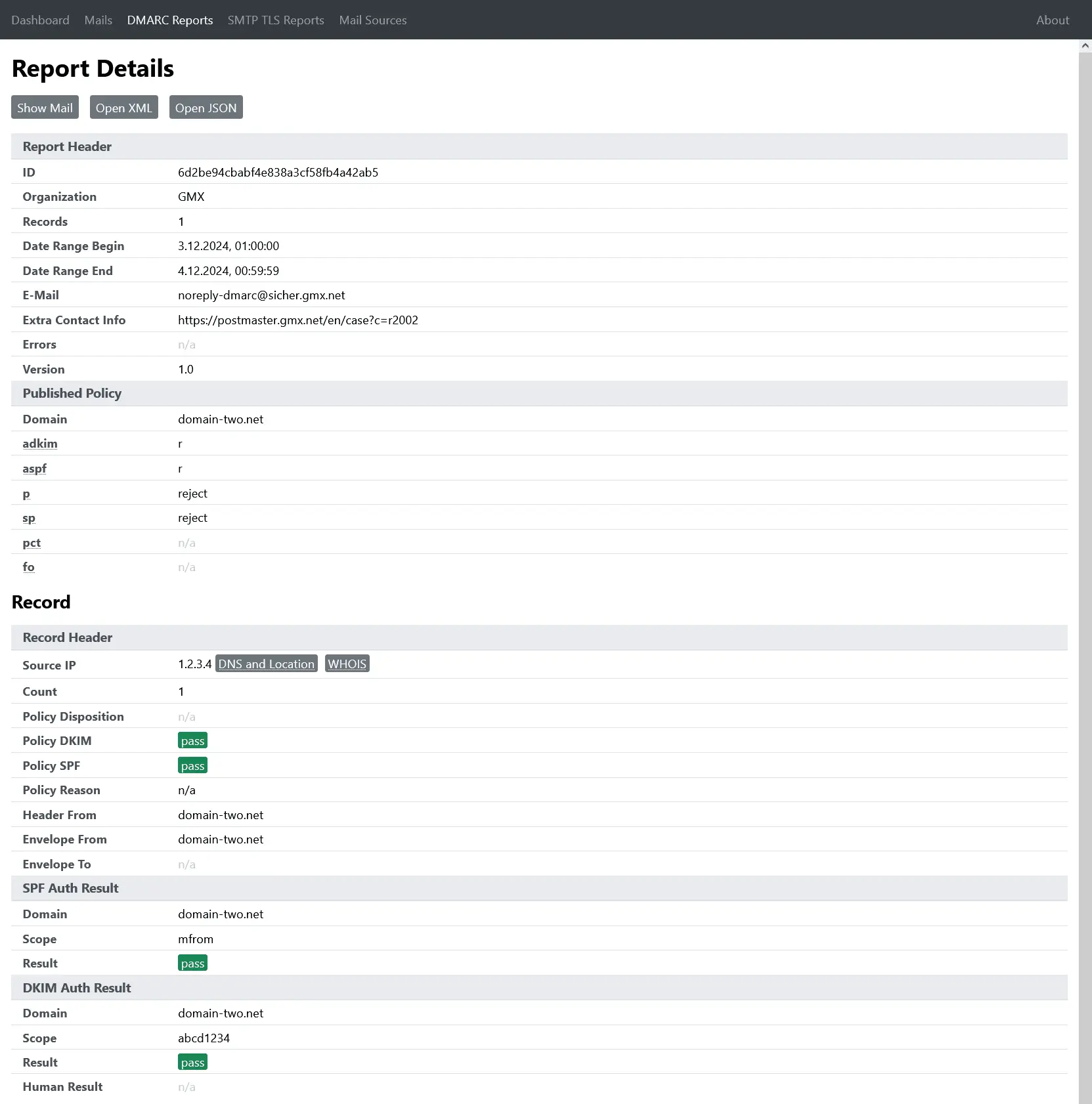
- Read reports in plain tables Each DMARC report opens as a readable page instead of a zipped XML file, with your published policy and each result.
- Check secure delivery too SMTP TLS reports show when other mail servers could not deliver to you securely, such as an expired certificate.
- Filter by domain and date Narrow charts and report lists to one domain or a time span, or show only reports with problems.
- Look up a sending server Click an IP address to see its name, location and owner, and every report that mentions it.
- Export what you need Download reports as XML or JSON, or print one as a PDF for your records.
Replaces dmarcian and EasyDMARC
DMARC Report Viewer does the same job as dmarcian and EasyDMARC. Here is what changes when you switch.
- Your reports stay in your own mailbox and on your server
- Free for any number of domains and reports
- Covers DMARC and SMTP TLS reports in one place
- Very light, with no database to look after
- It shows your reports but does not guide you through a DMARC rollout
- No email alerts; a webhook can tell another app when new reports arrive
- One shared login, not separate user accounts
- History lasts as long as you keep the report emails in the mailbox
What happens when you click Deploy?
You do not need a server or any technical knowledge. Four steps, and DMARC Report Viewer is running at its own web address.
- Step 1 Click Deploy and create your account
Deploy takes you to Cloudgate. Create an account, or log in if you have one. DMARC Report Viewer itself is free.
- Step 2 Choose a server
No server? Get one from Cloudgate: pick a size and a country, and Cloudgate gets it ready. Already have one? Connect it instead.
- Step 3 Cloudgate sets up DMARC Report Viewer
It prepares the server, makes the passwords the app needs and starts it. There is nothing to install and nothing to write down.
- Step 4 Open your app and sign in
Your app gets a free web address to start, without https. Add your own domain, like app.yourshop.com, and Cloudgate secures it with https for you.
New to Cloudgate? See what Cloudgate is
Run Cloudgate yourself? Deploy from your own console
In your Cloudgate console, open Templates and choose DMARC Report Viewer.
Questions
Is DMARC Report Viewer free?
Yes, DMARC Report Viewer is free and open source under the MIT licence, with no paid edition. You pay only for the server it runs on.
What is a DMARC report?
A DMARC report is a daily summary that Gmail, Outlook, Yahoo and other mail providers send to the address in your domain's DMARC record. It lists which servers sent email as your domain and whether each passed SPF and DKIM, the checks that prove the email really came from you. The reports arrive as zipped XML files, which DMARC Report Viewer turns into charts and tables.
Is DMARC Report Viewer a good alternative to dmarcian or EasyDMARC?
Yes, if you mainly want to read your DMARC reports and see who sends as your domain. dmarcian and EasyDMARC also guide you through tightening your DMARC policy, send alerts and offer support; DMARC Report Viewer only shows the reports, with no subscription and with the data kept on your own server.
How do my reports get into DMARC Report Viewer?
DMARC Report Viewer reads them from a mailbox you choose, such as dmarc@yourcompany.com, and checks it for new reports every 30 minutes. Your domain's DMARC record must name that mailbox as its report address (the rua tag), and mail providers then send reports there about once a day.
How do I sign in to DMARC Report Viewer the first time?
The DMARC Report Viewer username is dmarc and the password is the one Cloudgate generates, shown among the app's settings in Cloudgate. Your browser asks for both when you open the web address; there are no other accounts to create.
Does DMARC Report Viewer work with Microsoft 365?
Not directly, because DMARC Report Viewer signs in to the mailbox with a plain username and password, which Microsoft 365 does not allow. It works with mailboxes that offer IMAP with a password; for Microsoft 365, the project explains how to add a separate sign-in helper called DavMail.
What server size do I need for DMARC Report Viewer?
The smallest server is enough, because DMARC Report Viewer is one small program with no database. It keeps the reports in memory and reads them again from the mailbox when it restarts.
Do I need technical skills to run DMARC Report Viewer?
No. Click Deploy, create your Cloudgate account and choose a server, and Cloudgate sets up DMARC Report Viewer and gives it a web address. You use it in your browser like any other online tool.
Do I need my own server for DMARC Report Viewer?
No. When you deploy DMARC Report Viewer, hosted Cloudgate can provide a server. If you already rent one, you can connect it instead.
Can I move my data from dmarcian to DMARC Report Viewer?
Most people export from dmarcian and import into DMARC Report Viewer. The official guides at github.com walk through it.
Related apps

One sign-in with two-step login for the apps you host yourself.

Single sign-on and one user list for all your apps, on your server.

Encrypted notes that self-destruct by views or by timer.

Encrypted notes and files that delete after reading.