
Easy!Appointments
Let customers book a service with your staff online.
No server needed to start: Cloudgate can provide one. What happens when you click Deploy

What is Easy!Appointments?
Easy!Appointments is a self-hosted appointment booking app: customers book a service with your staff online, like Acuity Scheduling.
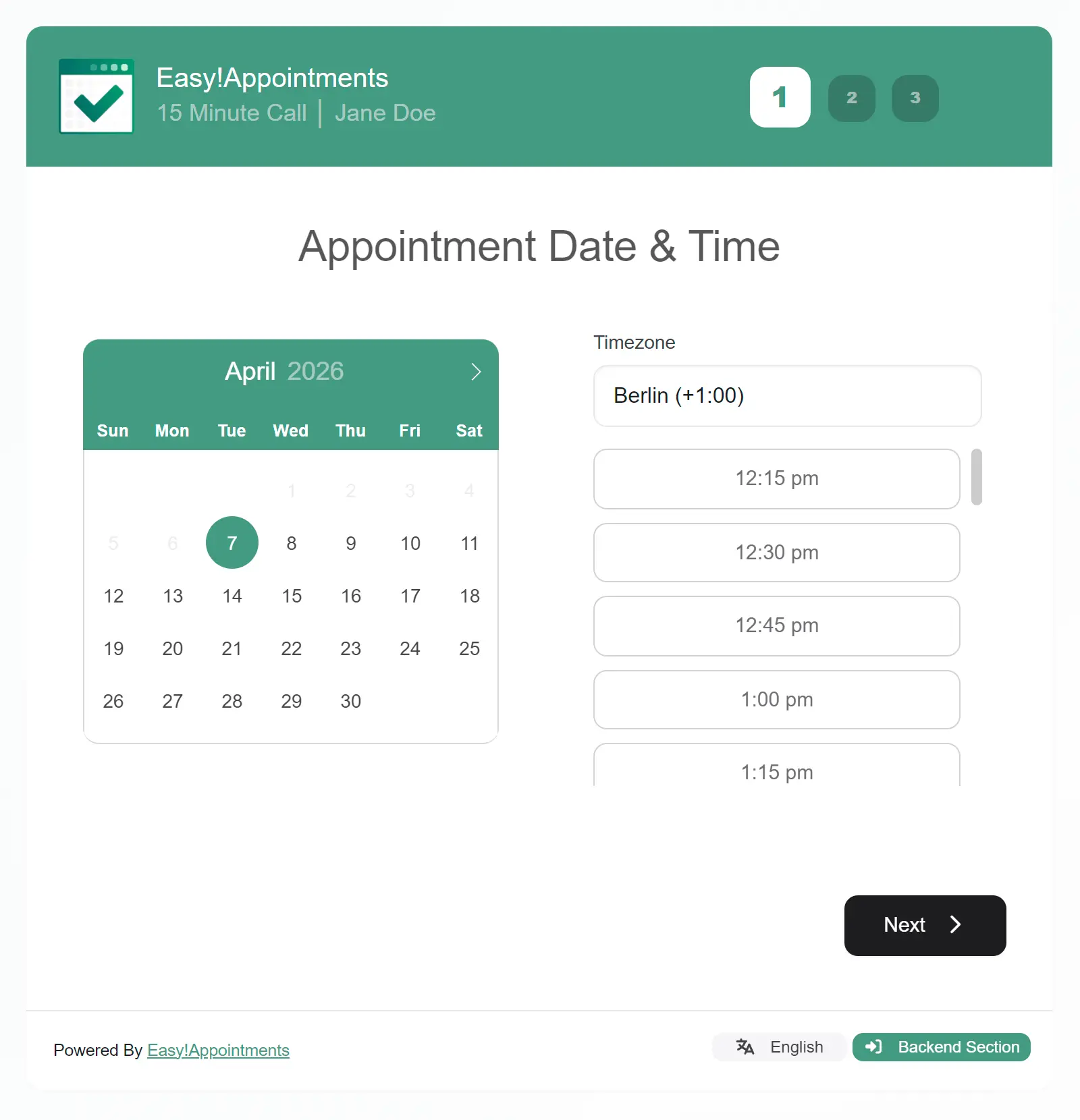
Easy!Appointments is a free, open-source, self-hosted appointment booking app, an alternative to Acuity Scheduling and Calendly for businesses with staff and set services. Customers pick a service, a member of staff, a day and a free time on your booking page, and book without creating an account.
Your team works from one calendar that shows every appointment, break and day off. You set up each service with its length and price, and each person's working hours. Staff and customers get an email when a booking is made, changed or cancelled. A hair salon, for example, could let clients book a cut or colour with the stylist they like, and see the whole day's appointments for every chair in one view.
It syncs with Google Calendar and other calendars, can add a Jitsi or Google Meet link, and can send each booking to n8n, Zapier or Make. It works in any browser on a phone or computer; there is no phone app. It does not take payments or send reminders.
Cloudgate installs Easy!Appointments on a server Cloudgate provides or one you connect, together with the database it needs, and gives it a secure web address. Open that address right after setup to create the admin account.
What you can do with Easy!Appointments
- A public booking page Customers choose a service, a member of staff, a day and a free time, and book without creating an account.
- One calendar for your team See every appointment and time off for all your staff in one calendar, and add or move bookings yourself.
- Services and working hours Set each service's length and price, and each person's working hours, breaks and days off.
- The right access for each person Admins run everything, providers see their own bookings, and secretaries manage bookings for chosen staff.
- Sync with Google Calendar Keep each person's appointments in step with their Google Calendar or another calendar that supports CalDAV.
- Booking emails Customers and staff get an email when an appointment is booked, changed or cancelled.
- Online meeting links Add a Jitsi or Google Meet link to appointments that take place online.
- Connect other tools Send every booking to n8n, Zapier or Make, or embed the booking page in WordPress, Joomla! or Drupal.
Replaces Acuity Scheduling and Calendly
Easy!Appointments does the same job as Acuity Scheduling and Calendly. Here is what changes when you switch.
- No monthly fee per staff member
- Your customers' details and bookings stay on your server
- Bookings, customers and staff in one place
- No online payments, reminder emails or text messages
- No importer from Acuity or Calendly, so you set up services again
- The look is plainer than Acuity's or Calendly's
- Booking pages show "Powered By Easy!Appointments" unless you buy a white-label licence
What happens when you click Deploy?
You do not need a server or any technical knowledge. Four steps, and Easy!Appointments is running at its own web address.
- Step 1 Click Deploy and create your account
Deploy takes you to Cloudgate. Create an account, or log in if you have one. Easy!Appointments itself is free.
- Step 2 Choose a server
No server? Get one from Cloudgate: pick a size and a country, and Cloudgate gets it ready. Already have one? Connect it instead.
- Step 3 Cloudgate sets up Easy!Appointments
It prepares the server, makes the passwords the app needs and starts it. There is nothing to install and nothing to write down.
- Step 4 Open your app and sign in
Your app gets a free web address to start, without https. Add your own domain, like app.yourshop.com, and Cloudgate secures it with https for you.
New to Cloudgate? See what Cloudgate is
Run Cloudgate yourself? Deploy from your own console
In your Cloudgate console, open Templates and choose Easy!Appointments.
Questions
Is Easy!Appointments free?
Yes, Easy!Appointments is free and open source under the GPL-3.0 licence, for personal and commercial use. Its maker also sells optional services such as support, hosting and custom work.
Is Easy!Appointments a good alternative to Acuity Scheduling?
Yes, Easy!Appointments suits a service business that wants customers to book a service with a member of staff online. Unlike Acuity, the free app does not take payments or send reminder emails or text messages.
Is Easy!Appointments a good alternative to Calendly?
Yes, Easy!Appointments fits if your bookings are services with staff, such as haircuts or consultations. For personal meeting links that check your calendar, Cal.com is a closer match to Calendly.
How do I sign in to Easy!Appointments the first time?
The first visit to your Easy!Appointments web address opens an installation wizard, where you create the admin account and enter your company details; do it right after setup. Afterwards the address shows your booking page, and staff sign in at /index.php/login.
Does Easy!Appointments send reminders or take payments?
No, the free Easy!Appointments app sends emails only when a booking is made, changed or cancelled. Reminders, text messages and online payments are offered only as paid custom work from its maker.
Does Easy!Appointments send emails?
Yes, Easy!Appointments sends emails if you enter your email service's details when you set it up, or add them later. Without them, bookings still work, but no emails go out.
Does Easy!Appointments work with Google Calendar?
Yes, Easy!Appointments syncs appointments both ways with Google Calendar. You need your own Google API credentials, which you enter under Settings > Integrations.
Do I need technical skills to run Easy!Appointments?
No. Click Deploy, create your Cloudgate account and choose a server, and Cloudgate sets up Easy!Appointments and gives it a web address. You use it in your browser like any other online tool.
Do I need my own server for Easy!Appointments?
No. When you deploy Easy!Appointments, hosted Cloudgate can provide a server. If you already rent one, you can connect it instead.
Can I move my data from Acuity Scheduling to Easy!Appointments?
Most people export from Acuity Scheduling and import into Easy!Appointments. The official guides at github.com walk through it.
Related apps

Your own booking link, so clients pick a time without emails.

A light, self-hosted booking link for consultants and small teams.

Let clients book time with you from a simple link.

Encrypted online appointment booking for practices and clinics.