Donetick
A self-hosted chore app that shares and rotates household chores.
No server needed to start: Cloudgate can provide one. What happens when you click Deploy

What is Donetick?
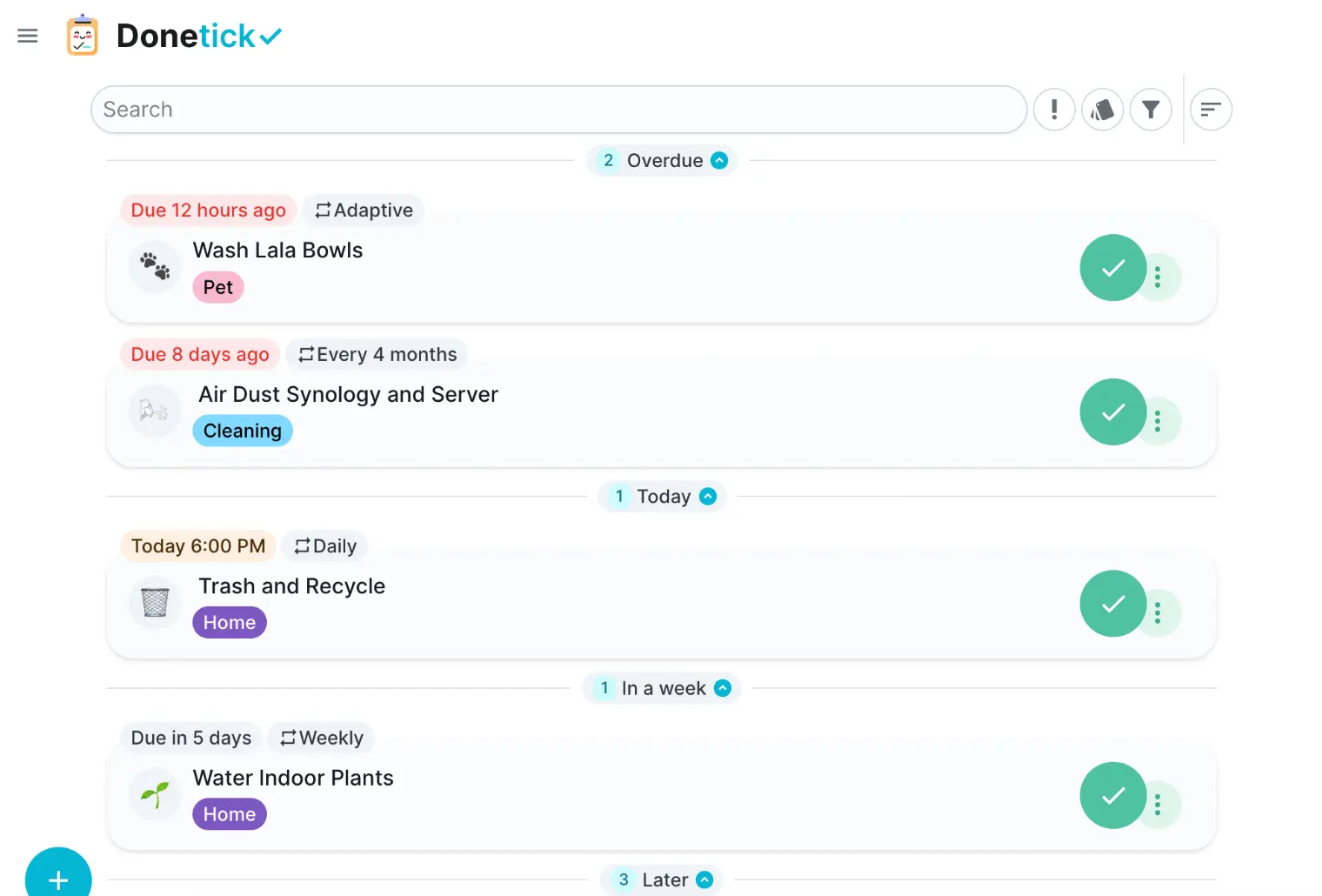
Donetick is a self-hosted chore app for families and house-shares: share recurring chores, rotate who does them, earn points and tick them off on a wall tablet.
Donetick is a free, open-source, self-hosted chore app that lets a family or house-share split recurring chores fairly, in place of paid apps such as Tody, Sweepy or OurHome. Everyone sees what is overdue, what is due today and whose turn it is.
You add chores in plain words, such as "change the water filter every 6 months", and Donetick sets the schedule. Repeating chores can rotate between people, finished chores earn points, and a dashboard on a kitchen tablet lets anyone tick off a chore with a tap. A family of four, for example, could have the bins rotate between the two teenagers each week, watering the plants come round every Sunday, and see on the tablet who has the most points by the end of the month.
Donetick runs in any browser and on phones, with an early Android app and an iPhone test version. It sends reminders through Telegram, Discord or Pushover and shows chores in Home Assistant. It does not import from other chore apps.
Cloudgate installs Donetick on a server Cloudgate provides or one you connect, and gives it a secure web address. Open that address to sign up and create your household, then invite everyone with its code.
What you can do with Donetick
- Type chores the way you say them Write "Take the trash out every Monday at 6 pm" and Donetick fills in the day, time and repeat for you.
- Repeat chores on any schedule Set daily, weekly, monthly or yearly chores, pick days or months, or let Donetick learn how often a chore really gets done.
- Take turns fairly Rotate a chore in turn, at random, or to whoever has done the fewest, so the same person isn't always stuck with it.
- Earn points for what gets done Finished chores earn points, and charts show who did what by label and over time.
- Put the house list on a wall tablet A dashboard view shows the task list, a calendar and recent activity, and anyone can tap their name to tick a chore off.
- Break chores into steps Add subtasks, labels and priorities, and the steps of a repeating chore reset each time it is done.
- Get reminders where you already look Receive reminders through Telegram, Discord or Pushover, and see each person's chores as a to-do list in Home Assistant.
Replaces Tody, Sweepy, OurHome and Todoist
Donetick does the same job as Tody, Sweepy, OurHome and Todoist. Here is what changes when you switch.
- Free and open source, with no premium plan and no limit on household members
- Fair rotation, points and a wall-tablet view are all included
- Your family's chores and history stay on your own server
- Works with Home Assistant, Telegram, Discord and Pushover
- Chores from Tody, Sweepy or OurHome don't move across; you set them up again
- It is built for the browser first; the Android app and the iPhone test version are early
- Donetick is still before version 1.0, so expect frequent updates
- Anyone who can open the web address can sign up until you turn new sign-ups off
What happens when you click Deploy?
You do not need a server or any technical knowledge. Four steps, and Donetick is running at its own web address.
- Step 1 Click Deploy and create your account
Deploy takes you to Cloudgate. Create an account, or log in if you have one. Donetick itself is free.
- Step 2 Choose a server
No server? Get one from Cloudgate: pick a size and a country, and Cloudgate gets it ready. Already have one? Connect it instead.
- Step 3 Cloudgate sets up Donetick
It prepares the server, makes the passwords the app needs and starts it. There is nothing to install and nothing to write down.
- Step 4 Open your app and sign in
Your app gets a free web address to start, without https. Add your own domain, like app.yourshop.com, and Cloudgate secures it with https for you.
New to Cloudgate? See what Cloudgate is
Run Cloudgate yourself? Deploy from your own console
In your Cloudgate console, open Templates and choose Donetick.
Questions
Is Donetick free?
Yes, Donetick is free and open source under the AGPL-3.0 licence. The self-hosted version has no paid plan and no limit on how many people join your household; you pay only for your server.
Is Donetick a good alternative to Tody or Sweepy?
Yes, Donetick suits a household that wants to share chores rather than plan cleaning alone. Like Tody and Sweepy it tracks recurring chores and what is overdue; it adds fair rotation between people, points and a wall-tablet view, but it runs mainly in the browser instead of a polished phone app.
How do I sign in to Donetick the first time?
Open your Donetick web address and sign up; there is no default password. The first account gets its own household group, and family members sign up too and join it with the group's invite code, which you approve.
Can Donetick rotate chores between family members?
Yes. In Donetick, each repeating chore can pass to the next person in turn, to someone at random, or to whoever has finished the fewest chores.
Is there a Donetick app for iPhone or Android?
Partly. Donetick works in any phone browser and can be added to the home screen, and the project offers an early Android app and an iPhone test version that connect to your own server.
Does Donetick work with Home Assistant?
Yes, Donetick has an official Home Assistant integration that shows each person's chores as a to-do list in Home Assistant.
Can I import my chores from Tody, Sweepy or OurHome?
No, Donetick has no importer for other chore apps. Typing a chore in plain words, such as "water the plants every Sunday", makes setting them up again quick.
Do I need technical skills to run Donetick?
No. Click Deploy, create your Cloudgate account and choose a server, and Cloudgate sets up Donetick and gives it a web address. You use it in your browser like any other online tool.
Do I need my own server for Donetick?
No. When you deploy Donetick, hosted Cloudgate can provide a server. If you already rent one, you can connect it instead.
Related apps

A self-hosted family planner for calendar, chores, meals and money.

A self-hosted travel tracker, trip planner and world map in one.

A self-hosted flight tracker for every flight you take, on one map.
A self-hosted baby tracker the whole family can share.