CTFd
Host capture-the-flag events with teams, hints and a live scoreboard.
No server needed to start: Cloudgate can provide one. What happens when you click Deploy
What is CTFd?
Self-hosted CTFd runs capture-the-flag competitions for security classes, clubs and company events, with challenges, teams, hints and a live scoreboard.
CTFd is a free, open-source platform for running capture-the-flag (CTF) competitions, and self-hosted CTFd is an alternative to CTFd's hosted plans or Hack The Box's paid CTF hosting. You write security puzzles called challenges, each hiding a secret "flag"; players solve them, submit the flag for points and climb a live scoreboard, alone or in teams.
It suits security teachers, school and university clubs, meetups and companies running a training day. A college lecturer, for example, could set ten beginner challenges in web, cryptography and forensics, let student teams play through a two-hour lab session with hints that cost points, and check afterwards which teams got stuck where.
CTFd comes with no challenges of its own, so you write them or reuse ones you have. Players use it in any web browser, including on a phone; there is no app. Themes change its look, plugins add new challenge types, and a whole event can be exported and imported again next term.
Cloudgate installs CTFd on a server Cloudgate provides or one you connect, with the database it needs, and gives it a secure web address. Open the address, finish the short setup to create your admin account, and add your first challenge.
What you can do with CTFd
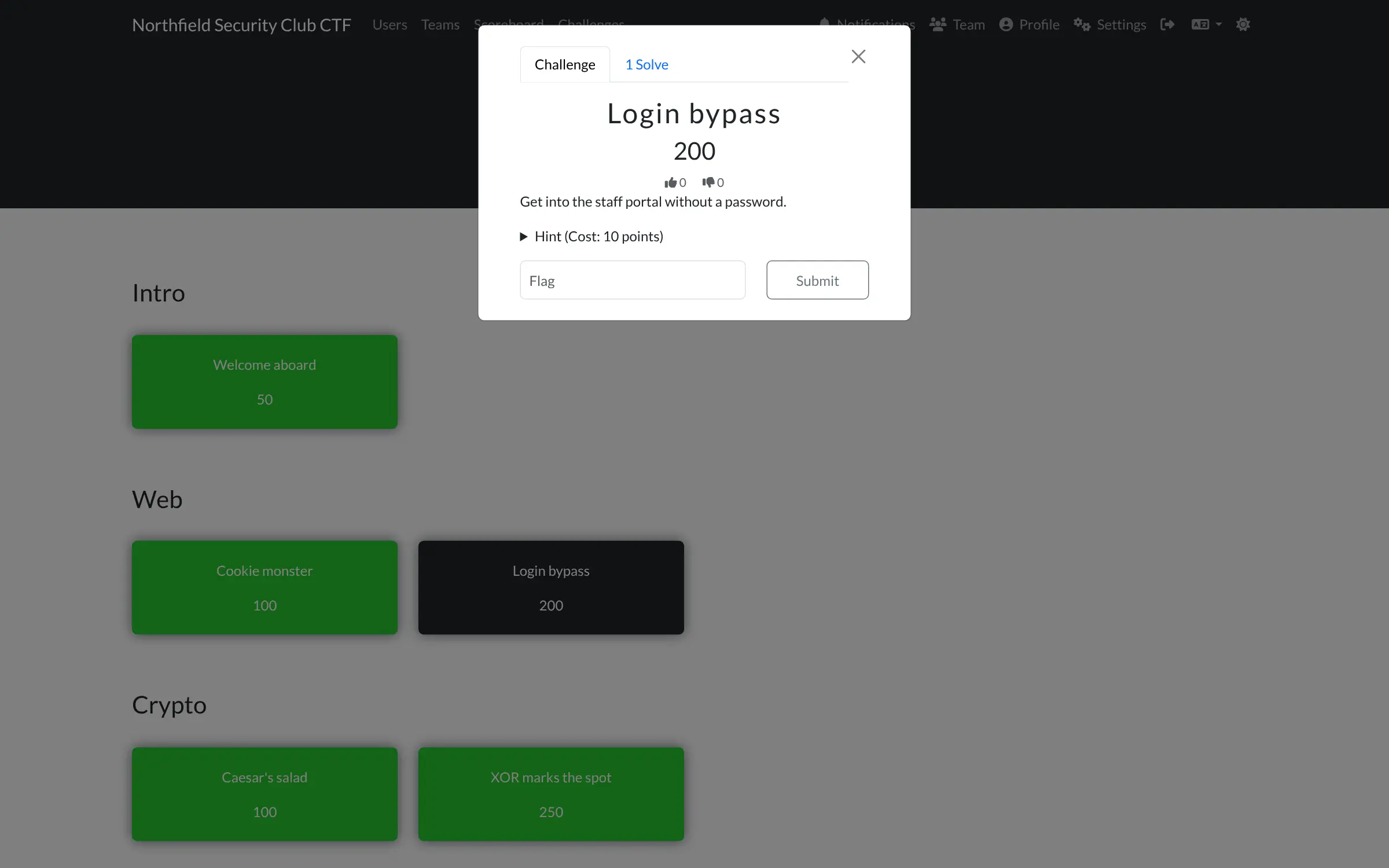
- Write your own challenges Give each challenge a category, points, a flag, files to download and a limit on attempts.
- Play alone or in teams Choose individual or team play, set a team size, and manage, hide or ban teams.
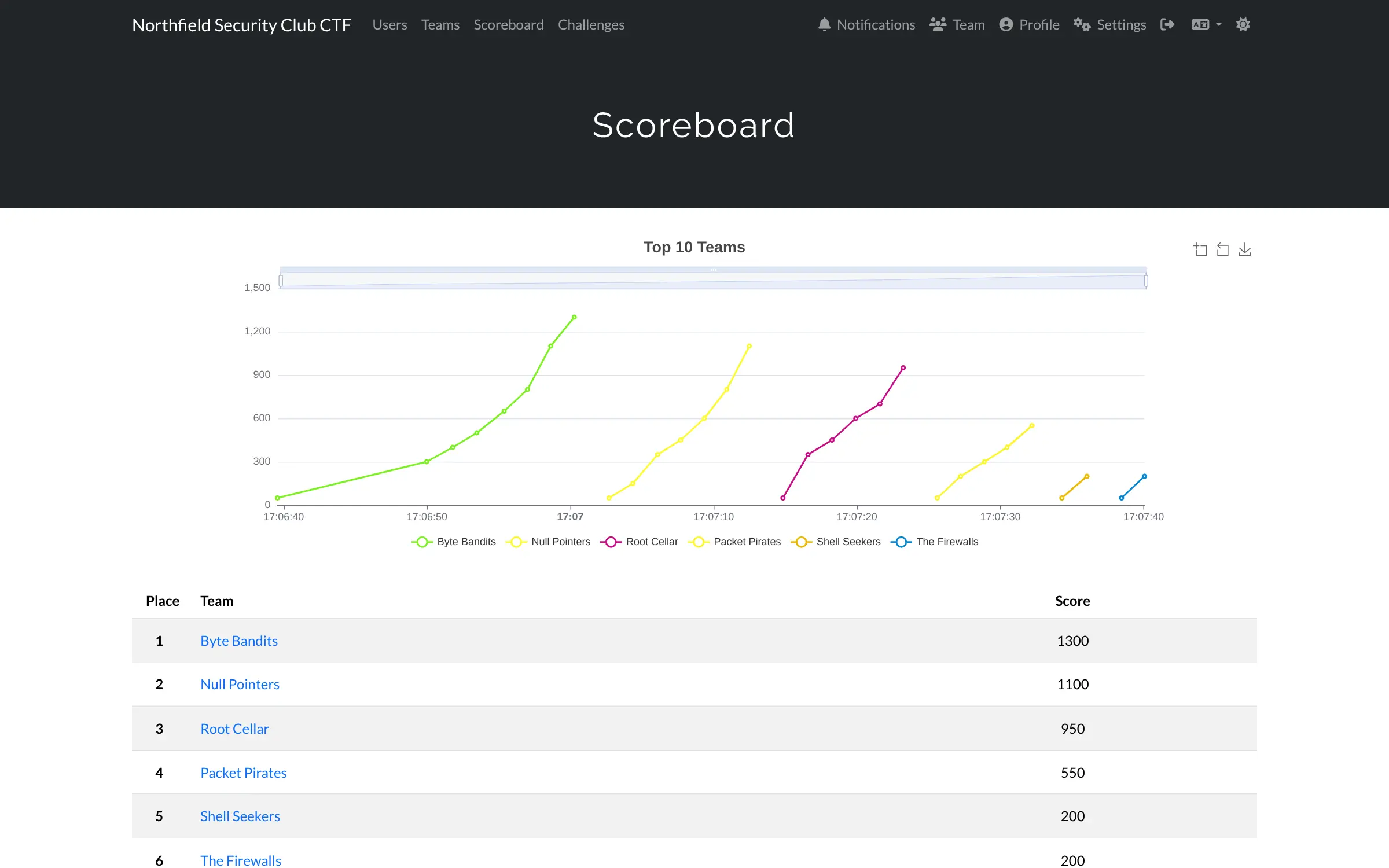
- Keep a live scoreboard A ranked table and a score graph of the top ten update as flags come in, and you can hide or freeze scores.
- Give hints that cost points Players unlock hints when they are stuck, and you decide how many points each one costs.
- Make scoring fairer Dynamic scoring lowers a challenge's value as more teams solve it, and some challenges unlock only after others.
- Run the clock for you Set a start and end time and the competition opens and closes on its own.
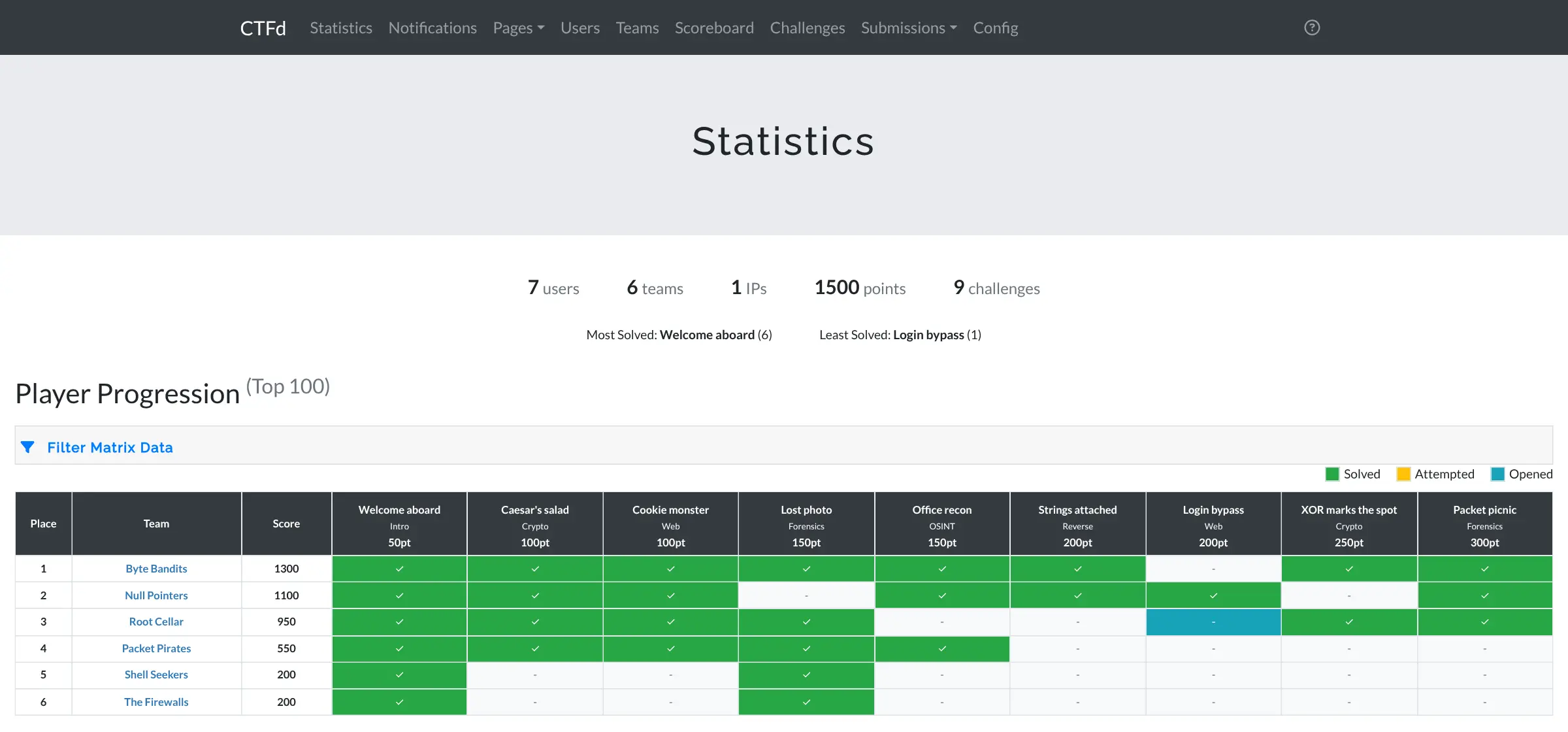
- See how players progress An admin view shows which team solved, attempted or opened each challenge, plus solve counts and player ratings.
- Keep and reuse your events Export a whole event as a backup, import it later, and add users, teams or challenges from a spreadsheet file.
Replaces CTFd hosting
CTFd does the same job as CTFd hosting. Here is what changes when you switch.
- No monthly bill for the platform, and no limit on players or events
- Player accounts, flags and results stay on your own server
- The same CTFd software the hosted plans are built on, so a CTFd backup can move across
- Change the look with themes and add features with plugins
- CTFd comes with no challenges; you write them or bring your own
- Challenges that need a live server to attack have to be hosted separately
- Some hosted-plan extras are not in the free edition, such as multiple-choice and coding challenges, chat webhooks and single sign-on
- Password-reset and confirmation emails need an email service set up first
What happens when you click Deploy?
You do not need a server or any technical knowledge. Four steps, and CTFd is running at its own web address.
- Step 1 Click Deploy and create your account
Deploy takes you to Cloudgate. Create an account, or log in if you have one. CTFd itself is free.
- Step 2 Choose a server
No server? Get one from Cloudgate: pick a size and a country, and Cloudgate gets it ready. Already have one? Connect it instead.
- Step 3 Cloudgate sets up CTFd
It prepares the server, makes the passwords the app needs and starts it. There is nothing to install and nothing to write down.
- Step 4 Open your app and sign in
Your app gets a free web address to start, without https. Add your own domain, like app.yourshop.com, and Cloudgate secures it with https for you.
New to Cloudgate? See what Cloudgate is
Run Cloudgate yourself? Deploy from your own console
In your Cloudgate console, open Templates and choose CTFd.
Questions
Is CTFd free?
Yes, CTFd is free and open source under the Apache 2.0 licence. You pay only for your server. CTFd's company also sells hosted plans with extra features, which are not part of the free edition.
What is the difference between self-hosted CTFd and CTFd's hosted plans?
Self-hosted CTFd is the free open-source core running on your own server; the hosted plans are the same core run for you by CTFd's company, for a monthly fee, with extras such as multiple-choice and coding challenges, Slack and Discord webhooks, single sign-on and servers for live challenges.
Is CTFd a good alternative to Hack The Box for hosting a CTF?
Yes, if you want to run your own event with challenges you write. Hack The Box's CTF hosting comes with ready-made challenge packs and practice machines, while CTFd gives you the platform, scoreboard and teams, and you supply the challenges.
How do I set up CTFd the first time?
The first person to open CTFd's web address sees a setup page that asks for the event name, individual or team play, start and end times and the admin account. There is no default password, so finish the setup straight after installing.
Can CTFd run team competitions?
Yes. In CTFd you choose team or individual play during setup and can limit how many people join each team. Players create or join a team, and the scoreboard ranks teams.
Can I move an event from hosted CTFd or import challenges?
Yes, CTFd can import a backup of a whole event exported from another CTFd, as long as it is not from a newer version, and it can add users, teams and challenges from CSV files. Importing a full backup replaces what is already there, and hosted-only features will not carry over.
What server size do I need for CTFd?
A small server is enough for a class, club or office event. Cloudgate sets up CTFd with the database and cache it needs, and you can move to a bigger server before a large public competition.
Do I need technical skills to run CTFd?
No. Click Deploy, create your Cloudgate account and choose a server, and Cloudgate sets up CTFd and gives it a web address. You use it in your browser like any other online tool.
Do I need my own server for CTFd?
No. When you deploy CTFd, hosted Cloudgate can provide a server. If you already rent one, you can connect it instead.
Related apps

Live polls, Q&A and quizzes on your own slides, self-hosted.

LMS for staff training, compliance and customer courses.

Sell online courses and downloads from your own website.

Sell courses and memberships, with a community, on your own server.