
Craftplan
Recipes, costs, stock, orders and production for small makers.
No server needed to start: Cloudgate can provide one. What happens when you click Deploy
What is Craftplan?
Craftplan is a self-hosted planner for small makers: recipe costing, ingredient stock with lots, orders, production batches and purchasing in one app.
Craftplan is a free, open-source production and stock manager for small makers, and a self-hosted alternative to Katana and Craftybase. It keeps your recipes and their costs, ingredient stock, customer orders, production batches and supplier orders in one place, built for businesses that make their own goods in small batches.
Each recipe lists its ingredients and work steps, so Craftplan can tell you what a product really costs and suggest a price. When you finish a batch, it takes the ingredients out of stock by lot number and records the cost. A small chocolate maker, for example, can see on Monday which bars to make for this week's shop and café orders, check that there is enough cocoa butter, and later trace which customers received chocolate made from one supplier's lot if that lot is recalled. Allergens and nutrition facts carry over from ingredients to products and batch labels.
Craftplan runs in any web browser, with no phone app. It imports and exports CSV files, sends its schedule to Google or Apple Calendar, and has no Shopify or accounting connection. Cloudgate installs Craftplan on a server Cloudgate provides or one you connect, with the database and photo storage it needs, and gives it a secure web address.
What you can do with Craftplan
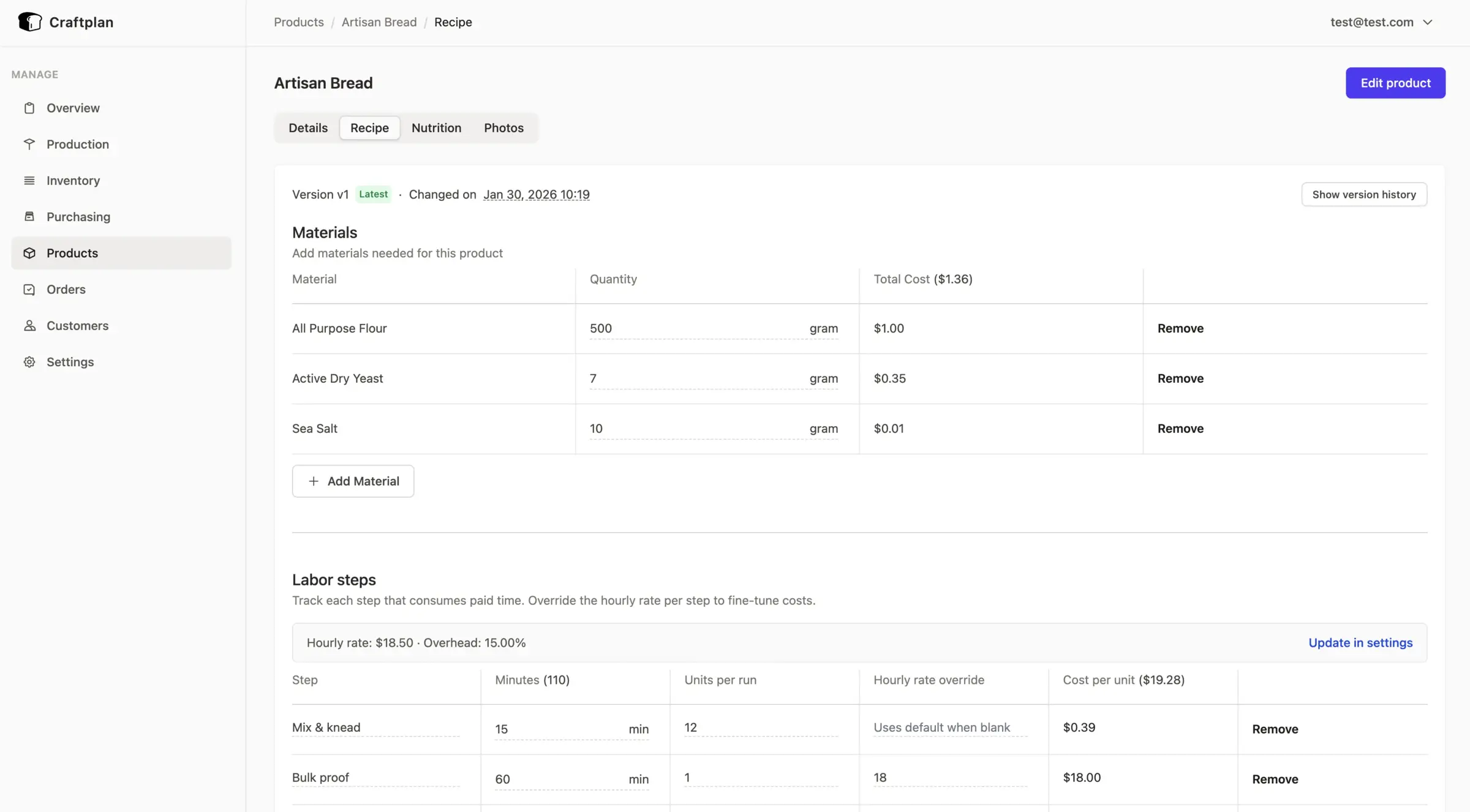
- Know what each product costs Recipes list every ingredient and work step, and Craftplan adds up material, labour and overhead into a cost per unit and suggested prices.
- Keep every recipe version Changing a recipe saves a new version, so older versions and their costs stay on record.
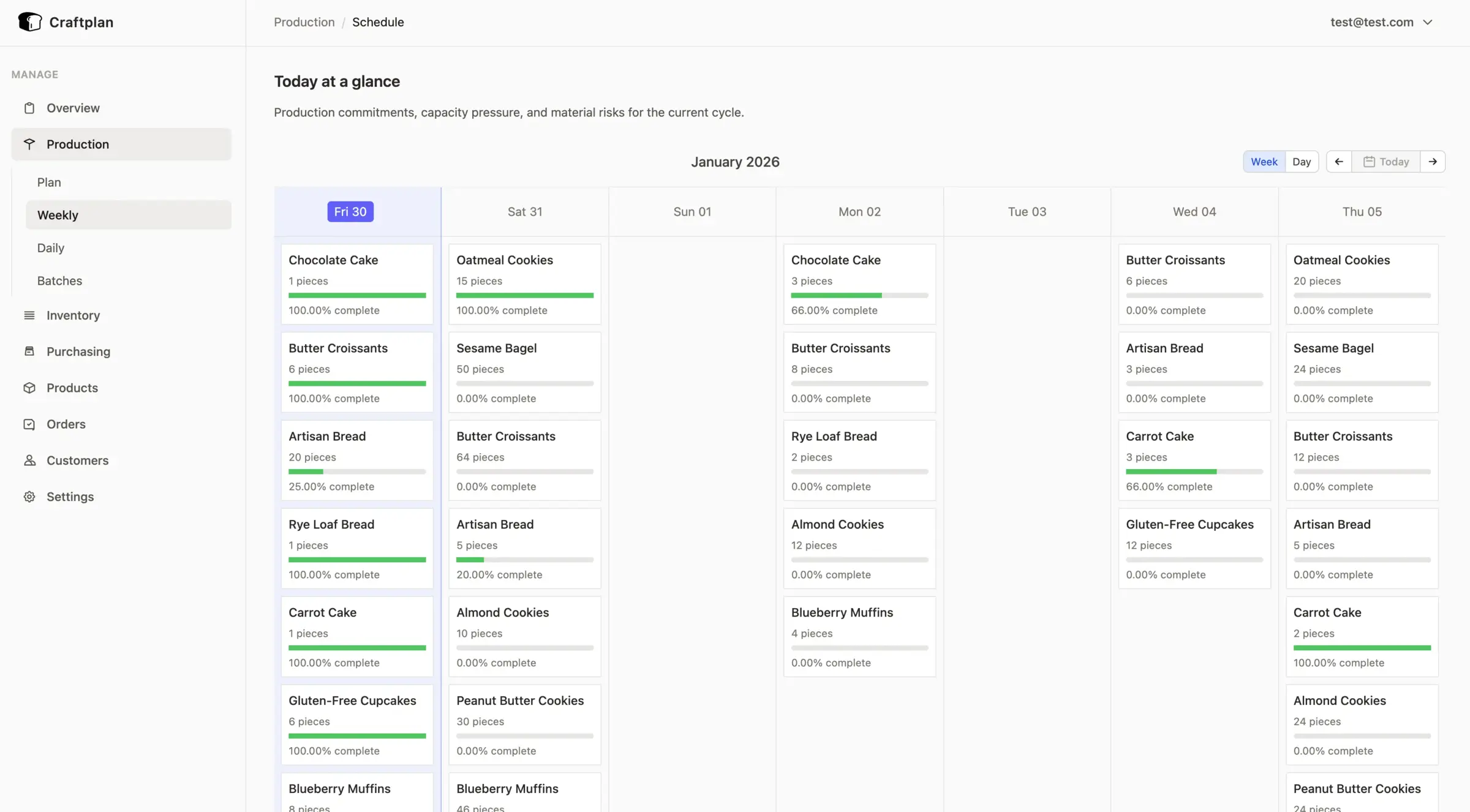
- Plan the week's production A weekly and daily schedule shows what to make for upcoming orders, which days are over capacity and a printable make sheet for the team.
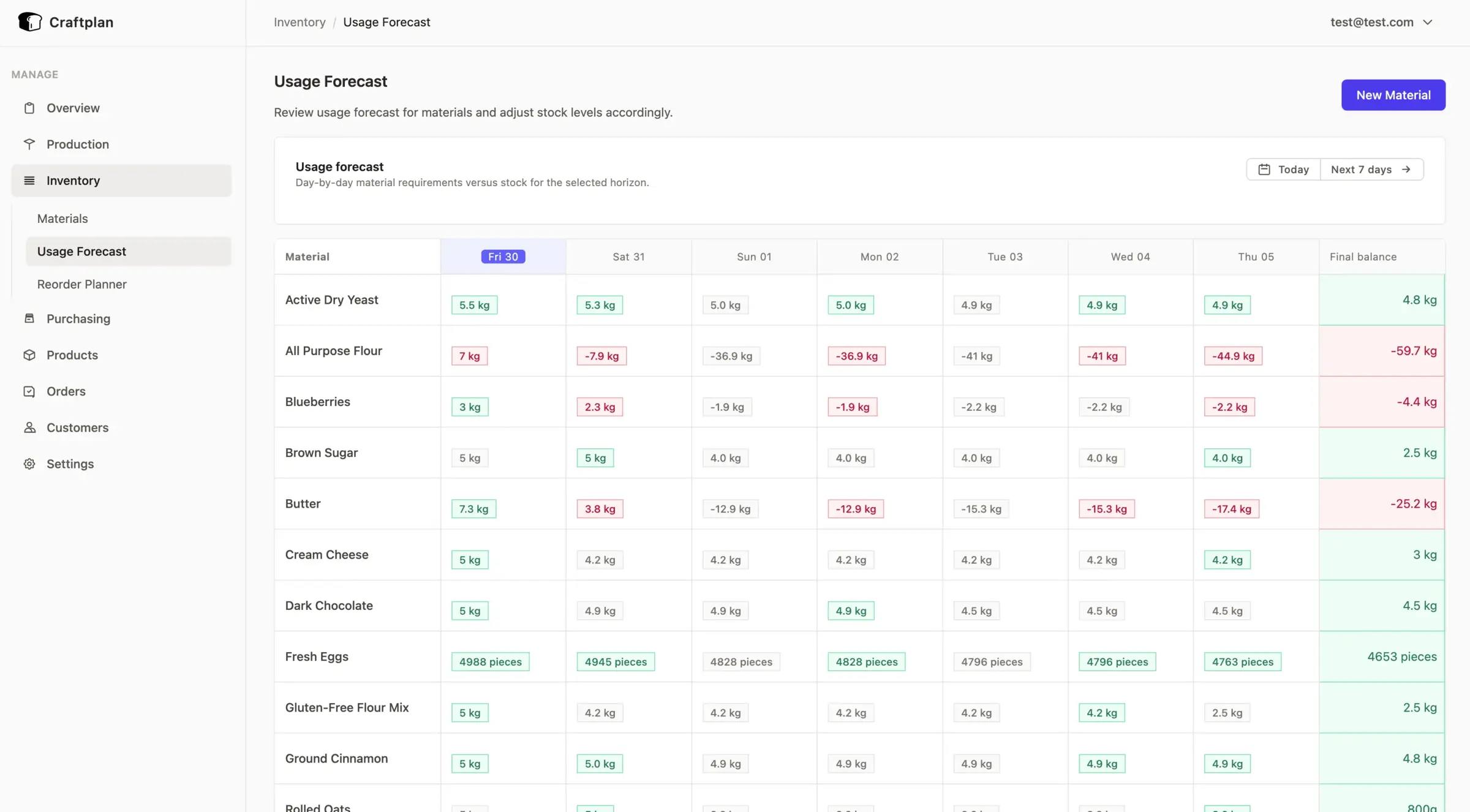
- Never run short of ingredients Stock is tracked by lot, used up automatically when a batch is finished, and a usage forecast and reorder planner show what to buy before you run out.
- Track allergens and trace every lot Allergens and nutrition facts roll up from ingredients to products, and a trace view shows which batches and customers received a given ingredient lot.
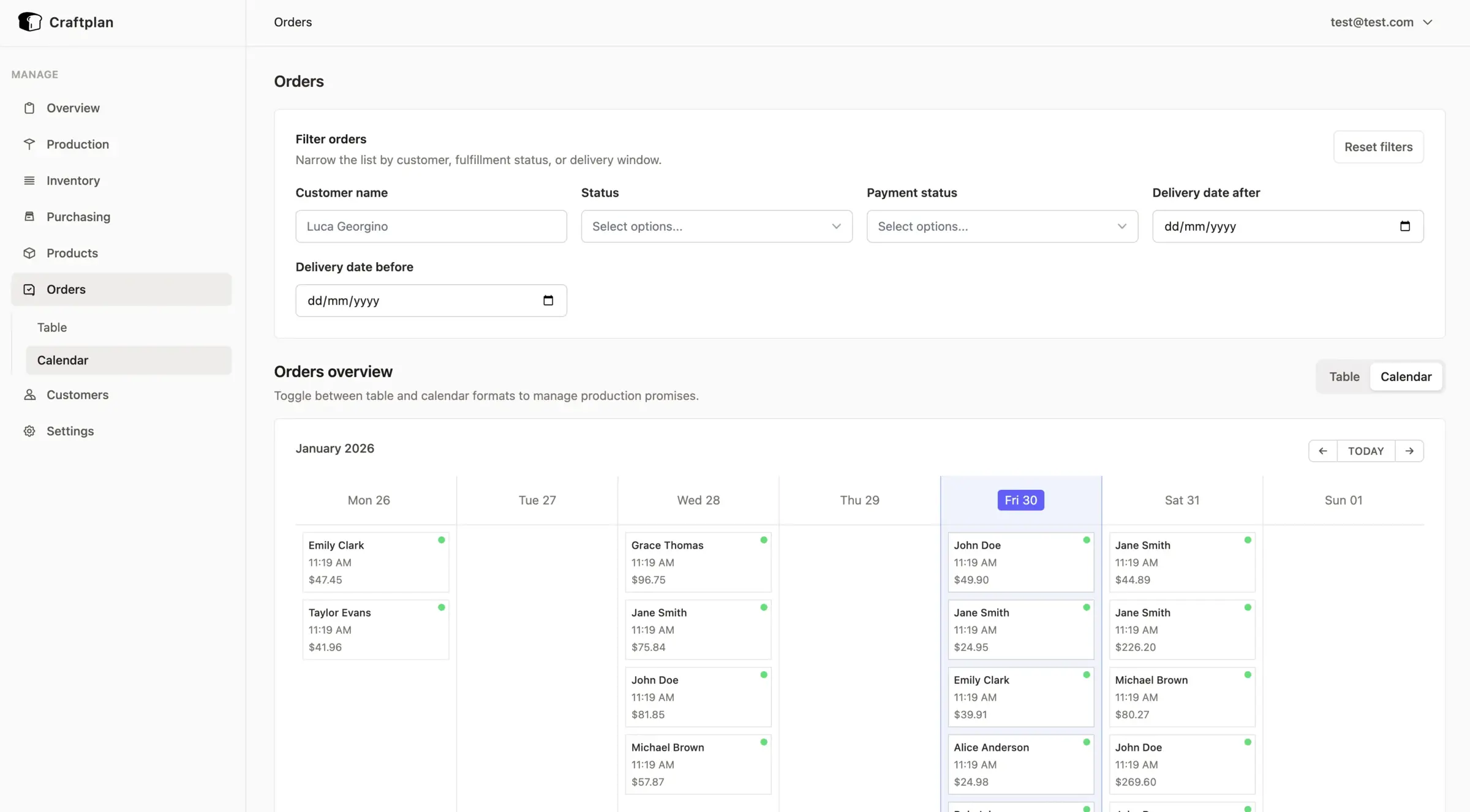
- Take orders and send invoices Record customer orders with delivery dates and payment status, see them on a calendar, and create invoices from them.
- Buy from suppliers Raise purchase orders and receive deliveries straight into stock with their lot numbers.
- Share the schedule Subscribe to deliveries and production batches in Google Calendar or Apple Calendar, and export orders, customers and stock movements as CSV.
Replaces Katana, Craftybase and MRPeasy
Craftplan does the same job as Katana, Craftybase and MRPeasy. Here is what changes when you switch.
- No subscription and no limit on products, ingredients or users
- Recipe costing, production, stock, orders and purchasing in one app
- Lot tracing and allergen data for food producers at no extra cost
- Your recipes, costs and customer list stay on your own server
- No built-in sync with Shopify, Etsy, Amazon or accounting software
- No phone app; it runs in the browser
- A young project, still before version 1.0
- Data moves across by CSV, with no direct import from Katana or Craftybase
What happens when you click Deploy?
You do not need a server or any technical knowledge. Four steps, and Craftplan is running at its own web address.
- Step 1 Click Deploy and create your account
Deploy takes you to Cloudgate. Create an account, or log in if you have one. Craftplan itself is free.
- Step 2 Choose a server
No server? Get one from Cloudgate: pick a size and a country, and Cloudgate gets it ready. Already have one? Connect it instead.
- Step 3 Cloudgate sets up Craftplan
It prepares the server, makes the passwords the app needs and starts it. There is nothing to install and nothing to write down.
- Step 4 Open your app and sign in
Your app gets a free web address to start, without https. Add your own domain, like app.yourshop.com, and Cloudgate secures it with https for you.
New to Cloudgate? See what Cloudgate is
Run Cloudgate yourself? Deploy from your own console
In your Cloudgate console, open Templates and choose Craftplan.
Questions
Is Craftplan free?
Yes, Craftplan is free and open source under the AGPL-3.0 licence, with no paid edition and no limits on products, orders or users. You pay only for the server it runs on.
Is Craftplan a good alternative to Katana?
Yes, for a small maker who mainly needs recipe costing, production batches, stock with lot numbers, orders and purchasing. Katana connects to Shopify, Amazon, QuickBooks and Xero; Craftplan has no such integrations, so sales and accounting stay in your other tools.
Can Craftplan replace Craftybase (now Stocksmith)?
Yes, for recipe costing and batch production Craftplan covers the same ground as Craftybase, and adds an orders calendar, a production schedule and lot tracing for recalls. It does not sync stock with online shops, which Craftybase does.
How do I sign in to Craftplan the first time?
The first time you open Craftplan, a setup screen asks you to create the admin account. You then invite staff from Settings, after setting up email so they can set their own password.
Can I import my products and ingredients into Craftplan?
Yes, Craftplan imports products, materials and customers from CSV files, so you can move a spreadsheet or another tool's export across. There is no direct importer for Katana or Craftybase.
Does Craftplan work with Shopify or my accounting software?
No, Craftplan has no built-in Shopify, Etsy or accounting integration. You can export orders, customers and stock movements as CSV, and a developer can connect other tools through its API.
Is there a Craftplan phone app?
No, Craftplan has no phone app. It runs in a web browser, so you can open it on a tablet in the kitchen or workshop.
Do I need technical skills to run Craftplan?
No. Click Deploy, create your Cloudgate account and choose a server, and Cloudgate sets up Craftplan and gives it a web address. You use it in your browser like any other online tool.
Do I need my own server for Craftplan?
No. When you deploy Craftplan, hosted Cloudgate can provide a server. If you already rent one, you can connect it instead.
Related apps
Production planning and demand forecasts for factories.

An open-source CMMS for work orders and preventive maintenance.

Run your fab lab or makerspace, from machine bookings to invoices.

Farm records: map fields, log crops, animals and tasks.