
Coral
Comments for news sites, with real moderation tools.
No server needed to start: Cloudgate can provide one. What happens when you click Deploy
What is Coral?
Coral is a self-hosted comments platform for news sites and blogs, with moderation queues, word filters and roles to keep discussions civil.
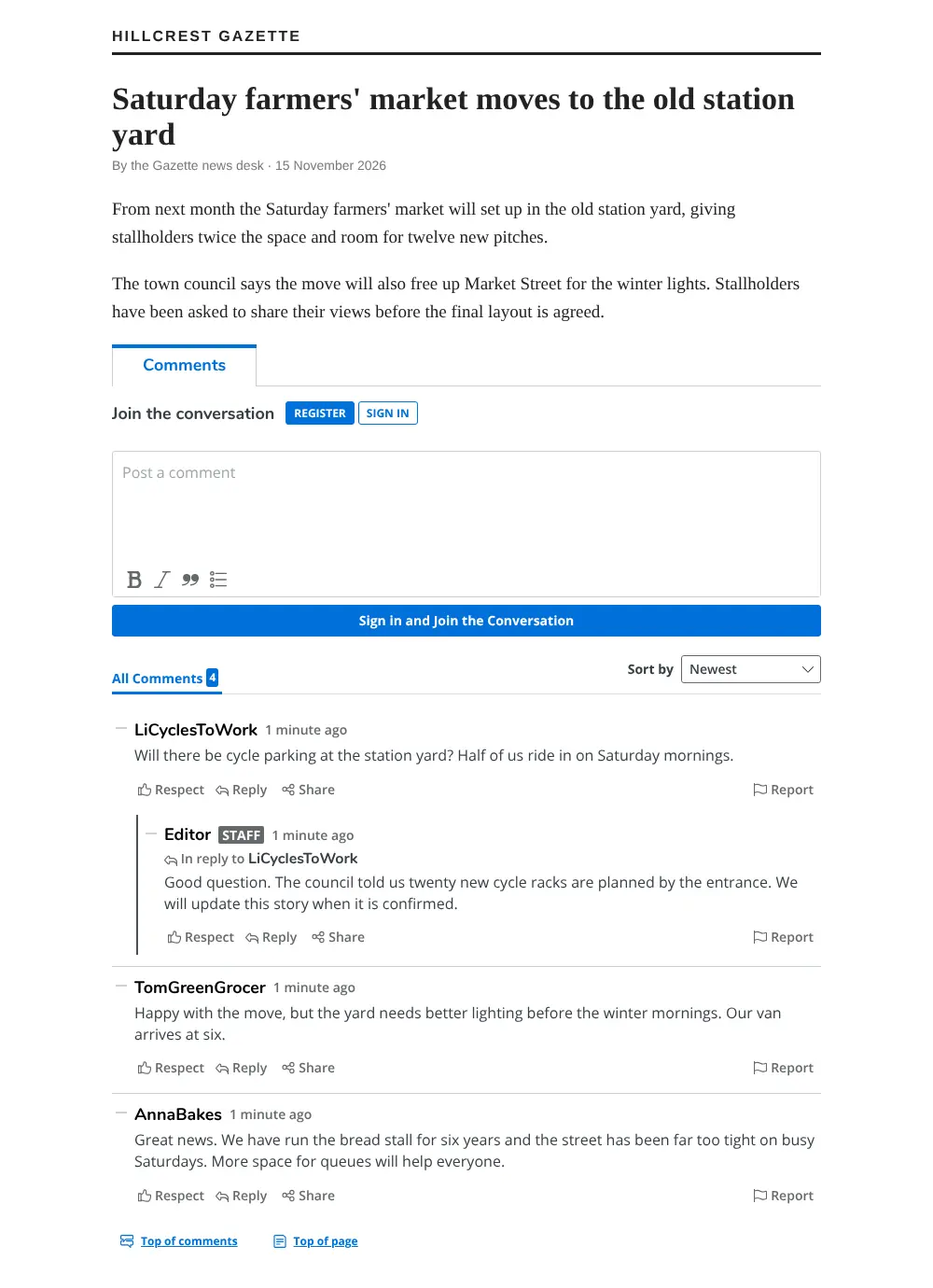
Coral is a free, open-source, self-hosted comments platform by Vox Media and an alternative to Disqus for news sites, magazines and blogs. It puts a comment section under your articles and gives your team the tools to keep the discussion civil, with every comment and reader account stored on your own server.
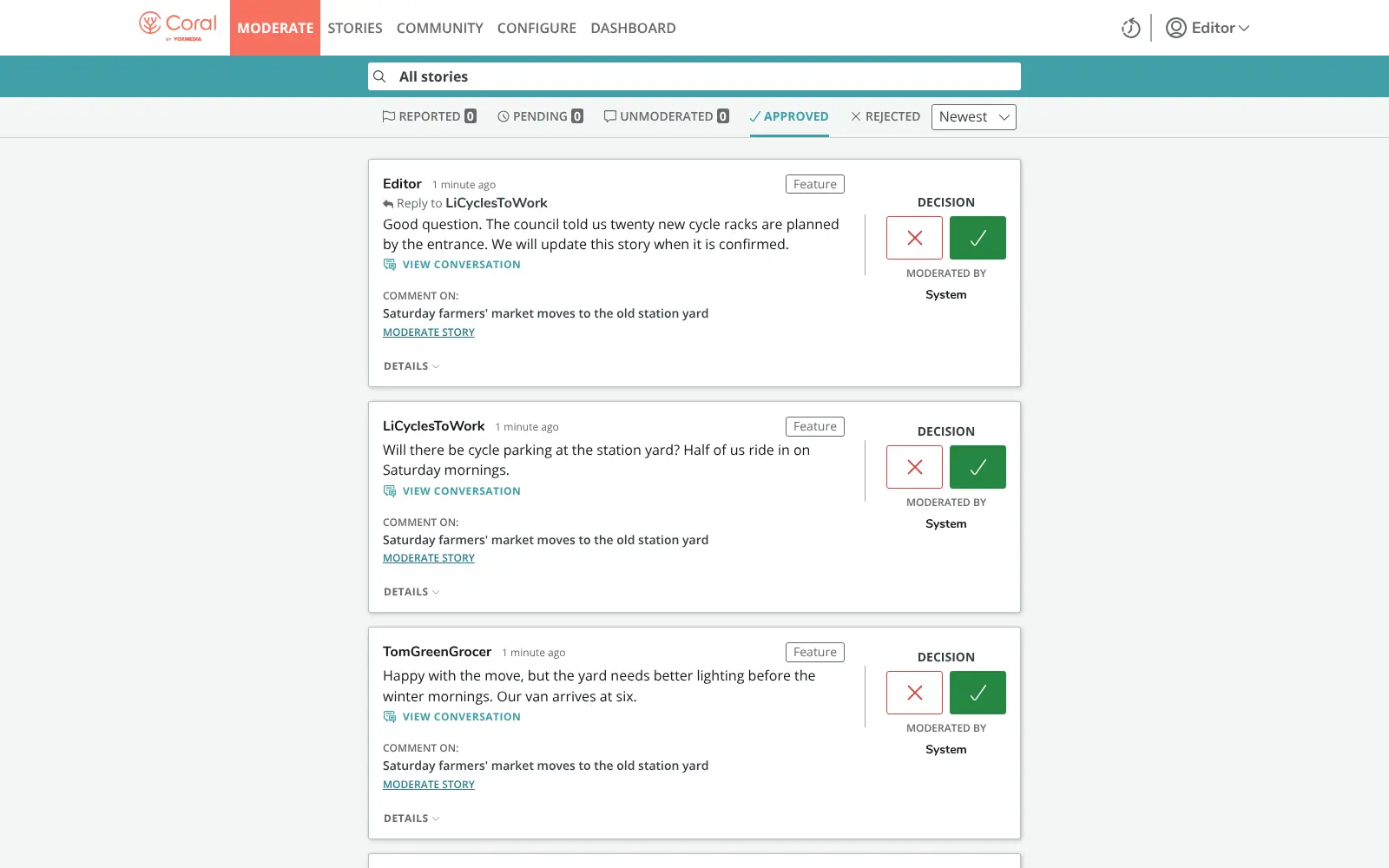
Readers register, reply in threads and report comments that break your rules. Your moderators work through queues of reported and pending comments, approve or reject each one, feature the best replies and ban words or people. A local newspaper, for example, could hold back every comment with a link for review and feature the most useful reader replies at the top of each story.
You add Coral to any website by pasting its embed code into your article template. One Coral can serve several websites, and email notifications work once you connect an email service.
Cloudgate installs Coral on a server Cloudgate provides or one you connect, together with the two databases it needs, and gives it a secure web address. Open that address straight after setup and run the install wizard to create the admin account and add your website.
What you can do with Coral
- Add comments under every article Readers register, reply in threads, react with "Respect" and report comments, on any website you allow.
- Moderate from one place Queues for reported, pending and unmoderated comments let your team approve or reject each one in a click.
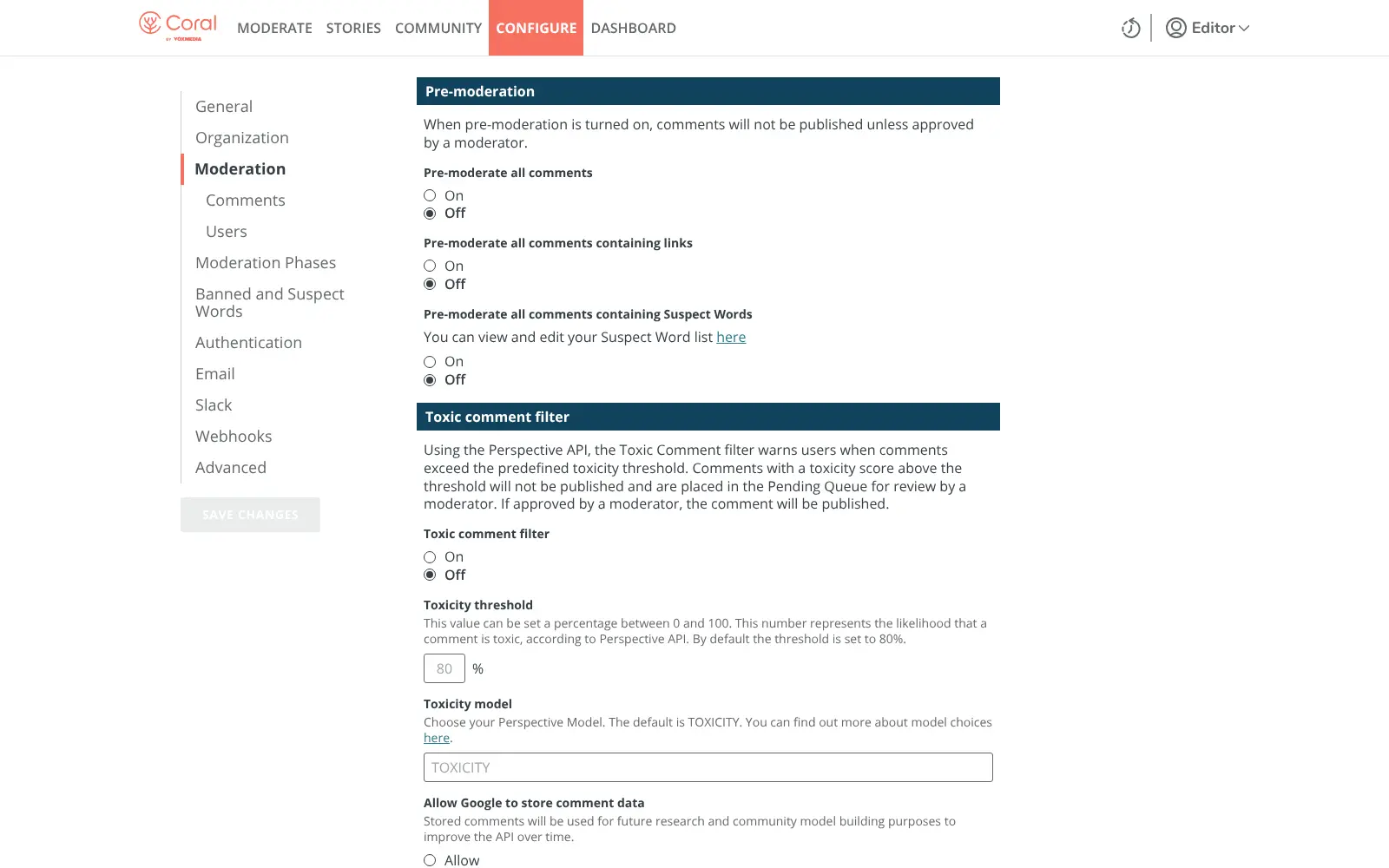
- Hold back risky comments Pre-moderate all comments, comments with links, or comments with words from your suspect list, and ban words outright.
- Highlight the best replies Feature thoughtful comments so they show up first, and give your staff a visible badge.
- Manage your community Give people roles from commenter to admin, and suspend, ban or always pre-moderate anyone who breaks your rules.
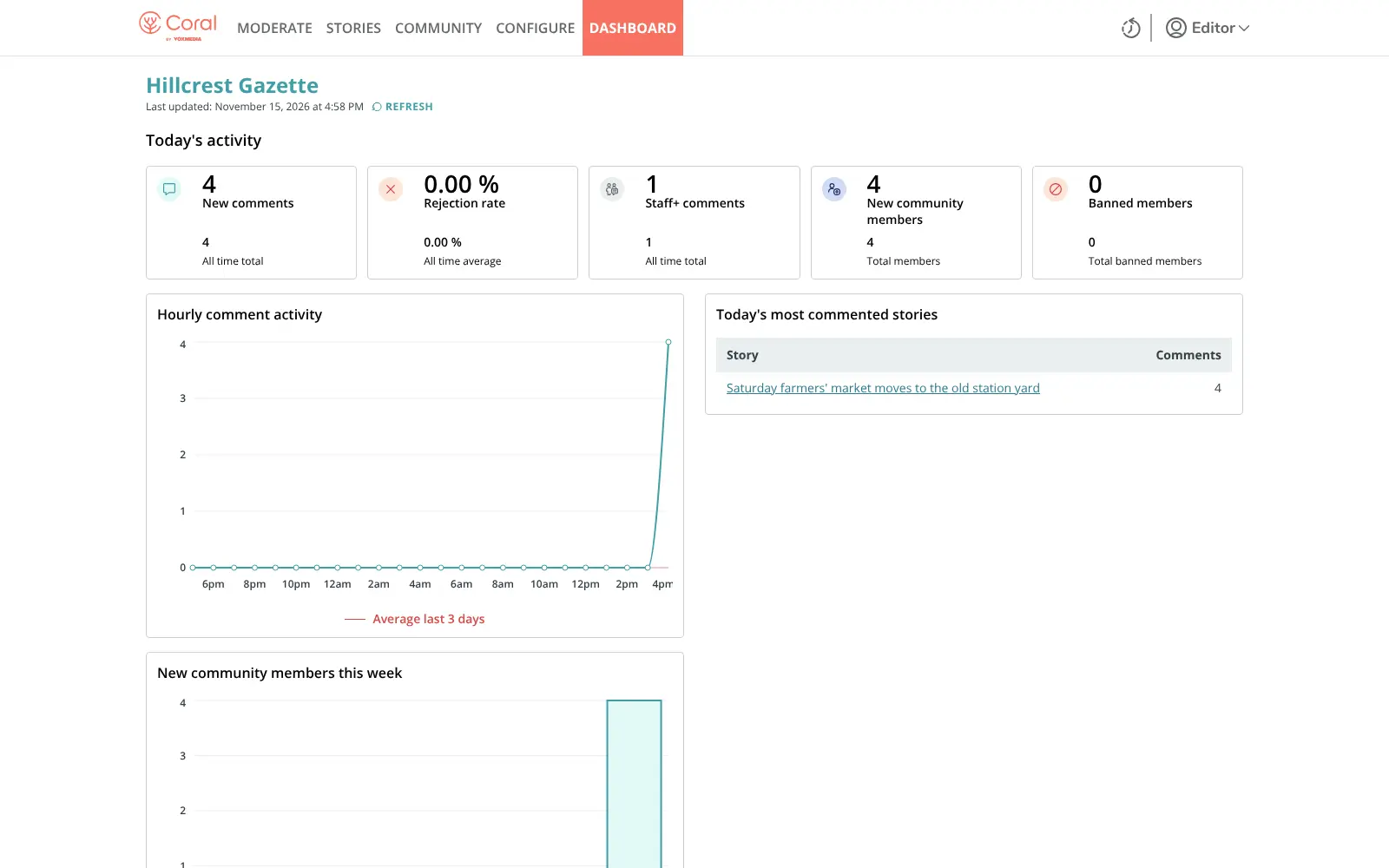
- See how discussions go A dashboard shows new comments, rejection rate, new members and today's most commented stories.
- Run several sites One Coral can serve more than one website, and can alert your team in Slack or through webhooks.
Replaces Disqus
Coral does the same job as Disqus. Here is what changes when you switch.
- No ads in your comment section and no fee for the software
- Comments and reader accounts stay on your server
- A full moderation workflow with queues, roles and word lists
- Your own look and your own rules for each site
- Heavier to run than a simple comment widget
- No one-click Disqus import; moving comments needs a technical step
- Emails, including password resets, need an email service you set up
- No network of discussions across other websites
What happens when you click Deploy?
You do not need a server or any technical knowledge. Four steps, and Coral is running at its own web address.
- Step 1 Click Deploy and create your account
Deploy takes you to Cloudgate. Create an account, or log in if you have one. Coral itself is free.
- Step 2 Choose a server
No server? Get one from Cloudgate: pick a size and a country, and Cloudgate gets it ready. Already have one? Connect it instead.
- Step 3 Cloudgate sets up Coral
It prepares the server, makes the passwords the app needs and starts it. There is nothing to install and nothing to write down.
- Step 4 Open your app and sign in
Your app gets a free web address to start, without https. Add your own domain, like app.yourshop.com, and Cloudgate secures it with https for you.
New to Cloudgate? See what Cloudgate is
Run Cloudgate yourself? Deploy from your own console
In your Cloudgate console, open Templates and choose Coral.
Questions
Is Coral free?
Yes, Coral is free and open source under the Apache-2.0 licence when you host it yourself. Vox Media, its maker, also sells hosting and support, but the self-hosted version needs neither.
Is Coral a good alternative to Disqus?
Yes, for publishers who moderate as a team. Coral has no ads and keeps comments on your server, with moderation queues, roles, word lists and a dashboard. For a small personal blog, a lighter tool such as Remark42 is simpler to run.
Can I import my Disqus comments into Coral?
Partly. Coral has no one-click Disqus import; its separate command-line importer takes comments from other platforms as CSV files in its own format, so the move needs someone technical.
How do I add Coral to my website?
You paste Coral's embed code into the template of your article pages, and add your website's address to Coral's list of permitted domains. The comment section then appears under each article.
How do I set up Coral the first time?
Open Coral's web address after setup and follow the install wizard, which creates the admin account, your organisation and site, and the list of websites allowed to show comments. Do it straight away, then manage everything at the admin page.
Does Coral filter toxic comments?
Yes, if you turn it on. Coral can check comments with Google's Perspective API, which needs your own API key, and hold back those above a toxicity score for review. Banned and suspect word lists work without it.
What server size do I need for Coral?
Plan for a medium server with about 2 GB of memory, because Coral runs with two databases. Cloudgate sets all three parts up for you.
Do I need technical skills to run Coral?
No. Click Deploy, create your Cloudgate account and choose a server, and Cloudgate sets up Coral and gives it a web address. You use it in your browser like any other online tool.
Do I need my own server for Coral?
No. When you deploy Coral, hosted Cloudgate can provide a server. If you already rent one, you can connect it instead.
Related apps

A self-hosted comment system for blogs, with a moderation dashboard.

Comments for many websites, with moderation rules.

Ad-free comments for your blog, with an admin panel to moderate.

Ad-free, private comments under your blog posts, on your server.