Open-source alternatives to Webflow

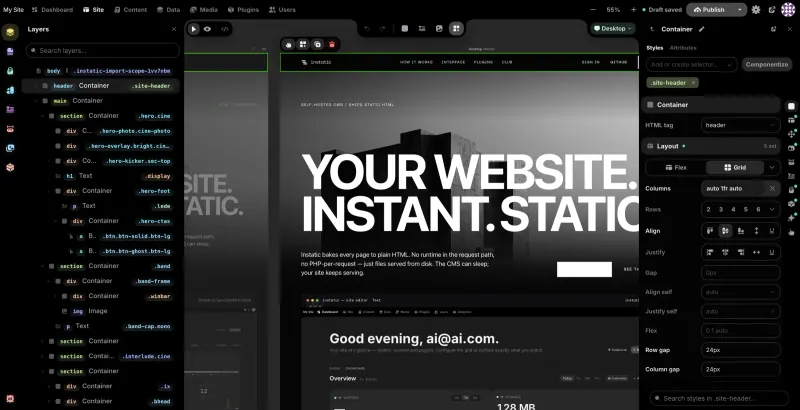
Silex is a free, open-source Webflow alternative for designing websites visually: drag blocks onto a canvas, style them with panels for Flexbox layout, typography and colour, and publish plain HTML and CSS you can host anywhere. Webflow charges for each hosted site and adds a CMS, e-commerce and animations; self-hosted Silex has no plan fees or hosting lock-in, but no shop, no CSS Grid and no built-in form handling.

2 alternatives Free apps Our pick: Silex

At a glance

App Good for Code Import from Webflow Ease of use
Silex Designers and freelancers building fast websites visually, with no subscription or lock-in Code Open source Import from Webflow No Some setup
Instatic Designers and small businesses who want Webflow-style design and a built-in CMS on their own server, and are fine with early-stage software Code Open source Import from Webflow Partly Easy

Why look for an alternative to Webflow?

Webflow is a hosted visual website designer: you build pages with real CSS layout on a canvas, then host them on Webflow with its CMS, e-commerce and animations, paying per site.

Designers look for an alternative when the per-site fees add up across client projects, or when they want the finished site as plain files they can host anywhere. Silex, from the French non-profit Silex Labs, is a free, open-source visual designer that publishes static HTML and CSS, with no plan fees and no lock-in, though it has fewer features and a smaller community. Instatic, a much newer MIT-licensed builder, adds a built-in CMS, forms and team logins, and imports Webflow's code export, but it is still at version 0.0.x.

The alternatives, compared

Silex

Our pick

Design websites visually and publish fast static pages you own.

The same idea as Webflow's designer: drag blocks onto a canvas, style them with Flexbox, typography and colour panels, reuse headers and footers as symbols, preview each screen size, and publish clean static HTML and CSS that you can host anywhere. It has no CSS Grid, no shop, no built-in form handling and no built-in CMS, editing works only in desktop Chrome or Firefox, and its template library and community are much smaller.

What you gain
  • No monthly plan or fee per site; you pay only for your server
  • Your site is plain HTML and CSS that you can move to any host
  • Precise visual control over layout and styles, in the spirit of Webflow
What is different
  • It expects some web design know-how, such as boxes and styles, so it is harder than Wix for a beginner
  • No online shop checkout, no built-in form inbox and no hosted CMS like Webflow's
  • No importer for Webflow or Wix, so pages are rebuilt by hand
Some setup Open source

A visual website builder and CMS that publishes plain HTML.

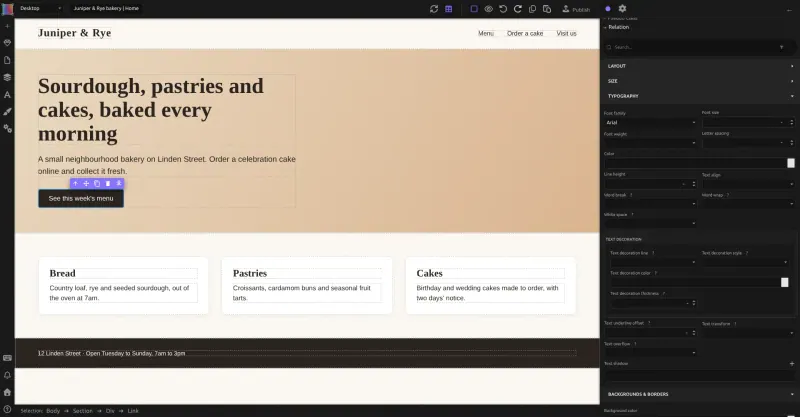
A visual canvas with screen sizes side by side, reusable components, CSS Grid and Flexbox, plus the parts Silex leaves out: a built-in CMS with post types and data tables, forms that store their submissions, and users with roles. It publishes plain HTML and CSS like Silex. It is very new, version 0.0.x, so expect breaking changes between releases, and it has no shop, no visitor analytics and far fewer templates than Webflow.

What you gain
  • No monthly plan or fee per site; you pay only for your server
  • The published site is plain HTML and CSS files you can read, copy and host anywhere
  • A CMS, form replies and team roles included, with nothing to upgrade to
What is different
  • It is version 0.0.x and changes quickly, so expect things to move between updates
  • No online shop checkout and no visitor analytics yet
  • Far fewer ready-made templates and add-ons than Webflow, Wix or Squarespace
Easy Open source

Moving from Webflow

Silex has no import from Webflow, so rebuild each page in Silex: recreate your classes and Flexbox layouts, turn your header and footer into symbols, and set each page's title, description and social sharing image. Forms need an outside service, such as Formspree, to receive submissions. Silex can connect to an outside CMS, such as WordPress or Strapi, for collection pages, but that needs a build step this template does not set up or test. When the pages are ready, publish and point your domain at the new site. In this template each install publishes one site.

Instatic can bring in Webflow's code export: drop the exported folder or zip into its Super Import and it turns the HTML, CSS, images and fonts into editable pages, classes and colour and font settings. CMS collection items are not part of that export, so recreate your collections as post types or data tables and add the items again. Forms work without an outside service, since submissions are stored in Instatic's own tables, but it sends no email, so read them in the admin.

Questions

What is the best open-source alternative to Webflow?

Start with Silex. If you want something simpler, try Instatic. Both are free and open source.

Is Silex as easy as Webflow?

Close, if you already know Webflow. Both expect you to think in boxes, classes and Flexbox; Silex is harder for someone who has never designed for the web.

Does Silex have a CMS like Webflow?

Not built in; Instatic does have one. Silex can pull content from an outside CMS such as WordPress, Strapi or Supabase when the site is published, but that needs a build step this template does not set up or test.

Should I choose Silex or Instatic?

Choose Silex for a stable, long-running project and a plain static site. Choose Instatic if you need a CMS, forms and team logins built in and can live with version 0.0.x software that may change between releases; it can also import Webflow's code export.

Can I export my site from Silex?

Yes. Silex publishes plain HTML and CSS files, so you can host the site anywhere and are never locked in.

Are these Webflow alternatives really free?

Yes, Silex and Instatic are free. To run them you need Cloudgate and a server. Use hosted Cloudgate, which can also provide the server, or install Cloudgate on a server of your own for free. Cloudgate's plans and prices are at cloudgate.octabyte.io/pricing. One server can run several apps.

Do I need a developer to replace Webflow?

No. Cloudgate installs the app you choose on your server and gives it a secure web address, and you use it in your browser instead of Webflow.