
T

Open-source alternative to Total Commander

Cloud Commander is a free, open-source Total Commander alternative for files kept on a server: the same two panels and function-key shortcuts, F5 to copy and F6 to move, in any web browser. Total Commander is Windows software you buy after a 30-day trial; Cloud Commander has no licence fee, but it manages the files stored on your server, not the files on your own PC.

Free app Code: Open source Import from Total Commander: No Easy

Why look for an alternative to Total Commander?

Total Commander is a two-panel file manager for Windows by Christian Ghisler, in the tradition of Norton Commander: two folder lists side by side, with function keys to view, edit, copy, move and delete files. It is shareware: when we checked its order page in November 2026, it could be tried for 30 days, after which a single licence cost 42 euros before VAT.

People look for an alternative for different reasons. Some want the same two-panel way of working on files that live on a server, from any computer, phone or tablet, without copying them to a PC first. A self-hosted Cloud Commander does that in the browser with no licence fee. It is not a desktop program, so it does not replace Total Commander for the files on your own PC.

How Cloud Commander compares

A two-panel web file manager for your server, in any browser.

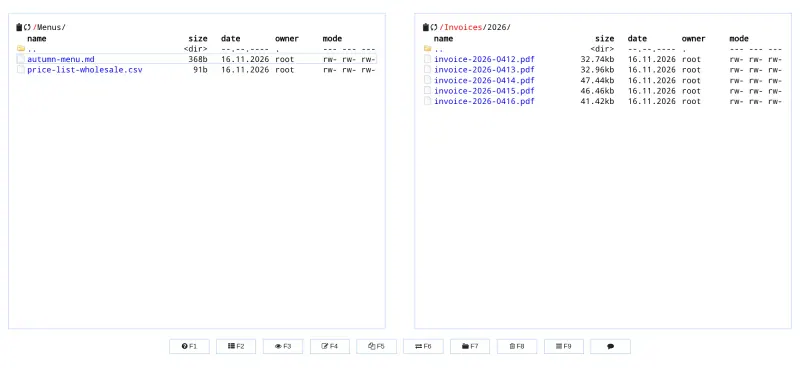
Brings Total Commander's way of working to a web browser: two folder panels side by side, F3 to view, F4 to edit, F5 to copy, F6 to move, F7 for a new folder and F8 to delete, plus drag and drop, zip and tar packing, and a built-in text editor. It manages the files stored on your server, not the files on your PC, and everyone shares one login, with no separate user accounts, share links or search across files.

What you gain
  • It runs in a browser, so it works from any computer, tablet or phone
  • No licence to buy for each computer
  • Your files stay on your own server, behind a password
What is different
  • It manages files on your server, not the files on your own computer
  • One shared login; there are no separate accounts or per-folder rights
  • No share links, no sync app, and fewer tools than Total Commander
Easy Open source

Moving from Total Commander

There is nothing to import: Total Commander keeps no data of its own, and Cloud Commander works on the files in its storage on your server. Sign in with the username admin and the password Cloudgate shows you; Cloudgate sets that password at every start, so change it in Cloudgate rather than in the app. Drag the files and folders you want to work on from your computer into a panel to upload them, and drag them out, or use the right-click menu, to download them again. The function keys work as you expect, F5 to copy and F6 to move between the panels. Keep Total Commander for the files on your own PC; Cloud Commander is for files you keep on the server.

Questions

What is the best open-source alternative to Total Commander?

Cloud Commander is the free, open-source alternative to Total Commander for two-panel file management in the catalogue today. Brings Total Commander's way of working to a web browser: two folder panels side by side, F3 to view, F4 to edit, F5 to copy, F6 to move, F7 for a new folder and F8 to delete, plus drag and drop, zip and tar packing, and a built-in text editor. It manages the files stored on your server, not the files on your PC, and everyone shares one login, with no separate user accounts, share links or search across files.

Is Cloud Commander a web version of Total Commander?

Not an official one. Cloud Commander is a separate, open-source file manager with the same two-panel layout and function keys, F3 to view, F4 to edit, F5 to copy and F6 to move, that runs in any web browser.

Can Cloud Commander manage the files on my PC?

No. It manages the files stored on your server. You upload files from your PC by dragging them into a panel and download them by dragging them out, but it does not replace a file manager on your own computer.

Can several people use Cloud Commander?

Yes, but they share one login. There are no separate user accounts, per-folder permissions or share links for people outside.

Can I run commands on the server from Cloud Commander?

Not in this template. Cloud Commander has a web console and terminal, but Cloudgate switches them off, along with the settings dialog, so the app can only manage files.

Is Cloud Commander really free compared with Total Commander?

Yes, Cloud Commander is free. To run them you need Cloudgate and a server. Use hosted Cloudgate, which can also provide the server, or install Cloudgate on a server of your own for free. Cloudgate's plans and prices are at cloudgate.octabyte.io/pricing. One server can run several apps.

Do I need a developer to replace Total Commander?

No. Cloudgate installs Cloud Commander on your server and gives it a secure web address, and you use it in your browser instead of Total Commander.