
Open-source alternative to PagerDuty

OneUptime is a free, open-source PagerDuty alternative for on-call schedules, escalation rules and paging by phone call, text, email, push and chat, and it imports your PagerDuty schedules and escalation policies. PagerDuty charges per user each month beyond a small free plan; self-hosted OneUptime has no per-user fee, though it needs a large server and a Twilio account for calls and texts.

Free app Code: Open source Import from PagerDuty: Yes Some setup

Why look for an alternative to PagerDuty?

PagerDuty is a hosted incident response service: it sorts alerts from your monitoring tools, works out who is on call, and wakes them up by phone call, text or push until someone responds.

Teams look for an alternative because of how it is priced. When we checked its pricing page in November 2026, the free plan covered up to 5 users and the Professional plan cost $21 per user a month billed yearly, or $25 billed monthly, so every person added to a rota adds to the bill. A self-hosted OneUptime runs on-call schedules, escalations and paging with no per-user fee, and adds uptime checks, incidents and status pages in the same app. In return you run a sizeable server, and you pay Twilio directly for the calls and texts it sends.

How OneUptime compares

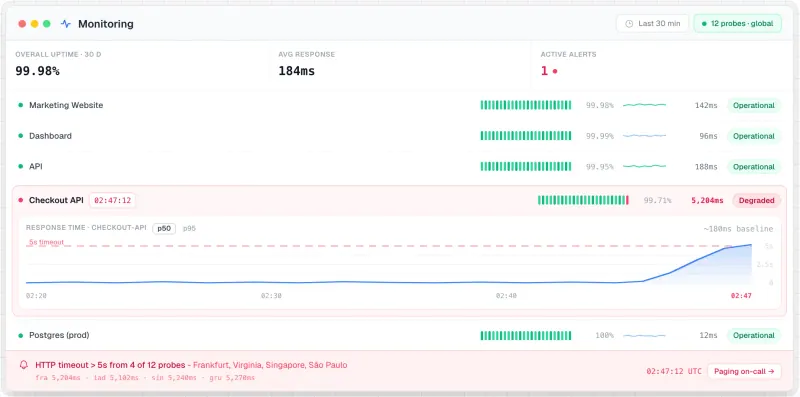
Uptime checks, on-call paging and a status page in one tool.

Covers PagerDuty's core job: on-call schedules with rotations and overrides, escalation rules, and paging by phone call, text, email, push to its iPhone and Android app, Slack or Microsoft Teams. It also checks your websites and servers, tracks incidents on one timeline and runs status pages, so it can replace several tools at once. It needs a large server, at least 8 GB of memory, and phone calls and texts go through your own Twilio account.

What you gain
  • No fee per user for on-call, and no limit on monitors or status pages
  • Uptime checks, paging, incidents and status pages in one place instead of three bills
  • Imports your PagerDuty, Opsgenie, Statuspage and Pingdom setup
What is different
  • It needs a large server, with at least 8 GB of memory
  • Checks run from your server, not from many locations, unless you add more probes elsewhere
  • Phone calls and texts need your own Twilio account, paid per message
Some setup Open source

Moving from PagerDuty

OneUptime has a PagerDuty importer. Create a read-only API key in PagerDuty, paste it into OneUptime's import screen, and tick what to bring over: users, teams, on-call schedules, escalation policies and services. Then add your email server in OneUptime's admin settings and connect a Twilio account so it can call and text people. Ask everyone on call to install the OneUptime On-Call app and sign in to your server. Send a test alert through each escalation policy, and keep PagerDuty running alongside for a week or two until every alert source points at OneUptime.

Questions

What is the best open-source alternative to PagerDuty?

OneUptime is the free, open-source alternative to PagerDuty for on-call scheduling and paging in the catalogue today. Covers PagerDuty's core job: on-call schedules with rotations and overrides, escalation rules, and paging by phone call, text, email, push to its iPhone and Android app, Slack or Microsoft Teams. It also checks your websites and servers, tracks incidents on one timeline and runs status pages, so it can replace several tools at once. It needs a large server, at least 8 GB of memory, and phone calls and texts go through your own Twilio account.

Can OneUptime phone the person on call like PagerDuty?

Yes, once you connect a Twilio account or your own call and text gateway. It can also page by email, push notification to its phone app, Slack and Microsoft Teams without Twilio.

Can I bring my PagerDuty schedules into OneUptime?

Yes. OneUptime's importer reads your users, teams, schedules, escalation policies and services through a read-only PagerDuty API key, and creates the ones you tick.

How big a server does OneUptime need?

At least 8 GB of memory and 4 processor cores for a small team; the project recommends 16 GB and 8 cores for heavier use, because it also stores logs, metrics and traces.

Is OneUptime really free compared with PagerDuty?

Yes, OneUptime is free. To run them you need Cloudgate and a server. Use hosted Cloudgate, which can also provide the server, or install Cloudgate on a server of your own for free. Cloudgate's plans and prices are at cloudgate.octabyte.io/pricing. One server can run several apps.

Do I need a developer to replace PagerDuty?

No. Cloudgate installs OneUptime on your server and gives it a secure web address, and you use it in your browser instead of PagerDuty.