
Open-source alternative to Overleaf.com

Overleaf Community Edition is the free, open-source, self-hosted edition of Overleaf itself: the same browser LaTeX editor, with several people writing in one project at once, on your own server. Overleaf.com’s free plan allows one collaborator per project and its paid plans are charged per user; the Community Edition has no collaborator limit or subscription, though it has no comments, track changes, Git sync or AI assistant, and a smaller set of LaTeX packages.

Free app Code: Open source Import from Overleaf.com: Yes Easy

Why look for an alternative to Overleaf.com?

Overleaf.com is the best-known online LaTeX editor: you write papers, theses and reports in the browser, see the PDF as you go, and share projects with co-authors. Its free plan allows one collaborator per project, keeps 24 hours of history and has no track changes; paid plans for students, individuals and groups add collaborators, full history, track changes and Git, GitHub and Dropbox sync.

People look for an alternative when a research group needs more co-authors per project than it wants to pay for, or wants unpublished work kept on its own server. Overleaf Community Edition is Overleaf's own free, self-hosted edition, so the editor works the same way, with no collaborator limit, though it has fewer features than the paid plans.

How Overleaf Community Edition compares

LaTeX editor for writing papers together in your browser.

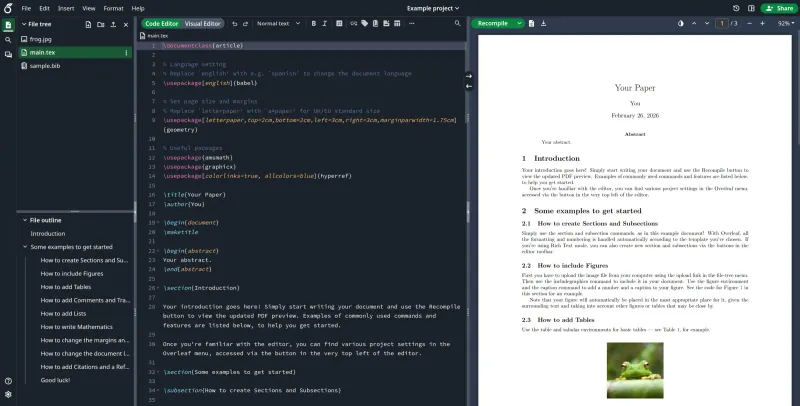
The same editor as Overleaf.com, run on your own server: code and visual editing, a PDF preview beside the source, full project history, project chat and real-time co-editing with no limit on collaborators. It leaves out comments, track changes, Git, GitHub and Dropbox sync, reference-manager sync and the AI assistant, and it installs only a basic set of LaTeX packages, so missing ones are added on the server.

What you gain
  • No limit on collaborators per project and no subscription; you pay only for your server
  • Unpublished papers and grant proposals stay on your own server
  • The same editor as overleaf.com, so people who know Overleaf feel at home
What is different
  • No comments or track changes; those are only in Overleaf's paid Server Pro and overleaf.com plans
  • No Git, GitHub or Dropbox sync, AI Assistant or Zotero and Mendeley sync
  • Only a basic set of LaTeX packages is installed, so some documents need packages added on the server before they compile
Easy Open source

Moving from Overleaf.com

Move one project at a time. On Overleaf.com, open the project and choose Menu, then Download, then Source to get a .zip file. In your Community Edition, choose New project, then Upload project, and pick that file. The files come across, but the project's history, comments and chat do not. Compile each project once after uploading: if a package is missing, the person who runs the server adds it. The admin creates an account for each co-author, since there is no public sign-up, and accounts should go only to people you trust, because compiles are not sandboxed.

Questions

What is the best open-source alternative to Overleaf.com?

Overleaf Community Edition is the free, open-source alternative to Overleaf.com for writing LaTeX documents together in the catalogue today. The same editor as Overleaf.com, run on your own server: code and visual editing, a PDF preview beside the source, full project history, project chat and real-time co-editing with no limit on collaborators. It leaves out comments, track changes, Git, GitHub and Dropbox sync, reference-manager sync and the AI assistant, and it installs only a basic set of LaTeX packages, so missing ones are added on the server.

Is Overleaf Community Edition really Overleaf?

Yes. It is the free, open-source edition of Overleaf, published by the Overleaf team under the AGPL-3.0 licence. The paid on-premises edition, Server Pro, and Overleaf.com's paid plans add the features it leaves out.

Does the Community Edition have track changes and comments?

No. Comments and track changes are in Overleaf Server Pro and Overleaf.com's paid plans, not in the Community Edition.

Will my LaTeX packages work?

Many will, but the Community Edition installs a basic TeX Live, not the full one Overleaf.com uses. Missing packages can be added on the server, but the change is lost when the app is reinstalled or updated, so keep a list.

Is Overleaf Community Edition really free compared with Overleaf.com?

Yes, Overleaf Community Edition is free. To run them you need Cloudgate and a server. Use hosted Cloudgate, which can also provide the server, or install Cloudgate on a server of your own for free. Cloudgate's plans and prices are at cloudgate.octabyte.io/pricing. One server can run several apps.

Do I need a developer to replace Overleaf.com?

No. Cloudgate installs Overleaf Community Edition on your server and gives it a secure web address, and you use it in your browser instead of Overleaf.com.