
Open-source alternative to Google Sheets

Grist is a free, open-source Google Sheets alternative for teams whose shared spreadsheet has grown into a database, with typed columns, linked tables, Python formulas and access rules down to single rows. Google Sheets keeps your data on Google’s servers and Google Workspace is charged per user; self-hosted Grist keeps it on yours, though it works differently from a cell-by-cell spreadsheet.

Free app Code: Open source Import from Google Sheets: Partly Some setup

Why look for an alternative to Google Sheets?

Google Sheets is Google's online spreadsheet. Several people can edit a sheet at once in the browser, and it comes free with a Google account and as part of Google Workspace for businesses.

Teams look for an alternative when a shared sheet has turned into a small database: hundreds of rows of customers, orders or stock, with lookups between tabs and no way to stop people editing the wrong rows. Others want their data off Google's servers, or to avoid Workspace's price per user. Grist keeps the familiar grid but adds typed columns, linked tables and row-level permissions, on your own server.

How Grist compares

A self-hosted spreadsheet that works like a database.

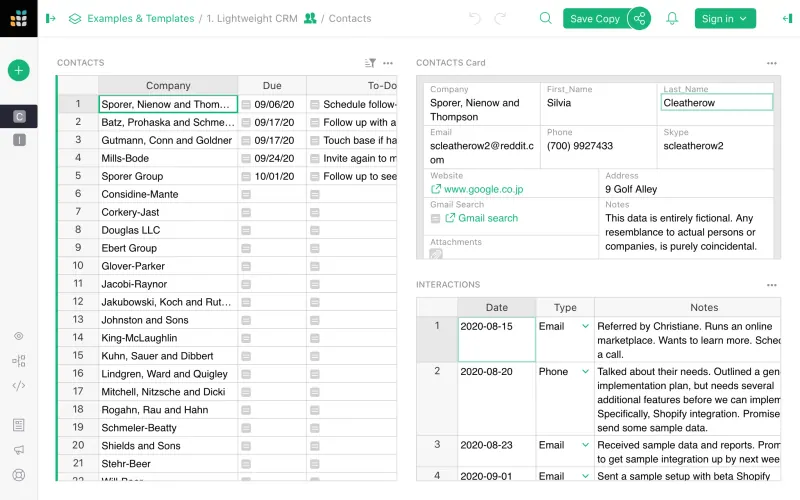
Looks like a spreadsheet, but every column has a type and tables link to each other like a database. It adds Python formulas, forms that add rows, charts and linked widgets, and access rules down to single rows and columns. It works differently from a cell-by-cell sheet, which takes some getting used to, and in the free Community edition people sign in with a free getgrist.com account.
Some setup Open source

Moving from Google Sheets

Download each Google Sheet as an Excel or CSV file, or import it in Grist straight from Google Drive or a share link. Grist turns each sheet into a table: check the column types it guesses, then rewrite formulas as column formulas, which apply to the whole column at once. Link tables with reference columns instead of lookups, and set access rules before you invite your team.

Questions

What is the best open-source alternative to Google Sheets?

Grist is the free, open-source alternative to Google Sheets for shared spreadsheets in the catalogue today. Looks like a spreadsheet, but every column has a type and tables link to each other like a database. It adds Python formulas, forms that add rows, charts and linked widgets, and access rules down to single rows and columns. It works differently from a cell-by-cell sheet, which takes some getting used to, and in the free Community edition people sign in with a free getgrist.com account.

Can Grist open Excel and Google Sheets files?

Yes. Grist imports Excel, CSV, JSON and TSV files, and files from Google Drive or a web address, and it exports tables back to CSV or Excel.

Does Grist work like Google Sheets?

Partly. As in Google Sheets, you edit in a grid, and many spreadsheet functions work in Grist, but formulas apply to whole columns and use Python, and each column has a type. It suits lists and records better than free-form sheets.

How does my team sign in to self-hosted Grist?

In the free Community edition of Grist, people sign in with a free getgrist.com account, while your documents stay on your server, instead of the Google accounts used by Google Sheets. Signing in through your own Google Workspace, Microsoft or other provider needs a full-edition activation key.

Is Grist really free compared with Google Sheets?

The Community edition of Grist is free and open source under the Apache 2.0 licence. Grist's makers sell a full edition that adds your own single sign-on, automations, notifications and an AI assistant; its activation key is free for individuals and organisations under US $1 million a year, and paid above that. To run Grist you need Cloudgate and a server: use hosted Cloudgate, which can also provide the server, or install Cloudgate on a server of your own for free. Cloudgate's plans and prices are at cloudgate.octabyte.io/pricing.

Do I need a developer to replace Google Sheets?

No. Cloudgate installs Grist on your server and gives it a secure web address, and you use it in your browser instead of Google Sheets.